Freedom251 › Account Management
Visioner
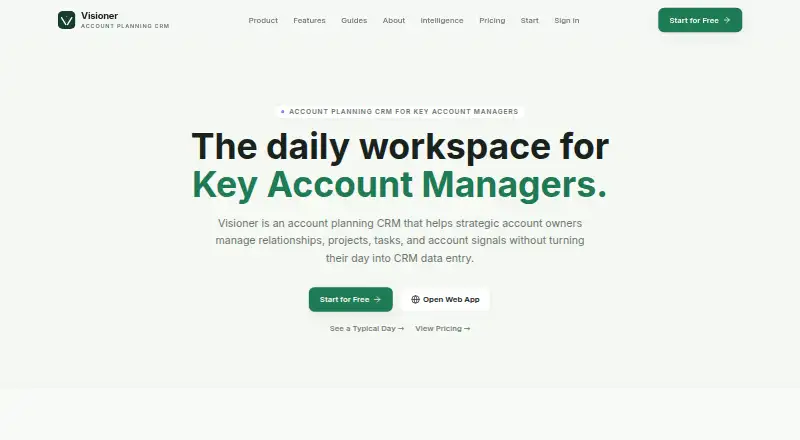
What Visioner is
Visioner is an account-planning CRM for managing relationships, projects, tasks, and account signals within strategic accounts. Its visual org chart maps reporting lines, decision roles, unknown seats, and stakeholder gaps. Relationship indicators show whether connections are warm, cooling, or stale, with cadence reminders to guide follow-up. Project workspaces bring together stakeholders, decision chains, risks, next steps, files, and revenue impact. Local signals can flag relationship gaps, stale contacts, missing project roles, and overdue follow-ups; paid plans add source-linked news and contact research. Paid BCC Capture archives outbound email against accounts and contacts, sending unclear project matches to a review queue. Pro users can connect their own THE ORG account to review reporting lines and reveal direct managers before importing. Visioner CRM is in beta on web, Android, and iOS. The free plan covers three accounts but excludes BCC capture. Paid plans start at $12/mo; beta support is founder-led by email, and response times may vary.
Who it suits
Visioner suits Key Account Managers, Strategic Account Managers, and founders managing a small number of high-value accounts. It is designed for in-depth account planning rather than high-volume lead management.
What it does well
- Maps reporting lines, roles, and stakeholder gaps.
- Tracks relationship status with cadence reminders.
- Project workspaces include risks and revenue impact.
- Free plan includes three accounts and account signals.
What to know first
- Free plan excludes BCC capture.
- Free plan is limited to three accounts.
- Beta email support response times may vary.
Limits
The free plan covers three accounts and excludes BCC capture. Basic costs $12 a month and includes 10 accounts and 100 archived emails per month; Pro costs $29 a month and includes 30 accounts.
Plans
| Plan | Billed and limits | Price |
|---|---|---|
| Free | 3 accounts · contacts, projects, tasks, org chart · CSV import/export · account signals · multi-device cloud sync · no BCC capture | Free |
| Basic | 10 accounts · BCC outbound archive · 100 archived emails/month · manual review queue · 100 Visioner Credits/month · Saved News and Inspire Me | $12 a month |
| Pro | 30 accounts · everything in Basic · 1,500 Visioner Credits/month · THE ORG BYOK mapping · private manager reveals · Account Plan PDF export | $29 a month |
| Team | Everything in Pro · shared accounts · Owner, Admin and Member roles · Account Plan review · account leads and collaborators · seat limits and audit trail | $49 a month |
As visioner.cc lists them, read 14 Oct 2026. The maker's own page has the final word.
Getting started
- Open the Visioner website.
- Sign up for the free plan or choose a paid plan.
- Use Visioner on the web, Android, or iOS.
- Add up to three accounts on the free plan, or choose a paid plan for a higher account allowance.
- Import account data using CSV, or add contacts, projects, tasks, and org chart details.
Visioner is a strategic account-planning CRM for teams managing a small set of important customers. It suits account managers and founders who need to coordinate stakeholder relationships, project work, and follow-ups in one place. Its depth-focused approach is a poor fit for high-volume lead management.
Overview
Visioner centers planning around individual accounts, bringing contacts, projects, tasks, and account signals together. That structure can help account owners keep track of who matters, what is underway, and where follow-up is overdue. The trade-off is its deliberately narrow scope: it is built for depth in a few valuable accounts, not for processing a large lead pipeline.
The CRM is in beta on web, Android, and iOS. Ronisens Inc. operates it, and support during beta is founder-led by email, with response times that may vary. Its security check uses Cloudflare Turnstile, with a one-time six-digit email-code fallback that expires after 10 minutes.
Key features
Relationship maps and account signals
The visual org chart maps reporting lines, decision roles, unknown seats, and stakeholder gaps. Relationship indicators distinguish warm, cooling, and stale contacts, while cadence reminders point to relationships that may need attention. Together, these tools are most useful when account owners need to improve stakeholder coverage and keep contact timing visible.
Local signals flag relationship gaps, stale contacts, missing project roles, and overdue follow-ups. Paid plans add source-linked news and contact research. Pro users can connect their own THE ORG account to review reporting lines and reveal direct managers before importing anything, a targeted option for teams that already use that service.
Projects and email capture
Project workspaces can hold stakeholders, decision chains, risks, next steps, files, and revenue impact. This gives account teams a place to connect project execution with the people and decisions around a customer, rather than tracking those details separately.
Paid BCC Capture archives outbound email against the relevant account and contact; messages associated with unclear projects go to a review queue. Basic includes manual review of that queue, while Free has no BCC capture. The feature is therefore useful for teams that want email history attached to account work, but it is not part of the free tier.
Pricing
Visioner has a free plan and paid plans from $12/mo. The paid plans are billed monthly at the prices below.
| Plan | Price | What it includes | Best fit |
|---|---|---|---|
| Free | Price not listed | 3 accounts; contacts, projects, tasks, org chart, account signals, CSV import and export, and multi-device cloud sync. No BCC capture. | Individuals evaluating the core account-planning workflow across a small number of accounts. |
| Basic | $12 a month | 10 accounts; BCC outbound archive; 100 archived emails/month; manual review queue; 100 Visioner Credits/month; Saved News and Inspire Me. | Account owners who need email capture and the paid account tools but can work within modest account, email, and credit limits. |
| Pro | $29 a month | 30 accounts; everything in Basic; 1,500 Visioner Credits/month; THE ORG BYOK mapping; private manager reveals; Account Plan PDF export. | Users handling more accounts or needing expanded research credits, manager reveals, and plan exports. |
| Team | $49 a month | Everything in Pro; shared accounts; Owner, Admin & Member roles; Account Plan review; account leads and collaborators; seat limits and audit trail. | Teams that need shared account ownership, defined roles, and review and audit controls. |
Free is capped at three accounts and omits email capture. Basic raises the cap to ten accounts and adds capture, but limits archived email to 100 per month and credits to 100 per month. Pro expands the account and credit allowances and adds THE ORG mapping and PDF export; Team adds collaboration and governance features. The plan descriptions do not state seat counts, so teams should confirm the applicable seat limits before choosing Team.
Platforms
Visioner CRM is in beta on web, Android, and iOS. Multi-device cloud sync is included in Free, making it possible to keep account work available across those devices.
Who it's for
Visioner is aimed at Key Account Managers, Strategic Account Managers, and founders responsible for a small number of high-value accounts. Its maps, health indicators, project workspaces, and follow-up signals make it a considered choice when stakeholder coverage and account coordination are central to the job.
It is less suitable for organizations focused on high-volume lead management. Beta status and founder-led email support also make it a more cautious choice for teams that need established support arrangements.
Pros and cons
- Pros: Visual org charts and relationship health indicators make stakeholder gaps and cooling contacts easier to spot.
- Pros: Project workspaces combine decision chains, risks, next steps, and revenue impact with account relationships.
- Pros: Free includes core planning tools, CSV import and export, and multi-device sync for up to three accounts.
- Cons: The account-focused design is not intended for high-volume lead management.
- Cons: Free has no BCC capture, while Basic's archive is limited to 100 emails/month.
- Cons: Beta support is founder-led by email, and response times may vary.
Alternatives
Account Planning Software is the broader category to browse if you want to compare account-planning tools.
Choose Distribute Strategic Account Plan if you want a completely free, web-based strategic account plan generator rather than an ongoing CRM workspace; it asks for an email to send a copy and product updates.
BuyerRadar and Centralize are web-based freemium alternatives to consider alongside Visioner.
Choose Altify if an annual, quote-based subscription whose price depends on solutions, user count, and whether Revenue Services are included suits your requirements.
Backstory Account Strategy & Execution uses custom pricing, with charges tied to people whose customer activity powers the platform and answers consumed.
Encompass-CX, Magnus Live Account Planning (Signals), and Valkre are paid, web-based alternatives.
Verdict
Visioner is a strong fit for account managers and founders who need to map relationships, coordinate projects, and keep follow-ups moving across a handful of strategic customers. Its account-centered workspace is the main reason to choose it; its beta stage, variable founder-led support, and limits on the lower tiers are reasons to look elsewhere if you need established support, broad lead-volume workflows, or more capacity.
Verdict
Visioner brings relationship mapping, project details, and account follow-ups into one account-planning workspace. Its focus on a few high-value accounts and beta status are worth considering before choosing it.
Questions
Is there a free plan?
Yes. It covers three accounts and includes contacts, projects, tasks, org charts, account signals, CSV import and export, and multi-device cloud sync. It does not include BCC capture.
What do paid plans cost?
Basic costs $12 a month, Pro costs $29 a month, and Team costs $49 a month.
Which platforms does Visioner support?
Visioner CRM is in beta on the web, Android, and iOS.
Who operates Visioner?
Its About page identifies Ronisens Inc. as the operator.
What does the Basic plan include?
Basic includes 10 accounts, BCC outbound archive, 100 archived emails per month, a manual review queue, 100 Visioner Credits per month, Saved News, and Inspire Me.
What does Pro add?
Pro includes 30 accounts, 1,500 Visioner Credits per month, THE ORG BYOK mapping, private manager reveals, and Account Plan PDF export, along with everything in Basic.
Facts from Visioner's own pages
- Account community
- An early-access Account Community lets users exchange non-confidential patterns around accounts they work on. · visioner.cc, 14 Oct 2026
- Account plan
- Account plans combine revenue, projects, stakeholders, tasks, notes and risks in one workspace. · visioner.cc, 14 Oct 2026
- Account signals
- Signals turn missing stakeholders, stale contacts, renewal risks and project gaps into next actions. · visioner.cc, 14 Oct 2026
- API and SDKs
- The opened Visioner pages describe CSV import/export and the THE ORG connection but do not document a public API or SDK. · visioner.cc, 14 Oct 2026
- Availability
- Visioner CRM is in beta on the web, Android, and iOS. · visioner.cc, 30 Sept 2026
- BCC capture
- Paid BCC Capture routes outbound email to the relevant account, contact and project and creates a review item when project matching is unclear. · visioner.cc, 14 Oct 2026
- Cloud sync
- The free tier includes multi-device cloud synchronization. · visioner.cc, 14 Oct 2026
- Company
- The About page identifies Ronisens Inc. as Visioner's operator and describes the product as in early commercial beta. · visioner.cc, 30 Sept 2026
- CSV support
- The free tier provides CSV import and export. · visioner.cc, 14 Oct 2026
- Documentation
- The maker publishes guides covering account mapping, account-plan contents, stakeholder mapping, KAM software selection and daily workflow. · visioner.cc, 14 Oct 2026
- Email capture
- Paid BCC Capture archives outbound email against the right account and contact; unclear projects go to a review queue. · visioner.cc, 30 Sept 2026
- Integration
- Pro users can connect their own THE ORG account to review reporting lines and reveal direct managers before importing anything. · visioner.cc, 30 Sept 2026
- Intelligence
- Local signals flag relationship gaps, stale contacts, missing project roles, and overdue follow-ups; paid plans add source-linked news and contact research. · visioner.cc, 30 Sept 2026
- Intelligence sources
- Paid plans add source-linked news, contact research and private organization intelligence; Apollo enrichment is marked Preview. · visioner.cc, 14 Oct 2026
- Intended users
- Visioner is built for Key Account Managers, Strategic Account Managers, and founders working a small number of high-value accounts. · visioner.cc, 30 Sept 2026
- Limit: account scale
- The free tier is limited to three accounts, while Basic, Pro and Team list caps of 10, 30 and team-governed accounts respectively. · visioner.cc, 14 Oct 2026
- Limit: beta maturity
- The product is in early commercial beta and the maker says support response time may vary before a full support desk exists. · visioner.cc, 14 Oct 2026
- Limit: free BCC
- The free plan explicitly excludes BCC capture. · visioner.cc, 14 Oct 2026
- Limit: strategic scope
- Visioner states it is designed for depth in a few strategic accounts rather than high-volume lead management. · visioner.cc, 14 Oct 2026
- Mobile beta
- The support page says the product is in beta on the web, Android and iOS. · visioner.cc, 14 Oct 2026
- Operator address confirmation
- The same directory lists Ronisens Inc. at 20863 Stevens Creek Blvd Ste 450, Cupertino, California 95014. · bizprofile.net, 14 Oct 2026
- Operator business focus
- Ronisens describes its business as automation using sensory technology and data processing. · ronisens.com, 14 Oct 2026
- Operator headquarters address
- Ronisens lists 20863 Stevens Creek Boulevard, Cupertino, California 95014, United States. · ronisens.com, 14 Oct 2026
- Operator legal name
- Visioner's About page identifies Ronisens Inc. as the operator. · visioner.cc, 14 Oct 2026
Where Visioner stands on Freedom251
- Account Management#1 of 12
- Account Planning Software#6 of 20