Freedom251 › Account Planning Software
Centralize
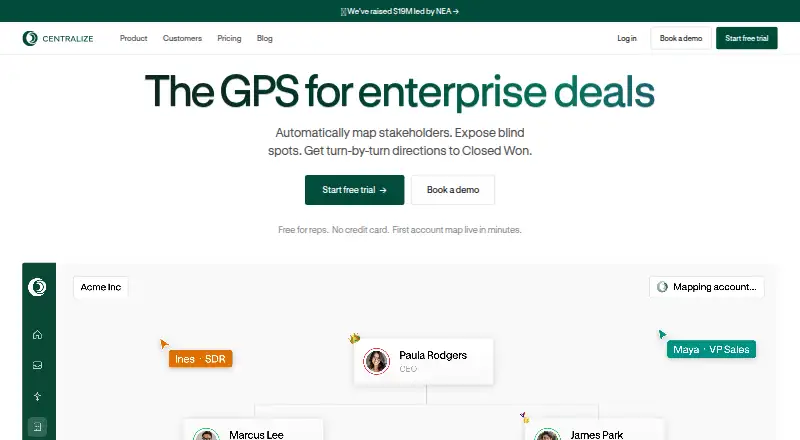
What Centralize is
Centralize is relationship intelligence software for enterprise revenue teams, available on the web and as an extension. It maps buying committees, flags stakeholders a team has not met, surfaces warm introductions, and recommends next steps. Org charts and stakeholder maps draw on CRM, email, and call information, with engagement details alongside the people involved. Sales, customer success, leadership, and a customer’s champion can share account maps to coordinate executive sponsorship, handoffs, and account strategy. Centralize can recommend outreach within the workflow and surface connections across the team’s network. Its Centra assistant answers deal questions; Pro adds AI priorities and drafted outreach. The Slack app can send job-change notifications and event-preparation briefs, and users can ask it questions about deals. Listed integrations include Salesforce, Slack, Gmail, Outlook, Google Calendar, Notion, and Gong. Centralize has a Free plan and a 30-day Pro trial. Free includes five Standard accounts; Pro is $49 a month per user and includes 50 Standard accounts, five Smart accounts, and per-user enrichment credits. The site states security controls including SOC 2 Type 2, SSO, role-based access control, scoped OAuth, encryption at rest and in transit, and customer-controlled data retention and deletion.
Who it suits
Centralize suits enterprise revenue teams that need to map account stakeholders and coordinate sales, customer success, leadership, and customer champions. Teams that want AI priorities and drafted outreach can consider Pro; Enterprise includes Salesforce integration and dedicated Slack support.
What it does well
- Builds org charts and account maps from CRM, email, and calls.
- Shows engagement and stakeholders the team has not met.
- Surfaces warm introductions across the team’s network.
- Slack app supports job-change notices, event briefs, and deal questions.
- States SOC 2 Type 2 and multiple access and encryption controls.
What to know first
- Free includes five Standard accounts.
- Pro is $49 a month per user.
- Enterprise pricing is custom, with no price listed.
Limits
The Free plan includes five Standard accounts. Pro is $49 a month per user and includes 50 Standard accounts, five Smart accounts, and 1,000 email plus 100 phone enrichment credits per user; additional Smart accounts cost $5 a month per account.
Plans
| Plan | Billed and limits | Price |
|---|---|---|
| Free | $0 / month · 5 Standard accounts · automatic org charts and account maps · LinkedIn warm connection sync · Chrome extension and manual contacts · email and calendar integrations | Free |
| Pro | $49 / month per user · 50 Standard accounts · 5 Smart accounts · extra Smart accounts $5/month each · Centra AI strategist · MCP access · suggested contacts and org charts · AI priorities and drafted outreach · 1,000 email and 100 phone enrichment credits | $49 a month |
| Enterprise | Custom · Everything in Pro · Salesforce integration · call recorder and sequencer integrations · SSO · MFA · dedicated Slack support | On request |
As usecentralize.com lists them, read 14 Oct 2026. The maker's own page has the final word.
Getting started
- Visit https://www.usecentralize.com/.
- Use Centralize on the web or as an extension.
- Start with the Free plan, or begin the 30-day Pro trial.
- Choose Pro at $49 a month per user if you need its account capacity and enrichment credits.
- Contact Centralize about its custom Enterprise plan if those features fit your team.
Centralize is relationship intelligence software for revenue teams working complex accounts. It is best suited to teams that need to coordinate stakeholder coverage and introductions across sales, customer success and leadership. Its advantage is connecting account maps to warm paths and recommended outreach; its free tier is narrow, and advanced integrations require Enterprise.
Overview
Centralize builds org charts and stakeholder maps from CRM, email and calls, combining engagement signals with visibility into people the team has not yet met. That makes it more useful for finding coverage gaps than a static account chart. Warm introductions through the team's network and recommended outreach connect those maps to next steps.
Shared maps let sales, customer success, leadership and a customer's champion coordinate executive sponsorship, handoffs and strategy. This is a focused choice for relationship-led account work, not a general-purpose CRM or a substitute for Salesforce integration on a lower-cost plan.
Key features
Account mapping and introductions
Seeing known stakeholders alongside missing ones helps teams identify whom they still need to reach. Centralize's warm-path recommendations can reveal an existing route to those people, which is particularly useful when several colleagues or a champion can help open doors. Teams with straightforward accounts may not need this extra layer of relationship intelligence.
Collaboration and AI
Cross-functional map sharing supports coordinated account strategy and handoffs. Centra answers questions about deals; Pro adds AI priorities and drafted outreach, giving users a way to turn account context into suggested actions. Those AI features are not part of Free.
Integrations and security
Centralize lists Salesforce, Slack, Gmail, Outlook, Google Calendar, Notion and Gong integrations. Its Slack app can send job-change notifications and event-preparation briefs, and users can ask Centra about deals. Salesforce integration, however, is reserved for Enterprise. Security measures include SOC 2 Type 2, SSO, role-based access control, scoped OAuth, encryption at rest and in transit, and customer-controlled data retention and deletion. SSO is also an Enterprise feature.
Pricing
Centralize has a Free plan at no cost and a 30-day Pro trial. Individual plans are billed monthly; custom Enterprise plans support annual billing.
- Free: free. Includes 5 Standard accounts, automatic org charts and account maps, LinkedIn warm connection sync, a Chrome extension, manual contacts, and email and calendar integrations. The five-account ceiling makes it a limited way to assess the product, not a broad team rollout.
- Pro: $49 a month, billed per user. Includes 50 Standard accounts, 5 Smart accounts, 1,000 email and 100 phone enrichment credits per user, plus AI priorities and drafted outreach. Additional Smart accounts cost $5 / month per account. The Pro trial includes 5 Smart accounts and full enrichment credits for 30 days, so teams can evaluate enriched account coverage before paying.
- Enterprise: custom pricing, with annual billing supported. Includes everything in Pro, Salesforce integration, call recorder and sequencer integrations, SSO, MFA and dedicated Slack support. It fits organizations that need those integrations or access controls, but requires a custom quote.
Free provides only 5 Standard accounts, while Pro adds Smart accounts and per-user enrichment credits. Teams that need Salesforce, MFA or dedicated support must move beyond Pro; the upgrade is a meaningful requirement rather than an optional convenience for those workflows.
Platforms
Centralize is available as a web product and browser extension. Its email and calendar integrations support account context, while the extension and manual contacts give users another way to work with account information.
Who it's for
Centralize suits revenue teams managing buying committees across multiple functions, especially when identifying missing stakeholders and finding warm introductions are central to account strategy. Pro is the practical starting point for teams that need more than five accounts or want AI priorities and outreach drafts. Teams needing Salesforce integration, MFA or dedicated Slack support should consider Enterprise. Those seeking only a simple plan for a handful of accounts may be adequately served by Free.
Pros and cons
- Pro: Combines stakeholder maps, engagement context and warm introductions, helping teams find coverage gaps and routes into accounts in one workflow.
- Pro: Shared maps support coordination among sales, customer success, leadership and a customer's champion, rather than leaving account strategy with one owner.
- Pro: Free includes core mapping and warm-connection features at no monthly cost, and Pro has a 30-day trial with Smart accounts and full enrichment credits.
- Con: Free is capped at 5 Standard accounts, limiting its usefulness for teams managing a wider book of business.
- Con: Salesforce integration, MFA and dedicated Slack support are Enterprise-only, with custom pricing.
- Con: Pro's enrichment allowance is per user, and adding Smart accounts beyond the included five incurs an additional monthly per-account charge.
Alternatives
For a wider comparison, browse Account Planning Software.
- Visioner is a freemium option on Android, iOS and web, with a Basic plan at $12 a month that includes 10 accounts, a BCC outbound archive, 100 archived emails per month, a manual review queue and 100 Visioner Credits per month. Choose it when those account-archiving and review features matter more than Centralize's shared stakeholder mapping.
- Kandir offers a free plan for one account plan and a monthly Individual plan at $10 per account plan, with a minimum of five account plans. Consider it when a per-account-plan price and a limited free starting point better fit your needs.
- Distribute Strategic Account Plan is a completely free web-based generator that asks for an email address to send a copy and product updates. Pick it when you need a free account-plan generator rather than relationship intelligence and ongoing shared maps.
- InterAction+ is a paid option for Android, iOS, self-hosted and web environments; contact LexisNexis for a demo or quote. Consider it if those platform options suit your deployment needs.
- Altify is a paid web and API option with quote-based annual pricing that depends on selected solutions, user count and whether Revenue Services are included. Consider it if those solution and service choices fit your requirements.
- Backstory Account Strategy & Execution is a paid web, API and extension option with custom pricing, charging for people whose customer activity powers the platform and for answers consumed. Consider it if that usage-based structure suits your team.
- BuyerRadar is freemium and available on web, API and extension, with a Professional plan at €50 a month that includes 2,000 monthly credits, AI contact autofill, advanced analytics and API access. Consider it when those contact-enrichment and analytics features are the priority.
- Encompass-CX is a paid web option with a free trial; contact the vendor or book a briefing. Consider it if you want to evaluate that alternative before discussing a quote.
Verdict
Choose Centralize if your revenue team needs shared account maps, missing-stakeholder visibility and warm introduction paths in one workflow. Pro is the strongest fit for teams that need broader account coverage, enrichment and AI-assisted next steps. Look elsewhere if you need Salesforce integration or enterprise controls without custom pricing, or if a small number of accounts does not justify a dedicated relationship-intelligence tool.
Verdict
Choose Centralize if your revenue team needs shared account maps, stakeholder visibility, and warm introduction paths. Pro adds AI priorities and drafted outreach, while teams that need Salesforce integration, SSO, MFA, or dedicated Slack support can look at Enterprise; its price is custom.
Questions
Does Centralize have a free plan?
Yes. Free costs nothing and includes five Standard accounts, automatic org charts and account maps, LinkedIn warm connection sync, the extension and manual contacts, and email and calendar integrations.
How much does Pro cost?
Pro costs $49 a month per user. Additional Smart accounts cost $5 a month per account.
Is there a free trial?
Yes. The Pro trial lasts 30 days and includes five Smart accounts and full enrichment credits.
What integrations are listed?
Salesforce, Slack, Gmail, Outlook, Google Calendar, Notion, and Gong are listed integrations.
What is included in Enterprise?
Enterprise is custom priced and includes everything in Pro, Salesforce integration, call recorder and sequencer integrations, SSO, MFA, and dedicated Slack support.
Facts from Centralize's own pages
- Account insights
- The product provides account and stakeholder insights plus outreach recommendations inside the workflow. · usecentralize.com, 14 Oct 2026
- Account mapping
- It builds org charts and stakeholder maps from CRM, email, and calls, showing engagement and stakeholders the team has not met. · usecentralize.com, 7 Oct 2026
- Account maps
- The product builds org charts and account maps from CRM, email and call data, showing engaged, inactive and missing stakeholders. · usecentralize.com, 14 Oct 2026
- AI assistant
- Centra answers deal questions such as who controls budget or how to reach a CRO in seconds. · usecentralize.com, 14 Oct 2026
- AI limitation
- The Slack documentation warns that AI-generated responses can be inaccurate. · usecentralize.com, 14 Oct 2026
- Billing
- Individual plans are billed monthly; annual billing is supported for custom Enterprise plans. · usecentralize.com, 7 Oct 2026
- Billing terms
- Individual plans are monthly, while annual billing is offered for custom enterprise plans. · usecentralize.com, 14 Oct 2026
- Buying committee coverage
- Stakeholder maps are designed to show buying-committee coverage and multithreading gaps. · usecentralize.com, 14 Oct 2026
- Collaboration
- Sales, customer-success staff, leadership and champions can collaborate on one shared deal map with reach-out requests and account context. · usecentralize.com, 14 Oct 2026
- Company
- Y Combinator lists the company as founded in 2023 and located in San Francisco. · ycombinator.com, 7 Oct 2026
- Company product description
- Crunchbase describes Centralize as an AI relationship-intelligence platform for mapping and managing enterprise deal relationships. · crunchbase.com, 14 Oct 2026
- Company profile
- LinkedIn describes Centralize as a privately held technology, information and internet company founded in 2023 with 11–50 employees. · linkedin.com, 14 Oct 2026
- Documentation depth
- Public maker documentation consists of product, pricing, Slack setup guidance, blog posts and an llms.txt index; no public REST API or SDK reference was identified on those pages. · usecentralize.com, 14 Oct 2026
- Enrichment limits
- Pro includes 1,000 email and 100 phone enrichment credits per user, with each revealed contact consuming one credit. · usecentralize.com, 14 Oct 2026
- Free plan limit
- The Free plan includes 5 Standard accounts, while the Pro trial includes 5 Smart accounts and full enrichment credits for 30 days. · usecentralize.com, 7 Oct 2026
- Free tier
- The Free plan costs $0 per month and is limited to five Standard accounts. · usecentralize.com, 14 Oct 2026
- Funding
- Crunchbase lists three funding rounds and a Series A led by New Enterprise Associates, while masking the dollar amounts. · crunchbase.com, 14 Oct 2026
- Headquarters record
- Crunchbase lists San Francisco, California, United States as headquarters and 11–50 employees. · crunchbase.com, 14 Oct 2026
- Independent site safety finding
- ScamAdviser marked usecentralize.com as very likely safe, citing valid SSL and DNSFilter labeling, while flagging low traffic rank and a registrar associated with many low-trust sites. · scamadviser.com, 14 Oct 2026
- Integrations
- Listed connections include Salesforce, Slack, Gmail, Outlook, Google Calendar, Notion and Gong, with more integrations available. · usecentralize.com, 14 Oct 2026
- Legal entity
- Crunchbase lists the legal name as Collate Labs, Inc., with Rachit Kataria and William Wang as founders. · crunchbase.com, 14 Oct 2026
- Limit: review evidence
- G2 says there are not enough Centralize reviews to provide buying insight. · g2.com, 14 Oct 2026
- MCP extensibility
- The Pro plan explicitly includes MCP access for connecting AI tooling to Centralize. · usecentralize.com, 14 Oct 2026
- Notable news: customers
- Crunchbase News named CoreWeave, Cognition, Decagon, Brex, Webflow, LangChain and MaintainX among Centralize customers. · news.crunchbase.com, 14 Oct 2026
Where Centralize stands on Freedom251
- Account Planning Software#3 of 20