Freedom251 › Account Planning Software
Kandir
What Kandir is
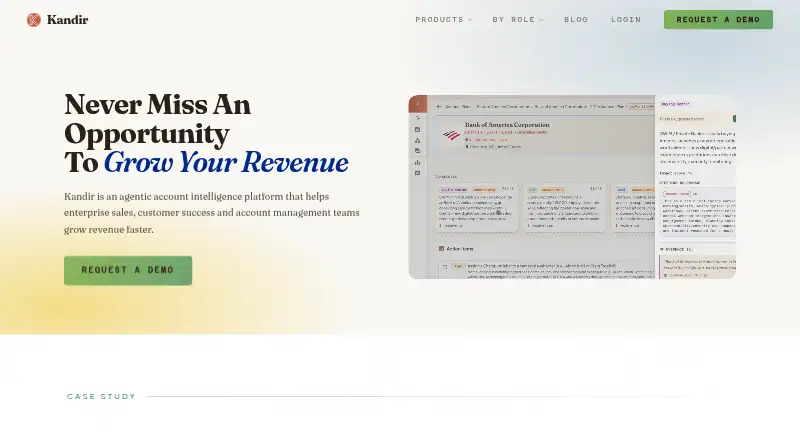
Kandir is a web-based AI account intelligence platform for enterprise sales, customer success, and account management teams. Its agents monitor accounts for changes involving leadership, budgets, hiring, filings, competitive activity, corporate strategy, and usage. Kandir says that naming an account produces an account plan, org chart, and current signals in under five minutes. Teams can configure signals specific to their business, while org charts and persona information help identify stakeholders, buying roles, and interests. Tech stack intelligence identifies technologies an account uses and where they overlap with a customer's offerings. Meeting Prep creates briefs using an account plan and a connected calendar; Google Calendar and Microsoft 365 are listed options. The Free tier includes account briefings, My Feed, Offerings, news and SEC signals, tech stack data, AI chat, org and stakeholder data, and a report builder. Kandir's terms limit use to organizations and authorized users for business purposes, rather than individual consumers. Pricing includes a free tier with one account plan; Individual is $10.00 per month per account plan, with a five-plan minimum and a $50 monthly starting total. Starter is $25.00 per year per account plan, with a 25-plan minimum and a $7,500 yearly starting total. Standard is $40.00 per year per account plan, with the same minimum and a $12,000 yearly starting total. Enterprise pricing is negotiated.
Who it suits
Kandir suits account executives, account managers, customer success managers, support leads, and revenue leaders responsible for account growth. It is intended for organizational business use, not individual consumers.
What it does well
- Monitors account changes across several signal types.
- Teams can define custom business-specific signals.
- Meeting Prep uses connected calendar context.
- Free tier includes one account plan.
What to know first
- Individual pricing starts at $50 / month.
- Starter requires a $7,500 / year commitment.
- Standard requires a $12,000 / year commitment.
- Gmail and Calendar access is read-only.
Limits
The Free plan includes 1 account plan; additional plans require an upgrade. Individual has a minimum of 5 account plans and starts at $50 / month; Starter and Standard each have a 25-plan minimum.
Plans
| Plan | Billed and limits | Price |
|---|---|---|
| Free | Free · 1 account plan · Additional plans require upgrade | Free |
| Individual | Billed monthly; $10 per account plan, per month · Minimum 5 account plans · Starts at $50 / month · Additional plans $12.50 / month | $10 a month |
| Starter | Billed annually; $25 per account plan, per month · Minimum 25 account plans · Starts at $7,500 / year · Additional plans $31.25 / month | $25 |
| Standard | Billed annually; $40 per account plan, per month · Minimum 25 account plans · Starts at $12,000 / year · Additional plans $50 / month | $40 |
| Enterprise | Negotiated terms · Larger commitments · SSO · Custom sales methodologies | On request |
As kandir.io lists them, read 8 Oct 2026. The maker's own page has the final word.
Getting started
- Visit the Kandir website and review the Free tier or paid plans.
- Start with the Free tier, which includes one account plan.
- Name an account to receive an account plan, org chart, and current signals.
- Connect Google Calendar or Microsoft 365 for Meeting Prep, if needed.
- Contact Kandir about pricing or a custom plan.
Kandir is an AI account intelligence platform for sales, customer success, and account management teams. It suits organizations tracking complex accounts and coordinating follow-up; the main trade-off is that even its lowest paid tier requires a multi-account commitment.
Overview
Kandir brings account monitoring, stakeholder intelligence, and planning together for teams responsible for growing customer accounts. Its business-only terms make it unsuitable for individual consumers, and its paid minimums may be difficult to justify for teams with a small portfolio.
Key features
Account monitoring covers leadership moves, budget changes, corporate strategy, filings, competitors, hiring, and usage. Teams can also define custom signals around their own business, which helps focus attention on changes relevant to their sales or retention work. Kandir says that naming an account produces an account plan, org chart, and current signals in under five minutes.
Pre-built org charts and persona information help teams identify stakeholders, buying roles, and what people care about. Relationship maps and account action tracking support the work of coordinating account activity. Tech stack intelligence identifies technologies an account uses and where those tools overlap with a customer's offerings.
Meeting Prep builds briefs from a connected calendar and account plan, with Google Calendar and Microsoft 365 named as options. Kandir's integration examples also include Gmail, Slack, Salesforce, and HubSpot. Google connections request read-only access to Gmail messages and Calendar events for account-planning signals and meeting context. Kandir's DPA describes TLS 1.2+ encryption and role-based access controls; it lists SOC 2 Type I and CASA as maintained or undergoing certification.
Pricing
The Free tier costs nothing and includes one account plan; adding plans requires an upgrade. It also includes account briefings, My Feed, Offerings, news and SEC signals, tech stack data, AI chat, org and stakeholder data, and a report builder. This is a substantial starting set for an individual business user evaluating account workflows, but the single-plan cap makes it a limited fit for ongoing portfolio management.
Individual costs $10 a month per account plan, with a five-plan minimum, a starting price of $50 / month, and additional plans at $12.50 / month. It fits a smaller team that needs more than one account plan, though its minimum commitment and incremental price matter if the portfolio grows.
Starter costs $25 a year per account plan, billed annually, with a 25-plan minimum and a starting price of $7,500 / year; additional plans cost $31.25 / month. It adds custom signals and personas, email and calendar integrations, meeting prep, and team management to Individual features. That bundle is aimed at teams that need shared workflows, but the 25-plan floor makes it a substantial commitment.
Standard costs $40 a year per account plan, billed annually, with a 25-plan minimum and a starting price of $12,000 / year; additional plans cost $50 / month. Enterprise has custom pricing on negotiated terms for larger commitments, with SSO and custom sales methodologies. Kandir also offers a 7-day trial. Since the plans are described per account plan while the paid tiers impose minimums, buyers should weigh both the unit rate and the minimum commitment.
Platforms
Kandir runs on the web. Its calendar options include Google Calendar and Microsoft 365, while the listed third-party integration examples include Gmail, Slack, Salesforce, and HubSpot.
Who it's for
Account executives, account managers, customer success managers, support leads, and revenue leaders responsible for account growth are the clearest fit. The combination of monitoring, stakeholder data, meeting briefs, and action tracking is most useful when several people need to keep up with complex accounts. Organizations with only a few accounts may find the paid minimums hard to match to their needs.
Pros and cons
- Pros: Monitoring spans multiple account changes and supports team-defined signals, so teams can tune attention to their own business priorities.
- Pros: Account plans, org charts, stakeholder information, meeting briefs, and action tracking cover several parts of account work in one platform.
- Pros: The Free tier includes a broad set of briefing, signal, stakeholder, and reporting features, with one account plan available at no cost.
- Cons: Individual requires five plans and starts at $50 / month, while Starter and Standard require 25 plans and start at $7,500 / year and $12,000 / year respectively.
- Cons: The Free tier is capped at one account plan, so teams managing a portfolio need to upgrade.
- Cons: Google connections access messages and events, albeit read-only, which may require review by organizations with strict data controls.
Alternatives
Compare account planning software if you want to consider a wider set of tools for the same workflow.
- Visioner is worth considering for a freemium option available on Android, iOS, and web; its Basic plan is $12.00 per month for 10 accounts and includes a BCC outbound archive, manual review queue, and 100 Visioner Credits/month.
- Centralize may suit teams seeking a free starting tier with five Standard accounts, automatic org charts and account maps, LinkedIn warm connection sync, and a Chrome extension.
- Distribute Strategic Account Plan is a free web-based plan generator for readers who need a single strategic account plan without a paid subscription; it asks for an email to send a copy and product updates.
- InterAction+ is another paid option, with Android, iOS, self-hosted, and web platforms; pricing is available by contacting LexisNexis for a demo or quote.
- Altify may fit buyers looking for an annual subscription whose quote depends on selected solutions, user count, and whether Revenue Services are included.
- Backstory Account Strategy & Execution offers custom pricing tailored to a team, with charges tied to people whose customer activity powers the platform and answers consumed.
- BuyerRadar is a freemium alternative with a Professional plan at €50 a month that includes 2,000 credits, AI contact autofill, analytics, and API access.
- Encompass-CX is a paid web option with a free trial; its pricing page directs buyers to contact the company or book a briefing.
Verdict
Kandir is a strong candidate for business teams that need account signals, stakeholder context, meeting preparation, and follow-through in a shared workflow. Its Free tier can cover an initial account, but the minimum paid commitments make it a better choice for organizations with a meaningful account portfolio than for individuals or small teams. Choose it when those account workflows justify the plan floor; look elsewhere when you need low-cost coverage for only a handful of accounts.
Verdict
Kandir brings account signals, stakeholder information, and meeting preparation into a business-focused platform. Compare the account-plan minimums and tier costs with the number of accounts your team needs to manage.
Questions
Does Kandir have a free plan?
Yes. Free is listed as free and includes 1 account plan. Additional plans require an upgrade.
How much do paid plans cost?
Individual is $10 a month per account plan, with a minimum of 5 plans and a starting total of $50 / month. Starter is listed at $25 a year, and Standard at $40 a year; each requires a minimum of 25 account plans. Enterprise has negotiated terms.
Which calendars can Meeting Prep use?
Google Calendar and Microsoft 365 are listed as calendar options.
What integrations are named?
The terms list Gmail, Google Calendar, Slack, Salesforce, and HubSpot as examples of third-party integrations.
Who is Kandir for?
Its terms say the service is intended solely for business use by organizations and authorized users, not individual consumers.
What security measures are described?
Kandir’s DPA describes TLS 1.2+ encryption and role-based access controls. It lists SOC 2 Type I and CASA certification as maintained or undergoing certification.
Facts from Kandir's own pages
- Account monitoring
- Its agents monitor accounts for changes such as leadership moves, budget shifts, competitive activity, hiring, and filings. · kandir.io, 8 Oct 2026
- Account plans
- Kandir says it creates an account plan, org chart, and current signals in under five minutes after an account is named. · kandir.io, 8 Oct 2026
- Business use
- Kandir's terms state that its services are intended solely for business use by organizations and authorized users, not individual consumers. · kandir.io, 8 Oct 2026
- Custom signals
- Teams can configure the signals they sell on, including signals specific to their business. · kandir.io, 8 Oct 2026
- Free tier features
- The Free tier includes account briefings, My Feed, Offerings, news and SEC signals, tech stack data, AI chat, org and stakeholder data, and a report builder. · kandir.io, 8 Oct 2026
- Google access
- The Gmail and Google Calendar connections request read-only access to messages and events for account-planning signals and meeting context. · kandir.io, 8 Oct 2026
- Google data
- For connected Google accounts, Kandir says Gmail and Calendar access is read-only and used for account-planning features. · kandir.io, 8 Oct 2026
- Headquarters
- Saunderstown, Rhode Island, United States · kandir.io, 28 Sept 2026
- Integrations
- Kandir's privacy policy names Gmail, Google Calendar, Slack, Salesforce, and HubSpot as examples of connected third-party services. · kandir.io, 8 Oct 2026
- Intended use
- The terms say the services are intended solely for business use by organizations and authorized users, not individual consumers. · kandir.io, 8 Oct 2026
- Meeting prep
- Meeting Prep creates briefs from a connected calendar and an account plan; the page lists Google Calendar and Microsoft 365 as calendar options. · kandir.io, 8 Oct 2026
- Org intelligence
- Kandir maps buying committees, including budget holders, supporters, detractors, and stakeholders not yet contacted. · kandir.io, 8 Oct 2026
- Pricing details
- The pricing page says to contact Kandir about pricing or a custom plan; it does not show specific prices on the page. · kandir.io, 8 Oct 2026
- Pricing model
- Kandir says it charges per account plan, not per seat, and offers unlimited users on every tier, including Free. · kandir.io, 8 Oct 2026
- Product
- Kandir is an AI account intelligence platform for enterprise sales, customer success, and account management teams. · kandir.io, 8 Oct 2026
- Security
- Kandir's DPA lists SOC 2 Type I and CASA certification as maintained or undergoing certification, and describes TLS 1.2+ encryption and role-based access controls. · kandir.io, 8 Oct 2026
- Signals
- It monitors people moves, budget changes, corporate strategy, filings, competitive activity, hiring, and usage, and users can define custom signals. · kandir.io, 8 Oct 2026
- Support
- Kandir's privacy policy directs users to [email protected] for privacy requests, including requests to delete Google user data. · kandir.io, 8 Oct 2026
- Target users
- Kandir is aimed at account executives, account managers, customer success managers, support leads, and revenue leaders responsible for account growth. · kandir.io, 8 Oct 2026
- Team tier features
- Starter adds custom signals and personas, email and calendar integrations, meeting prep, and team management to Individual features. · kandir.io, 8 Oct 2026
- Tech stack intelligence
- Kandir describes a feature for identifying the technologies accounts use and where they overlap with a customer's offerings. · kandir.io, 8 Oct 2026
Where Kandir stands on Freedom251
- Account Planning Software#5 of 20