Freedom251 › Student Attendance Software
UnivTrack
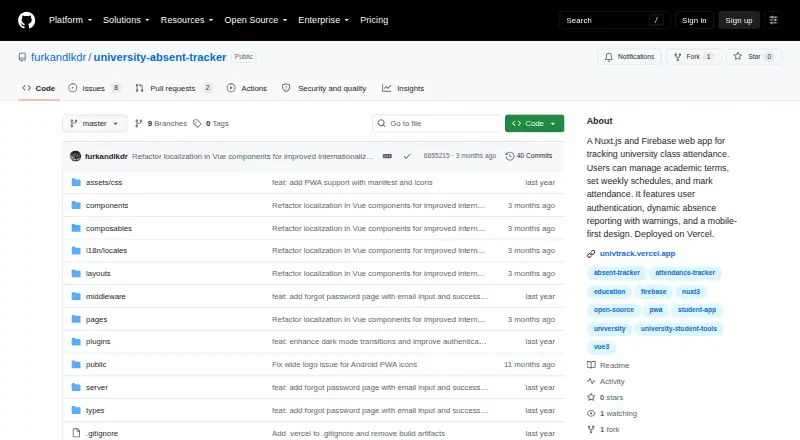
What UnivTrack is
UnivTrack is a free, open-source attendance tracker for college and high-school students. It records attendance by course and shows live absence counts, highlighting courses nearing or over their absence limits. Users can create unlimited academic terms, set each term’s name and start date, and choose a length from 5 to 18 weeks. Weekday schedules can include up to five morning and five afternoon course slots. For each class, users can mark Attended, Absent, or Holiday / No Class, and long-press actions can update earlier weeks in bulk. Once a term passes its final week, it becomes read-only. UnivTrack is an installable PWA with an offline app shell, home-screen icon, and full-screen mode. It supports Android, iOS, Windows, macOS, and Linux, with English and Turkish translations and automatic browser-language detection. Users who self-host must configure their own Firebase project; the app uses Firebase Authentication and Cloud Firestore, and says user data stays in that project without third-party ads or tracking.
Who it suits
UnivTrack suits students who want to monitor course attendance and absence limits across multiple academic terms. It can also suit users who want an installable, offline-capable tracker or are prepared to configure their own Firebase project for self-hosting.
What it does well
- Unlimited academic terms with custom dates and lengths
- Live per-course absence counts and limit warnings
- Bulk updates for attendance in earlier weeks
- Offline app shell and installable PWA
- Free forever, with no listed term limit
What to know first
- At most five morning and five afternoon slots per weekday
- Completed terms become read-only
- Self-hosting requires configuring a Firebase project
Limits
The free plan supports up to five morning and five afternoon course slots per weekday. Terms become read-only after their final week has passed.
Plans
| Plan | Billed and limits | Price |
|---|---|---|
| Free | Free forever · unlimited academic terms · up to 5 morning and 5 afternoon course slots per weekday | Free |
As github.com lists them, read 5 Oct 2026. The maker's own page has the final word.
Getting started
- Open the project on GitHub.
- Use the installable PWA on Android, iOS, Windows, macOS, or Linux.
- Create a term with a custom name, start date, and length of 5 to 18 weeks.
- Set weekday course slots, then mark each class Attended, Absent, or Holiday / No Class.
- For self-hosting, follow the local setup or Vercel deployment instructions and configure your own Firebase project.
UnivTrack is a free, open-source attendance tracker for college and high-school students who need to keep course absences within set limits. Its term setup, live absence counts, and offline-capable PWA make it a practical fit for individual tracking, provided its weekday schedule caps match your timetable.
Overview
Students create academic terms, set up weekday course slots, and record each class as attended, absent, or a holiday/no-class day. Live counts show absences by course and flag courses nearing or over their limits, turning a weekly record into a usable warning system. Attendance capture is manual, so the app depends on students keeping records current rather than capturing attendance automatically.
Terms can have custom names, start dates, and lengths of 5 to 18 weeks, with no stated cap on the number of terms. After a term's final week passes, it becomes read-only. That protects a finished term from further changes, but makes the setup less forgiving if a past record needs correction.
Key features
- Weekday schedules: Set up to five morning and five afternoon course slots for each weekday, Monday through Friday. This covers many student timetables, but the fixed per-period and weekday structure may not suit schedules with more courses in a period or classes outside those days.
- Attendance and bulk updates: Mark classes attended, absent, or holiday/no class; long-press actions can update previous weeks in bulk. The bulk action can reduce repetitive correction, while manual marking still requires regular upkeep.
- Absence monitoring: Live course-level absence counts and warnings for courses approaching or exceeding their limits help students spot risk before it becomes harder to address.
- Installable and offline-capable: The PWA offers an offline app shell, a home-screen icon, and full-screen mode. It runs on Android, iOS, Windows, macOS, and Linux, making it usable across common phone and computer platforms.
- Language and data: English and Turkish translations are included, with browser-language detection. The app uses Firebase Authentication and Cloud Firestore, and says user data stays in the user's own Firebase project, with no third-party ads or tracking.
Pricing
Free — free, free forever. The plan includes unlimited academic terms and up to five morning and five afternoon course slots per weekday. There is no paid tier described; the practical constraint is the schedule cap, not a term quota. For students whose timetable fits those limits, the free plan includes the core attendance and absence-monitoring functions without a subscription.
UnivTrack is MIT-licensed. Students who want to self-host can use the local setup or Vercel deployment instructions, but must configure their own Firebase project. That adds setup responsibility in exchange for control over the project holding their data.
Platforms
UnivTrack is an installable PWA for Android, iOS, Windows, macOS, and Linux. Its offline app shell and full-screen mode give it some app-like convenience without limiting it to one operating system. The listed integrations include Firebase Authentication, Cloud Firestore, Vercel deployment, and opt-in Vercel Analytics.
Who it's for
UnivTrack suits students who want a personal record of attendance, need to monitor course absence limits, and are comfortable marking classes themselves. It is a weaker fit for timetables that exceed its five-slot morning or afternoon weekday caps, or for anyone who needs completed terms to remain editable. GitHub issues are the route for bug reports, while feature suggestions go to discussions.
Pros and cons
Pros
- Unlimited terms at no cost: Students can maintain separate academic terms without a term-count ceiling or recurring fee.
- Warnings tied to course limits: Live counts and approaching-limit highlights make it easier to see which courses need attention.
- Broad device coverage: An installable PWA works across mobile and desktop platforms and includes an offline app shell.
- Self-hosting option: The MIT license and deployment instructions support users who want to run the project with their own Firebase setup.
Cons
- Manual attendance entry: Students must record attendance themselves; there is no automated capture described.
- Fixed schedule structure: The per-weekday morning and afternoon limits may exclude more complex timetables.
- Finished terms are read-only: A mistake in a completed term cannot be corrected through ordinary editing.
- Self-hosting takes configuration: Users deploying their own instance must supply and configure a Firebase project.
Alternatives
Student Attendance Software is the broader category to explore if UnivTrack's student-focused schedule and individual manual tracking do not match your needs.
- QRaten is a better candidate for students or members who want QR/code attendance and personal history rather than manual class-by-class records. Its free plan is forever, and a free trial is also offered.
- Bulsee is another free option on Android, iOS, and web if you want to compare a different attendance product; no further product distinction is established.
- QRoll may suit users with approved access who want to consider a tool built by a UC San Diego instructor; access is limited and subject to approval at QRoll's discretion.
- Rollcallz is aimed at organizations with 500 or more users and uses custom enterprise pricing, rather than UnivTrack's free individual-student model.
- SchoolPass Visitor Management is a paid alternative for readers considering a different attendance-related product.
- Attendances is worth considering for schools seeking an institution-specific quote; pricing depends on student and staff numbers, modules, and scale, and a free trial is offered.
- Jisc Attendance Monitoring is a paid alternative for readers comparing other attendance monitoring products.
- SwipeK12 is a paid option with pricing by request for its starting package, rather than a free student tracker.
Verdict
Choose UnivTrack if you are a student who wants a free, cross-platform way to log classes and watch course absence limits without capping the number of terms. Its combination of live warnings, offline-capable PWA access, and self-hosting option is compelling for personal tracking. Look elsewhere if you need automated attendance capture, a timetable beyond its weekday slot limits, or the ability to edit a term after it ends.
Verdict
UnivTrack combines attendance records, absence-limit monitoring, and flexible term setup in a free PWA. Check that its weekday slot limits fit your schedule, and note that completed terms cannot be edited.
Questions
Is UnivTrack free?
Yes. Its Free plan costs nothing, is free forever, and includes unlimited academic terms.
Which devices can run UnivTrack?
The installable PWA runs on Android, iOS, Windows, macOS, and Linux.
Is UnivTrack open source?
Yes. The project is MIT-licensed.
How does attendance entry work?
Attendance is entered manually. A class can be marked Attended, Absent, or Holiday / No Class.
Can I host UnivTrack myself?
Yes. The project provides local setup and Vercel deployment instructions, and self-hosting requires configuring your own Firebase project.
What data services does the project use?
UnivTrack uses Firebase Authentication and Cloud Firestore. The project says user data is stored in the user's own Firebase project, with no third-party ads or tracking.
Facts from UnivTrack's own pages
- Absence reporting
- The app displays live absence counts per course and highlights courses approaching or exceeding the absence limit. · github.com, 5 Oct 2026
- Academic terms
- Users can create unlimited terms with custom names, start dates, and lengths from 5 to 18 weeks. · github.com, 5 Oct 2026
- Attendance records
- Each class can be marked Attended, Absent, or Holiday / No Class, and long-press actions can update previous weeks in bulk. · github.com, 5 Oct 2026
- Authentication and data
- The project uses Firebase Authentication and Cloud Firestore, and says user data is stored in the user's own Firebase project with no third-party ads or tracking. · github.com, 5 Oct 2026
- Completed terms
- A term becomes read-only after its final week has passed. · github.com, 5 Oct 2026
- Integrations and hosting
- The listed stack includes Firebase Authentication, Cloud Firestore, Vercel deployment, and opt-in Vercel Analytics. · github.com, 5 Oct 2026
- Languages
- The app includes English and Turkish translations and automatic browser-language detection. · github.com, 5 Oct 2026
- License and support
- The project is MIT-licensed and directs users to GitHub issues for bug reports and discussions for feature suggestions. · github.com, 5 Oct 2026
- Offline and installable
- UnivTrack is an installable PWA with an offline app shell, home-screen icon, and full-screen mode. · github.com, 5 Oct 2026
- Purpose
- UnivTrack is a free, open-source attendance tracker that helps college and high-school students track course attendance and stay below absence limits. · github.com, 5 Oct 2026
- Schedules
- Users can define up to five morning and five afternoon course slots per weekday, Monday through Friday. · github.com, 5 Oct 2026
- Self-hosting
- The README provides local setup and Vercel deployment instructions and requires users to configure their own Firebase project. · github.com, 5 Oct 2026
- Supported devices
- The README says the PWA runs on Android, iOS, Windows, macOS, and Linux. · github.com, 5 Oct 2026
Where UnivTrack stands on Freedom251
- Student Attendance Software#8 of 27