Freedom251 › Student Attendance Software

QRoll
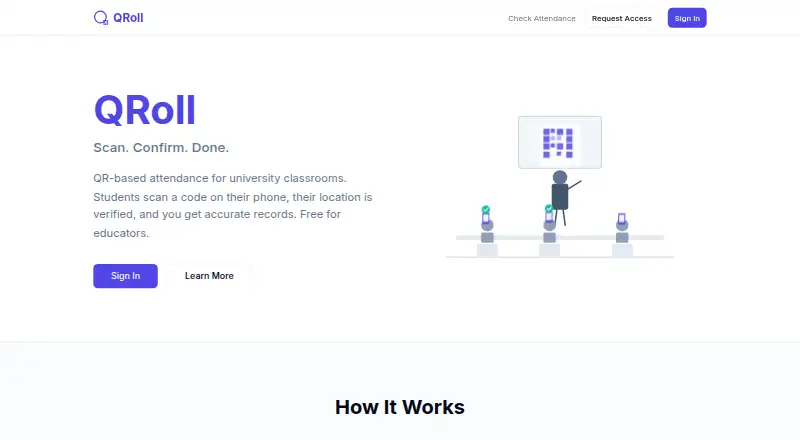
What QRoll is
QRoll is a free web-based attendance system for university classrooms, using QR check-ins and location verification for in-person and online sessions. Session QR codes can change every 30 seconds, and professors can set an allowed location radius for each course. For remote sessions, students scan a code from a shared screen. Professors can upload rosters from CSV and export attendance as Excel or CSV files. The service flags students below 75% or 50% attendance, while students can check their own attendance with a course and student ID without logging in. Professors can add teaching assistants and group sections for combined views and exports. Access is invite-only, and an access request does not guarantee approval. QRoll may restrict the number of professors, institutions, classes, users, sessions, or attendance records it supports. Its maker says it cannot guarantee that the service is secure or that location checks and anti-sharing features will always work correctly. QRoll was built by Mayank Chadha, Ph.D. in 2026 while teaching at UC San Diego, and lists an email address for questions or feedback.
Who it suits
It suits university professors who need QR-based attendance tracking, roster imports, and exportable reports for classroom or online sessions.
What it does well
- QR codes can rotate every 30 seconds
- Supports classroom and online sessions
- Exports attendance as Excel or CSV
- Students can look up attendance without logging in
What to know first
- Access is invite-only and approval is not guaranteed
- Service may restrict supported users or records
- Security and location checks are not guaranteed
Limits
The Free plan costs nothing and provides limited access to approved users at QRoll’s discretion. QRoll may restrict the number of professors, institutions, classes, users, sessions, or attendance records it supports.
Plans
| Plan | Billed and limits | Price |
|---|---|---|
| Free | Limited access · approved users only · access at QRoll’s discretion | Free |
As qroll.org lists them, read 7 Oct 2026. The maker's own page has the final word.
Getting started
- Visit https://qroll.org/ to request access.
- Wait for QRoll to approve access; requesting it does not guarantee approval.
- Use the web service to set up courses and sessions once access is granted.
- Professors can upload rosters from CSV and configure course location radii.
- Students can scan session QR codes or look up attendance with a course and student ID.
QRoll is a web-based attendance service for university courses, aimed at professors who want QR check-ins with roster and reporting tools. It works for both campus and online teaching, but its invite-only access and verification caveats make it better for controlled, lower-stakes use than as an institution-wide attendance authority.
Overview
Professors can run attendance sessions, track absences, and review course records from a browser. Students can check their own attendance with a course and student ID, without creating an account or signing in. That self-service lookup is practical for routine questions, while instructors retain control of the underlying course data.
QRoll was built by Mayank Chadha, Ph.D. in 2026 while teaching at UC San Diego. Access is by invitation, and requesting entry does not ensure acceptance. The service can also restrict how many professors, institutions, classes, users, sessions, or attendance records it supports. Departments needing guaranteed onboarding or predictable expansion should therefore look elsewhere.
Key features
QR check-ins and location controls
Each session can use a QR code that changes every 30 seconds. Professors can also define an allowed location radius for a course, adding a geographic condition to in-person attendance. These measures can discourage casual code sharing, but QRoll does not promise that location checks or anti-sharing protections will always function correctly. They are useful controls, not proof of physical presence.
Classroom and remote sessions
The same workflow supports classroom teaching and online meetings. Remote students scan a code displayed on a shared screen, which gives an online class a familiar check-in method without requiring a separate attendance process. Instructors should still account for the service's stated verification limitations when attendance has disciplinary or grading consequences.
Roster, sections, and reporting
Professors can upload rosters from CSV and export attendance as Excel or CSV. Teaching assistants can be added, and course sections can be grouped for combined views and exports. Those functions fit courses with multiple instructors or parallel sections and reduce manual consolidation work.
Alerts and student access
Automatic flags identify students below 75% or 50% attendance, giving instructors an early way to spot persistent absence. Students can independently look up their records using course and student ID, with no login required. That convenience should be balanced against the need to protect those identifiers within the course.
Pricing
Free: free
The free plan includes QR-code attendance capture, absence tracking, and automated alerts. It is limited to approved users, with access granted at QRoll's discretion. There is no paid tier described for buying higher capacity or guaranteed availability, so a department cannot use a subscription upgrade to remove the service's access and scale constraints.
Platforms
QRoll runs on the web. A mobile app is not provided, so students and staff use a browser on their existing devices rather than a dedicated iOS or Android application.
Who it's for
QRoll suits university professors and teaching teams that can obtain approval and need a no-cost way to record attendance across in-person and remote classes. Its CSV roster handling, assistant permissions, section grouping, threshold alerts, and spreadsheet exports are particularly relevant to courses with recurring administrative work.
It is a poor fit for institutions that require guaranteed capacity, assured access, or attendance verification that can be relied on without qualification. The service's security is not guaranteed, and its location and anti-sharing checks may fail, so high-stakes compliance records need an additional control or a different platform.
Pros and cons
- Pros: Rotating 30-second QR codes and per-course location radii provide more control than a static sign-in code.
- Pros: Classroom and shared-screen remote scanning cover two teaching formats in one workflow.
- Pros: CSV imports, Excel/CSV exports, assistants, and grouped sections support multi-instructor administration.
- Pros: 75% and 50% attendance alerts help identify absence problems early, while students can review their own records without logging in.
- Cons: Invite-only access and discretionary approval can prevent a willing professor or department from starting.
- Cons: Capacity may be restricted across users, classes, sessions, and records, making long-term scale unpredictable.
- Cons: Security, location verification, and anti-sharing behavior are not guaranteed, limiting suitability for consequential decisions.
- Cons: Web-only access means there is no dedicated mobile application.
Alternatives
For a broader comparison, see Student Attendance Software.
Choose QRaten instead if you want freemium access across Android, iOS, Linux, macOS, web, and Windows, with a free plan, trial, personal history, and QR/code attendance.
UnivTrack is the stronger option when free-forever academic terms and support for up to five morning and five afternoon course slots per weekday matter.
Pick AttenQR if you prefer Android, iOS, or web access and want a free account with an optional one-time $9.99 payment to remove ads.
Bulsee offers a free starting plan across Android, iOS, and web.
iAttended is an alternative for users seeking a free App Store application.
Choose AttendUni when a web service with a defined free tier of one classroom and up to 30 students, plus paid expansion, fits your course.
Rollcallz is an alternative for organizations with 500 or more users seeking custom enterprise pricing.
GEGI is another paid attendance option.
Verdict
QRoll is a sensible choice for an approved university teaching team that wants free QR attendance, useful roster administration, and exports for classroom or online sessions. The main reason to choose it is the combination of rotating codes, course-level location settings, alerts, and section-aware reporting at no charge. Look elsewhere if access must be guaranteed, capacity must scale predictably, or attendance verification must carry institutional or disciplinary weight.
Verdict
QRoll offers attendance capture and reporting for university courses at no listed cost. Access is discretionary, and the maker cautions that capacity and verification reliability are not guaranteed.
Questions
How much does QRoll cost?
Its Free plan costs nothing.
Can anyone use QRoll?
No. Access is invite-only, and requesting access does not guarantee approval.
What devices or platforms does QRoll support?
QRoll is available on the web and has no mobile app.
Can students check their attendance without an account?
Students can look up attendance with their course and student ID without logging in.
Who built QRoll?
Mayank Chadha, Ph.D. built QRoll in 2026 while teaching at UC San Diego.
How can I contact QRoll?
QRoll lists [email protected] for questions or feedback.
Facts from QRoll's own pages
- Access
- QRoll is invite-only, and an access request does not guarantee approval. · qroll.org, 7 Oct 2026
- Attendance alerts
- QRoll automatically flags students below 75% or 50% attendance. · qroll.org, 7 Oct 2026
- Availability limits
- QRoll may restrict the number of professors, institutions, classes, users, sessions, or attendance records it supports. · qroll.org, 7 Oct 2026
- Course management
- Professors can add teaching assistants and group course sections for combined views and exports. · qroll.org, 7 Oct 2026
- Founded
- 2026 · qroll.org, 28 Sept 2026
- Location checks
- Professors can set an allowed location radius per course. · qroll.org, 7 Oct 2026
- Maker
- QRoll was built by Mayank Chadha, Ph.D. in 2026 while teaching at UC San Diego. · qroll.org, 7 Oct 2026
- Purpose
- QRoll tracks attendance for university classrooms using QR-based check-ins and location verification. · qroll.org, 7 Oct 2026
- Remote sessions
- QRoll supports classroom and online sessions, with remote students scanning a QR code from a shared screen. · qroll.org, 7 Oct 2026
- Roster and reports
- Professors can upload rosters from CSV and export attendance as Excel or CSV. · qroll.org, 7 Oct 2026
- Rotating QR codes
- Session QR codes can change every 30 seconds. · qroll.org, 7 Oct 2026
- Security and verification limits
- QRoll does not guarantee that the service is secure or that location checks and anti-sharing features will always work correctly. · qroll.org, 7 Oct 2026
- Student lookup
- Students can look up their own attendance using their course and student ID without logging in. · qroll.org, 7 Oct 2026
- Support
- QRoll lists [email protected] for questions or feedback. · qroll.org, 7 Oct 2026
Where QRoll stands on Freedom251
- Student Attendance Software#9 of 27