Freedom251 › Student Attendance Software

AttenQR
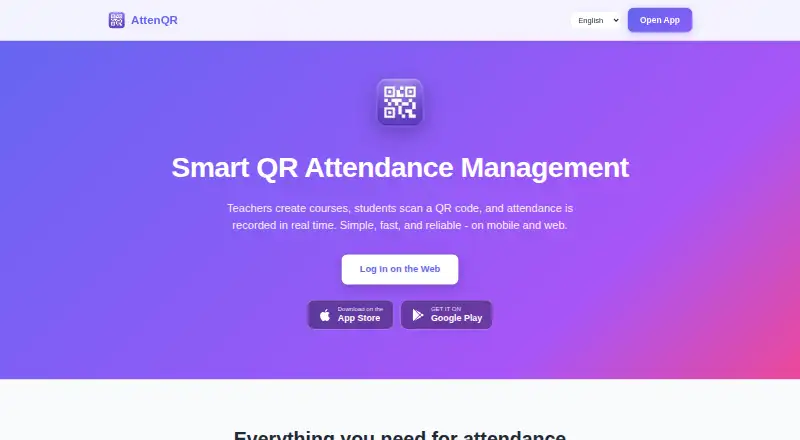
What AttenQR is
AttenQR is a QR code-based attendance system for teachers, professors, and students. Students scan a daily QR code to record attendance, and teachers see check-ins in real time. A separate permanent enrollment code lets students join a course. Teachers can share courses with other teacher accounts to manage students and attendance together, then export attendance records to CSV. The service supports English, Spanish, Korean, Chinese, and Japanese, and is available on Android, iOS, and the web. AttenQR has a free plan and a one-time payment of 9.99 USD to remove ads permanently; that premium status is tied to the user account and cannot be transferred. The app displays Google AdMob ads, and the maker says attendance may not be recorded if a student closes the post-scan ad before it finishes. Attendance QR tokens rotate daily. Course and attendance data is stored in US Firebase Cloud Firestore with encryption in transit and at rest and access controls. Course data is automatically deleted 30 days after a course ends, so teachers can export records before deletion.
Who it suits
AttenQR suits teachers, professors, and students who need QR-based attendance and course enrollment. It is designed for classes of any size, according to the maker.
What it does well
- Teachers see attendance check-ins in real time.
- Students can join courses using a permanent QR code.
- Teachers can share courses with other teacher accounts.
- Attendance records can be exported to CSV.
- Available on Android, iOS, and the web.
What to know first
- The maker says closing a post-scan ad may prevent attendance recording.
- Course and attendance data is deleted 30 days after a course ends.
- The ad-removal payment is non-transferable.
Limits
The free plan displays ads. Attendance may not be recorded if a student closes the post-scan ad before it finishes. Course and attendance data is automatically deleted 30 days after a course ends; teachers can export it to CSV before deletion.
Plans
| Plan | Billed and limits | Price |
|---|---|---|
| Free | Create account · core attendance service · advertisements | Free |
| Remove Ads Forever | one-time payment · Permanently removes advertisements · premium status tied to user account · non-transferable · sales final unless law requires refund | $9.99, paid once |
As attenqr.com lists them, read 15 Oct 2026. The maker's own page has the final word.
Getting started
- Visit the AttenQR website.
- Create a free account.
- Use the web service or access AttenQR on Android or iOS.
- Create a course and share its permanent enrollment QR code with students.
- Provide the daily attendance QR code for student check-ins.
- Export attendance records to CSV before course data is deleted.
AttenQR is a classroom attendance app built around QR scans, course enrollment, and shared course management. It suits teachers and professors who want a focused attendance workflow across mobile and web. Its free entry point is useful, though ad interruptions and the short retention window make record-keeping part of the job.
Overview
Students scan a daily QR code to check in, and teachers see attendance appear in real time. A permanent enrollment QR code lets students join a course, while course sharing allows teachers to manage students and attendance together. That combination is particularly useful for co-taught classes; schools seeking a broader administration system should look elsewhere.
Key features
- Daily QR check-ins: A scan gives students a simple route to record attendance, and teachers can follow check-ins as they arrive. Attendance capture is mixed, however: the maker warns that closing the post-scan ad before it finishes may prevent a check-in from being recorded. That makes the ad-supported workflow a poor fit when every scan must be dependable and interruption-free.
- Enrollment and shared courses: A permanent QR code lets students enroll, and teachers can share a course with other teacher accounts to manage students and attendance together. This helps coordinate a class with multiple teachers without changing the core QR workflow.
- CSV reports and data retention: Teachers can export attendance records to CSV, a practical way to keep a copy outside the service. Course and attendance data is automatically deleted 30 days after a course ends, so export records before that deadline if they need to be retained.
- Languages and security: The app supports English, Spanish, Korean, Chinese, and Japanese. The privacy policy says data is stored in US Firebase Cloud Firestore and protected with encryption in transit and at rest plus access controls; attendance QR tokens rotate daily.
Pricing
The Free plan costs nothing and lets users create an account at no charge. It is the sensible starting point for teachers who can accept ads and want to see whether QR attendance fits their classes; there is no free trial because the product already has a free plan.
Remove Ads Forever costs $9.99, paid once, billed as a one-time payment. It removes all ads permanently, which addresses the post-scan interruption, though the maker's warning about missed attendance applies to the ad-driven workflow. Premium status is tied to the user account and cannot be transferred, so it is a personal purchase rather than a transferable license. No paid seat or usage quota is stated.
Platforms
AttenQR is available on Android, iOS, and the web. Teachers and students can use a phone app or the web, while the listed platform range does not extend to desktop operating systems as dedicated apps.
Who it's for
AttenQR is aimed at teachers, professors, and students, including classes of any size. It is a good match for courses that can organize check-ins around a daily QR code, especially when instructors share course management. Teachers who need uninterrupted scans or long-term in-service records should weigh the ad warning and 30-day deletion cycle carefully.
Pros and cons
- Pro: Real-time check-ins let teachers follow attendance as students scan.
- Pro: Enrollment QR codes and shared course management cover joining a course and coordinating its attendance.
- Pro: CSV exports provide a way to preserve records before automatic deletion.
- Con: Ads may interrupt attendance capture if students close them before completion.
- Con: Course and attendance data is deleted 30 days after a course ends, requiring timely exports.
- Con: The one-time ad-removal purchase is non-transferable between user accounts.
Alternatives
For a broader comparison, see Student Attendance Software. Choose QRaten if you want a free QR attendance option with a free trial and support across Android, iOS, Linux, macOS, web, and Windows. UnivTrack may suit academic schedules better: its free plan includes unlimited academic terms and up to five morning and five afternoon course slots per weekday, with platforms spanning mobile, desktop, web, and self-hosted use. Bulsee is another free option across Android, iOS, and web, with no price or usage limits stated for its free plan. Choose iAttended if you prefer an app listed as free on the App Store, though its pricing model is paid. QRoll is a web-only free option with limited access for approved users, and access is at the maker's discretion. AttendUni may work for a small web-based classroom: its free tier covers one classroom and up to 30 students with full QR verification and a real-time dashboard; its Professional plan is 100 EGP a month for one classroom and up to 100 students. Rollcallz offers a paid option with custom enterprise pricing for organizations with 500 or more users. GEGI is another paid option available on Android, iOS, web, and API.
Verdict
AttenQR is a strong fit for teachers who want QR-based attendance, shared course management, and CSV reports without an upfront software cost. Its main advantage is a focused classroom workflow across mobile and web; its main drawback is that ads can disrupt check-ins, while records must be exported within 30 days of a course ending. Choose it if those trade-offs suit your classes, and consider another attendance tool if uninterrupted capture or longer retention is essential.
Verdict
AttenQR combines QR attendance with course sharing and CSV exports across mobile and web. Teachers should account for the post-scan ad warning and export records before course data is deleted.
Questions
Is AttenQR free?
Yes. Its Free plan costs nothing, and account creation is free.
How much does ad removal cost?
Remove Ads Forever costs 9.99 USD as a one-time payment. Premium status is tied to the user account and cannot be transferred.
Which platforms does AttenQR support?
AttenQR is available on Android, iOS, and the web.
How does attendance check-in work?
Students scan the daily attendance QR code, and teachers see check-ins in real time. The maker says attendance may not be recorded if a student closes the post-scan ad before it finishes.
Can teachers export attendance records?
Yes. Teachers can export attendance records to CSV, including before course and attendance data is deleted 30 days after a course ends.
Which languages does AttenQR support?
It supports English, Spanish, Korean, Chinese, and Japanese.
Facts from AttenQR's own pages
- Account requirements
- Users must register with an email address, password of at least six characters, name and teacher-or-student account type. · attenqr.com, 15 Oct 2026
- Ad-related attendance limitation
- The Google Play listing warns that attendance may not be recorded when a student closes the post-scan advertisement before it finishes. · play.google.com, 15 Oct 2026
- Ads
- The service displays Google AdMob advertisements, and its terms offer a paid ad-free version. · attenqr.com, 15 Oct 2026
- Apple availability
- Apple lists AttenQR as a free Education app for iPhone and iPad, with in-app purchases and no macOS verification. · apps.apple.com, 15 Oct 2026
- Apple compatibility
- The Canadian App Store listing requires iOS or iPadOS 15.0 or later and lists a 40.1 MB package. · apps.apple.com, 15 Oct 2026
- Apple privacy label
- Apple says the developer may use identifiers and usage data for tracking and may link contact information, photos or videos, device ID and other data to the user. · apps.apple.com, 15 Oct 2026
- Camera handling
- The maker says the camera is used only for real-time QR scanning and that camera images are not collected, stored or transmitted. · attenqr.com, 15 Oct 2026
- Check-in
- Students scan the daily attendance QR code to record attendance, and teachers see check-ins appear in real time. · attenqr.com, 7 Oct 2026
- Course enrollment
- Students can scan a permanent enrollment QR code to join a course. · play.google.com, 7 Oct 2026
- Course management
- Teachers can create, edit and delete courses with schedules and manage enrolled students. · play.google.com, 15 Oct 2026
- Course sharing
- Teachers can share a course with other teacher accounts so they can manage students and attendance together. · apps.apple.com, 15 Oct 2026
- Daily attendance QR
- A new attendance QR code is generated for each class day and students scan it to check in. · attenqr.com, 15 Oct 2026
- Data retention
- Course and attendance data is automatically deleted 30 days after a course ends, and teachers can export it to CSV before deletion. · attenqr.com, 7 Oct 2026
- Data retention limit
- Course and attendance data is automatically deleted 30 days after a course ends and deleted data cannot be recovered. · attenqr.com, 15 Oct 2026
- Developer API
- The public terms and help pages describe user-facing web and mobile features but do not publish an API or SDK reference. · attenqr.com, 15 Oct 2026
- Developer identity
- Google Play identifies the developer as Juntae Jake Son and gives a Muncie, Indiana, United States address. · play.google.com, 15 Oct 2026
- Documentation
- Public help content is an FAQ covering course creation, enrollment, attendance checking, web QR display, language changes, ad removal, security and account deletion. · attenqr.com, 15 Oct 2026
- Enrollment QR
- Courses have a permanent enrollment QR code that students scan once to join. · attenqr.com, 15 Oct 2026
- Google Play data safety
- Google Play says the app may share device or other IDs, may collect personal information and photos or videos, encrypts data in transit and supports deletion requests. · play.google.com, 15 Oct 2026
- Google Play distribution
- Google Play lists AttenQR with 500+ downloads, advertising and in-app purchases. · play.google.com, 15 Oct 2026
- Google Play update
- The Google Play listing reports an update on September 6, 2026. · play.google.com, 15 Oct 2026
- Integrations and services
- The service uses Firebase for authentication, database, and hosting, Google AdMob for ads, and Google Play or the App Store for app distribution and purchases. · attenqr.com, 7 Oct 2026
- Intended users
- The maker describes AttenQR as designed for teachers, professors, and students of classes of any size. · attenqr.com, 7 Oct 2026
- Languages
- The interface is offered in English, Spanish, Korean, Simplified Chinese and Japanese. · attenqr.com, 15 Oct 2026
Where AttenQR stands on Freedom251
- Student Attendance Software#1 of 27