Freedom251 › Student Attendance Software

QRaten
What QRaten is
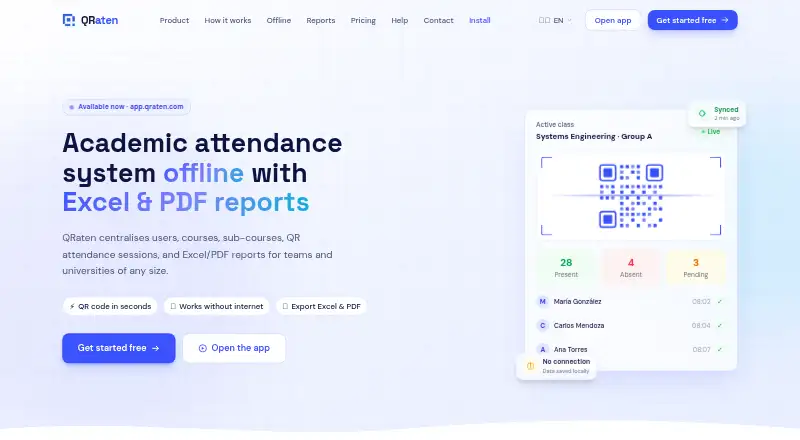
QRaten is an academic attendance platform for managing users, courses, sub-courses, QR attendance sessions and reports. Teachers create classes; students record attendance by scanning a QR code or entering a code that expires after a set time. When offline, QRaten stores data on the device, queues actions and synchronizes them when the connection returns. The site says this offline data is encrypted and that synchronization conflicts are resolved automatically. Users can export attendance reports as Excel or PDF files and filter them by course, date, role, status and academic period. Roles include student, teacher, assistant and substitute, with permissions based on role. QRaten is an installable Progressive Web App rather than an app-store download. Its installation guide lists Android 8+, iOS 16.4+, Windows, Mac and Linux through compatible browsers. The Free Plan is listed as free and includes attendance, personal history, alerts and offline syncing. Pro Plan Full access is listed as free for a limited time, adding institutional management, advanced roles, reports, analytics, integrations, onboarding and priority support. The terms do not guarantee uninterrupted cloud availability or cover losses from unsynced offline use or misuse.
Who it suits
QRaten suits educational institutions that need attendance management across courses, roles and academic periods. It may be useful where offline attendance capture and exportable reports are important.
What it does well
- Attendance can be recorded by QR scan or expiring code.
- Offline actions sync when a connection returns.
- Reports export to Excel or PDF.
- Supports four role types with role-based permissions.
- Free plan includes offline syncing.
What to know first
- Cloud availability is not guaranteed uninterrupted.
- The terms exclude losses from unsynced offline use.
- Some parts may not yet fully meet WCAG 2.1 Level AA.
Limits
The Free Plan includes attendance, personal history, alerts and offline sync. Pro Plan Full access is listed as free for a limited time; no additional quota or seat limits are stated.
Plans
| Plan | Billed and limits | Price |
|---|---|---|
| Free Plan | forever · students and members · QR/code attendance · personal history · offline sync · essential alerts · PWA installation | Free |
| Pro Plan Full access | limited time · institutional courses, sub-courses and users · advanced roles · Excel/PDF executive reports · analytics · onboarding · integrations · priority support | Free |
As qraten.com lists them, read 15 Oct 2026. The maker's own page has the final word.
Getting started
- Open the QRaten website in a compatible browser.
- Install the Progressive Web App from the browser.
- Use Android 8+, iOS 16.4+, Windows, Mac or Linux through a compatible browser.
- Choose the Free Plan or Pro Plan Full access.
QRaten is an attendance platform for academic institutions that need check-ins, absence tracking and reporting in one system. It is best suited to schools coordinating students and staff across courses, especially where connectivity is unreliable. Its offline capture and free starting plan are useful, but institutions should weigh the Pro plan’s limited-time terms and the risk of unsynced data.
Overview
QRaten brings users, courses, sub-courses and attendance sessions together. Teachers create classes, and students check in by scanning a QR code or entering a time-limited code. That gives institutions two ways to capture attendance; duplicate-record protections and device-bound sessions are intended to discourage repeated or proxy check-ins.
Beyond attendance capture, the platform supports absence tracking, alerts and personal history. Permissions for students, teachers, assistants and substitutes make it more appropriate for institutions with distinct responsibilities than for a simple, single-purpose register.
Key features
Offline capture and sync
When a device is offline, QRaten stores actions locally and queues them for automatic synchronization when the connection returns. The company says this data is encrypted on the device and conflicts are resolved automatically during sync. This is a practical advantage for campuses with inconsistent connectivity, but it does not remove the need to confirm that queued records have synced: the terms disclaim responsibility for loss through unsynced offline use.
Reports and administration
Excel and PDF reports can be filtered by course, date, role, status and academic period, giving administrators several ways to examine attendance patterns. These reporting tools and institutional course and user management are part of Pro, so the free plan is less suitable for schools that need centralized oversight.
Access and security
QRaten describes secure authentication, expiring invitations, role-based access, synchronization validation and safeguards against duplicate attendance records. Sessions are tied to a device to help prevent a student from recording attendance for someone else on another device. These controls address common attendance-integrity concerns, though they do not change the service’s stated limits around cloud availability or unsynced data.
Pricing
QRaten uses a freemium model and offers a free trial.
- Free Plan: free, billed $0 / forever. It includes students and members, QR/code attendance, personal history, mobile, tablet and computer access, offline sync, essential alerts and PWA installation. It is a sensible starting point for basic attendance capture, but does not include the institutional management, advanced roles, reports, analytics or integrations offered by Pro.
- Pro Plan Full access: free, billed Free for a limited time. It includes everything in Free, plus institutional course and user management, advanced roles, Excel/PDF reports, analytics, onboarding, integrations and priority support. The limited-time billing term matters for institutions planning ongoing use; the plan’s stated price should not be treated as a permanent rate.
No seat or usage caps are stated for either plan. Institutional contacts can reach QRaten at [email protected] or WhatsApp +591 70930853.
Platforms
QRaten is an installable Progressive Web App, so installation happens through a compatible browser rather than the App Store or Google Play. Its platform coverage includes Android, iOS, Linux, macOS, web and Windows; the installation guide specifies Android 8+ and iOS 16.4+, with Windows, Mac and Linux support through compatible browsers. This broad browser-based approach suits institutions using a mix of devices, though access depends on browser compatibility.
QRaten aims to conform to WCAG 2.1 Level AA, while acknowledging that some parts may not yet be fully accessible. Institutions with accessibility requirements should account for that limitation.
Who it's for
QRaten is a good fit for academic institutions that need QR or code check-ins, offline capture and structured roles, and that can manage synchronization carefully. It is less compelling for a school that needs guaranteed uninterrupted cloud access, or one unwilling to plan around Pro’s limited-time terms.
Pros and cons
- Pro: Offline queuing and automatic sync help attendance capture continue through connectivity gaps.
- Pro: Role-based permissions and device-bound sessions address the needs of institutions managing multiple user types and attendance integrity.
- Pro: Pro combines filtered Excel/PDF reporting, analytics and integrations with course and user management.
- Con: The terms do not guarantee uninterrupted cloud availability and disclaim responsibility for data lost through unsynced offline use.
- Con: Pro is billed free only for a limited time, which makes its ongoing cost difficult to plan from the stated terms.
- Con: Some parts may not yet meet the platform’s WCAG 2.1 Level AA accessibility aim.
Alternatives
For a broader shortlist, see Student Attendance Software.
Bulsee is another free-plan option, with Android, iOS and web support. UnivTrack has a free plan and covers web, desktop and mobile platforms. AttenQR is a freemium option for web, iOS and Android, while Attendae offers a freemium web option. QRoll and AttendUni also offer free plans.
SchoolPass Visitor Management is a paid alternative for Android, iOS and web. Attendances offers a school-specific quote and a free trial, with Android and web support.
Verdict
Choose QRaten if your institution needs attendance capture that can continue offline, differentiated roles and reporting in an installable web app. Its free plan makes basic adoption possible, and Pro adds the administrative tools many schools will need. Look elsewhere if dependable cloud availability, clear ongoing Pro pricing or fully realized accessibility are essential requirements.
Verdict
QRaten covers attendance capture, offline syncing and reporting in an installable web app. Institutions should account for the terms on cloud availability and unsynced offline data.
Questions
Is QRaten free?
The Free Plan is $0 forever. Pro Plan Full access is listed at $0 for a limited time.
What platforms does QRaten support?
The platform list includes Android, iOS, Linux, macOS, web and Windows. The installation guide specifies Android 8+, iOS 16.4+ and compatible browsers on Windows, Mac and Linux.
How do students record attendance?
Students scan a QR code or enter a time-limited code created for a class.
Can QRaten work offline?
Yes. It stores data locally, queues actions and syncs them when a connection returns. The site says offline data is encrypted and conflicts are resolved automatically.
What does Pro add?
Pro includes institutional course and user management, advanced roles, Excel and PDF reports, analytics, onboarding, integrations and priority support.
How can institutions contact support?
Institutional contacts can email [email protected] or use WhatsApp at +591 70930853. Pro includes priority support.
Facts from QRaten's own pages
- Accessibility
- QRaten aims to conform to WCAG 2.1 Level AA and states that some parts may not yet be fully accessible. · qraten.com, 30 Sept 2026
- Accessibility target
- QRaten says it aims for WCAG 2.1 Level AA and supports keyboard navigation, alternative text, responsive layouts and screen readers. · qraten.com, 15 Oct 2026
- Alerts
- The feature list includes custom or real-time alerts for attendance monitoring. · qraten.com, 15 Oct 2026
- API and SDKs
- The maker's public pages provide no API reference, SDK download or developer documentation. · qraten.com, 15 Oct 2026
- App delivery
- QRaten is a Progressive Web App installable from the browser without the App Store or Google Play. · qraten.com, 30 Sept 2026
- Attendance validation
- Teachers create classes and students record attendance by scanning a QR code or entering a time-limited code. · qraten.com, 30 Sept 2026
- Browser support
- The accessibility page lists current Chrome, Firefox, Safari and Edge browsers as compatible. · qraten.com, 15 Oct 2026
- Compatibility
- The installation guide lists Android 8+, iOS 16.4+, Windows, Mac and Linux support through compatible browsers. · qraten.com, 30 Sept 2026
- Conflict handling
- The maker says synchronization automatically resolves conflicts and preserves consistency. · qraten.com, 15 Oct 2026
- Course hierarchy
- Institutions can organize faculties, courses, subjects and sub-courses in one structure. · qraten.com, 15 Oct 2026
- Developer background
- LinkedIn identifies Andres Alpiri in Santa Cruz de la Sierra, Bolivia, and describes QRaten as an offline-capable public attendance PWA. · bo.linkedin.com, 15 Oct 2026
- Device binding
- The FAQ says attendance sessions are tied to a device to deter one student recording for another. · qraten.com, 15 Oct 2026
- Documentation
- Public documentation consists mainly of marketing pages, FAQs, legal pages and a browser installation guide; no technical documentation portal is listed. · qraten.com, 15 Oct 2026
- Dynamic QR
- The Spanish product page says the displayed QR changes every 10 seconds. · qraten.com, 15 Oct 2026
- Independent access control
- AppRecs says invitation creators can activate or deactivate access and that accounts use email and password authentication. · apprecs.com, 15 Oct 2026
- Independent app listing
- AppRecs lists an Android QRaten app by Ganex as free with 10+ downloads. · apprecs.com, 15 Oct 2026
- Independent feature detail
- AppRecs describes teacher tools for creating courses, groups and subgroups, issuing invitations and generating QR roll calls. · apprecs.com, 15 Oct 2026
- Independent requirement
- AppRecs lists a camera for QR scanning and an internet connection for synchronization as requirements for its Android listing. · apprecs.com, 15 Oct 2026
- Independent role detail
- AppRecs documents separate workflows for teachers, alternate teaching assistants and students. · apprecs.com, 15 Oct 2026
- Integration
- The Pro feature list promises integration with existing academic or administrative systems but names no specific connectors. · qraten.com, 15 Oct 2026
- Integrations
- The Pro plan includes integration with existing systems and the site mentions academic and administrative workflow integration. · qraten.com, 30 Sept 2026
- Invitations
- Teachers and administrators can invite users with specific roles, and invitation links expire automatically. · qraten.com, 15 Oct 2026
- Licence
- The terms state that QRaten's code, design and brand belong to its creators and may not be copied or modified without permission. · qraten.com, 15 Oct 2026
- Limit: accessibility
- The accessibility statement acknowledges that some platform areas are not yet fully accessible. · qraten.com, 15 Oct 2026
Where QRaten stands on Freedom251
- Student Attendance Software#6 of 27