Freedom251 › Gantt Chart Software
Tom's Planner
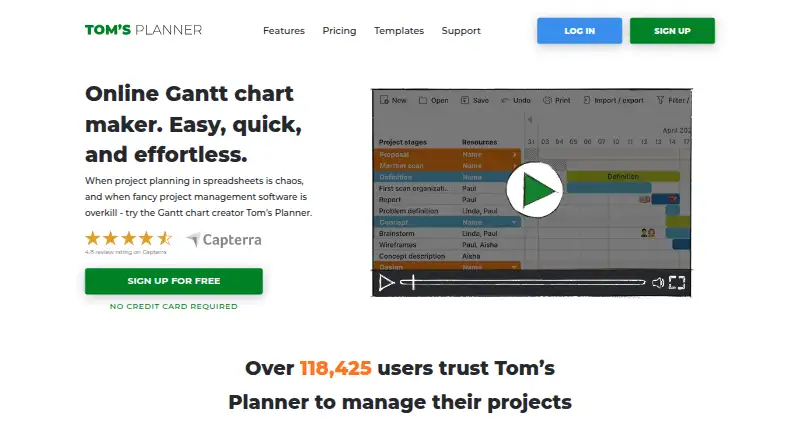
What Tom's Planner is
Tom's Planner is an online Gantt chart maker for people planning projects who find spreadsheets difficult to manage or do not need more complex project management software. Schedules can be viewed at scales from a full year down to five-minute intervals. Users arrange color-coded time blocks by dragging them, track progress with percentages, traffic lights, icons, or colors, and link tasks with dependencies. Milestones and resource management are supported, and filters can narrow schedules by resource, activity, team, icon, or date. The maker says schedules can be imported from Excel, MS Project, Outlook, and Google Calendar. Paid accounts can print and export schedules; JSON export is limited to Unlimited accounts. Free users may accept collaboration invitations, but need a paid account to invite others. The Personal plan allows one schedule of up to 200 rows or activities and excludes online sharing, printing, and export. Pricing is $9.95/mo (annual) for Professional and $19.95/mo (annual) for Unlimited. The service works on the web and is compatible with Android, iPhone, and iPad without an app.
Who it suits
It suits individuals or teams who want a visual project schedule without adopting more complex project management software. Mobile access is mainly suited to consulting schedules while away from a computer.
What it does well
- Views range from yearly to five-minute intervals
- Tasks can be linked with dependencies
- Imports from Excel, MS Project, Outlook, and Google Calendar
- Free email support for all account types
What to know first
- Free plan allows one schedule
- Free plan excludes sharing, printing, and export
- Paid plan required to invite collaborators
Limits
The free Personal plan allows one schedule with a maximum of 200 rows or activities. It excludes online sharing, printing, and export; inviting collaborators also requires a paid account.
Plans
| Plan | Billed and limits | Price |
|---|---|---|
| Personal | 1 schedule · max. 200 rows/activities in one schedule · cannot print or export | Free |
| Unlimited | * Based on a yearly subscription · Unlimited schedules · JSON export · embed schedules · collaborators can print | $19.95 a month |
| Professional | * Based on a yearly subscription · 20 schedules · collaboration invitations · print and export | $9.95 a month |
As tomsplanner.com lists them, read 9 Oct 2026. The maker's own page has the final word.
Getting started
- Open the Tom's Planner website.
- Choose the free Personal plan or a paid plan.
- Use the web version, or access it on a compatible Android, iPhone, or iPad device without installing an app.
- Import a schedule from Excel, MS Project, Outlook, or Google Calendar if needed.
- Create or edit a schedule with time blocks, progress indicators, and task dependencies.
Tom’s Planner is an online Gantt chart maker for building and tracking project schedules. It suits people who want a visual alternative to spreadsheets without adopting more complex project-management software. Its standout strength is a highly adjustable timeline; the free plan is constrained if you need to share, print or export your work.
Overview
Founded in 2009, Tom’s Planner focuses on scheduling rather than presenting itself as an all-purpose project-management system. Its appeal is the ability to organize work in a chart, track progress visually and adjust the level of timing detail to the task. That focused approach may suit individuals and teams whose spreadsheets have become difficult to manage, but it is less compelling if they need a wider set of project-management capabilities.
Key features
Schedules can be viewed at scales ranging from a year down to five-minute intervals. That flexibility makes it possible to use one chart for both long-range planning and tightly timed work. Drag-and-drop, color-coded time blocks make schedule changes visible, while progress markers can use percentages, traffic lights, icons or colors. Milestones and task dependencies help show sequence and status; resource management is also supported.
Filters by resource, activity, team, icon and date can help narrow a busy chart. Imports from Excel, MS Project, Outlook and Google Calendar give users a way to bring in schedules from familiar tools. Paid accounts can export to MS Project, Excel, CSV, PDF or an image file; JSON export is limited to Unlimited. This makes paid plans the practical choice when schedules need to move between tools or be distributed outside the planner.
Free users can accept collaboration invitations, but need a paid account to invite others. Personal also excludes online sharing, printing and export, so it works better for trying out a chart or keeping a limited schedule for individual use than for distributing plans. The privacy statement says chart access is limited to account credentials and credentials of collaborators the user has chosen.
Tom’s Planner is cloud-based and requires no installation, but schedules can also be saved offline on a user’s own computer. It works with iPhone, iPad and Android devices without requiring an app; mobile use is mainly intended for consulting schedules on the go. Free email support is offered across account types. The support team is available from 10 a.m. to 10 p.m. CET on weekdays and 10 a.m. to 4 p.m. CET on weekends, and typically responds within an hour.
Pricing
The freemium plans are priced in USD per month on a yearly subscription for paid accounts:
| Plan | Price | What it includes |
|---|---|---|
| Personal | free | One schedule, capped at 200 rows or activities; no printing or export. |
| Professional | $9.95 a month, billed yearly | 20 schedules, collaboration invitations, printing and export. |
| Unlimited | $19.95 a month, billed yearly | Unlimited schedules, JSON export, embedded schedules and collaborator printing. |
Personal is a useful no-cost starting point, but its one-chart cap and lack of printing, export and online sharing sharply limit its role in collaborative work. Professional is the sensible step up for users who need to manage multiple schedules and invite collaborators or distribute copies. Unlimited is aimed at heavier use or workflows that specifically need JSON export, embedded schedules or printing by collaborators. Both paid plans are based on a yearly subscription.
Platforms
Tom’s Planner supports web, Android and iOS. The maker says it can be used on iPhone, iPad and Android devices without an app, with mobile chiefly suited to checking schedules rather than doing the main planning work.
Who it's for
Choose Tom’s Planner if a visual schedule, adjustable time scale, progress indicators and task dependencies address the core of your planning needs. It is particularly suited to people replacing chaotic spreadsheets who do not want a more complex project-management product. Look elsewhere if you need the free plan to support sharing, printing or export, or if your work calls for more than a schedule-centered tool.
Pros and cons
- Pros: The timeline spans yearly views to five-minute intervals, so users can match the chart to different planning horizons.
- Pros: Color-coded time blocks, multiple progress markers, dependencies, milestones and filters make schedule status and structure easier to represent.
- Pros: Imports from four common scheduling tools and a range of paid export formats support moving schedules between applications.
- Cons: Personal allows only one schedule of up to 200 rows or activities, with no printing or export.
- Cons: Inviting collaborators and online sharing require a paid account, making the free tier a poor fit for teams distributing plans.
- Cons: Mobile access is positioned mainly for consulting schedules, not as the primary way to plan.
Alternatives
For a broader comparison, see Gantt Chart Software.
- Agantty is another freemium option, with a 14-day trial of all features and a free plan capped at one project.
- Open Planner Studio is a free, open-source alternative with Gantt charts, critical-path analysis and resource planning, without subscription or per-seat licence fees.
- ProjectLibre is worth considering for Microsoft Project import and Gantt and WBS features; its Core plan is $9.99 a month billed annually.
- RationalPlan offers a free tier capped at two projects, 100 tasks, 10 MB of storage and two users.
- Ganttic may suit resource-focused planning, with a free plan for up to 10 resources and unlimited users and projects.
- GanttProject is a free desktop download for users who prefer a desktop application.
- LibrePlan offers a self-hosted, open-source Community Edition with no license fee.
- Microsoft Project is another option for users considering a paid project-planning product.
Verdict
Tom’s Planner is a strong fit for individuals and teams who want a flexible, visual schedule without taking on a more complex project-management system. Its adjustable time scales and clear progress tracking are the main reasons to choose it. Look elsewhere if you need free sharing, printing or export, or expect a broader project-management tool; Personal’s one-chart limit and paid collaboration features make that distinction important.
Verdict
Tom's Planner offers flexible time scales and visual progress tracking for project schedules. Check the Personal plan's one-chart limit and export restrictions if you need to share or print plans.
Questions
Is there a free plan?
Yes. The Personal plan costs nothing and includes one schedule with up to 200 rows or activities.
How much do the paid plans cost?
Professional costs $9.95 a month when billed on a yearly subscription. Unlimited costs $19.95 a month when billed on a yearly subscription.
Which platforms does Tom's Planner support?
The listed platforms are Android, iOS, and web. The maker says it works on iPhone, iPad, and Android devices without requiring an app.
Can free users collaborate?
Free accounts can accept collaboration invitations. A paid account is required to invite others to collaborate on schedules.
What can paid accounts export?
Paid accounts can export schedules to MS Project, Excel, CVS, PDF, or an image file. JSON export is listed for Unlimited accounts only.
Can schedules be used offline?
The pricing page says users can save a schedule offline on their own computer. The product is also described as cloud-based and requiring no installation.
Facts from Tom's Planner's own pages
- Collaboration
- Free accounts can accept invitations to collaborate, while a paid account is required to invite others to collaborate on schedules. · tomsplanner.com, 9 Oct 2026
- Dependencies
- Users can add dependencies between tasks in a schedule. · tomsplanner.com, 9 Oct 2026
- Editing
- The product supports drag-and-drop color-coded time blocks and flexible progress tracking with percentages, traffic lights, icons, and colors. · tomsplanner.com, 9 Oct 2026
- Exports
- Paid accounts can export schedules to MS Project, Excel, CVS, PDF, or an image file; JSON export is listed for Unlimited accounts only. · tomsplanner.com, 9 Oct 2026
- Filtering
- Schedules can be filtered by resource, activity, team, icon, and dates. · tomsplanner.com, 9 Oct 2026
- Founded
- 2009 · tomsplanner.com, 28 Sept 2026
- Free-plan limit
- The free Personal account allows one chart and does not include online sharing, printing, or export. · tomsplanner.com, 9 Oct 2026
- Headquarters
- Willemstad, Netherlands Antilles · tomsplanner.com, 28 Sept 2026
- Imports
- The maker says users can import project schedules from Excel, MS Project, Outlook, and Google Calendar. · tomsplanner.com, 9 Oct 2026
- Intended users
- The maker describes the product as useful when spreadsheets are chaotic and more complex project management software is excessive. · tomsplanner.com, 9 Oct 2026
- Mobile
- Tom’s Planner states it is compatible with iPhone, iPad, and Android devices without requiring an app, but says mobile is mainly suited to consulting schedules on the go. · plan.tomsplanner.com, 9 Oct 2026
- Offline use
- The pricing page says users can save a schedule offline on their own computer, and its FAQ says the product is cloud-based and does not need installation. · tomsplanner.com, 9 Oct 2026
- Purpose
- Tom’s Planner is an online Gantt chart maker intended for project planning as an alternative to spreadsheets or more complex project management software. · tomsplanner.com, 9 Oct 2026
- Scheduling
- Users can change schedule views from yearly down to five-minute intervals. · tomsplanner.com, 9 Oct 2026
- Security and privacy
- The privacy statement says chart data is stored securely and access is limited to account credentials or credentials of collaborators the user chose. · tomsplanner.com, 9 Oct 2026
- Support
- The maker offers free email support to all account types and says its support team is available 10 a.m.–10 p.m. CET weekdays and 10 a.m.–4 p.m. CET weekends, typically responding within an hour. · tomsplanner.com, 9 Oct 2026
Where Tom's Planner stands on Freedom251
- Gantt Chart Software#27 of 46