Freedom251 › Project management tools

GanttPRO
by GanttPRO
What GanttPRO is
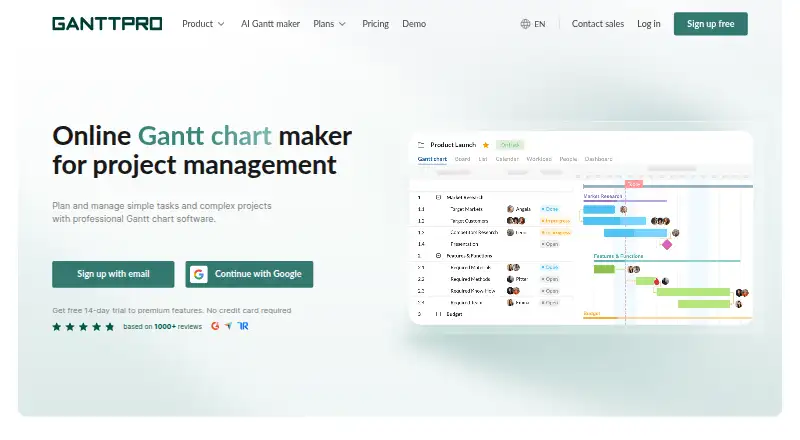
GanttPRO is online Gantt chart software for planning and managing work, from simple tasks to complex projects. Its Gantt charts support work breakdown structures, task dependencies, auto scheduling, and critical path views. Teams can also organize projects in board, list, calendar, portfolio, and workload views. Collaboration features include task comments, file attachments, teammate mentions, and real-time notifications. Business includes workload management, portfolios and reports, budget planning, and time tracking. Projects can be exported to PDF, PNG, XLSX, and XML, including during the 14-day trial. Listed integrations include Slack, Google Drive, Jira Cloud, OneDrive, Microsoft Teams, and Microsoft Project; two-way Jira Cloud integration is available on Business and Enterprise. The iOS and Android apps cover core tasks such as creating tasks, receiving notifications, replying to comments, and tracking time, while advanced management requires the web version. Project data cannot be changed offline, though charts can be saved as PNG or PDF for viewing. GanttPRO is made by DPM Solutions Sp. z o.o., based in Kraków, Poland, and its story began in 2014. Pricing starts at $7/user/mo when billed annually, and there is no free plan.
Who it suits
GanttPRO suits people planning projects with dependencies, schedules, and several ways to view work, as well as teams that need task collaboration and exports. Its mobile apps support core tasks, while advanced project management is for users of the web version.
What it does well
- Gantt charts include dependencies, auto scheduling, and critical path views.
- Offers six project views, including portfolio and workload.
- Supports task comments, attachments, mentions, and real-time notifications.
- Projects export to PDF, PNG, XLSX, and XML, including during trial.
- Two-way Jira Cloud integration is available on Business and Enterprise.
What to know first
- There is no free plan.
- Project data cannot be modified offline.
- Advanced management requires the web version.
- Two-way Jira Cloud integration is limited to Business and Enterprise.
Limits
There is no free plan. The lowest listed plan is Core at $7 per user per month, billed annually; the trial lasts 14 days.
Plans
| Plan | Billed and limits | Price |
|---|---|---|
| Core | per user per month / billed annually · Unlimited projects · 1+ users annually or teams of 5+ monthly | $7 |
| Advanced | per user per month / billed annually · Unlimited projects · 1+ users annually or teams of 5+ monthly | $10 |
| Business | per user per month / billed annually · Unlimited projects · 1+ users annually or teams of 5+ monthly | $17 |
| Enterprise | per user per month / billed annually; limited offer showing $35 crossed out and $25 · 5+ users annually · Unlimited projects · Custom price available | $25 |
As ganttpro.com lists them, read 5 Oct 2026. The maker's own page has the final word.
Getting started
- Visit the GanttPRO website.
- Start the 14-day trial.
- Choose a plan; pricing starts at $7/user/mo when billed annually.
- Use the web version for advanced project management, or install the iOS or Android app for core tasks.
- Create a project and choose a Gantt chart, board, list, calendar, portfolio, or workload view.
- Connect a listed integration if needed; two-way Jira Cloud integration requires Business or Enterprise.
Verdict
Choose GanttPRO if you need online Gantt planning with multiple project views, collaboration, and export options. Look elsewhere if you need a free plan, offline editing, or advanced management in a mobile app.
Questions
How much does GanttPRO cost?
Pricing starts at $7/user/mo when billed annually. Core is listed at $7 per user per month, billed annually.
Does GanttPRO have a free plan or trial?
There is no free plan, but a 14-day trial is listed.
Which platforms are listed?
Platforms include Android, API, iOS, Linux, macOS, web, and Windows.
Which integrations are listed?
GanttPRO lists Slack, Google Drive, Jira Cloud, OneDrive, Microsoft Teams, and Microsoft Project. Two-way Jira Cloud integration is available on Business and Enterprise.
Can I manage projects offline or from a mobile app?
Project data cannot be modified offline. The iOS and Android apps handle core tasks, while advanced management requires the web version.
Who makes GanttPRO?
GanttPRO identifies DPM Solutions Sp. z o.o. as its company, based in Kraków, Poland; its story began in 2014.
Facts from GanttPRO's own pages
- Client/stakeholder sharing
- Shared private links can expose plans to stakeholders and clients with static or dynamic charts. · help.ganttpro.com, 16 Nov 2026
- Collaboration
- Users can comment on tasks, attach files, mention teammates, and receive real-time notifications. · ganttpro.com, 5 Oct 2026
- Comments and attachments
- Tasks support comments and attachments for collaboration. · help.ganttpro.com, 16 Nov 2026
- Company
- GanttPRO says its story began in 2014 and identifies DPM Solutions Sp. z o.o. in Kraków, Poland, as the company. · ganttpro.com, 5 Oct 2026
- Exports
- Projects can be exported in PDF, PNG, XLSX, and XML formats, including during the trial. · ganttpro.com, 5 Oct 2026
- Founded
- 2014 · ganttpro.com, 23 Sept 2026
- Free plan
- No · ganttpro.com, 20 Sept 2026
- Guest access
- Yes · ganttpro.com, 20 Sept 2026
- Headquarters
- Kraków, Poland · ganttpro.com, 23 Sept 2026
- Integrations
- Integrations include Jira Cloud, Slack, MS Teams and Google/Outlook calendars. · help.ganttpro.com, 16 Nov 2026
- Jira availability
- The two-way Jira Cloud integration is available on Business and Enterprise plans. · help.ganttpro.com, 5 Oct 2026
- Mobile app
- The iOS and Android apps cover core tasks such as creating tasks, notifications, replying to comments, and tracking time; advanced management requires the web version. · help.ganttpro.com, 5 Oct 2026
- Mobile/web availability
- The software is available online and has a mobile app. · help.ganttpro.com, 16 Nov 2026
- Native integrations
- 7 · ganttpro.com, 20 Sept 2026
- Offline use
- GanttPRO says project data cannot be modified offline, though charts can be saved as PNG or PDF for viewing. · ganttpro.com, 5 Oct 2026
- Planning
- Its Gantt charts support work breakdown structures, task dependencies, auto scheduling, and critical path views. · ganttpro.com, 5 Oct 2026
- Project management scope
- GanttPRO provides features for efficient project management, tracking tasks, dependencies and resources. · help.ganttpro.com, 16 Nov 2026
- Purpose
- GanttPRO is online Gantt chart software for planning and managing simple tasks and complex projects. · ganttpro.com, 5 Oct 2026
- Resource management
- Business includes workload management, portfolios and reports, budget planning, and time tracking. · ganttpro.com, 5 Oct 2026
- Restricted commenter access
- Business and Enterprise users can assign a Commenter right for viewing projects and commenting on tasks. · help.ganttpro.com, 16 Nov 2026
- Security
- GanttPRO states GDPR compliance and 2FA/SSO options. · help.ganttpro.com, 16 Nov 2026
- Paid from
- 7 · ganttpro.com, 20 Sept 2026
- Support
- GanttPRO lists email and live chat support, learning materials, live support, product training, and a knowledge base. · help.ganttpro.com, 5 Oct 2026
- Time tracking
- Time tracking is included as a Business-and-above capability. · ganttpro.com, 16 Nov 2026
Where GanttPRO stands on Freedom251
- Project management tools#119 of 196
- IT Project Management Software#17 of 28
- Gantt Chart Software#28 of 46
- Project Management Software#123 of 188
- Project Planning Software#20 of 25
- Nonprofit Project Management#29 of 34
- Project Tracking Software#30 of 34