Freedom251 › Project management tools
ProjectLibre
What ProjectLibre is
ProjectLibre is project management software with a free desktop option and paid cloud plans. It is available on Windows, macOS, Linux, and the web; Gantt is its listed task view, and time tracking and guest access are also listed. ProjectLibre Desktop is free for a single user managing individual projects locally. It supports Microsoft Project files, as well as listed Primavera P6 and other project-file imports. The company describes Desktop as suited to an individual, while Cloud adds team collaboration, shared resources, and portfolio management. Cloud scheduling covers dependencies, constraints, calendars, baselines, float, critical path, and recurring, split, and effort-driven tasks. Resource tools include leveling, capacity and availability, teams, and resource analysis. Cloud also lists Monte Carlo risk analysis, DCMA schedule quality audits, Earned Value Management, and an AI Copilot for creating and editing project plans. ProjectLibre Core costs $9.99 a month when billed annually; Enterprise/PMO Cloud costs $29.99 a month when billed annually. A seven-day trial is listed.
Who it suits
Desktop suits an individual project manager working on a single local project. Cloud is described for teams and organizations managing shared resources and multiple projects.
What it does well
- Desktop is free for a single user.
- Available on Windows, macOS, Linux, and web.
- Cloud includes resource leveling and portfolio management.
- AI Copilot can create projects from prompts.
- Seven-day trial is listed.
What to know first
- Free Desktop option is limited to one user.
- Core and Enterprise/PMO Cloud are billed annually.
- Desktop is described for one local project at a time.
Limits
The free Desktop plan is for a single user and individual projects. Cloud Core starts at $9.99 per user per month, billed annually; Enterprise/PMO Cloud is listed at $29.99 per month, billed annually.
Plans
| Plan | Billed and limits | Price |
|---|---|---|
| ProjectLibre Core | billed annually · Core & Pro User Modes · Microsoft Project import · Gantt & WBS · Enterprise Resource Management* · Portfolio Management* · AI Copilot | $9.99 a month |
| Enterprise/PMO Cloud | billed annually · Basic & Expert UX Modes · Microsoft Project import · Gantt & WBS · Enterprise Resource Management · Portfolio Management · AI Copilot | $29.99 a month |
| ProjectLibre Desktop | Single user / individual projects · Windows, macOS, Linux · no subscription | Free |
As projectlibre.com lists them, read 4 Oct 2026. The maker's own page has the final word.
Getting started
- Visit the ProjectLibre website.
- Choose Desktop for an individual local project or a Cloud plan for team and portfolio features.
- For Desktop, install the edition for Windows, macOS, or Linux.
- For Cloud, start the listed seven-day trial or choose a paid plan.
- Import a Microsoft Project file or another supported project file if needed.
Overview
ProjectLibre pairs a local desktop planner with a cloud platform for coordinated project work. Desktop is the better fit for an individual managing one project; teams that need shared resources or oversight across multiple projects should consider Cloud. The split is clear: free, single-user planning or paid cloud modes with broader organizational capabilities.
Key features
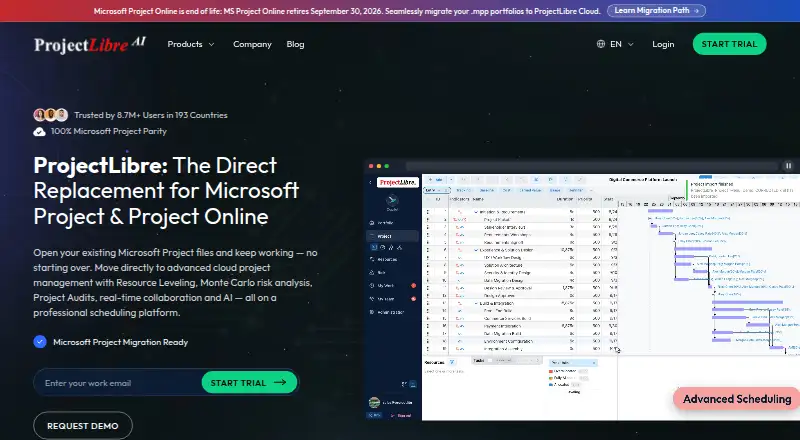
Cloud brings scheduling, resource management, risk, cost, performance, collaboration, and AI into one project model. Its Gantt and WBS planning includes dependencies, constraints, calendars, baselines, float, critical path, and recurring, split, and effort-driven tasks. That range suits schedules with interdependent work, but may be more than a solo planner needs.
Resource leveling, enterprise resource pools, capacity and availability, teams, and resource analysis are aimed at coordinating people and work across an organization. Monte Carlo risk analysis, DCMA schedule quality audits, and Earned Value Management add controls for projects where schedule risk and cost performance need close attention. The AI Copilot can create projects from prompts and help edit tasks and WBS, adjust resources, and refine schedules.
Desktop supports Microsoft Project files and lists Primavera P6 and other project files for import, which can help individuals work with existing plans. Its scope is deliberately narrower: project files ordinarily stay on the user's computer, and normal Desktop connectivity does not upload plans to Cloud. That local model suits solo work, not shared planning.
Pricing
ProjectLibre Desktop costs nothing, with no subscription, for a single user managing individual projects on Windows, macOS, or Linux. Its one-user limit and local scope make it a sensible starting point for solo project management, but not a team workspace.
ProjectLibre Core costs $9.99 a month, billed annually. It includes Core and Pro User Modes, Microsoft Project import, Gantt and WBS, AI Copilot, and enterprise resource management and portfolio management marked with an asterisk. This is the lower-cost paid option for users who need Cloud capabilities; the annual billing term is important, and the asterisks distinguish some inclusions from the unmarked Enterprise plan.
Enterprise/PMO Cloud costs $29.99 a month, billed annually. It includes Basic and Expert UX Modes, Microsoft Project import, Gantt and WBS, enterprise resource management, portfolio management, and AI Copilot. It is the clearer fit for organizations that need the full unstarred resource and portfolio capabilities, at three times Core's monthly price.
A 7-day trial gives prospective Cloud users a short period to assess the service before committing. European users' Cloud data is hosted in Europe; Desktop project files ordinarily remain local.
Platforms
ProjectLibre supports Linux, macOS, Windows, and web access. Desktop is the local option on the three computer platforms; Cloud is the team-oriented path. Time tracking and guest access are listed capabilities, though no plan-specific limits are given for either.
Who it's for
Choose Desktop if you are an individual managing a single local project, want a free option, or need to work with Microsoft Project files without moving plans into Cloud. Choose Cloud if your team needs shared resources, collaboration, or portfolio management across projects. ProjectLibre is less suited to readers who need team coordination on a free plan, since Desktop is single-user.
Pros and cons
- Pro: The free Desktop edition has no subscription and supports major desktop operating systems, making it a practical option for individual project work.
- Pro: Cloud combines detailed scheduling with resource, risk, and performance controls, a useful mix for complex organizational projects.
- Pro: Desktop files ordinarily stay on the user's computer, supporting a local workflow.
- Con: Desktop is limited to one user and individual projects, so collaboration and shared resources point to Cloud instead.
- Con: Both paid plans are billed annually, and the 7-day trial leaves a short evaluation window.
- Con: Core marks enterprise resource management and portfolio management with asterisks, while Enterprise/PMO includes them without that distinction.
Alternatives
For a broader set of Gantt options, browse Gantt Chart Software. Readers focused on AI-assisted project tools can compare the AI Project Management Software list, while the Project Management Software list covers the wider category.
Agantty offers a free plan with a 14-day trial, but its free tier is capped at one project, excludes teams, and has no support; consider it if that project limit suits your needs. Open Planner Studio is free and open source, with Gantt charts, critical-path analysis, and resource planning, making it an alternative for readers who want those tools without per-seat fees.
Ganttic has a free tier with up to 10 resources, unlimited users and projects, Gantt charts, reports, and Kanban boards; consider it if those resource and project limits fit. Sinnaps has a free plan for up to 20 people per project and 10 projects, which may suit readers whose team fits those caps.
GANTT360° is a web-based freemium option. GanttFlow has a free tier limited to one project saved in the browser, with Finish-to-Start dependencies and watermarked PNG export; choose it if that compact, browser-based scope is enough. Ganttile offers unlimited projects and tasks with all features included and no per-user pricing, a fit for readers who want a free web option without those caps. GanttProject is a free desktop download for Windows, macOS, and Linux.
Verdict
ProjectLibre is a strong fit for individual project managers who want a capable local planner at no subscription cost, especially when Microsoft Project compatibility matters. Its Cloud tools make it relevant to teams that need resource coordination and portfolio oversight, but those capabilities require an annual paid plan. Look elsewhere if you need a free collaborative workspace or a desktop product designed for multiple users.
Verdict
ProjectLibre offers a free local desktop option alongside Cloud tools for teams, shared resources, and portfolios. Consider the single-user Desktop scope and annual billing on paid plans.
Questions
Is ProjectLibre free?
ProjectLibre Desktop is listed at $0.00 with no subscription. A free plan is available for one user.
How much do the paid plans cost?
ProjectLibre Core is $9.99 per month per user, billed annually. Enterprise/PMO Cloud is $29.99 per month, billed annually.
Is there a free trial?
Yes. A seven-day trial is listed.
Which platforms does ProjectLibre support?
The listed platforms are Linux, macOS, web, and Windows. Desktop is specifically listed for Windows, macOS, and Linux.
Can ProjectLibre import Microsoft Project files?
Yes. Desktop supports Microsoft Project files and also lists Primavera P6 and other supported project files for import.
Does Desktop upload project plans to Cloud?
The privacy policy says normal Desktop project files ordinarily remain on the user's computer and normal Desktop connectivity does not upload project plans to ProjectLibre Cloud.
Facts from ProjectLibre's own pages
- AI
- The AI Copilot can create a project from a prompt and help edit tasks and WBS, adjust resources, and refine schedules. · projectlibre.com, 4 Oct 2026
- Cloud data hosting
- The trial FAQ says Cloud data is hosted in secure, compliant data centers in appropriate geographic regions, with European users' data hosted in Europe. · projectlibre.com, 4 Oct 2026
- Company history
- The company page says ProjectLibre began in 2012+ as an open-source Desktop product and later expanded that foundation into a cloud platform. · projectlibre.com, 4 Oct 2026
- Desktop limits
- Desktop is described for an individual managing a single project locally; Cloud adds team collaboration, shared resources, and portfolio management. · projectlibre.com, 4 Oct 2026
- File compatibility
- ProjectLibre Desktop supports Microsoft Project files and also lists Primavera P6 and other supported project files for import. · projectlibre.com, 4 Oct 2026
- Free plan
- Yes · projectlibre.com, 20 Sept 2026
- Guest access
- Yes · projectlibre.com, 20 Sept 2026
- Intended users
- The company describes Desktop as a free option for individual project managers and Cloud as a platform for teams and organizations managing shared resources and multiple projects. · projectlibre.com, 4 Oct 2026
- Free-plan user limit
- 1 · projectlibre.com, 20 Sept 2026
- Platforms
- ProjectLibre Desktop runs locally on Windows, macOS, and Linux, while ProjectLibre Cloud is accessed through a browser. · projectlibre.com, 4 Oct 2026
- Product
- ProjectLibre Cloud combines scheduling, resources, risk, cost, performance, team collaboration, and AI in one project model. · projectlibre.com, 4 Oct 2026
- Resource management
- Cloud resource features include resource leveling, enterprise resource pools, capacity and availability, teams, and resource analysis. · projectlibre.com, 4 Oct 2026
- Risk and controls
- Cloud includes Monte Carlo risk analysis, DCMA schedule quality audits, and Earned Value Management. · projectlibre.com, 4 Oct 2026
- Scheduling
- Cloud scheduling includes dependencies, constraints, calendars, baselines, float, critical path, and recurring, split, and effort-driven tasks. · projectlibre.com, 4 Oct 2026
- Security and privacy
- The privacy policy says normal Desktop project files ordinarily remain on the user's computer and normal Desktop connectivity does not upload project plans to ProjectLibre Cloud. · projectlibre.com, 4 Oct 2026
- Paid from
- 9.99 · projectlibre.com, 20 Sept 2026
- Support
- The trial page instructs users who cannot activate a trial to contact [email protected] and users with trial-start issues to write to [email protected]. · projectlibre.com, 4 Oct 2026
- Task views
- gantt · projectlibre.com, 20 Sept 2026
- Time tracking
- Yes · projectlibre.com, 20 Sept 2026
Where ProjectLibre stands on Freedom251
- Project management tools#20 of 196
- Gantt Chart Software#11 of 46
- Project Planning Software#7 of 25
- Project Management Software#55 of 188
- AI Project Management Software#9 of 27
- Project Tracking Software#13 of 34
- Nonprofit Project Management#17 of 34