Freedom251 › Gantt Chart Software
Sinnaps
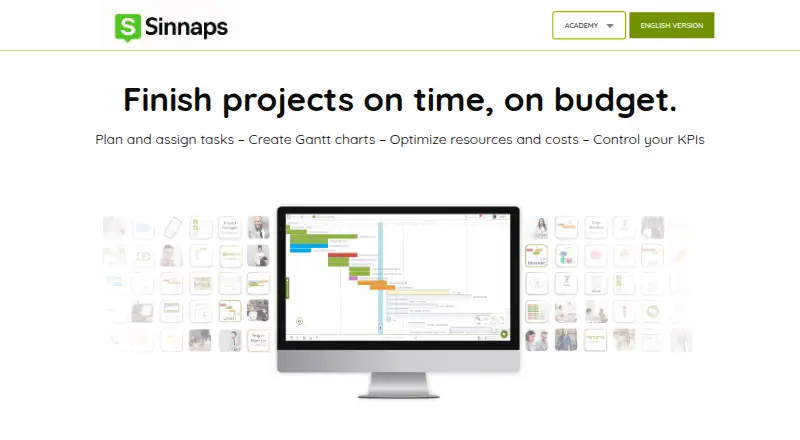
What Sinnaps is
Sinnaps is an online project management tool for planning tasks, schedules, resources, costs, and team work. Its automated planning calculates a project plan from task dependencies, PERT, CPM, dates, and milestones. Teams can view an activity timeline for complex projects, and the pricing page lists both a Gantt planner and an agile board. Sinnaps tracks resource capacity and planned versus spent costs and resources, helping teams follow allocation and spending as work progresses.
Collaboration features include activity chat, project and activity walls, notifications, and team invitations. Users can export project data to Excel and PDF. A mobile app supports tracking, validating, and assigning work. The Free plan allows up to 20 people per project and up to 10 projects, with free training and courses and online exams. A paid plan includes all functionalities, unlimited projects, unlimited team size, and support chat. Sinnaps lists Android, iOS, web, and self-hosted platforms. For company deployments, Sinnaps Corporate offers an independent installation, private company databases, access controls, and daily backup copies. Business plans support 50, 70, or 100 workers and up to 10 floating plans, without per-user costs or additional charges.
Who it suits
Sinnaps suits individuals and teams coordinating project schedules, dependencies, resources, and costs. Its Corporate and Business offerings are aimed at companies managing teams, training, deployment, and real-time cost monitoring.
What it does well
- Automated planning uses dependencies, PERT, CPM, dates, and milestones.
- Includes a timeline, Gantt planner, and agile board.
- Tracks resource capacity and planned versus spent costs.
- Project data can be exported to Excel and PDF.
- Mobile app supports tracking, validating, and assigning work.
- Corporate offers independent installation and private company databases.
What to know first
- The paid plan's price is available on request.
- The paid plan's name is not shown.
- The Free plan is limited to 10 projects.
- The Free plan supports up to 20 people per project.
Limits
The Free plan allows up to 20 people per project and up to 10 projects. The paid plan includes unlimited projects and team size, but its price is available on request.
Plans
| Plan | Billed and limits | Price |
|---|---|---|
| Free | up to 20 people per project · up to 10 projects · free training and courses · online exams | Free |
| Paid subscription | per feature · free version · free trial · subscription | $9 a month |
| Paid plan (name not shown) | All functionalities · Unlimited projects · Unlimited team size · Support chat | On request |
| Business Plan | one annual payment · up to 50, 70 or 100 workers · personalised training · deployment project · VIP support · ongoing monitoring · no per-user charges | On request |
As sinnaps.com lists them, read 15 Oct 2026. The maker's own page has the final word.
Getting started
- Open the Sinnaps website.
- Choose the Free plan or contact Sinnaps about paid pricing.
- Create a project and plan tasks, dates, dependencies, and milestones.
- Invite team members to collaborate on project activities.
- Use the web or mobile app, or arrange an independent Corporate installation.
Verdict
Choose Sinnaps if you need project planning that combines dependencies, timelines, resource tracking, and cost monitoring, with a free option for small project portfolios. Companies needing private databases or an independent installation can consider Sinnaps Corporate; teams seeking the paid plan need to request pricing.
Questions
Does Sinnaps have a free plan?
Yes. The Free plan supports up to 20 people per project and up to 10 projects.
What does the paid plan include?
The paid plan includes all functionalities, unlimited projects, unlimited team size, and support chat. Its price is available on request, and no plan name is shown.
Which platforms are listed for Sinnaps?
The listed platforms are Android, iOS, self-hosted, and web.
Can Sinnaps plan tasks automatically?
Yes. It calculates project planning using dependencies, PERT, CPM, dates, and milestones.
Can teams export project information?
Yes. Project data can be exported to Excel and PDF.
What does Sinnaps Corporate provide?
Sinnaps Corporate offers an independent installation, private company databases, access controls, and daily backup copies.
Facts from Sinnaps's own pages
- Android system requirement
- The archived Android package required Android 2.1 or later and was 3.13 MB. · appbrain.com, 15 Oct 2026
- Audience
- Sinnaps describes its Business Plan as supporting company project management, team training, deployment, and real-time cost monitoring. · sinnaps.com, 4 Oct 2026
- Automated planning
- Sinnaps calculates project planning using dependencies, PERT, CPM, dates, and milestones. · sinnaps.com, 4 Oct 2026
- Business plan limits
- Business plans include 50, 70, or 100 workers and up to 10 floating plans, with no per-user costs or additional charges. · sinnaps.com, 4 Oct 2026
- Collaboration
- Projects include activity chat, project walls, notifications and invitations for team members. · sinnaps.com, 15 Oct 2026
- Company scale claim
- Sinnaps states that more than 150,000 users and 30,000 companies manage projects on the platform. · sinnaps.com, 15 Oct 2026
- Cost management
- The software tracks planned and actual costs, variances and budget scenarios. · sinnaps.com, 15 Oct 2026
- Critical-path automation
- Sinnaps recalculates priorities and critical paths from task dependencies, durations and dates. · sinnaps.com, 15 Oct 2026
- Documentation depth
- The Sinnaps Academy provides step-by-step guides covering setup, planning, collaboration, simulations and reporting. · sinnaps.com, 15 Oct 2026
- Earlier product history
- The product originated as an internal prototype called Ulises in December 2013 and later had an on-premises version. · es.wikipedia.org, 15 Oct 2026
- Exports
- Users can export project data to Excel and PDF. · sinnaps.com, 4 Oct 2026
- Founder and origin
- Richard Balet began designing Sinnaps in Zaragoza in January 2015; the SaaS product launched in January 2017. · es.wikipedia.org, 15 Oct 2026
- Gantt and agile
- The product page describes an activity timeline for complex projects, while pricing lists a Gantt planner and agile board. · sinnaps.com, 4 Oct 2026
- Gantt planning
- The product provides Gantt planning for visualising project activity timelines. · sinnaps.com, 15 Oct 2026
- Integrations
- The pricing page lists exports to Excel and PDF; it does not name third-party service integrations in the opened content. · sinnaps.com, 4 Oct 2026
- Kanban board
- The dashboard groups work into To Do, In Process, Late and Completed Kanban states. · sinnaps.com, 15 Oct 2026
- Licence notice
- A Sinnaps Academy page carries an “All Rights Reserved” copyright notice. · sinnaps.com, 15 Oct 2026
- Limit: Gantt controls
- Reviewers report that Gantt zoom options are not customisable and that the view can initially be confusing. · getapp.co.uk, 15 Oct 2026
- Limit: interface performance
- A G2 reviewer wanted brighter, newer graphics, a mobile app and reported occasional slowness. · g2.com, 15 Oct 2026
- Limit: missing cloning
- A Capterra reviewer reports that activities cannot be cloned and that exporting to Excel is needed for some Gantt work. · capterra.nl, 15 Oct 2026
- Limit: mobile availability
- The Android app listing says the app was removed from Google Play on 7 March 2024 and had no user ratings. · appbrain.com, 15 Oct 2026
- Limit: mobile capability
- A Capterra review describes the mobile app as having very limited functions and options. · capterra.com.de, 15 Oct 2026
- Mobile
- The pricing page lists a mobile app for tracking, validating, and assigning work from mobile. · sinnaps.com, 4 Oct 2026
- Notable news: ULPGC
- On 24 July 2026, the University of Las Palmas de Gran Canaria added Sinnaps to its software catalogue with free educational access and 90 days of Business access. · si.ulpgc.es, 15 Oct 2026
Where Sinnaps stands on Freedom251
- Gantt Chart Software#19 of 46