Freedom251 › Project management tools
TaskJuggler
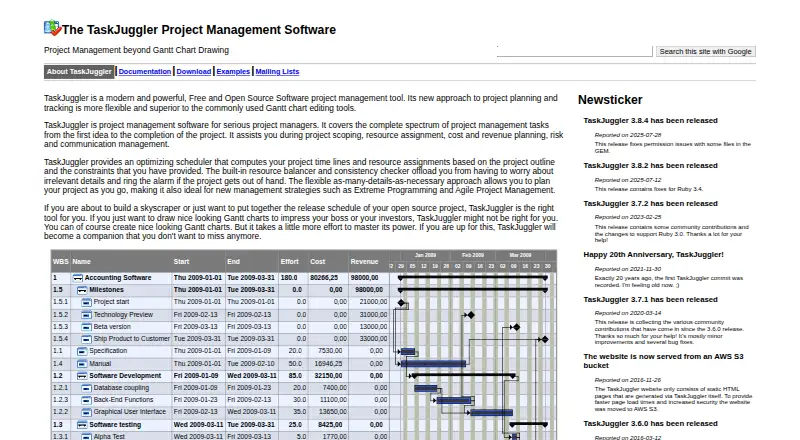
What TaskJuggler is
TaskJuggler is free project management software for planning and tracking a project from its initial idea to completion. It helps project managers define scope, assign resources, plan costs and revenue, manage risks, and coordinate communication. Its scheduler calculates timelines and resource assignments from a project outline and its constraints. Resource features include automatic leveling, conflict resolution, flexible working hours, leave management, shift work, and support for multiple time zones. Teams can compare an unlimited number of scenarios or baselines, track task and resource costs, and examine profit and loss. Reports include filters, tracking and status dashboards, HTML output, and CSV or iCalendar exports. TaskJuggler integrates with Vim and can export data to Microsoft Project and Computer Associates Clarity; other listed supporting tools include Emacs, FreeMind, Redmine, and Bugzilla. It runs on Linux, macOS, and Windows and includes Gantt views and time tracking. The interface is command-line only, without a graphical user interface. TaskJuggler is free and open source under GNU GPL version 2.
Who it suits
It suits project managers who need resource, schedule, cost, and scenario planning across a project. Its command-line interface may not suit people who only want to draw Gantt charts.
What it does well
- Plans scope, resources, costs, revenue, risks, and communication
- Automatically levels resources and resolves task conflicts
- Supports unlimited scenarios or baselines
- Exports reports and data in several formats
What to know first
- No graphical user interface
- The site says it may not suit Gantt-only users
Plans
| Plan | Billed and limits | Price |
|---|---|---|
| TaskJuggler | Free and open source software · source code licensed under GNU GPL version 2 | Free |
As taskjuggler.org lists them, read 11 Oct 2026. The maker's own page has the final word.
Getting started
- Visit the TaskJuggler website.
- Use a Linux, macOS, or Windows system.
- Prepare a command shell and plain-text editor; a web browser is also sufficient.
- Plan your project outline and constraints for the scheduler.
- Use the project’s user or developer mailing lists for support, or its GitHub issue tracker for bug reports and feature requests.
Verdict
TaskJuggler covers project planning, scheduling, resource management, and financial analysis in a free command-line tool. Its interface and stated focus on serious project management are important considerations for prospective users.
Questions
Is TaskJuggler free?
Yes. The listed plan costs nothing, and the software is open source under GNU GPL version 2.
Which operating systems does it support?
TaskJuggler runs on Linux, macOS, and Windows.
Does TaskJuggler have a graphical interface?
No. It is a command-line tool without a graphical user interface; a command shell, plain-text editor, and web browser are sufficient.
Can TaskJuggler make Gantt charts?
Gantt is a listed task view. The project describes TaskJuggler as intended for serious project managers and says it may not suit users who only want to draw Gantt charts.
What reports and exports are available?
It provides filtered reports, tracking and status dashboards, and HTML reports. Exports include CSV and iCalendar, and it can export data to Microsoft Project and Computer Associates Clarity.
What tools does TaskJuggler support or integrate with?
The site lists full Vim integration, plus support from Emacs, Emacs orgmode, FreeMind, Redmine, and Bugzilla.
Facts from TaskJuggler's own pages
- Accounting
- It supports task and resource costs and profit and loss analysis. · taskjuggler.org, 11 Oct 2026
- Audience
- The site describes TaskJuggler as a tool for serious project managers and says it may not suit users who only want to draw Gantt charts. · taskjuggler.org, 11 Oct 2026
- Founded
- 2001 · taskjuggler.org, 28 Sept 2026
- Free plan
- Yes · taskjuggler.org, 23 Sept 2026
- Integrations
- The site lists full Vim integration and data export to Microsoft Project and Computer Associates Clarity. · taskjuggler.org, 11 Oct 2026
- Interfaces
- TaskJuggler is a command-line tool without a graphical user interface; the site says a command shell, plain-text editor, and web browser are sufficient. · taskjuggler.org, 11 Oct 2026
- Other tool support
- The site lists Emacs mode, Emacs orgmode, FreeMind, Redmine, and Bugzilla among tools with TaskJuggler support. · taskjuggler.org, 11 Oct 2026
- Planning
- It supports project scoping, resource assignment, cost and revenue planning, risk management, and communication management. · taskjuggler.org, 11 Oct 2026
- Platforms
- The installation manual says Linux is the primary development platform; Windows releases are not tested, and Mac OS releases are not tested. · taskjuggler.org, 11 Oct 2026
- Purpose
- TaskJuggler is project management software for planning and tracking projects from the first idea through completion. · taskjuggler.org, 11 Oct 2026
- Release
- The site reports TaskJuggler 3.8.4 was released on 2025-07-28 to fix permission issues with some files in the gem. · taskjuggler.org, 11 Oct 2026
- Reports and exports
- It provides filtered reports, tracking and status dashboards, HTML reports, and CSV and iCalendar exports. · taskjuggler.org, 11 Oct 2026
- Resource management
- Features include automatic resource leveling, task conflict resolution, flexible working hours, leave management, shift work, and multiple time zones. · taskjuggler.org, 11 Oct 2026
- Scenario planning
- It supports an unlimited number of scenarios or baselines for what-if analysis of the same project. · taskjuggler.org, 11 Oct 2026
- Scheduling
- Its scheduler computes project timelines and resource assignments from the project outline and supplied constraints. · taskjuggler.org, 11 Oct 2026
- Security
- The site says its static HTML website moved to an AWS S3 bucket in 2016 to provide faster page loads and increased security. · taskjuggler.org, 11 Oct 2026
- Support
- The project provides user and developer mailing lists, and directs bug reports and feature requests to its GitHub issue tracker. · taskjuggler.org, 11 Oct 2026
- Task views
- gantt · taskjuggler.org, 23 Sept 2026
- Time tracking
- Yes · taskjuggler.org, 23 Sept 2026
Where TaskJuggler stands on Freedom251
- Project management tools#65 of 196
- Project Management Software#93 of 188
- Gantt Chart Software#25 of 46