Freedom251 › Digital Experience Monitoring Software
TeamViewer RMM
What TeamViewer RMM is
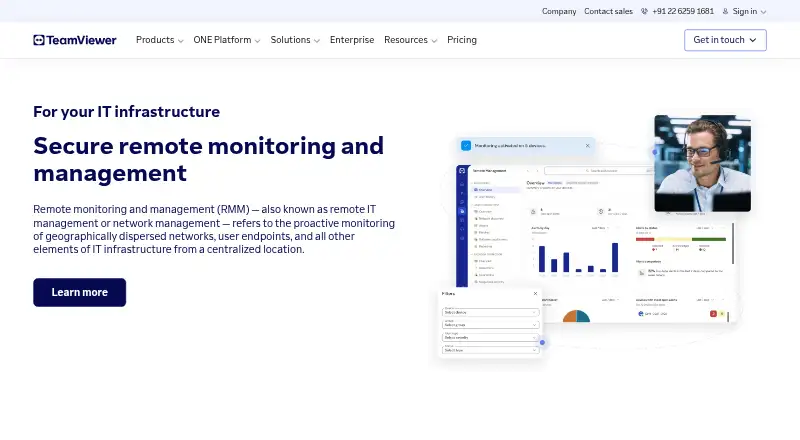
TeamViewer RMM brings remote access, device management, monitoring, automation, and support into a centralized cloud platform for in-house IT teams and managed service providers. Device Monitoring checks disk space and health, CPU and memory use, event logs, status changes, and online availability, with notifications when checks fail. Remote Task Manager and Remote Scripting let technicians manage processes and services or automate repeated tasks across devices. Asset Management scans connected and hidden equipment, including computers, mobile devices, printers, routers, switches, UPS devices, and network-attached storage. Technicians can assist users through video, chat, screen sharing, and dynamic assistance. Administrators can specify backup content and timing, monitor adherence, and intervene through the management console. Supported operating systems include Windows, macOS, Linux, Android, and iOS. Pricing is available on request; a 14-day trial is listed for Device Monitoring and Asset Management. Device-based licenses count designated managed devices and start at five endpoints.
Who it suits
TeamViewer RMM is presented for in-house IT teams and managed service providers supporting business users or external customers. It suits teams managing remote devices across the listed operating systems.
What it does well
- Checks device health, usage, logs, and online status.
- Automates repetitive work on remote devices.
- Scans connected and hidden equipment.
- Supports Windows, macOS, Linux, Android, and iOS.
What to know first
- Pricing is available on request.
- Device licenses start at five endpoints.
- Trial applies to Device Monitoring and Asset Management.
Limits
The listed Device Monitoring and Asset Management trial lasts 14 days. Device-based licenses count each designated managed device and start at five endpoint devices.
Plans
| Plan | Billed and limits | Price |
|---|---|---|
| Monitoring & Asset Management | Device-based license · starts from 5 endpoint devices | On request |
As teamviewer.com lists them, read 30 Sept 2026. The maker's own page has the final word.
Getting started
- Visit the TeamViewer RMM product page.
- Contact TeamViewer for pricing and product support.
- Start the 14-day trial for Device Monitoring and Asset Management.
- Plan for device-based licensing, which starts at five endpoint devices.
- Deploy the cloud service for supported Windows, macOS, Linux, Android, or iOS devices.
Overview
TeamViewer RMM brings remote device oversight and user support together in a cloud platform. It is a strong fit for in-house IT teams and managed service providers responsible for business endpoints and network equipment. Its broad monitoring and management scope is balanced by device-based licensing that starts at five endpoints and pricing available on request.
Key features
Device Monitoring covers disk space and health, CPU and memory use, event logs, status updates and online status, with instant notifications when checks fail. Endpoint, application and network monitoring, along with automated remediation, extend the remit beyond basic availability checks. That breadth can help teams spot and address issues across a fleet, though the specific remediation actions are not defined.
Remote Task Manager and Remote Scripting let technicians manage processes and services and automate recurring tasks on remote devices. These are practical tools for teams supporting multiple endpoints, where repeated manual work can consume support time.
Asset Management scans connected and hidden devices, spanning computers, mobile devices, printers, routers, switches, UPS devices and network-attached storage. That makes it useful for teams seeking an inventory that includes more than user computers. Technicians can also connect to managed devices using video, chat, screen sharing and dynamic assistance, giving them several ways to diagnose issues and guide users remotely.
TeamViewer Backup lets administrators define what to back up and when, monitor whether backups are being performed, and intervene remotely through the management console. The REST API uses OAuth 2.0 and supports user management, connection reports, session management, monitoring and patch management. TeamViewer states that connections use 4096-bit RSA key exchange and 256-bit session encryption, and cites ISO/IEC 27001 certification and SOC 2 and SOC 3 audits.
Pricing
The Monitoring & Asset Management plan uses device-based licensing and starts at five endpoint devices. Its price is custom pricing, so buyers should confirm the cost against the size of their managed fleet. The five-device starting point is a meaningful threshold for very small teams that need to cover only a few devices.
A 14-day free trial covers Device Monitoring and Asset Management. It gives buyers a short window to assess those capabilities, but does not establish the cost of a longer-term deployment. TeamViewer directs sales and product support inquiries to its contact and support pages.
Platforms
The cloud service supports Windows, macOS, Linux, Android and iOS devices. This range suits mixed operating-system fleets, with network visibility extending to equipment such as printers, switches and storage devices.
Who it's for
TeamViewer RMM is aimed at internal IT departments and managed service providers supporting business users or external customers. It is most compelling when one team needs monitoring, asset discovery, remote assistance and routine-task automation in the same platform. Organizations with fewer than five endpoints, or buyers who need a published price before engaging sales, should weigh those constraints carefully.
Pros and cons
- Pros: Monitoring includes endpoint, application and network coverage, with alerts when device checks fail.
- Pros: Asset scanning includes hidden devices and network equipment, not just computers and phones.
- Pros: Remote support, task automation, backup management and an OAuth 2.0 API broaden its use for IT operations.
- Cons: Device-based licensing starts at five endpoints, which may not suit very small deployments.
- Cons: Pricing is custom, so buyers must request a quote to assess ongoing cost.
- Cons: The free trial lasts 14 days and covers Device Monitoring and Asset Management rather than establishing the full value of a paid deployment.
Alternatives
For buyers comparing digital experience monitoring products, the Digital Experience Monitoring Software directory is a useful starting point.
Almaden Collective IQ is another paid option, with Essential and Business editions that specify 13 months of data retention and two months of data visibility. FlexxClient is a paid alternative with pricing available upon request. Nexthink Adopt may require an additional license depending on the licensing model, with pricing through a Nexthink representative. Riverbed Aternity is an enterprise digital experience management offering with pricing not stated publicly.
Citrix Remote Browser Isolation uses pooled-user licensing, with subscriptions including 5,000 pooled user hours and additional hours available through Citrix or Azure Marketplace. HP Workforce Experience Platform offers employee engagement and remediations, AI remediation and smart device refresh, limited natural language search, and HP Remote Connect in its Pro plan. Lakeside SysTrack and TeamDynamix DEX are other paid alternatives; TeamDynamix pricing requires an inquiry.
Verdict
Choose TeamViewer RMM if your IT team or service provider needs a cloud platform that combines fleet monitoring, broad asset scanning, remote user support and task automation. Its range of capabilities and supported systems is the central case for it. Look elsewhere if a five-endpoint minimum or quote-based pricing does not fit your deployment or purchasing process.
Verdict
TeamViewer RMM combines monitoring, remote support, asset scanning, automation, and backup management in a cloud platform. Buyers should account for the device-based licensing model, five-endpoint starting point, and request-based pricing.
Questions
How much does TeamViewer RMM cost?
Pricing is available on request.
Is there a free trial?
A 14-day free trial is listed for Device Monitoring and Asset Management.
Which operating systems are supported?
The service supports Windows, macOS, Linux, Android, and iOS.
How are licenses counted?
Licenses are device-based: each designated managed device counts, and licenses start at five endpoint devices.
Does TeamViewer RMM have an API?
TeamViewer offers a REST API using OAuth 2.0 for functions including user management, connection reports, session management, monitoring, and patch management.
Who is TeamViewer RMM for?
TeamViewer presents it for in-house IT teams and managed service providers supporting business users and external customers.
Facts from TeamViewer RMM's own pages
- Asset management
- Asset Management can scan connected and hidden devices, including computers, mobile devices, printers, routers, switches, UPS devices, and network-attached storage. · teamviewer.com, 30 Sept 2026
- Automation
- Remote Task Manager and Remote Scripting let technicians manage processes and services and automate repetitive tasks across remote devices. · teamviewer.com, 30 Sept 2026
- Backup
- TeamViewer Backup lets administrators specify what to back up and when, monitor adherence, and intervene remotely through the management console. · teamviewer.com, 30 Sept 2026
- Founded
- 2005 · teamviewer.com, 28 Sept 2026
- Headquarters
- Göppingen, Germany · teamviewer.com, 28 Sept 2026
- Integrations
- TeamViewer offers a REST API using OAuth 2.0 for functions including user management, connection reports, session management, and monitoring and patch management. · teamviewer.com, 30 Sept 2026
- Intended users
- TeamViewer presents RMM as suitable for in-house IT teams and managed service providers supporting business users and external customers. · teamviewer.com, 30 Sept 2026
- License limit
- The Remote Management product description says device-based licenses count each designated managed device and start at five endpoint devices. · teamviewer.com, 30 Sept 2026
- Monitoring
- Device Monitoring checks items such as disk space and health, CPU and memory usage, status updates, event logs, and online status, and sends instant notifications when checks fail. · teamviewer.com, 30 Sept 2026
- Platforms
- The RMM page gives setup instructions for Windows, Mac, Chrome, Android, iOS, and Linux, and says license holders can connect directly from a browser. · teamviewer.com, 30 Sept 2026
- Purpose
- TeamViewer RMM provides remote access, remote control, device management, network visibility, automated responses, and scheduled routine tasks from a centralized platform. · teamviewer.com, 30 Sept 2026
- Remote support
- Technicians can connect to managed devices and use video, chat, screen sharing, and dynamic assistance to diagnose issues and guide users. · teamviewer.com, 30 Sept 2026
- Security
- TeamViewer states that its connections use 4096-bit RSA key exchange and 256-bit session encryption, and lists ISO/IEC 27001 certification and SOC 2 and SOC 3 audits. · teamviewer.com, 30 Sept 2026
- Support
- TeamViewer directs customers to its contact and support pages for sales and product support. · teamviewer.com, 30 Sept 2026
- Trial
- The US pricing overview lists a 14-day free trial for Device Monitoring and Asset Management. · teamviewer.com, 30 Sept 2026