TapScanner
What TapScanner is
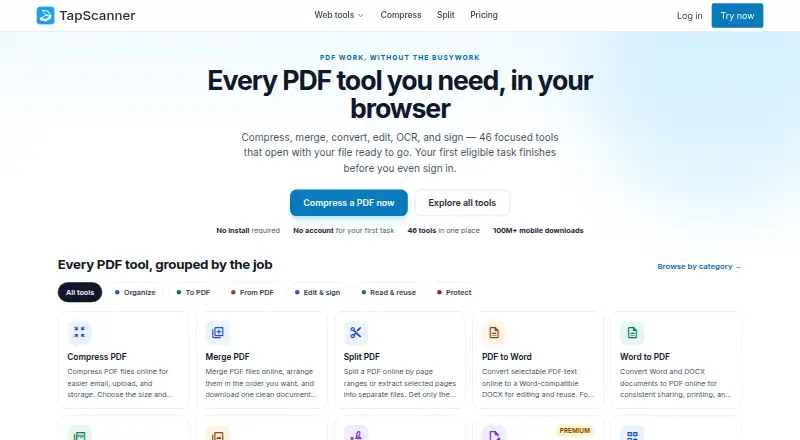
TapScanner combines mobile document scanning with a browser workspace for PDF tasks. Its Android and iOS apps capture and arrange paper documents into PDFs that can be exported or shared, with automatic capture, OCR, searchable PDF output, and multipage PDF support. The web workspace provides 46 focused tools for actions such as compressing, merging, splitting, converting, editing, signing, recognizing text, and protecting PDFs. TapScanner says its web tools require no installation, and the first eligible web task can be completed before sign-in.
The Free plan costs 0.00 USD and allows three completed tasks per day after sign-in, with up to 25 files, 100 MB, and 500 pages per task. Premium costs $39.99 a year, billed once annually, and shows a 7-day trial for eligible accounts. It allows up to 100 files and 1 GB per task, with no plan page cap or daily job cap, subject to fair-use protection. Premium adds OCR, text editing, repair, compare, forms, automation, and AI tools such as Ask PDF, summaries, question generation, and PDF translation. Web Premium does not include mobile app Premium, which is sold separately. Business customers arrange volume, invoicing, and support terms in advance.
Who it suits
TapScanner suits people who scan paper documents on iPhone, iPad, or Android and want to export or share PDFs, as well as people handling PDF tasks in a browser. Its Free plan is suited to occasional work within the listed daily and per-task limits; Premium covers larger tasks and adds advanced editing and AI tools.
What it does well
- Mobile apps capture and arrange documents into PDFs for export or sharing.
- Automatic capture, OCR, searchable PDFs, and multipage PDFs are included.
- Browser workspace offers 46 focused PDF tools.
- First eligible web task can be completed before sign-in.
- Premium includes summaries, question generation, and PDF translation assistance.
What to know first
- Free use is limited to three completed tasks per day after sign-in.
- Premium mobile access is separate from Web Premium.
- Business pricing is arranged up front rather than listed.
Limits
The Free plan allows three completed tasks per day after sign-in, with up to 25 files, 100 MB, and 500 pages per task. Premium allows up to 100 files and 1 GB per task, with no plan page cap or daily job cap subject to fair-use protection; Web Premium does not include mobile app Premium.
Plans
| Plan | Billed and limits | Price |
|---|---|---|
| Free | free forever · 3 completed tasks/day after sign-in · up to 25 files, 100 MB, and 500 pages per task · essential merge, split, compress, convert, organize, and sign tools | Free |
| Premium | $3.33 per month; $39.99 billed once a year · 7-day trial for eligible accounts · up to 100 files and 1 GB per task · no plan page cap or daily job cap, subject to fair-use protection · OCR, text editing, repair, compare, forms, and automation | $39.99 a year |
| Business | Quoted after scoping; price agreed before anything is signed · Everything in Premium as the starting point · volume, invoicing, and support terms agreed up front | On request |
As tap-scanner.com lists them, read 4 Oct 2026. The maker's own page has the final word.
Getting started
- Open the TapScanner website to use its browser PDF tools; no installation is required for the web tools.
- Complete the first eligible web task before signing in, or sign in to use the Free plan's daily allowance.
- For mobile scanning, get the app for iPhone, iPad, or Android.
- Choose Free or review Premium at $39.99 a year, with a 7-day trial for eligible accounts.
- Arrange Business volume, invoicing, and support terms up front if that plan is the fit.
TapScanner combines mobile document capture with a substantial browser-based PDF workbench. It is best suited to people who scan paper on a phone and then need to repair, convert, sign, or analyze those files online. The free tier is useful for light workloads, while regular or advanced users will need to weigh Premium’s annual price, fair-use limits, and separate mobile upgrade.
Overview
The Android and iOS apps capture paper documents, arrange pages, and export or share them as PDFs. On the web, TapScanner provides installation-free PDF processing, and the first eligible task can be completed before sign-in. That combination works well for an occasional document as well as a phone-to-browser workflow, but it is not a single universal subscription: web Premium does not include mobile app Premium.
Key features
Scanning and PDF handling
Auto capture reduces the work of framing pages, while multipage PDF support lets a paper packet become one organized file. OCR and searchable-PDF output are important when you need to find words or reuse text instead of keeping a scan as a static image. The browser workspace contains 46 focused tools covering compression, merging, splitting, conversion, editing, signing, OCR, and PDF protection. That breadth makes TapScanner more than a scanner, although someone who only scans and exports may not use much of the web toolkit.
Premium AI and advanced tools
Premium adds Ask PDF, summaries, question generation, and an AI PDF translation assistant, in addition to OCR, text editing, repair, comparison, forms, and automation. These tools are a better fit for document-heavy work than for simple receipt or note capture. They also make the paid plan more useful to readers who need to understand or transform document contents, not merely store them.
Processing and privacy considerations
Web tools may send files to TapScanner-hosted processing, and customers cannot choose a processing region. The normal download path removes output when its stream closes, with scheduled cleanup for stale temporary files; immediate deletion appears only on result screens that offer it. The web data layer rejects filenames and document contents, but analytics destinations require separate configuration verification. TapScanner does not currently claim verified storage-encryption coverage, an AI-training policy, DPA availability, or independent security certifications. Organizations with strict residency, deletion, or assurance requirements should account for those limits.
Pricing
Free
Free costs 0.00 USD forever. After sign-in, it allows three completed tasks per day, with up to 25 files, 100 MB, and 500 pages per task. Essential merge, split, compress, convert, organize, and sign tools cover occasional jobs, but the daily quota will constrain repeated professional use.
Premium
Premium is $39.99 a year, shown as $3.33 a month and billed once annually. Eligible accounts receive a 7-day trial. The plan raises each task to 100 files and 1 GB, removes the plan page cap and daily job cap subject to fair-use protection, and adds OCR, text editing, repair, compare, forms, automation, and AI tools. The annual commitment is sensible for steady web use; occasional users may find the free allowance sufficient. Mobile app Premium is sold separately, so this price does not unlock every paid feature in the apps.
Business
Business uses custom pricing. Volume, invoicing, and support terms are agreed up front, with a written proposal before capabilities are enabled. TapScanner also says its public PDF API is not self-serve: there is no public API key, endpoint SLA, or production integration currently available.
Platforms
TapScanner runs on Android, iOS, and the web. The mobile listing includes iPhone and iPad as well as Android, while the browser workspace avoids installation for web tasks.
Who it's for
Choose TapScanner if you need both phone scanning and a broad set of browser PDF operations, or if Premium’s AI document tools match your workflow. It is less suitable when you need a single subscription covering mobile and web, guaranteed processing-region choice, or independently verified security assurances.
Pros and cons
Pros
- Wide PDF coverage: 46 browser tools handle common editing, conversion, signing, OCR, and protection jobs in one workspace.
- Useful scan output: Auto capture, multipage PDFs, OCR, and searchable files support practical paper-to-document workflows.
- Accessible first task: An eligible web task can run before sign-in and without installing software.
- Strong Premium ceiling: Larger per-task limits, no daily job cap, AI features, and advanced document tools suit regular users.
Cons
- Free use is tightly rationed: Three signed-in tasks per day and 25-file, 100 MB, 500-page task limits restrict heavier workloads.
- Subscriptions are split: Web Premium does not include mobile app Premium.
- Assurance gaps matter to businesses: Processing region cannot be selected, and several security and compliance claims are not provided.
- No self-serve API: Teams cannot currently obtain a public key or production endpoint for integration.
Alternatives
For a wider mobile and cloud mix, consider Zoho Scanner, whose Premium plan includes OCR text export, translation, e-signing, Google Drive backup, unlimited workflows, and cloud auto-upload. Smallpdf is an option when you want a 30-tool free tier and a 7-day trial across mobile, web, and Windows. CamScanner suits readers comparing a scanner with a free Basic tier capped at 10 OCR recognitions and paid monthly Premium. Genius Scan is worth considering for a fully functional mobile scanner with unlimited scans and full privacy. Easy Scanner is a mobile-only alternative with Premium at $4.49 a month and a 3-day trial. Docutain offers unlimited scans, OCR, and cloud synchronization on its free Android and iOS plan. vFlat Scan has a free allowance of 10 pages per month for PDF export and OCR. Prizmo is an iOS and macOS choice with unlimited on-device OCR in its Premium Pack. For a broader shortlist, see Mobile Scanning Apps.
Verdict
TapScanner is a strong choice for people who move from phone scanning into frequent browser-based PDF work, especially if Premium’s AI and advanced tools save time. Its main reasons to look elsewhere are the separate mobile subscription, constrained free quota, unavailable self-serve API, and limited published security assurances.
Verdict
Choose TapScanner for document scanning across mobile and web, or for a browser workspace with a broad set of PDF tools. The Free plan covers essential tasks within its daily and per-task limits, while Premium raises those limits and adds advanced and AI tools. Check the separate mobile Premium option if you need paid features in the apps.
Questions
Is TapScanner free?
Yes. Its Free plan costs 0.00 USD and allows three completed tasks per day after sign-in, with up to 25 files, 100 MB, and 500 pages per task.
How much does Premium cost?
Premium costs $39.99 a year, billed once annually. A 7-day trial is available for eligible accounts.
Which platforms does TapScanner support?
The listed platforms are Android, iOS, and web. The mobile app is listed for iPhone, iPad, and Android.
Does Premium include OCR and AI tools?
Premium includes OCR and AI tools such as Ask PDF, summaries, question generation, and a PDF translation assistant. It also includes text editing, repair, compare, forms, and automation.
Does Web Premium include mobile app Premium?
No. Web Premium does not include mobile app Premium, which is available separately.
Who operates TapScanner?
The privacy policy identifies Smart media internet marketing ltd. as the service controller and gives an address in Beer Sheva, Israel.
Facts from TapScanner's own pages
- Analytics boundary
- The web application data layer rejects filenames and document contents, while published analytics destinations require separate configuration verification. · tap-scanner.com, 4 Oct 2026
- Android app
- Yes · tap-scanner.com, 23 Sept 2026
- API availability
- TapScanner says its public PDF API is not self-serve, with no public API key, endpoint SLA, or production integration currently available. · tap-scanner.com, 4 Oct 2026
- Auto capture
- Yes · tap-scanner.com, 23 Sept 2026
- Business support
- Business customers agree scope, invoicing, and support terms up front and receive a written proposal before capabilities are enabled. · tap-scanner.com, 4 Oct 2026
- Company
- The privacy policy identifies Smart media internet marketing ltd. as the service controller and gives an address in Beer Sheva, Israel. · tap-scanner.com, 4 Oct 2026
- Deletion limit
- Immediate deletion is available only on result screens that explicitly offer it, not across every web tool. · tap-scanner.com, 4 Oct 2026
- File processing
- Web tools may send files to TapScanner-hosted processing, and customers cannot select a processing region. · tap-scanner.com, 4 Oct 2026
- First task
- The first eligible task can be completed before sign-in, and the site says no installation is required for its web tools. · tap-scanner.com, 4 Oct 2026
- Free plan
- Yes · tap-scanner.com, 23 Sept 2026
- iOS app
- Yes · tap-scanner.com, 23 Sept 2026
- Mobile and web plans
- Web Premium checkout does not include mobile app Premium, which is available separately. · tap-scanner.com, 4 Oct 2026
- Mobile scanning
- The mobile app captures and arranges paper documents into PDFs for export or sharing, and is listed for iPhone, iPad, and Android. · tap-scanner.com, 4 Oct 2026
- Multipage PDF
- Yes · tap-scanner.com, 23 Sept 2026
- OCR included
- Yes · tap-scanner.com, 23 Sept 2026
- PDF workspace
- The browser workspace offers 46 focused PDF tools for tasks including compressing, merging, splitting, converting, editing, signing, OCR, and protecting PDFs. · tap-scanner.com, 4 Oct 2026
- Premium AI tools
- Premium includes Ask PDF, summaries, question generation, and an AI PDF translation assistant alongside OCR and other advanced tools. · tap-scanner.com, 4 Oct 2026
- Searchable PDF
- Yes · tap-scanner.com, 23 Sept 2026
- Security evidence
- The trust page says it does not currently claim verified storage encryption coverage, AI-training policy, DPA availability, or independent security certifications. · tap-scanner.com, 4 Oct 2026
- Temporary files
- The trust page says the normal download path removes output when its stream closes and scheduled cleanup handles stale temporary files; production runtime observation is still pending. · tap-scanner.com, 4 Oct 2026
Where TapScanner stands on Freedom251
- Scanner apps#5 of 76
- Mobile Scanning Apps#6 of 76