Docutain
by Docutain
What Docutain is
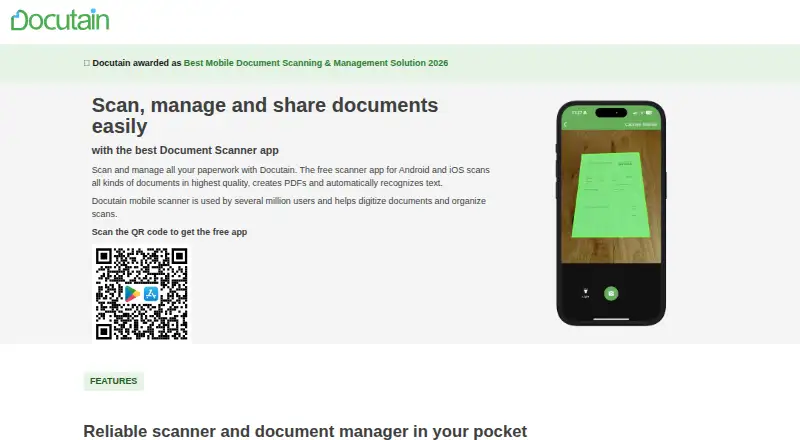
Docutain turns paper documents into searchable digital files using automatic capture and OCR text recognition. Its Android and iOS apps allow unlimited scans on the free plan, and a Windows desktop version is available. Scanning and OCR take place locally on the device. Docutain says personal data is not passed to third parties and offers encryption and password protection. Users may connect cloud providers and choose where documents are stored, or share scans as PDFs or images through email, local folders, or messenger apps. The Windows version accepts input from email, folders, and scanners. One desktop license covers up to three computers, while the mobile apps can be used on any number of the user's mobile devices. A separate SDK offers document scanning, barcode scanning, and data extraction for Android, iOS, or Windows apps. Windows desktop and Premium plans include a 14-day free trial; it ends without automatic action, leaving users to decide whether to buy. Windows annual pricing starts at €2.08 per month; Premium annual pricing is €4.17 per month.
Who it suits
Docutain suits people who want to scan, search, and share documents from mobile devices or Windows PCs. App developers can also use its SDK for scanning, barcode scanning, and data extraction.
What it does well
- Free mobile plan allows unlimited scans
- OCR and scanning happen locally on the device
- Searchable PDFs and image sharing are supported
- Cloud providers are optional, with storage location choice
- Desktop license covers up to three devices
What to know first
- Windows annual plan costs €2.08 per month
- Premium annual plan costs €4.17 per month
- Desktop version is for Windows
Limits
The free Android and iOS plan provides unlimited scans, OCR text recognition, and cloud synchronization. Windows desktop and Premium plans include a 14-day trial; the desktop license covers up to three devices. Paid plans start at €2.08/mo billed annually.
Plans
| Plan | Billed and limits | Price |
|---|---|---|
| Docutain Free Android & iOS | 0 € für immer · Unlimited scans · OCR text recognition · Cloud synchronization | Free |
| Docutain Windows annual | jährlich abgerechnet · 3 desktop devices | €2.08 a month |
| Docutain Windows monthly | bei monatlicher Abrechnung · 3 desktop devices | €3.99 a month |
| Docutain Premium annual | jährlich abgerechnet · Windows version · Premium app features · PDF import, reminders and bill payments | €4.17 a month |
| Docutain Premium monthly | bei monatlicher Abrechnung · Windows version · Premium app features · PDF import, reminders and bill payments | €4.99 a month |
| Docutain Free | Shown as EUR 0 per free on our read (localised); USD price not displayed to our checker | On request |
As docutain.de lists them, read 22 Sept 2026. The maker's own page has the final word.
Getting started
- Visit the Docutain website.
- Install the Android or iOS app, or choose the Windows desktop version.
- Use the free mobile plan for unlimited scans, or select a paid plan.
- For Windows or Premium, begin the 14-day trial; it ends without automatic action.
- Optionally connect a cloud provider and choose where to store documents.
Docutain is a document-scanning and management app for Android, iOS and Windows. It best suits people who want unlimited mobile scanning with on-device OCR and, when needed, a Windows PC workflow. The main reason to choose it is control over processing and storage; the main compromise is that Windows access and several management functions sit behind paid plans.
Overview
Docutain covers the core paperwork workflow with automatic capture, OCR text recognition, searchable PDFs and multipage PDF creation. Scanning and OCR happen locally on the device, so the app is a strong fit for users who prefer documents to be processed without sending them elsewhere. Scans can be shared as PDFs or images through email, local folders and messenger apps.
Cloud use is optional rather than mandatory. You can connect common cloud providers and decide where documents are stored. Docutain says personal data is not passed to third parties, and describes the service as made in Germany, GDPR-compliant and 100% local. Encryption algorithms and password protection add useful safeguards, although the service does not suit someone seeking a completely cloud-centered document platform.
For a wider comparison, see our Mobile Scanning Apps list.
Key features
- Automatic capture and OCR: Automatic capture reduces repeated framing while scanning, and OCR turns pages into searchable documents. Because recognition is performed on-device, it suits paperwork that users would rather keep local.
- Multipage, searchable PDFs: Combining pages into one PDF works for receipts, forms and longer records. Searchable output is more practical than image-only scans when you need to find text later.
- Flexible storage and sharing: Optional cloud connections let you choose a provider and storage location. Sharing as either PDF or image through email, folders or messenger apps handles quick handoffs without forcing one destination.
- Windows inputs: The desktop edition accepts documents from email, folders and scanners, extending the workflow beyond a phone camera.
- SDK: Developers can add document scanning, barcode scanning and data extraction to Android, iOS or Windows applications. That makes Docutain relevant as an integration component, not only as an end-user app.
- Support: Help articles and a contact channel provide the stated support routes.
Pricing
The free Android and iOS plan costs 0.00 EUR forever and requires no account or payment. It includes unlimited scans, OCR text recognition and cloud synchronization, making it the clear choice for mobile-only scanning. The free plan does not provide the Windows desktop entitlement or the Premium document-management additions listed below.
<| Plan | Price | Includes |
|---|---|---|
| Docutain Windows annual | €2.08 per month, billed annually | Windows access for up to three desktop devices |
| Docutain Windows monthly | €3.99 per month, billed monthly | Windows access for up to three desktop devices |
| Docutain Premium annual | €4.17 per month, billed annually | Windows, Premium app features, PDF import, reminders and bill payments |
| Docutain Premium monthly | €4.99 per month, billed monthly | Windows, Premium app features, PDF import, reminders and bill payments |
Windows and Premium plans include a 14-day free trial. When it ends, nothing is purchased automatically; you actively choose whether to buy a license. The annual prices lower the monthly equivalent but commit you to annual billing, while monthly plans cost more for flexibility. One Windows license covers three desktop devices; the Android and iOS apps can be used on any number of your mobile devices.
Platforms
Android and iOS provide the mobile scanning apps, while Windows supplies the PC version. The mobile apps support unlimited scanning on the free plan. Windows is the useful addition for users who receive documents by email, folder or scanner and want those inputs in the same system.
Who it's for
Choose Docutain if you scan frequently on a phone, want searchable output without a scan quota, and value local OCR and control over cloud storage. It is also well matched to households or small operations using several phones, since mobile use is not capped by device count, and to Windows users who need desktop inputs.
Look elsewhere if you need broad cross-platform web access, a published refund promise, or a free Windows workflow. The free tier is generous for mobile capture but does not replace the paid desktop and Premium features.
Pros and cons
Pros
- Unlimited free mobile scans: Android and iOS users can scan without a stated quota or payment.
- On-device OCR: Local recognition supports searchable PDFs while keeping processing on the device.
- Storage choice: Optional cloud connections and local sharing avoid forcing one storage destination.
- Desktop coverage: Windows accepts email, folder and scanner inputs, with one license covering three PCs.
- Clear trial behavior: The 14-day trial ends without automatic purchase.
Cons
- Windows requires payment: Free users do not get the desktop edition.
- Premium management tools cost extra: PDF import, reminders and bill payments are limited to Premium plans.
- Annual billing trade-off: The lowest monthly equivalents require annual billing.
Alternatives
Zoho Scanner is a better choice when you need macOS or web access, translation, e-signing, Google Drive backup or unlimited workflows in its Premium offering.
Pick Smallpdf instead for a broader web and Windows PDF toolkit, including a free tier with 30 tools and a seven-day trial.
CamScanner suits users seeking a scanner available across macOS, web and Windows with OCR allowances on its Basic plan and a paid Premium account.
Choose Genius Scan for a fully functional free mobile scanner centered on unlimited scans and privacy.
Easy Scanner is an Android and iOS alternative with a 3-day trial and 10 GB cloud storage on Premium.
TapScanner fits lighter, task-based use where a free plan limits completed tasks per day and file size.
vFlat Scan is worth considering if you accept monthly page and feature-use limits in its free plan.
Prizmo is an option for users focused on Apple platforms and on-device OCR.
Verdict
Docutain is a strong recommendation for privacy-conscious mobile scanners who want unlimited free capture, local OCR and optional control over storage, with Windows support available when they pay. Look elsewhere if you need a free desktop tier, web access or a broader PDF editing suite; Docutain's best value is concentrated in its mobile scanning and local-processing strengths.
Verdict
Docutain offers free unlimited mobile scanning alongside Windows desktop tools and an SDK. Its local processing and optional cloud connections may appeal to users who want control over document storage.
Questions
Is Docutain free?
Yes. The Android and iOS free plan is listed as free and includes unlimited scans, OCR text recognition, and cloud synchronization.
How much do the paid plans cost?
Windows annual is €2.08 per month billed annually, and Windows monthly is €3.99 per month billed monthly. Premium annual is €4.17 per month billed annually, and Premium monthly is €4.99 per month billed monthly.
Which platforms does Docutain support?
Docutain offers Android, iOS, and Windows versions. Its SDK supports Android, iOS, or Windows apps.
How long is the free trial?
The Windows desktop and Premium plans include a 14-day free trial. It ends without automatic action, and users decide whether to buy a license.
Where are scans processed and stored?
Scanning and OCR happen locally on the device. Users can optionally connect common cloud providers and choose where documents are stored.
Who makes Docutain?
Docutain is the maker. It was founded in 2018 and is headquartered in Koblenz, Germany.
Facts from Docutain's own pages
- Android app
- Yes · docutain.de, 22 Sept 2026
- Auto capture
- Yes · docutain.de, 22 Sept 2026
- Cloud integrations
- Users can optionally connect common cloud providers and choose where documents are stored. · docutain.de, 28 Sept 2026
- Compliance and location
- The service is made in Germany, GDPR-compliant and 100% local. · docutain.de, 28 Sept 2026
- Data sharing
- The page says personal data is not passed to third parties. · docutain.de, 28 Sept 2026
- Desktop device limit
- One license covers up to three desktop devices. · docutain.de, 28 Sept 2026
- Desktop inputs
- The Windows version supports email, folder and scanner inputs. · docutain.de, 28 Sept 2026
- Desktop platform
- Docutain offers a Windows desktop version for PC. · docutain.de, 28 Sept 2026
- Founded
- 2018 · docutain.de, 28 Sept 2026
- Free plan
- Yes · docutain.de, 22 Sept 2026
- Free scan limit
- The free plan provides unlimited scans. · docutain.de, 28 Sept 2026
- Headquarters
- Koblenz, Germany · docutain.de, 28 Sept 2026
- iOS app
- Yes · docutain.de, 22 Sept 2026
- Local processing
- Scanning and OCR text recognition happen locally on the device. · docutain.de, 28 Sept 2026
- Mobile device limit
- The Android and iOS app can be used on any number of the user's mobile devices. · docutain.de, 28 Sept 2026
- Multipage PDF
- Yes · docutain.de, 22 Sept 2026
- OCR included
- Yes · docutain.de, 22 Sept 2026
- Refund policy
- The provided text does not state a refund policy. · docutain.de, 28 Sept 2026
- SDK integration
- The SDK offers document scanning, barcode scanning and data extraction for Android, iOS or Windows apps. · docutain.de, 28 Sept 2026
- Searchable PDF
- Yes · docutain.de, 22 Sept 2026
- Security controls
- Docutain provides state-of-the-art encryption algorithms and password protection. · docutain.de, 28 Sept 2026
- Sharing formats
- Scanned documents can be shared as PDFs or images through email, local folders or messenger apps. · docutain.de, 28 Sept 2026
- Support resources
- Support is provided through help articles and a contact channel. · docutain.de, 28 Sept 2026
- Trial aftercare
- The trial ends without automatic action, and users actively decide whether to buy a license. · docutain.de, 28 Sept 2026
Where Docutain stands on Freedom251
- Scanner apps#6 of 76
- Mobile Scanning Apps#7 of 76