Easy Scanner
by Easy Scanner
What Easy Scanner is
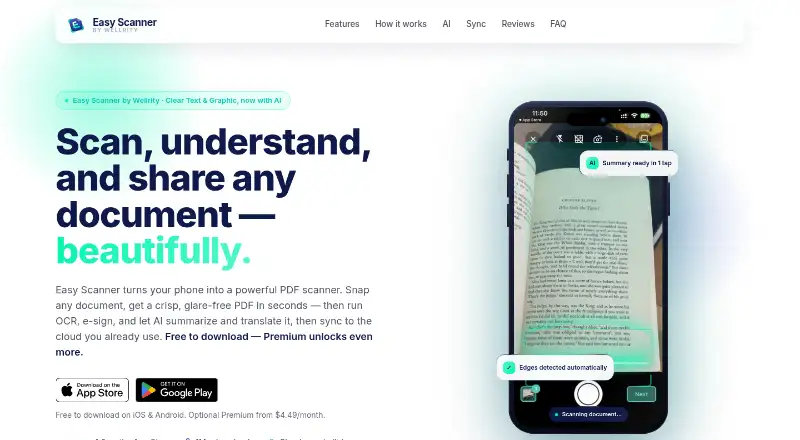
Easy Scanner is a mobile scanning app for Android and iOS. It captures and enhances documents, then uses OCR to make scan text searchable, selectable, and copyable. Users can export multi-page PDFs or JPEGs and share them by email, message, social platforms, or cloud services. Capture, enhancement, and OCR work offline; cloud sync and AI features need a connection when available. The AI tools can answer questions, summarize documents, translate more than 100 languages, and organize scans. Easy Scanner syncs with Google Drive, Dropbox, OneDrive, Box, and Evernote. The app is free to download and scan, and no scan-count limit is specified. Premium adds batch scanning, watermark-free exports, unlimited folders, and 10 GB cloud storage. Premium is listed at $4.49 a month, billed monthly, with a 3-day free trial and cancellation available. The maker is Easy Scanner, and the company is Wellrity Joint Stock Company, located in Hanoi, Vietnam.
Who it suits
It suits people who scan documents on an Android or iOS device and want searchable text, multipage exports, or cloud syncing. Users who need batch scans, watermark-free exports, unlimited folders, or cloud storage can consider Premium.
What it does well
- OCR makes scans searchable, selectable, and copyable.
- Capture and OCR work offline.
- Exports as multi-page PDF or JPEG.
- Syncs with five listed cloud services.
- Free to download and scan.
What to know first
- Cloud sync and AI need a connection when available.
- Premium is $4.49 a month.
- No encryption or security standard is stated.
Limits
The free tier is described as free to download and scan, but no scan-count limit is stated. Premium costs $4.49 a month and includes 10 GB cloud storage; the stated trial lasts 3 days.
Plans
| Plan | Billed and limits | Price |
|---|---|---|
| Premium | Cancel anytime; 3-day free trial · 10 GB cloud storage | $4.49 a month |
| Premium monthly | billed monthly at $4.49 | $4.49 a month |
| Free | — | On request |
As wellrity.com lists them, read 22 Sept 2026. The maker's own page has the final word.
Getting started
- Download Easy Scanner on iOS or Android.
- Start with the free option to download and scan.
- Capture a document and use image enhancement or OCR; these functions work offline.
- Export scans as a multi-page PDF or JPEG and share them by email, message, social, or cloud.
- Connect a listed cloud service to sync when a connection is available.
- Choose Premium for batch scanning, watermark-free exports, unlimited folders, and 10 GB cloud storage; the plan includes a 3-day trial.
Easy Scanner is a phone-based document scanner for people who want searchable scans and optional tools to work with their contents. It is strongest for individual use across capture, OCR, and cloud sync; it is less suited to teams that need administrator controls.
Overview
Auto capture, offline scanning, and OCR make Easy Scanner useful when you need to turn paper into searchable files without depending on a live connection. It exports multipage PDFs and JPEGs, and OCR text can be selected and copied. Cloud syncing and AI tools add a broader document workflow, but require a connection.
AI can answer questions about documents, summarize them, translate across 100+ languages, and organize scans. These tools extend the app beyond capture, though they are unavailable offline. Scans can sync with Google Drive, Dropbox, OneDrive, Box, and Evernote, or be shared by email, message, social, or cloud.
Key features
- Capture and export: Auto capture and multipage PDF or JPEG output suit forms, receipts, and other documents that need to be saved or shared. Premium batch scanning is more useful for processing several documents in a run.
- OCR: Searchable, selectable, copyable text makes scans easier to locate and reuse than image-only files. Offline OCR is a practical advantage when scanning away from a connection.
- Cloud sync: Connections to five named services let users move scans into familiar storage and note-taking workflows. Sync itself needs a connection.
- AI tools: Questions, summaries, translation, and scan organization may help users work with document contents, but depend on connectivity.
Pricing
The Free plan is free to download and scan, and no scan-count cap is stated. It is the sensible starting point for occasional scanning and OCR. Premium is $4.49 a month, billed monthly, with cancel-anytime terms and a 3-day free trial. It adds batch scanning, watermark-free exports, unlimited folders, and 10 GB cloud storage.
Premium suits people who process documents in batches, want clean exports, or need more room for synced scans. The free tier gives up those Premium additions. No trial refund policy is stated, so the short trial is the opportunity to decide whether the paid workflow is worthwhile.
Platforms
Easy Scanner is available on iOS and Android. The app can capture, enhance, and run OCR offline on either mobile platform; cloud sync and AI require a connection.
Who it's for
Choose Easy Scanner if you want a mobile scanner that combines offline capture and OCR with optional cloud syncing and document-focused AI. The free tier suits light use, while Premium is aimed at people who need batch scanning, watermark-free output, folders, and storage. It is not a clear fit for organizations seeking team or administrator features.
Pros and cons
- Pro: Capture, enhancement, and OCR work offline, so a connection is not required to make a searchable scan.
- Pro: Five cloud integrations and PDF or JPEG exports offer several ways to store and share scans.
- Pro: The free plan has no stated scan-count limit, while Premium spells out useful additions for heavier work.
- Con: AI and cloud sync need connectivity, limiting their usefulness during offline work.
- Con: Team and administrator controls are not part of the product's stated feature set.
- Con: The 3-day trial is brief for evaluating a paid workflow.
Alternatives
Mobile Scanning Apps is the broader category to browse if Easy Scanner's combination of scanning and connected tools is not the right fit.
- Smallpdf is worth considering if you want a broader toolset across Android, iOS, web, and Windows; its free plan includes 30 tools and a 7-day trial is available.
- Genius Scan is a better fit if unlimited scans and privacy are priorities: its free Basic plan describes a fully functional mobile scanner with unlimited, high-resolution scans.
- TapScanner may suit users who want a free plan with defined daily task and file limits: it allows 3 completed tasks per day after sign-in, with up to 25 files, 100 MB, and 500 pages per task.
- Docutain is an option for Android, iOS, and Windows users; its free mobile plan includes unlimited scans, OCR, and cloud synchronization.
- Prizmo is an alternative for iOS or macOS users.
- LumenScan is another Android and iOS freemium option.
- PDF Scanner is an iOS alternative with a free-to-use plan.
- ScanLens is an iOS option whose free plan unlocks the first 3 pages of each document.
Verdict
Easy Scanner is a good choice for individuals who want offline mobile scanning and OCR, then the option to sync, share, or use AI tools when connected. Its no-stated-cap free scanning makes it easy to start; look elsewhere if you need team administration, or choose Premium only if batch work, watermark-free exports, folders, or 10 GB storage justify $4.49 a month.
Verdict
Easy Scanner combines mobile capture, OCR, offline scanning, and cloud syncing with optional AI tools. The free tier has no stated scan-count limit, while Premium adds batch work, watermark-free exports, folders, and storage.
Questions
Is Easy Scanner free?
Yes. It is free to download and scan. Premium is listed at $4.49 a month.
What does Premium add?
Premium adds batch scanning, watermark-free exports, unlimited folders, and 10 GB cloud storage. The listed plan includes a 3-day free trial.
Which devices can run Easy Scanner?
It is available on iOS and Android.
Can it scan without an internet connection?
Capture, image enhancement, and OCR work offline. Cloud syncing and AI features use a connection when available.
Which cloud services does it sync with?
It syncs with Google Drive, Dropbox, OneDrive, Box, and Evernote.
Who makes Easy Scanner and how can users contact support?
The maker is Easy Scanner, and the company is Wellrity Joint Stock Company in Hanoi, Vietnam. Support is available at [email protected] and +84 90346 1119.
Facts from Easy Scanner's own pages
- AI Features
- AI answers questions, summarizes documents, translates 100+ languages, and organizes scans. · wellrity.com, 28 Sept 2026
- Android app
- Yes · wellrity.com, 22 Sept 2026
- App Rating
- The page reports a 4.6 App Store rating. · wellrity.com, 28 Sept 2026
- Cloud Apps
- Syncs with Google Drive, Dropbox, OneDrive, Box, and Evernote. · wellrity.com, 28 Sept 2026
- Auto capture
- Yes · wellrity.com, 22 Sept 2026
- Cloud Storage
- Premium includes 10GB+ cloud storage. · wellrity.com, 28 Sept 2026
- Company Facts
- The company is Wellrity Joint Stock Company, located in Dai Mo, Ha Noi, Vietnam. · wellrity.com, 28 Sept 2026
- Download Count
- The page reports 1M+ downloads worldwide. · wellrity.com, 28 Sept 2026
- Security Claims
- No encryption, certification, or security standard is stated. · wellrity.com, 28 Sept 2026
- Free plan
- Yes · wellrity.com, 22 Sept 2026
- Free Tier
- Free to download and scan. · wellrity.com, 28 Sept 2026
- Free Limits
- The page does not specify a scan-count limit; Premium adds batch scanning, watermark-free exports, unlimited folders, and 10GB+ cloud storage. · wellrity.com, 28 Sept 2026
- Headquarters
- Hanoi, Vietnam · wellrity.com, 28 Sept 2026
- iOS app
- Yes · wellrity.com, 22 Sept 2026
- Multipage PDF
- Yes · wellrity.com, 22 Sept 2026
- OCR Extraction
- OCR makes scans searchable, selectable, and copyable. · wellrity.com, 28 Sept 2026
- Offline Mode
- Capture, enhance, and OCR work offline; cloud sync and AI use a connection when available. · wellrity.com, 28 Sept 2026
- Mobile Platforms
- Available on iOS and Android. · wellrity.com, 28 Sept 2026
- Export Formats
- Exports are available as multi-page PDF or JPEG. · wellrity.com, 28 Sept 2026
- Searchable PDF
- Yes · wellrity.com, 22 Sept 2026
- Sharing Options
- Exports can be shared by email, message, social, or cloud. · wellrity.com, 28 Sept 2026
- Paid from
- 4.49 · wellrity.com, 22 Sept 2026
- Support Contact
- Support is available by email at [email protected] and by phone at +84 90346 1119. · wellrity.com, 28 Sept 2026
- Teams Admin
- No team or administrator features are stated. · wellrity.com, 28 Sept 2026
Where Easy Scanner stands on Freedom251
- Scanner apps#8 of 76
- Mobile Scanning Apps#10 of 76