Freedom251 › Check Printing Software

SimpleChex
What SimpleChex is
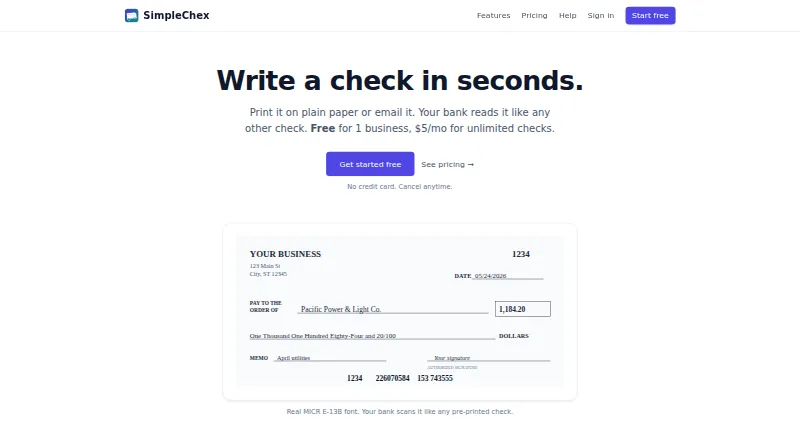
SimpleChex is a web-based service that generates business checks as PDFs with MICR-encoded routing and account numbers. Users can print checks on plain white paper or blank check stock, including Costco NL-VT-compatible stock, or email a PDF for the recipient to print and deposit like a check. The product uses the E-13B MICR font used by bank scanners. Users can save payees and addresses, then add a signature image or typed signature to checks. SimpleChex logs checks, batches, and emails, and past checks can be reprinted as PDFs. Firm users can invite unlimited team members and limit their access to selected businesses or bank accounts. For QuickBooks payroll, users can upload a payroll PDF for SimpleChex to add a MICR line to each page. SimpleChex says it does not hold, transmit, or process funds; checks clear through the user’s existing bank relationship. The free plan includes one business, unlimited bank accounts, 10 checks per month, and one user. Paid plans start at $5/mo.
Who it suits
SimpleChex is aimed at small businesses and bookkeepers that need to generate, print, or email checks. Its Firm plan also supports team access across businesses or bank accounts.
What it does well
- Prints checks on plain paper or blank check stock.
- Email check PDFs for recipients to print and deposit.
- Past checks can be reprinted as PDFs.
- Firm plan supports unlimited team members.
What to know first
- Free plan allows 10 checks per month.
- Free plan is limited to one business and one user.
- Does not hold, transmit, or process funds.
- No accounting import is listed.
Limits
The free plan covers one business and one user, with 10 checks per month. Solo costs $5 a month and allows one business and one user; Firm costs $19 a month for up to 10 businesses, with each additional business costing $2 a month.
Plans
| Plan | Billed and limits | Price |
|---|---|---|
| Free | $0/ forever · 1 business · unlimited bank accounts · unlimited checks first 90 days, then 10/month · real MICR E-13B · email eChecks · signature stamping · single user | Free |
| Firm | $19/ month; +$2/month per business beyond 10 · up to 10 businesses · unlimited bank accounts and checks · unlimited team members · per-business and per-bank scoping · full audit history · email eChecks | $19 a month |
| Solo | $5/ month · 1 business · unlimited bank accounts · unlimited checks · real MICR E-13B · email eChecks · signature stamping · single user | $5 a month |
As simplechex.com lists them, read 15 Oct 2026. The maker's own page has the final word.
Getting started
- Open the SimpleChex website in a web browser.
- Choose Free, Solo, or Firm based on businesses, check volume, and team access.
- Create checks as PDFs and print them on plain paper or blank check stock, or email a PDF to a recipient.
- For QuickBooks payroll, upload a payroll PDF to add MICR lines.
SimpleChex is a browser-based check-preparation service for small businesses and bookkeepers. It suits teams that need bank-compatible printed or emailed checks without replacing their bank, while larger operations should weigh its plan structure and web-only delivery.
Overview
SimpleChex generates business checks as PDFs with routing and account numbers rendered in the E-13B MICR font used by bank scanners. You can print on ordinary white paper or blank check stock, including Costco NL-VT-compatible stock. An emailed PDF lets the recipient print a paper check and deposit it like a conventional check.
This is not a payment processor: SimpleChex does not hold, transmit, or process funds. Checks clear through the bank relationship you already use, so the service handles preparation and delivery rather than money movement.
Key features
Check creation and repeat payments
Save payees and their addresses for recurring work. A signature image or typed signature can be stamped onto each check. Logs cover individual checks, batches, and emailed checks, and past checks can be reprinted as PDFs. Those records make repeated disbursements and internal tracking more manageable, although bank records remain separate.
Printing and emailed checks
MICR output is designed for bank-scanner reading, and support for both plain paper and blank stock gives businesses flexibility over supplies. Emailing a PDF can avoid mailing a check, but the recipient still has to print it and deposit it.
Payroll workflow
QuickBooks payroll users can upload a payroll PDF; SimpleChex adds a MICR line to each page. This is a targeted payroll-document conversion rather than a broader accounting import, since no accounting import integration is provided.
Teams and security
Firm users can invite unlimited team members and limit each person's access to selected businesses or bank accounts. Data is encrypted in transit with TLS 1.3 and at rest with AES-256, with workspace isolation enforced through Postgres row-level security. Email support is offered at [email protected], with a typical response time of one business day.
Pricing
| Plan | Price | Includes | Best for |
|---|---|---|---|
| Free | free, billed forever | 1 business, unlimited bank accounts, 10 checks per month, single user | Very light checking needs or evaluation |
| Solo | $5 a month, billed monthly | 1 business, unlimited bank accounts and checks, single user | One operator issuing checks regularly |
| Firm | $19 a month, billed monthly | Up to 10 businesses, unlimited bank accounts, checks, and team members; $2/mo for each business beyond 10 | Bookkeepers and multi-business teams |
The Free plan's 10-check monthly ceiling is the main trade-off; it also allows only one user. Solo removes the check quota but remains limited to one business and one user. Firm costs more but is the only tier built for shared access and multiple businesses. There is no free trial, so testing beyond the permanent Free allowance requires a paid subscription.
Platforms
SimpleChex runs on the web, making it accessible from a browser rather than as a desktop or mobile application. Printing still depends on your own printer and compatible paper or check stock.
Who it's for
Small businesses that issue occasional checks can start with Free, provided ten checks a month is enough. A single administrator with recurring volume gets the clearest value from Solo's unlimited checks. Bookkeepers and firms handling several client businesses should choose Firm for its business-level access controls and unlimited team members. Organizations seeking integrated accounting imports, native mobile apps, or independent payment processing should look elsewhere.
Pros and cons
- Pro: E-13B MICR encoding supports checks intended for bank scanners.
- Pro: Plain-paper, blank-stock, Costco NL-VT-compatible printing, and emailed PDFs cover several delivery workflows.
- Pro: Check, batch, and email logs plus PDF reprints aid repeat payments and records.
- Pro: Firm combines up to 10 businesses with unlimited team members and scoped account access.
- Con: The Free plan permits only 10 checks per month and one user.
- Con: Solo remains one-business and single-user, so shared operations must pay for Firm.
- Con: It does not move funds or provide accounting imports; your bank and existing processes remain essential.
Alternatives
CHECKPRINT is a better fit if you need Android or iOS access, one bank account with unlimited checks on its free plan, and can accept watermarked PDFs stored for 30 days. Choose Zil Money when you want a broader transaction service with limited free monthly transactions and paid unlimited-transaction tiers. Cheqaat suits Windows users wanting a 30-day, no-card trial with unlimited cheque printing, multi-bank templates, bulk preparation, and PDF export. ChequeMaster is for personal, non-commercial Windows use with unlimited banks, accounts, layouts, and printed cheques. ChequePro is an option for Windows users who prefer a one-time $99 Essential plan and device-based limits. PrintCheck offers free, no-signup web printing with batches up to 500 checks and five templates. SwiftCheckPrint is a free web option with guest use and user-supplied printer and check stock. TROY AssurePay Check targets medium-to-large businesses and requires a quote.
Verdict
Choose SimpleChex if you are a small business or bookkeeper that needs MICR-ready checks, repeatable records, and bank-connected clearing at a low monthly cost. Solo is the practical single-user upgrade, while Firm earns its price for multi-business teams. Look elsewhere if you need native mobile or desktop software, accounting imports, or a service that processes payments instead of preparing checks.
Verdict
SimpleChex creates printable or emailable checks while leaving funds and check clearing with the user’s bank. The free plan has a monthly check limit; paid plans start at $5/mo.
Questions
Is SimpleChex free?
Yes. The Free plan is $0.00 USD, billed forever, and includes one business, unlimited bank accounts, 10 checks per month, and one user.
What do the paid plans cost?
Solo is $5 a month, billed monthly. Firm is $19 a month, billed monthly, for up to 10 businesses; each additional business costs $2 a month.
Which platforms does SimpleChex support?
SimpleChex is available on the web.
Does SimpleChex process payments?
No. It says it does not hold, transmit, or process funds; checks clear through the user's existing bank relationship.
Can I use it with QuickBooks payroll?
For QuickBooks payroll, you can upload a payroll PDF and SimpleChex adds a MICR line to each page.
How can I contact support?
The help page lists [email protected] for email support and says typical response time is one business day.
Facts from SimpleChex's own pages
- API and SDKs
- The official pages reviewed describe browser workflows and PDF processing but do not state a public API, SDK, or self-hosted deployment. · simplechex.com, 15 Oct 2026
- Audit history
- The product logs checks, batches, and emails and allows prior checks to be reprinted as PDFs. · simplechex.com, 15 Oct 2026
- Availability limitation
- The terms provide the service as available without guaranteeing a specific uptime percentage. · simplechex.com, 15 Oct 2026
- Bank relationship
- SimpleChex does not hold, transmit, or process funds; checks clear through the user's existing bank account. · simplechex.com, 15 Oct 2026
- Capterra description
- Capterra describes SimpleChex as cloud check-writing software requiring no installation, with plain-paper MICR printing, email checks, multi-business workspaces, and audit logs. · capterra.com, 15 Oct 2026
- Costco stock layout
- The layout is pre-tuned for Costco NL-VT blank check stock and can be adjusted for other stock. · simplechex.com, 15 Oct 2026
- Data export
- Users can export account data as JSON, with account and routing numbers redacted. · simplechex.com, 15 Oct 2026
- eChecks
- SimpleChex can email a check PDF to a recipient, who can print it on plain paper and deposit it like a check. · simplechex.com, 29 Sept 2026
- Email eChecks
- Checks can be emailed as PDFs from [email protected] for recipients to print and deposit. · simplechex.com, 15 Oct 2026
- Free-plan limit
- After the first 90 days, Free allows only 10 checks per calendar month for one business. · simplechex.com, 15 Oct 2026
- GetApp deployment
- GetApp describes SimpleChex as a web application with one-time bank-account setup and no pre-printed check stock requirement. · getapp.com, 15 Oct 2026
- Integration
- For QuickBooks payroll, users can upload a payroll PDF and SimpleChex adds a MICR line to each page. · simplechex.com, 29 Sept 2026
- Licence
- The terms prohibit reverse engineering, scraping, and reselling or sublicensing, and no open-source licence is stated. · simplechex.com, 15 Oct 2026
- MICR
- The product uses the real E-13B MICR font used by bank scanners. · simplechex.com, 29 Sept 2026
- MICR printing
- The service uses the real ANSI X9.13 E-13B magnetic font so bank scanners can read checks printed on plain paper. · simplechex.com, 15 Oct 2026
- Multi-business workspace
- One workspace can contain multiple businesses, each with separate bank accounts, layouts, payees, and check numbering. · simplechex.com, 15 Oct 2026
- Not a payment processor
- SimpleChex says it does not hold, transmit, or process funds; checks clear through the user's existing bank relationship. · simplechex.com, 29 Sept 2026
- Payees and signatures
- Users can save payees with addresses and add a signature image or typed signature that is stamped on checks. · simplechex.com, 29 Sept 2026
- Printing
- Checks can be printed on plain white paper or blank check stock, including Costco NL-VT-compatible stock. · simplechex.com, 29 Sept 2026
- Printing limitation
- The help center lists wrong print scale, unsuitable paper, damaged MICR lines, and insufficient issuer funds as common rejection causes. · simplechex.com, 15 Oct 2026
- QuickBooks limitation
- The payroll-PDF reader is tuned to the QuickBooks Online paystub layout and other payroll formats require support review. · simplechex.com, 15 Oct 2026
- QuickBooks payroll
- Users can upload QuickBooks Online payroll PDFs so SimpleChex adds the MICR line while preserving the original paystub content and check numbers. · simplechex.com, 15 Oct 2026
- Rating on Capterra
- 0.0 out of 5 from 0 reviews. · capterra.com, 15 Oct 2026
- Rating on GetApp
- 0 out of 5 from 0 reviews. · getapp.com, 15 Oct 2026
Where SimpleChex stands on Freedom251
- Check Printing Software#10 of 28