Freedom251 › Check Printing Software

ChequeMaster
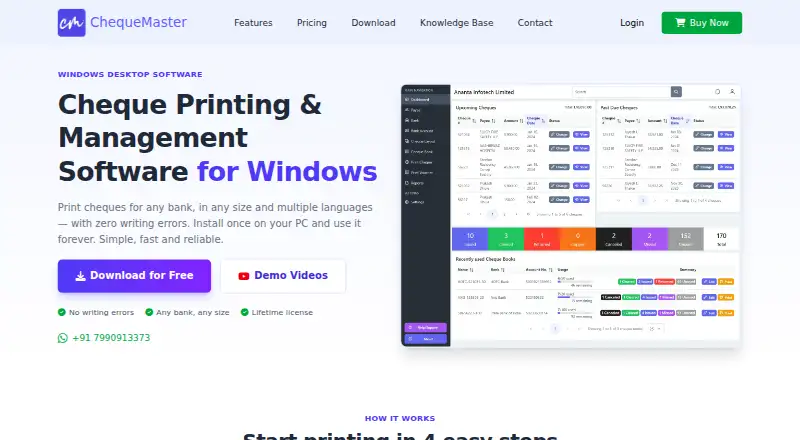
What ChequeMaster is
ChequeMaster is Windows desktop software for printing and managing bank cheques. Its layout creator lets users import a scanned cheque image and position details with drag and drop. It supports printing in English, Hindi, and Gujarati, multiple currencies, and laser, inkjet, deskjet, and all-in-one printers; users can request additional languages. A dashboard tracks issued, upcoming, and past-due cheques, with statuses such as cleared, cancelled, returned, missed, and stopped payment. Users can search cheque numbers, amounts, payees, cheque books, and layouts, and export reports to Excel. The free plan is for personal, non-commercial use and never expires, with unlimited banks, accounts, layouts, and printed cheques, but it limits users to two payees and two cheque books and excludes vouchers and reports. A lifetime license is also available, though no price is listed. Records stay on the user’s computer, so users handle their own backups; licensing and usage information is sent to the maker’s servers. Windows 10 and newer are supported.
Who it suits
ChequeMaster suits individuals or businesses printing and tracking cheques on Windows. The free plan is limited to personal, non-commercial use; users needing vouchers, reports, or more payees can consider the lifetime license.
What it does well
- Customizable cheque layouts with drag-and-drop positioning
- Prints in English, Hindi, and Gujarati
- Tracks cheque statuses and due dates
- Exports reports to Excel
- Free plan never expires
What to know first
- Free plan limits use to two payees and cheque books
- Free plan excludes vouchers and reports
- Windows 10 and newer only
- Users must back up local records themselves
Limits
The Free plan is for personal, non-commercial use, allows up to two payees and two cheque books, and excludes vouchers and reports. It never expires. The Lifetime License includes six months of updates and support.
Plans
| Plan | Billed and limits | Price |
|---|---|---|
| Free | Personal/non-commercial only · unlimited banks, bank accounts and cheque layouts · 2 payees · 2 cheque books · unlimited cheque printing · no vouchers or reports · limited support · never expires | Free |
| Lifetime License | one-time payment · Personal or enterprise use · unlimited banks, accounts, layouts, vouchers, reports, payees, cheque books and cheque printing · priority support · six months of updates/support · never expires | On request |
As chequemaster.com lists them, read 15 Oct 2026. The maker's own page has the final word.
Getting started
- Visit the ChequeMaster website
- Use a computer running Windows 10 or newer
- Choose the Free plan for personal, non-commercial use or the Lifetime License for personal or enterprise use
- Create a cheque layout by importing a scanned cheque image and positioning details
- Select a supported language, currency, and printer to print cheques
ChequeMaster is a Windows desktop application for creating, printing, and managing bank cheques. It suits individuals and small organisations that need tailored cheque layouts and a searchable local record rather than a cloud-first workflow. The free edition is a useful starting point for personal printing, while broader payee, voucher, and reporting needs point toward its lifetime licence.
Overview
ChequeMaster brings cheque design, printing, status tracking, search, and report export into one desktop program. Keeping cheque and business records on the user’s computer can be attractive for privacy and offline record-keeping, but it also means the user must maintain backups; the maker says it cannot recover local data because it does not store the database on its servers. Licensing and usage information is sent to the maker’s servers, including a device identifier, IP address, usage counts, and settings synchronised at sign-in, so local data storage does not mean every data flow stays local.
Key features
Flexible layouts and printing
The WYSIWYG creator accepts a scanned cheque image and lets users position cheque details with drag and drop. That is a practical advantage when a bank’s stock requires precise alignment or when fixed templates do not match. Multiple currencies and support for laser, inkjet, deskjet, and all-in-one printers make it adaptable to common office setups. Printing is supported in English, Hindi, and Gujarati, with additional languages available on request.
Tracking and retrieval
A dashboard follows issued, upcoming, and past-due cheques. Statuses include cleared, cancelled, returned, missed, and stopped payment, giving users a way to distinguish routine completion from exceptions that need attention. Search covers cheque numbers, amounts, payee names, cheque books, and layouts, which should reduce the effort of locating an old transaction or template.
Reports and data handling
Reports can be exported to Excel, a useful bridge for analysis or sharing outside the application. The published material does not describe accounting-software integrations, so businesses that require automatic ledger synchronisation should not assume this desktop tool provides it. Support is offered through WhatsApp, email, and live chat; phone support is not available.
Pricing
Free
The Free plan costs nothing and is for personal, non-commercial use. It never expires and allows unlimited banks, bank accounts, cheque layouts, and printed cheques. The meaningful restrictions are up to two payees and two cheque books, no vouchers or reports, and limited support. It is well suited to an individual with a small, stable set of cheque relationships, but the payee and book caps quickly constrain household complexity or any commercial workflow.
Lifetime License
The Lifetime License has custom pricing and is billed as a one-time payment. It permits personal or enterprise use and removes the Free plan’s caps: banks, bank accounts, layouts, vouchers, reports, payees, cheque books, and printed cheques are all unlimited. Priority support is included, and the licence never expires, although updates and support are included for six months. This is the sensible tier for organisations, frequent issuers, or anyone who needs Excel reporting and more than two payees; the absence of a published price makes cost comparison impossible until the maker supplies a quote.
There is no free trial. The permanent Free plan is therefore the only no-cost way to assess the workflow, with its commercial-use restriction and feature limits.
Platforms
ChequeMaster is desktop software for Windows 10 and newer. No other operating systems are currently supported, so macOS, Linux, Android, iOS, and browser-only users need another product or a separate Windows machine.
Who it's for
Choose ChequeMaster if you print bank cheques regularly, need to align fields to scanned cheque stock, use English, Hindi, or Gujarati, and prefer records kept on a local computer. The Free plan fits personal, non-commercial use with no more than two payees and two cheque books. The lifetime licence is aimed at personal or enterprise users who need unlimited records, vouchers, reports, and priority support. It is a poor fit for teams seeking a multi-platform cloud service, automatic accounting integration, phone support, or a provider-managed backup.
Pros and cons
Pros
- Drag-and-drop WYSIWYG design with scanned cheque import supports precise, bank-specific layouts.
- Tracking statuses and broad search fields make issued and problem cheques easier to follow up.
- English, Hindi, and Gujarati output, multiple currencies, and several printer types cover varied setups.
- Local database storage keeps cheque records off the maker’s servers.
- A never-expiring free plan permits unlimited banks, accounts, layouts, and printed cheques for personal use.
Cons
- The free edition allows only two payees and two cheque books and omits vouchers and reports.
- Users must back up their own local data because recovery is not available from the maker.
- Device, IP, usage, and synchronised settings are transmitted for licensing and usage purposes.
- Windows 10 or newer is required, and phone support and stated accounting integrations are absent.
- The lifetime licence price is custom, so its value cannot be judged without a quote.
Alternatives
For a wider comparison, see Check Printing Software.
CHECKPRINT is the better choice when Android, iOS, or web access matters; its free plan supports one bank account and unlimited checks but adds watermarks and stores checks for 30 days.
Zil Money suits users who want mobile, web, or API access and can work within limited monthly transactions on its free plan, with unlimited transactions on its Business tier.
Cheqaat is worth considering for a Windows workflow that offers a 30-day, no-card trial and core features such as multi-bank templates, bulk preparation, and PDF export.
ChequePro offers another Windows freemium route, with a free-forever plan limited to one device, three bank accounts, and one company.
PrintCheck is a browser option that is free forever, needs no signup, and supports batches of up to 500 checks and five templates.
SimpleChex is a web alternative whose free plan covers one business and unlimited bank accounts but limits output to 10 checks per month.
SwiftCheckPrint is a free web service with guest use, leaving printer and compatible check stock to the user.
TROY AssurePay Check targets medium-to-large businesses across desktop, mobile, Linux, and web platforms, with quote-based pricing.
Verdict
ChequeMaster is a strong fit for Windows users who value custom cheque alignment, detailed status tracking, and a local record, especially when the free plan’s two-payee limit is sufficient. Choose the lifetime licence for commercial or higher-volume work requiring unlimited records and reports. Look elsewhere if you need cross-platform access, cloud backup, phone support, or a known upfront price.
Verdict
ChequeMaster combines cheque layout design, printing, tracking, and search in a Windows desktop app. Its free plan covers ongoing personal use, but has limits on payees, cheque books, vouchers, and reports.
Questions
Does ChequeMaster have a free plan?
Yes. The Free plan costs nothing and never expires; it is for personal, non-commercial use.
What does the Free plan include?
It allows unlimited banks, bank accounts, cheque layouts, and printed cheques, with up to two payees and two cheque books. Vouchers and reports are excluded.
Which operating systems does it support?
The maker supports Windows 10 and newer. Other operating systems are not currently supported.
What cheque languages and printers does it support?
It supports English, Hindi, and Gujarati cheque printing, and users can request additional languages. Listed printer types include laser, inkjet, deskjet, and all-in-one.
Where are cheque and business records stored?
They stay on the user's computer. The maker says users are responsible for backups because it cannot recover those records.
What does the Lifetime License include?
It is for personal or enterprise use and includes unlimited banks, accounts, layouts, vouchers, reports, payees, cheque books, and printed cheques. It includes priority support and six months of updates and support.
Facts from ChequeMaster's own pages
- Amount and typo controls
- Automatic amount-to-words conversion, formatting, date formats and account-payee positioning are intended to reduce writing errors. · chequemaster.com, 15 Oct 2026
- API and SDKs
- No public API or SDK is documented; the privacy policy only describes private licensing and tracking APIs used by the installed software. · chequemaster.com, 15 Oct 2026
- Backups
- Users are responsible for backing up their local data, which the maker says it cannot recover because it does not store it. · chequemaster.com, 11 Oct 2026
- Bulk printing
- Bulk cheque printing is available as a beta feature and the maker advises testing on plain paper first. · chequemaster.com, 15 Oct 2026
- Cheque back printing
- Users can print account or contact details on the reverse and save recurring text as reusable hints. · chequemaster.com, 15 Oct 2026
- Cheque layout design
- Its WYSIWYG layout creator lets users import a scanned cheque image and position cheque details by drag and drop. · chequemaster.com, 11 Oct 2026
- Cheque tracking
- The dashboard tracks issued, cleared, cancelled, returned, missed and stopped-payment cheques with status indicators. · chequemaster.com, 15 Oct 2026
- Currencies and printers
- It supports multiple currencies and lists laser, inkjet, deskjet, and all-in-one printers among supported printer types. · chequemaster.com, 11 Oct 2026
- Data location
- Cheque records, payees, bank accounts and reports remain on the user’s computer; the maker says backups are the customer’s responsibility. · chequemaster.com, 15 Oct 2026
- Data storage
- Cheque and business records stay on the user's computer; the maker says it does not store the software database on its servers. · chequemaster.com, 11 Oct 2026
- Documentation and support
- Support is offered through WhatsApp, email and live chat, while the knowledge base covers setup, printing, layouts, bank formats and troubleshooting. · chequemaster.com, 15 Oct 2026
- Domain registration fact
- ScamAdviser reports chequemaster.com was registered on 19 August 2023 through BigRock Solutions. · scamadviser.com, 15 Oct 2026
- Founded year
- No founded year is stated on the maker’s pages reviewed. · chequemaster.com, 15 Oct 2026
- Headquarters
- The listed office is A/604 Sanskar Residency, Chandlodiya, Ahmedabad, Gujarat 382481, India. · chequemaster.com, 15 Oct 2026
- Independent company label
- SoftwareSuggest identifies the company as ChequePot, while the maker’s legal pages identify an individual proprietor. · softwaresuggest.com, 15 Oct 2026
- Independent price listing
- SoftwareSuggest lists a paid lifetime offering at $9 and says a free trial is available, which differs from the maker page’s undisclosed current paid price. · softwaresuggest.com, 15 Oct 2026
- Independent security assessment
- ScamAdviser reports a valid Let’s Encrypt SSL certificate and labels the site safe, while noting low traffic and use of free email addresses. · scamadviser.com, 15 Oct 2026
- Integrations
- There is no direct Tally, QuickBooks, Zoho or other accounting integration, plugin, live sync or public API; CSV payee import and export are provided. · chequemaster.com, 15 Oct 2026
- Languages
- It supports cheque printing in English, Hindi, and Gujarati, and says users can request additional languages. · chequemaster.com, 11 Oct 2026
- Layout editor
- A WYSIWYG editor lets users import a scanned cheque image and position fields by drag and drop. · chequemaster.com, 15 Oct 2026
- Licence type
- The terms describe a proprietary lifetime license and prohibit resale, sublicensing, redistribution or other commercialization without permission. · chequemaster.com, 15 Oct 2026
- License activation
- One paid license can be active on only one PC at a time and activation uses a license key. · chequemaster.com, 15 Oct 2026
- Licensing data
- The software sends licensing and usage information to the maker's servers, including a device identifier, IP address, usage counts, and settings synced on sign-in. · chequemaster.com, 11 Oct 2026
- Limit: bulk selection
- A SoftwareSuggest reviewer requests multi-select cheque printing for easier bulk work. · softwaresuggest.com, 15 Oct 2026
Where ChequeMaster stands on Freedom251
- Check Printing Software#3 of 28
- Cheque Printing Software#3 of 21