Freedom251 › Check Printing Software
PrintCheck
What PrintCheck is
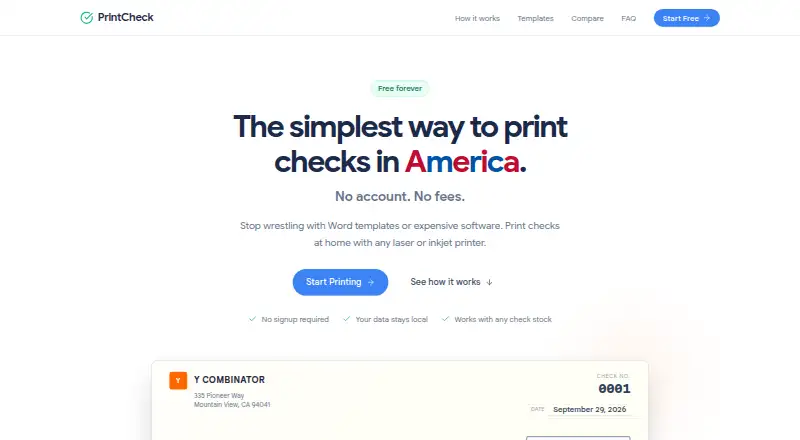
PrintCheck is a web utility for laying check details over pre-printed check stock that you supply. Add the payee, amount, date, and memo by typing them in or uploading a CSV file. You can preview the result before printing, and the print page can generate a PDF. Five templates are listed: QuickBooks voucher, Sage/Peachtree voucher, 3-per-page, voucher-bottom, and QuickBooks wallet personal. PrintCheck says its templates work with pre-printed stock from suppliers such as Deluxe, Intuit, Sage, and Checks Unlimited, and that it works with laser and inkjet printers. The site runs locally in the browser, including offline. Check details and uploaded CSV contents are processed in the browser rather than sent to PrintCheck or third parties. The Free plan costs nothing, is free forever, has no subscription, and does not require signup. It allows up to 500 checks per batch and includes five templates. Layouts are customizable. PrintCheck is intended for small businesses, nonprofits, and other organizations. It overlays information on checks you provide; it does not generate, issue, or process checks.
Who it suits
PrintCheck suits small businesses, nonprofits, and organizations such as churches, property managers, contractors, law firms, healthcare agencies, and daycares that use pre-printed checks. It fits users who want to enter check details manually or by CSV and preview layouts before printing.
What it does well
- No signup or subscription is required for the free plan.
- Processes check details and CSV contents in the browser.
- Works locally, including offline, according to the site.
- Offers five templates and customizable layouts.
- Supports laser and inkjet printers.
What to know first
- Requires user-supplied pre-printed check stock.
- Does not generate, issue, or process checks.
- Allows up to 500 checks per batch.
Limits
The free plan is free forever and permits up to 500 checks per batch with five templates. PrintCheck overlays details on pre-printed stock you supply and does not generate, issue, or process checks.
Plans
| Plan | Billed and limits | Price |
|---|---|---|
| Free | Free forever; no subscription · No signup required · 500 checks per batch · 5 templates | Free |
As printcheck.app lists them, read 7 Oct 2026. The maker's own page has the final word.
Getting started
- Open https://www.printcheck.app/ in a web browser.
- Enter check details manually or upload a CSV file.
- Choose one of the five templates and customize the layout.
- Preview the checks, then use the print page to print or generate a PDF.
PrintCheck is a browser utility for positioning payment information on pre-printed checks. It suits small organizations that already buy compatible stock and need occasional batches without installing desktop software. Its strongest case is privacy-conscious, straightforward printing; organizations needing check creation, MICR, blank forms, or transaction processing should choose a different tool.
Overview
PrintCheck places payee, amount, date, and memo fields onto checks supplied by the user. You can type entries one at a time or import a CSV, preview the result, and generate a PDF from the print page. That workflow is useful when payments are prepared elsewhere and the remaining job is accurate placement on physical stock.
The service is deliberately limited: it overlays information and does not generate, issue, or process checks. It also does not support blank checks or MICR printing, so it is not a replacement for a complete accounts-payable or check-production system.
Key features
Entry, preview, and output
Manual entry works for a few payments, while CSV upload makes larger runs less repetitive. Previewing before printing provides a practical check on alignment and entered values, and PDF generation gives you a file to send to a printer or retain for records. The stated maximum is 500 checks per batch, enough for many small offices but a constraint for larger payroll or disbursement runs.
Templates and stock
Five templates cover QuickBooks voucher, Sage/Peachtree voucher, three-per-page, voucher-bottom, and QuickBooks wallet personal formats. Customizable layouts help accommodate an existing form, and PrintCheck says its stock compatibility includes suppliers such as Deluxe, Intuit, Sage, and Checks Unlimited. You still have to purchase and load the pre-printed checks yourself.
Printing, privacy, and storage
The web app is designed for laser or inkjet printers and can run locally, including offline. Check fields and uploaded CSV contents are processed in the browser rather than transmitted to PrintCheck or third parties, which is a meaningful advantage for sensitive payment data. The privacy policy allows anonymous usage analytics, template preferences, device and browser information, and error logs without personal data. Convex stores template configurations and anonymous analytics, while Vercel hosts the application and standard server logs may contain IP addresses and request metadata.
Pricing
Free — free, billed Free forever. There is no subscription and no signup requirement. The plan includes up to 500 checks per batch and all five templates. For a small business, nonprofit, church, property manager, contractor, law firm, healthcare agency, or daycare that prints from supplied stock, the absence of recurring cost and account setup is compelling. The trade-off is the fixed batch ceiling and the lack of advanced check-production functions; there is no paid tier to raise those limits in the supplied plans.
Platforms
PrintCheck is delivered on the web. Its local, offline-capable operation and support for both laser and inkjet printers make it suitable for a workstation that may not have continuous internet access, while PDF output keeps the final print step flexible.
Who it's for
Choose it when your organization already has pre-printed checks, needs a browser workflow, and values keeping entries in the browser. CSV import and the 500-check batch allowance fit recurring but modest payment runs. Look elsewhere if you need blank-check printing, MICR encoding, issuance or processing, accounting automation beyond file import, or volumes above the batch limit.
Pros and cons
Pros
- No-cost, no-signup plan: the free-forever terms remove subscription and onboarding friction.
- CSV batches and preview: reduces repeated typing and lets you inspect output before committing paper.
- Browser-side check data: payment details and CSV contents stay in the browser instead of being sent to the service.
- Five practical layouts: supports common voucher, wallet, and multi-per-page stock formats.
- Offline local operation: useful where printing must continue without a live connection.
Cons
- Overlay-only workflow: it cannot generate, issue, or process checks.
- No blank checks or MICR: unsuitable for producing negotiable forms from plain paper.
- 500-check batch cap: larger operations must divide runs.
- Requires user-supplied stock: the service does not provide checks or replace a stock supplier.
- Web-only delivery: organizations requiring a native desktop or mobile application will need another option.
Alternatives
Browse Check Printing Software for a wider category comparison.
CHECKPRINT is the better fit if you want Android, iOS, and web access, one bank account on its free plan, unlimited checks, and printable PDFs with a watermark.
Choose Zil Money when you need mobile, API, and web availability with transaction-oriented plans, including limited monthly transactions free and unlimited transactions on Business.
Cheqaat suits Windows users seeking a 30-day trial, unlimited cheque printing, multi-bank templates, bulk preparation, and PDF export.
Pick ChequeMaster for a Windows desktop tool with unlimited banks, accounts, layouts, and printed cheques for personal, non-commercial use.
ChequePro is preferable if you want a Windows application with a free one-device plan and a paid one-time Essential tier.
Choose SimpleChex for a web service with business and bank-account management, accepting a 10-check monthly limit on its free plan.
SwiftCheckPrint is another free web option with guest use and user-supplied printers and compatible stock.
TROY AssurePay Check targets medium-to-large businesses that need a quote-based product across desktop, mobile, Linux, and web platforms.
Verdict
PrintCheck is a sensible choice for small organizations that already own compatible pre-printed checks and want free, privacy-conscious browser printing with CSV batches and previews. Its focused overlay model keeps the workflow simple, but the absence of MICR, blank-check support, and check processing is decisive: choose a fuller accounting or check-production system when those capabilities are part of the job.
Verdict
Choose PrintCheck if you need to place details on pre-printed checks using a browser, with manual entry or CSV upload and a preview before printing. Its free plan includes five templates and batches of up to 500 checks. Look elsewhere if you need software that generates, issues, or processes checks, or supports blank checks.
Questions
How much does PrintCheck cost?
The Free plan costs nothing, free forever, with no subscription.
Is signup required?
No. The Free plan requires no signup.
What platforms does PrintCheck support?
PrintCheck is a web product. The homepage says it runs locally, including offline.
Can I use blank checks?
No. PrintCheck overlays details on pre-printed check stock that you provide.
Can PrintCheck issue or process checks?
No. It does not generate, issue, or process checks.
How can I contact support?
General inquiries can be sent to [email protected]. Privacy questions can be sent to [email protected].
Facts from PrintCheck's own pages
- Check stock compatibility
- PrintCheck says it works with pre-printed check stock from suppliers including Deluxe, Intuit, Sage, and Checks Unlimited. · printcheck.app, 7 Oct 2026
- Collected data
- The privacy policy says PrintCheck may collect anonymous usage analytics, template preferences, device and browser information, and error logs without personal data. · printcheck.app, 7 Oct 2026
- Data entry
- Users can enter check details manually or upload a CSV file. · printcheck.app, 7 Oct 2026
- Intended users
- The site describes PrintCheck as a utility for small businesses, nonprofits, and organizations, including churches, property managers, contractors, law firms, healthcare agencies, and daycares. · printcheck.app, 7 Oct 2026
- Limitations
- PrintCheck states that it overlays data onto user-supplied checks and does not generate, issue, or process checks. · printcheck.app, 7 Oct 2026
- Preview and print
- Users can preview checks before printing, and the print page offers PDF generation. · printcheck.app, 7 Oct 2026
- Printers and offline use
- The homepage says PrintCheck works with laser or inkjet printers and runs locally, including offline. · printcheck.app, 7 Oct 2026
- Privacy
- Check data and uploaded CSV contents are processed in the browser and are not transmitted to PrintCheck’s servers or third parties. · printcheck.app, 7 Oct 2026
- Support
- The About page lists [email protected] for general inquiries and [email protected] for privacy questions. · printcheck.app, 7 Oct 2026
- Templates
- The site lists five templates, including QuickBooks voucher, Sage/Peachtree voucher, 3-per-page, voucher-bottom, and QuickBooks wallet personal. · printcheck.app, 7 Oct 2026
- Third-party services
- The privacy policy says Convex stores template configurations and anonymous analytics, while Vercel hosts the application and standard server logs may include IP addresses and request metadata. · printcheck.app, 7 Oct 2026
- What it does
- PrintCheck overlays check details such as payee, amount, date, and memo onto user-supplied pre-printed check stock. · printcheck.app, 7 Oct 2026
Where PrintCheck stands on Freedom251
- Check Printing Software#8 of 28