Freedom251 › Check Printing Software
Secure Check Printing
What Secure Check Printing is
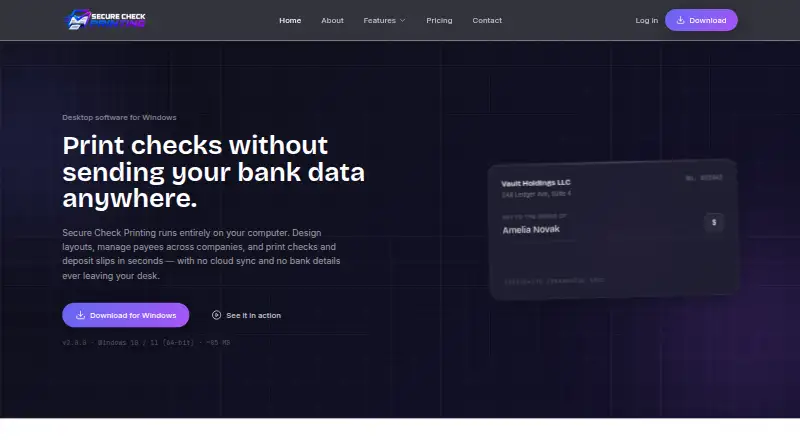
Secure Check Printing is Windows desktop software for designing check layouts, managing payees across companies, and printing checks and deposit slips. Users can create reusable check layouts for blank stock or pre-printed forms, and a dedicated layout designer handles deposit slips. Payees can be organized by type, including individuals, companies, resellers, and expense payees, across companies. The software stores accounts, checks, payees, companies, and deposits in an encrypted database on the user's computer. Its maker says that after license activation it can be used offline; internet access is used for activation, renewal, or update checks. The download is for 64-bit Windows 10 and 11. A free plan covers one device and up to two companies. Personal costs $60 a year and supports one device, up to three companies, and unlimited checks. Business costs $150 a year and supports one device, up to five companies, and unlimited checks. The pricing page describes use for a full five years with lifetime license assurance. A full-featured 14-day trial is advertised, while the pricing note lists a 10-day trial. Support is listed by email and phone.
Who it suits
It suits individuals or businesses that need to prepare checks and deposit slips on a Windows computer and organize payees across companies. The plan limits can help buyers choose between a free option for up to two companies and paid plans with unlimited checks.
What it does well
- Creates reusable layouts for blank stock or pre-printed forms.
- Includes a dedicated deposit slip layout designer.
- Stores accounts and transaction records in an encrypted local database.
- Can be used offline after license activation.
- Paid plans include unlimited checks.
What to know first
- The download supports only 64-bit Windows 10 and 11.
- Each listed plan covers one device.
- The free plan is limited to two companies.
Limits
The free plan covers one device and up to two companies. The lowest paid plan, Personal at $60 a year, covers one device and up to three companies; the facts list unlimited checks for this plan.
Plans
| Plan | Billed and limits | Price |
|---|---|---|
| Free/14-day trial | 1 device · Up to 2 companies | Free |
| Business | $150/ 36 mo · 1 device · Up to 5 companies · Unlimited checks | $150 a year |
| Personal | $60/ year · 1 device · Up to 3 companies · Unlimited checks | $60 a year |
As securecheckprinting.org lists them, read 8 Oct 2026. The maker's own page has the final word.
Getting started
- Visit the Secure Check Printing website.
- Download the software for 64-bit Windows 10 or 11.
- Select the free plan or a paid plan based on device and company limits.
- Activate the license using an internet connection.
- After activation, use the software offline if needed.
Verdict
Choose Secure Check Printing if you need desktop tools for check and deposit slip layouts, payee organization, and offline use after activation. The free plan may fit one device and up to two companies; look elsewhere if you need a listed platform beyond 64-bit Windows 10 or 11.
Questions
Is there a free plan?
Yes. The Free/14-day trial plan costs nothing and covers one device and up to two companies.
What do the paid plans cost?
Personal is $60 a year. Business is $150 a year; its listed billing note says $150 per 36 months.
Which systems does it support?
The download is listed for 64-bit Windows 10 and 11.
Can it be used offline?
Yes. The product says it works offline after activation; internet access is used for activation, renewal, or update checks.
How long is the trial?
The pricing note lists a 10-day trial, while the home page advertises a full-featured 14-day trial.
How long can a license be used?
The pricing page says the software is usable for a full five years with lifetime license assurance.
Facts from Secure Check Printing's own pages
- Check layouts
- Users can design reusable check layouts and print on blank stock or pre-printed forms. · securecheckprinting.org, 8 Oct 2026
- Deposit slips
- The software includes a dedicated layout designer for creating and printing deposit slips. · securecheckprinting.org, 8 Oct 2026
- License activation
- The site says the app checks in with its server to activate, after which it can be used offline. · securecheckprinting.org, 8 Oct 2026
- License duration
- The pricing page says the software is usable for a full 5 years with lifetime license assurance. · securecheckprinting.org, 8 Oct 2026
- Local storage
- The site says accounts, checks, payees, companies, and deposits are stored in an encrypted database on the user's computer. · securecheckprinting.org, 8 Oct 2026
- Offline use
- The product says it works offline after activation; the internet is used for activation, renewal, or update checks. · securecheckprinting.org, 8 Oct 2026
- Payees and companies
- The site says users can organize individuals, companies, resellers, and expense payees separately across companies. · securecheckprinting.org, 8 Oct 2026
- Product
- Secure Check Printing is desktop software for designing layouts, managing payees across companies, and printing checks and deposit slips. · securecheckprinting.org, 8 Oct 2026
- Support contact
- The pricing page lists [email protected] and the phone number +1 (682) 458-1476. · securecheckprinting.org, 8 Oct 2026
- Supported system
- The download is listed for Windows 10 and 11, 64-bit. · securecheckprinting.org, 8 Oct 2026
- Trial
- The home page advertises a full-featured 14-day trial. · securecheckprinting.org, 8 Oct 2026
Where Secure Check Printing stands on Freedom251
- Check Printing Software#9 of 28