Freedom251 › Bootable USB Software

SARDU MultiBoot Creator
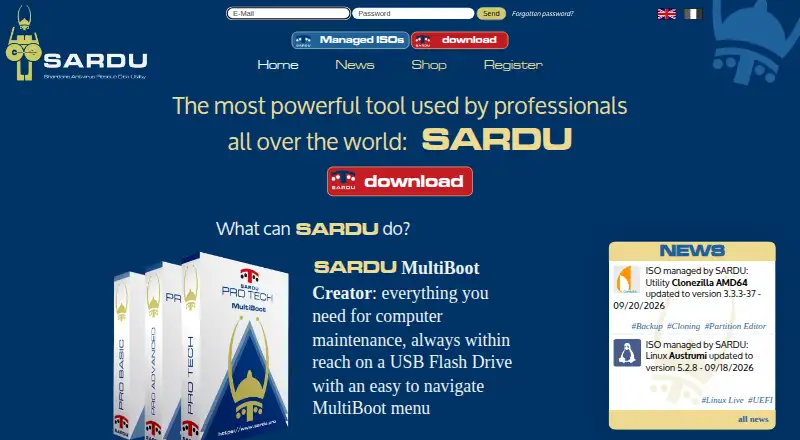
What SARDU MultiBoot Creator is
SARDU MultiBoot Creator builds bootable maintenance media from a catalog of over 300 ISO images organized into Antivirus, Utility, Linux, and Windows categories. It can create a multiboot rescue disk on a USB flash drive or DVD, and its downloader can fetch selected images and build a multiboot USB in one step. Uses for the resulting media include Windows installation, cloning, backup and restore, data recovery, password recovery or change, RAM testing, and hard disk checks. SARDU is portable: unzip the download and use it without installation. Downloads are offered as SARDU 6.1.0 for Windows and 4.4.0 for GNU Linux. Free standard and registered licenses are limited to personal, non-commercial use; PRO licenses permit commercial use. PRO supports BIOS Legacy and UEFI boot, while free licenses do not include the stated PRO UEFI feature. Secure Boot must be disabled for the described Windows installation workflow. Free plans are available, with paid plans from €11.90. SARDU points users to its FAQ and accepts email questions in Italian or English.
Who it suits
SARDU suits people who want to assemble bootable maintenance media from ISO images for computer repair tasks. Commercial use and the stated PRO UEFI boot feature require a PRO license.
What it does well
- Catalog has over 300 bootable ISO images
- Creates media on USB flash drives or DVD
- Downloader can fetch selected ISO images
- Portable app requires no installation
- Windows and GNU Linux downloads are listed
What to know first
- Free licenses are for personal, non-commercial use
- Free licenses lack the stated PRO UEFI feature
- Secure Boot must be disabled for the described Windows installation workflow
Limits
Free standard and registered licenses are limited to personal, non-commercial use. The registered free license has remote automatic updates; the standard license does not. Free licenses do not include the stated PRO UEFI feature.
Plans
| Plan | Billed and limits | Price |
|---|---|---|
| Free registered | Personal, non-commercial use · remote automatic updates | Free |
| Free standard | Personal, non-commercial use · no remote automatic updates | Free |
| PRO Basic | One year from activation · 1 PC · commercial use | On request |
| PRO Basic Lifetime | No expiry · 1 PC · commercial use | On request |
| PRO Tech | One year from activation · Up to 3 PCs · commercial use · IT maintenance and security tools | On request |
| PRO Advanced Lifetime | No expiry · Up to 2 PCs · commercial use | On request |
| PRO Advanced | One year from activation · Up to 2 PCs · commercial use | On request |
As sardu.pro lists them, read 8 Oct 2026. The maker's own page has the final word.
Getting started
- Open the SARDU MultiBoot Creator website.
- Download the Windows or GNU Linux version.
- Unzip the download; installation is not required.
- Choose a free license for personal, non-commercial use, or a PRO license for commercial use.
- Select ISO images from the catalog or use the downloader.
- Create the multiboot media on a USB flash drive or DVD.
SARDU MultiBoot Creator is a portable tool for assembling repair and installation media from many bootable ISO images. It fits technicians and capable home users who need several utilities on one USB drive or DVD. The breadth is its chief advantage, while license tier, commercial-use rules, and boot-mode constraints determine whether it is practical for your systems.
Overview
SARDU organizes a catalog of more than 300 images into Antivirus, Utility, Linux, and Windows groups. It can write a multiboot rescue disk to a USB flash drive or DVD, turning one medium into a toolkit for varied maintenance jobs. Listed uses include Windows installation, cloning, backup and restore, data recovery, password recovery or change, RAM testing, and hard-disk checks. That range is valuable for people supporting different machines; it is unnecessary overhead when the job is simply writing one operating-system installer.
An integrated downloader can retrieve selected ISO files and build the multiboot USB in one operation, avoiding a separate download-and-copy routine. SARDU is portable rather than installer-based: unzip the package and run it. The maker offers separate Windows and GNU Linux releases. For the described Windows installation workflow, Secure Boot must be disabled, so it is a poor fit when that firmware setting cannot be changed.
Key features
- Large image catalog: More than 300 entries across four categories let a service desk consolidate antivirus, diagnostics, recovery, Linux, and Windows tools on one medium. The same breadth can make a narrowly focused workflow more elaborate than necessary.
- Downloader and builder: SARDU can fetch chosen ISOs and create the multiboot USB in one step. This is most useful when preparing a repeatable field kit, rather than for a single image.
- USB and DVD output: Support for both media types gives flexibility for computers that cannot boot from a particular device.
- Portable operation: No installation is required, which suits technicians who carry the application between workstations or keep it on removable storage.
- Repair-oriented coverage: The stated cloning, backup, recovery, password, memory, and disk-check tasks make it a general maintenance environment instead of a single-purpose image writer.
- Boot-mode distinction: PRO supports BIOS Legacy and UEFI boot, while the free licenses do not receive the stated PRO UEFI feature. That difference matters on modern machines and should be resolved before choosing a tier.
Pricing
SARDU uses a freemium model. Free registered costs nothing for personal, non-commercial use and includes remote automatic updates. Free standard also costs nothing for personal, non-commercial use, but has no remote automatic updates. Both free licenses lack the stated PRO UEFI support, and neither permits commercial work.
Paid licensing starts at €11.90 in the published pricing note, while the listed plan prices are:
| Plan | Price and terms | What it covers |
|---|---|---|
| PRO Basic | €1,190,952 a year, billed one year from activation | 1 PC; commercial use |
| PRO Advanced | €23,901,912 a year, billed one year from activation | Up to 2 PCs; commercial use |
| PRO Tech | €47,903,832 a year, billed one year from activation | Up to 3 PCs; commercial use; IT maintenance and security tools |
| PRO Basic Lifetime | 49902495.00 EUR once, no expiry | 1 PC; commercial use |
| PRO Advanced Lifetime | 99904995.00 EUR once, no expiry | Up to 2 PCs; commercial use |
The free editions suit personal repair work when BIOS Legacy boot is sufficient. A business needing commercial rights or UEFI support must move to PRO; Advanced and Tech add additional PCs, while Tech is aimed at IT maintenance and security-tool work. The published annual and lifetime figures are substantial, so confirm the applicable offer before purchase.
Platforms
SARDU provides a Windows app (version 6.1.0) and a GNU Linux app (version 4.4.0). There is no macOS app. Multiboot creation and image downloads are supported.
Who it's for
Choose SARDU if you maintain multiple computers, want a portable rescue kit, or need several diagnostic and recovery environments on one drive. It also suits commercial technicians who can justify PRO licensing and require UEFI support. It is less suitable for macOS users, for a one-image installation, or for systems where Secure Boot must remain enabled for the stated Windows workflow.
Pros and cons
Pros
- More than 300 categorized images can cover many repair scenarios from one medium.
- The downloader and one-step builder reduce separate ISO-management work.
- Portable Windows and Linux releases require no installation.
- USB and DVD output supports older and varied hardware.
Cons
- Free licenses are restricted to personal, non-commercial use.
- Free editions do not include the stated PRO UEFI capability.
- Secure Boot must be disabled for the described Windows installation workflow.
- No macOS application is offered.
Alternatives
Bootable USB Software is the broader category to browse when you want to compare USB-focused tools. Boot Manager Software is the better starting point when boot selection and management, rather than assembling a repair catalog, is your priority.
- balenaEtcher is free and open source on Linux, macOS, and Windows; pick it for straightforward single-image writing or macOS support.
- Deepin Boot Maker is free on Linux, macOS, and Windows with no paid plans or usage limits stated; choose it when a simple free writer is enough.
- Fedora Media Writer is a free utility for Fedora images on Linux, Windows, and macOS; choose it when Fedora media is your specific target.
- Raspberry Pi Imager is a free desktop imaging utility for Linux, Windows, and macOS; select it for Raspberry Pi imaging.
- UNetbootin is free on Linux, macOS, and Windows with no paid plans listed; it is an alternative for basic bootable-media creation.
- USBImager is free, open source, and MIT licensed on Linux, macOS, and Windows; choose it for a lightweight imaging utility.
- Buddi is free budgeting software, not a boot-media tool.
- TFLint is a free open-source command-line Terraform linter, not a boot-media tool.
Verdict
SARDU MultiBoot Creator is a strong choice for technically capable users and IT teams that want one portable medium containing many repair, recovery, and installation options. Its catalog and integrated downloader are the main reasons to choose it. Look elsewhere if you need macOS support, a simple one-image writer, unrestricted free commercial use, or a Windows workflow that cannot disable Secure Boot.
Verdict
SARDU combines an ISO catalog and downloader for building multiboot maintenance media. Review the license and boot requirements before using it, especially for commercial use or the stated Windows installation workflow.
Questions
Is SARDU free?
Yes. Free standard and registered licenses cost nothing and are for personal, non-commercial use.
What does the registered free license add?
It includes remote automatic updates. The standard free license does not include remote automatic updates.
Which operating systems have downloads?
The download page offers SARDU 6.1.0 for Windows and SARDU 4.4.0 for GNU Linux.
Can SARDU create a bootable DVD?
Yes. It can create a multiboot rescue disk on a USB flash drive or DVD.
Can I use a free license for commercial work?
No. The standard and registered free licenses are for personal, non-commercial use. PRO licenses permit commercial use.
What boot support is stated for PRO?
PRO supports BIOS Legacy and UEFI boot. The stated PRO UEFI feature is not included with free licenses.
Facts from SARDU MultiBoot Creator's own pages
- Boot media
- The download page says SARDU can create a multiboot rescue disk on a USB flash drive or DVD. · sarducd.it, 8 Oct 2026
- Boot support limit
- The download page says PRO supports BIOS Legacy and UEFI boot, while free licenses do not receive the stated PRO UEFI feature. · sarducd.it, 8 Oct 2026
- Company identity
- The contact page identifies Davide Costa as SARDU Pro CEO and lists the business address in Sanluri, Italy. · sardu.pro, 8 Oct 2026
- Founded
- 2008 · sardu.pro, 28 Sept 2026
- Headquarters
- Sanluri, Italy · sardu.pro, 28 Sept 2026
- ISO catalog
- The maker describes a catalog of over 300 bootable ISO images organized into Antivirus, Utility, Linux, and Windows categories. · sardu.pro, 8 Oct 2026
- ISO downloader
- SARDU includes a downloader that can fetch selected ISO images and create the multiboot USB in one step. · sardu.pro, 8 Oct 2026
- License limits
- The standard and registered free licenses are for personal, non-commercial use; the PRO license permits commercial use. · sarducd.it, 8 Oct 2026
- Operating systems
- The download page offers SARDU 6.1.0 for Windows and SARDU 4.4.0 for GNU Linux. · sarducd.it, 8 Oct 2026
- Portable app
- The maker says SARDU is portable, requires no installation, and is ready to use after unzipping the download. · sardu.pro, 8 Oct 2026
- Privacy
- The privacy disclosure says AWS hosts the site data in the European Economic Area and describes security measures to prevent unauthorized access, disclosure, modification, and destruction. · sardu.pro, 8 Oct 2026
- Purpose
- SARDU creates a bootable multiboot USB drive for computer maintenance from a catalog of bootable ISO images. · sardu.pro, 8 Oct 2026
- Secure Boot
- The product page states that Secure Boot must be disabled for the described Windows installation workflow. · sardu.pro, 8 Oct 2026
- Support
- SARDU directs users to its FAQ and accepts questions by email in Italian or English. · sardu.pro, 8 Oct 2026
- System repair
- The maker lists Windows installation, cloning, backup and restore, data recovery, password recovery or change, RAM testing, and hard disk checks as uses for a created USB. · sardu.pro, 8 Oct 2026
Where SARDU MultiBoot Creator stands on Freedom251
- Bootable USB Software#16 of 38
- Boot Manager Software#17 of 29