Freedom251 › Bootable USB Software

Fedora Media Writer
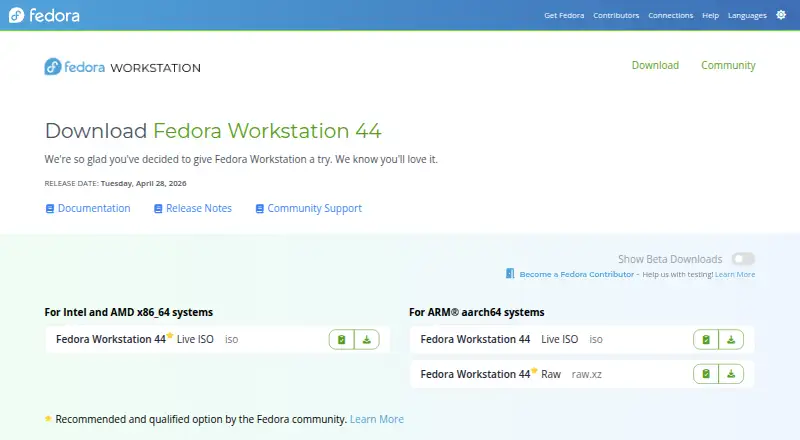
What Fedora Media Writer is
Fedora Media Writer writes Fedora images to USB flash drives, and it can download the required image before writing. It runs on Linux, Windows, and macOS, and is free. A Live Fedora image on a USB drive can be booted to try Fedora without making permanent changes to the computer. A 4GB USB flash drive is needed to get started. Writing uses direct device access and replaces the drive's existing contents and partition layout, so Fedora Media Writer includes a Restore feature that returns it to a standard single-partition layout. Fedora's instructions describe checking the written image by comparing the USB device with the downloaded ISO or booting and running a media check. They also advise verifying downloaded images against a checksum file signed by a Fedora Project OpenPGP certificate. Installation options include Fedora's RPM package, Flathub on Linux, Windows releases, and a macOS DMG. The project identifies the software as GPL-2.0 licensed and directs users with crashes or writing errors to open a GitHub issue.
Who it suits
It suits people preparing a Fedora USB drive on Linux, Windows, or macOS, including those who want to try Fedora from a Live image. Users should be ready to erase the USB drive's existing contents when writing an image.
What it does well
- Available for Linux, Windows, and macOS.
- Can download the Fedora image before writing.
- Includes a Restore feature for the drive layout.
- Supports trying Fedora from a Live USB image.
What to know first
- Requires a 4GB USB flash drive.
- Writing destroys the USB drive's existing contents.
- Downloaded images require checksum verification for the advised integrity check.
Limits
Writing an image destroys the USB drive’s existing contents and replaces its partition layout. A 4GB USB flash drive is required to get started.
Plans
| Plan | Billed and limits | Price |
|---|---|---|
| Fedora Media Writer | Fedora images · Linux, Windows, macOS | Free |
As fedoraproject.org lists them, read 4 Oct 2026. The maker's own page has the final word.
Getting started
- Get a 4GB USB flash drive.
- Download Fedora Media Writer through Fedora’s RPM package, Flathub on Linux, a Windows release, or the macOS DMG.
- Use the application to download the required Fedora image or provide an image to write.
- Write the image to the USB drive.
- Check the written image by comparing the USB device with the downloaded ISO or booting it and running the media check.
Fedora Media Writer is a free utility for putting Fedora images on USB flash drives, suited to people preparing Fedora Live or installation media on Linux, Windows, or macOS. Its focused Fedora workflow is a sensible choice for that job, but less suitable if you need a general-purpose USB imaging tool.
Overview
The app can download the image before writing it, so you can handle image retrieval and USB preparation in one place. A Live Fedora image can boot from the drive for a trial without making permanent changes to the computer. Getting started requires a 4GB USB flash drive.
Writing uses direct device access in a dd-like fashion and destroys the USB drive’s existing contents. That is appropriate for creating bootable media, but leaves no room for treating the target as storage to preserve: check the selected drive and move any files you need before writing. Fedora also recommends verifying downloaded images against a checksum file signed by a Fedora Project OpenPGP certificate.
Key features
Write and restore
Writing changes the drive’s partition layout. Restore returns it to a standard single-partition layout, which is useful when you want to reuse the stick for ordinary storage afterward. It does not recover the contents erased during writing.
Check the result
Fedora’s QA guidance describes checking a written image by comparing the USB device with the downloaded ISO, or by booting from it and running the media check. These checks give users a way to confirm the media, while the separate checksum step helps verify the downloaded image before writing.
Pricing
Fedora Media Writer is free: its plan costs nothing and covers Fedora images on Linux, Windows, and macOS. There is no paid tier or trial to weigh against it; its main trade-off is the Fedora-specific purpose rather than a pricing limit.
Platforms
The application runs on Linux, Windows, and macOS. Installation options include Fedora’s RPM package, Flathub on Linux, Windows releases, and a macOS DMG, giving users a native route on each supported system.
Who it's for
Choose Fedora Media Writer if your goal is to prepare a Fedora USB drive or try Fedora from a Live image without changing the computer. It is a poor fit if you need to keep the target drive’s files, since writing erases them, or if your USB workflow is not centered on Fedora images.
Pros and cons
- Pro: It can download the Fedora image and write it in the same workflow, avoiding a separate image-retrieval step.
- Pro: Restore resets the post-write partition layout to a standard single partition, making the USB drive easier to reuse for storage.
- Pro: Linux, Windows, and macOS support makes it usable across the three major desktop platforms.
- Con: Writing destroys existing USB contents, so the target drive must be treated as disposable for the operation.
- Con: Its stated purpose is writing Fedora images, which makes it less compelling for readers seeking a broader USB tool.
Alternatives
Browse bootable USB software for more options. balenaEtcher is another free, open-source choice for Linux, macOS, and Windows if you want an alternative that welcomes community contributions. Buddi is free budgeting software, while TFLint is a free command-line Terraform linter; neither is a USB imaging substitute.
UNetbootin, USBImager, and Ventoy are other free options to compare; choose among them based on the bootable USB workflow you need. YUMI is free for Linux and Windows, and Easy2Boot is another free option for Linux and Windows.
Verdict
Fedora Media Writer is the right pick for anyone who wants a straightforward way to put Fedora on a USB drive, with image download and a restore path built into the process. Look elsewhere if you need broader imaging flexibility or must preserve files on the target drive: writing erases them.
Verdict
Fedora Media Writer provides a cross-platform way to write Fedora images and restore the USB drive's standard layout afterward. Take care to preserve any existing drive contents before writing.
Questions
How much does Fedora Media Writer cost?
It is free, listed as free.
Which operating systems does it run on?
It runs on Linux, Windows, and macOS.
What does Fedora Media Writer do?
It writes Fedora images to USB flash drives and can download the required image before writing.
Will writing an image erase the USB drive?
Yes. Writing destroys the drive’s existing contents and overwrites its partition layout.
Can the USB drive be restored afterward?
The Restore feature returns it to a standard single-partition layout.
What license does it use?
The project repository identifies Fedora Media Writer as GPL-2.0 licensed.
Facts from Fedora Media Writer's own pages
- Bootable trial
- Fedora's download page says a Live Fedora image on a flash drive can be booted to try Fedora without making permanent changes to the computer. · fedoraproject.org, 4 Oct 2026
- Data loss
- The Fedora QA test instructions warn that writing an image destroys the USB stick's existing contents. · fedoraproject.org, 4 Oct 2026
- Download integrity
- Fedora's download page instructs users to verify downloaded images with a checksum file signed by a Fedora Project OpenPGP certificate. · fedoraproject.org, 4 Oct 2026
- Founded
- 2003 · fedoraproject.org, 28 Sept 2026
- Image downloads
- The application can automatically download the required image before writing it. · github.com, 4 Oct 2026
- Image verification
- The Fedora QA test describes checking that the image was written correctly, including by comparing the USB device with the downloaded ISO or booting and running the media check. · fedoraproject.org, 4 Oct 2026
- Installation options
- Fedora's QA instructions list installation through Fedora's RPM package, Flathub on Linux, Windows releases, and a macOS DMG. · fedoraproject.org, 4 Oct 2026
- License
- The project repository identifies Fedora Media Writer as GPL-2.0 licensed. · github.com, 4 Oct 2026
- Purpose
- Fedora Media Writer writes Fedora images to USB flash drives. · github.com, 4 Oct 2026
- Restore feature
- Because writing overwrites the drive's partition layout, the application provides a Restore feature to return it to a standard single-partition layout. · github.com, 4 Oct 2026
- Support
- The project asks users experiencing crashes or writing errors to open an issue on GitHub. · github.com, 4 Oct 2026
- Supported systems
- Fedora Media Writer runs on Linux, Windows, and macOS. · github.com, 4 Oct 2026
- USB requirement
- Fedora's download page says a 4GB USB flash drive is needed to get started with Fedora Media Writer. · fedoraproject.org, 4 Oct 2026
- Write behavior
- The project describes writing the image in a dd-like fashion using direct device access. · github.com, 4 Oct 2026
Where Fedora Media Writer stands on Freedom251
- Bootable USB Software#5 of 38