Freedom251 › Bootable USB Software
UNetbootin
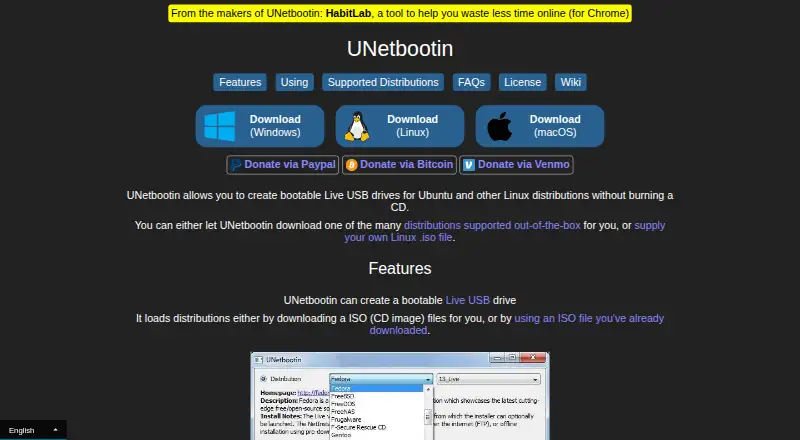
What UNetbootin is
UNetbootin creates bootable Live USB drives for Ubuntu and other Linux distributions without burning a CD. It can download supported distributions or use a Linux ISO stored on the computer, and lists a USB drive or hard disk as an installation target. Its built-in downloads include Ubuntu, Debian, Fedora, Arch Linux, Linux Mint, and FreeBSD, among other distributions. It can also load system utilities such as Parted Magic, SystemRescueCD, and rescue disks. The site says most Linux ISO files should work, though some need extra boot options or modifications, and some cannot boot from USB as-is. Non-Linux operating system ISOs are not expected to work because they use a different boot mechanism. Linux download options include an Ubuntu PPA, 32-bit and 64-bit binaries, packages for several distributions, and source code. The FAQ points to command-line options, including a targetdrive option if the destination is not detected. UNetbootin is free, accepts donations, and identifies its license as GNU GPL Version 2 or above.
Who it suits
UNetbootin suits people who want to create bootable media for Linux distributions or load listed system utilities. It is available for Linux, macOS, and Windows.
What it does well
- Can download supported Linux distributions or use a local ISO.
- Lists USB drive and hard disk targets.
- Free to use; donations are accepted.
- Source code is available under GNU GPL Version 2 or above.
What to know first
- Non-Linux operating system ISOs are not expected to work.
- Some Linux ISOs need extra options or modifications.
- Some ISO files cannot boot from USB as-is.
Plans
| Plan | Billed and limits | Price |
|---|---|---|
| UNetbootin | No charge; donations accepted · Windows, Linux and macOS desktop downloads · creates bootable USB or hard-disk installs · Linux/BSD distributions and supplied ISO images | Free |
As unetbootin.github.io lists them, read 15 Oct 2026. The maker's own page has the final word.
Getting started
- Visit the UNetbootin website.
- Choose a download for Windows, macOS, or Linux.
- Select a supported distribution to download or provide a Linux ISO from your computer.
- Choose a USB drive or hard disk as the target.
- Use the listed command-line options, including targetdrive, if the target drive is not detected.
Verdict
UNetbootin offers a free route to bootable media for supported Linux distributions and utilities. Check whether your particular ISO works, especially if it is not Linux.
Questions
How much does UNetbootin cost?
UNetbootin is free. Donations are accepted.
Which operating systems can run UNetbootin?
It has Windows, macOS, and Linux versions.
Can UNetbootin use an ISO already on my computer?
Yes. It can use a Linux ISO file stored on the computer, as well as download supported distributions.
Does UNetbootin support Windows installation ISOs?
The site says not to expect non-Linux operating system ISOs to work because they use a different boot mechanism.
Is UNetbootin open source?
Its source code is available on GitHub, and the site identifies its license as GNU GPL Version 2 or above.
Facts from UNetbootin's own pages
- Build tooling
- The development guide says qmake is used as the build system and Qt is used for the cross-platform GUI. · github.com, 15 Oct 2026
- Built-in distributions
- The official list includes Ubuntu, Debian, Fedora, openSUSE, Arch Linux, Linux Mint, CentOS, FreeBSD, NetBSD and many other distributions. · unetbootin.github.io, 15 Oct 2026
- Command line
- The wiki documents command-line options for language, distribution, disk image, install type, persistence and unattended installation. · github.com, 15 Oct 2026
- Company structure
- The official site identifies Geza Kovacs as the creator and author; it does not identify a separate legal company, headquarters or funding information. · unetbootin.github.io, 15 Oct 2026
- Developer documentation
- The wiki provides user guides, install-mode explanations, command references, compilation instructions, plugin material and development guidance. · github.com, 15 Oct 2026
- Distribution support
- Built-in download support includes Ubuntu, Debian, Fedora, Arch Linux, Linux Mint, FreeBSD, and other listed distributions. · unetbootin.github.io, 30 Sept 2026
- Extensibility
- Official documentation covers building and using UNetbootin plugins and creating custom versions. · unetbootin.github.io, 15 Oct 2026
- Image sources
- It can download a supported distribution or use a Linux ISO file already on the computer. · unetbootin.github.io, 30 Sept 2026
- Independent reception
- Full Circle described the interface as dated but said the program worked well for writing Linux or BSD distributions to USB media. · dl.fullcirclemagazine.org, 15 Oct 2026
- Install targets
- The interface supports USB-drive and hard-disk installation modes. · unetbootin.github.io, 15 Oct 2026
- ISO input
- Users can select a distribution for automatic download or provide an ISO already stored locally. · unetbootin.github.io, 15 Oct 2026
- Latest release
- GitHub lists release 702, adding macOS 11.1 Big Sur support, dated 4 February 2021. · github.com, 15 Oct 2026
- License
- UNetbootin is released under GNU GPL version 2 or later; site materials use Creative Commons Attribution-Share-Alike 3.0. · unetbootin.github.io, 15 Oct 2026
- Limit: boot failures
- SnapFiles includes a one-star report where a 7 GB CentOS image took almost a day and produced media that would not boot, while Rufus succeeded. · snapfiles.com, 15 Oct 2026
- Limit: hard-disk install risk
- The official FAQ explains that removing a hard-disk installation can require restoring the Windows bootloader and deleting the Linux partition manually. · unetbootin.github.io, 15 Oct 2026
- Limit: outdated support
- AlternativeTo marks the project discontinued, citing a latest version from 4 February 2021 and a last repository commit dated 28 June 2023. · alternativeto.net, 15 Oct 2026
- Limit: reliability
- AlternativeTo users report failed downloads, images that do not boot and frequent need to use Rufus or balenaEtcher instead. · alternativeto.net, 15 Oct 2026
- Limit: UEFI and Secure Boot
- AlternativeTo comments repeatedly report that it is mainly useful with legacy BIOS or CSM and lacks dependable UEFI/Secure Boot support. · alternativeto.net, 15 Oct 2026
- Linux downloads
- The Linux downloads page lists an Ubuntu PPA, 32-bit and 64-bit binaries, packages for several distributions, and source code. · unetbootin.github.io, 30 Sept 2026
- Maker
- The site credits Geza Kovacs as the person who created and wrote UNetbootin. · unetbootin.github.io, 30 Sept 2026
- Multiple installs
- Multiple installations on the same device are not supported. · en.wikipedia.org, 15 Oct 2026
- Operating system limit
- The site says not to expect non-Linux operating system ISOs to work because they use a different boot mechanism. · unetbootin.github.io, 30 Sept 2026
- Other images
- The site says most Linux ISO files should work, but some require extra boot options or modifications and some cannot boot from USB as-is. · unetbootin.github.io, 30 Sept 2026
- Other ISO limits
- The project says some Linux images need extra boot options and that non-Linux operating-system ISOs generally use a different boot mechanism. · unetbootin.github.io, 15 Oct 2026
Where UNetbootin stands on Freedom251
- Bootable USB Software#1 of 38