Freedom251 › Bootable USB Software

Deepin Boot Maker
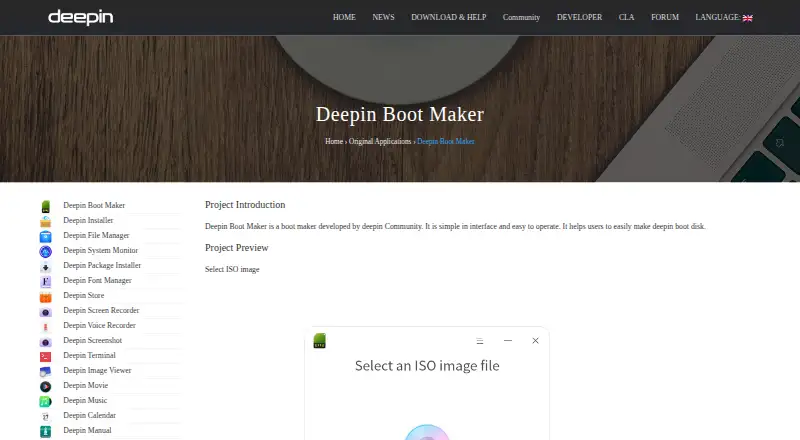
What Deepin Boot Maker is
Deepin Boot Maker creates a boot disk from an ISO image. Its workflow is to choose an image, select a USB disk, start the process, and complete the disk creation. The project is designed for Deepin installation ISOs and also works with Ubuntu live installation ISOs; ISO images can be added by dragging and dropping them. The software is free and open source, and is listed for Linux, macOS, and Windows. The download directory offers a Windows executable and macOS ZIP archive. For Deepin users, the README gives a repository installation command: `sudo apt-get install deepin-boot-maker`; it also says the only binary release is currently from a Deepin OS ISO. The project is licensed under GPL-3.0-only, and its product page links to the source code and internationalization work. Usage help is listed through a wiki, forum, Developer Center, and Matrix. Developed by the deepin Community, the project encourages issue reports and contributions.
Who it suits
It suits people who need to create a Deepin installation disk, or use an Ubuntu live installation ISO. Deepin users can install it from the repository; downloads are also listed for Windows and macOS.
What it does well
- Works with Deepin and Ubuntu live installation ISOs.
- Supports adding ISO images by drag and drop.
- Free and open source under GPL-3.0-only.
- Usage help includes a wiki, forum, and Matrix.
What to know first
- The only binary release is from a Deepin OS ISO.
- Repository installation is specified for Deepin users.
Plans
| Plan | Billed and limits | Price |
|---|---|---|
| Deepin Boot Maker | No paid plans or usage limits stated | Free |
As deepin.org lists them, read 11 Oct 2026. The maker's own page has the final word.
Getting started
- Visit https://www.deepin.org/en/original/deepin-boot-maker/.
- Get the Windows executable or macOS ZIP archive from the official download directory, or install from the Deepin repository.
- For repository installation on Deepin, run `sudo apt-get install deepin-boot-maker`.
- Open the tool and select an ISO image, or drag and drop the ISO into it.
- Select a USB disk and start making the disk.
- Complete the process shown by the product workflow.
Overview
Deepin Boot Maker is a free utility for creating boot disks from supported ISO images. It is best suited to people preparing Deepin or Ubuntu live install media; its focused image support makes it a poor fit when you need a writer for a wider range of distributions.
Key features
The process has four steps: choose an ISO, select a USB disk, start creating the disk, then finish. Drag-and-drop input gives users another way to add an image. That keeps the workflow direct, but the supported images remain limited to Deepin install ISOs and Ubuntu live install ISOs.
The deepin Community develops the GPL-3.0-only project, and its source code is available on GitHub. Users can report issues and contribute changes. A wiki, forum, Developer Center, and Matrix provide usage help, while Transifex supports the project's internationalization work.
Pricing
Deepin Boot Maker costs nothing. It is open source, and no paid plans or usage limits are stated, making it suitable for both occasional use and repeated boot-disk creation without a subscription.
Platforms
Apps are available for Linux, Windows, and macOS. The download directory provides a Windows executable and macOS ZIP archive. Deepin users can install the Linux version from the repository with sudo apt-get install deepin-boot-maker. The README says the only binary release is currently distributed from a Deepin OS ISO, so Linux users outside Deepin may find installation less direct.
Who it's for
Choose it if you need to make a Deepin installer or an Ubuntu live install disk and want a simple sequence of image selection and USB writing. Look elsewhere if your boot media needs extend beyond those supported ISO types.
Pros and cons
- Pros: Free, GPL-3.0-only software with Windows, macOS, and Linux options, plus multiple routes to community help.
- Pros: Drag-and-drop ISO input and a short, clear disk-creation sequence.
- Cons: Supported images are focused on Deepin and Ubuntu live installers, limiting its use as a general-purpose ISO writer.
- Cons: The README identifies a Deepin OS ISO as the only binary release; repository installation is documented for Deepin users.
Alternatives
balenaEtcher is a free, open-source option for Linux, macOS, and Windows if you want a cross-platform alternative with community contributions welcomed by its maker. Fedora Media Writer is another free option on those three platforms for readers preparing Fedora images. Raspberry Pi Imager suits readers seeking a free desktop imaging utility whose source code Raspberry Pi publishes publicly.
Buddi, SARDU MultiBoot Creator, TFLint, UNetbootin, and USBImager are also listed as alternatives.
Browse the Bootable USB Software list for more options.
Verdict
Deepin Boot Maker is a sensible pick for Deepin users and anyone creating Ubuntu live install media who wants a free, community-developed tool with a concise workflow. Its main drawback is its narrow ISO support; choose a broader alternative if you need to prepare other distributions.
Verdict
Deepin Boot Maker offers a focused workflow for turning supported ISO images into a boot disk. Its stated ISO support, platform downloads, and Deepin repository installation provide several ways to use it.
Questions
Does Deepin Boot Maker cost anything?
It is free, with no paid plans or usage limits stated.
Which ISO images does it support?
The project is designed for Deepin installation ISOs and also works with Ubuntu live installation ISOs.
Which operating systems have listed downloads?
The official download directory lists a Windows executable and a macOS ZIP archive. Linux instructions are provided for Deepin users.
Is Deepin Boot Maker open source?
Yes. It is licensed under GPL-3.0-only, and the product page links to its source code on GitHub.
Who develops Deepin Boot Maker?
The deepin Community develops it.
Where can users get help?
The README lists a wiki, forum, Developer Center, and Matrix for usage help.
Facts from Deepin Boot Maker's own pages
- Contributions
- The README encourages users to report issues and contribute changes. · github.com, 11 Oct 2026
- Distribution
- The README says the only binary release is currently from a Deepin OS ISO; Deepin users can also install it from the repository. · github.com, 11 Oct 2026
- Drag and drop
- A Deepin article says the software supports dragging and dropping ISO images to add them. · deepin.org, 11 Oct 2026
- How it works
- The product page shows a workflow to select an ISO image, select a USB disk, start making the disk, and complete the process. · deepin.org, 11 Oct 2026
- Integrations
- The product page links to a Transifex location for the project's internationalization work. · deepin.org, 11 Oct 2026
- ISO support
- The project README says it is designed for Deepin install ISOs and also works with Ubuntu live install ISOs. · github.com, 11 Oct 2026
- License
- The project is licensed under GPL-3.0-only. · github.com, 11 Oct 2026
- Linux installation
- The repository says Deepin users can install the tool from the repository with apt-get install deepin-boot-maker. · github.com, 11 Oct 2026
- Linux packaging
- The README gives `sudo apt-get install deepin-boot-maker` as the repository installation command for Deepin users. · github.com, 11 Oct 2026
- macOS
- The official download directory lists a macOS ZIP archive named deepin-boot-maker.zip. · cdimage.deepin.com, 11 Oct 2026
- Maker
- Deepin Boot Maker is developed by the deepin Community. · deepin.org, 11 Oct 2026
- Maker security statement
- Deepin Technology describes itself as aiming to provide safe and reliable Linux-based operating systems and open-source solutions. · deepin.org, 11 Oct 2026
- Platforms
- The product page links to Windows and macOS downloads, and the project README describes installation from the Deepin repository. · deepin.org, 11 Oct 2026
- Purpose
- Deepin Boot Maker helps users create a Deepin boot disk. · deepin.org, 11 Oct 2026
- Source availability
- The product page links to the project's source code on GitHub. · deepin.org, 11 Oct 2026
- Support
- The project README lists a wiki, forum, Developer Center, and Matrix for usage help. · github.com, 11 Oct 2026
- Windows
- The official download directory lists a Windows executable named deepin-boot-maker.exe. · cdimage.deepin.com, 11 Oct 2026
- Workflow
- The product page shows steps to select an ISO image, select a USB disk, start making the disk, and complete the process. · deepin.org, 11 Oct 2026
Where Deepin Boot Maker stands on Freedom251
- Bootable USB Software#4 of 38