Freedom251 › Bootable USB Software
FlashBoot
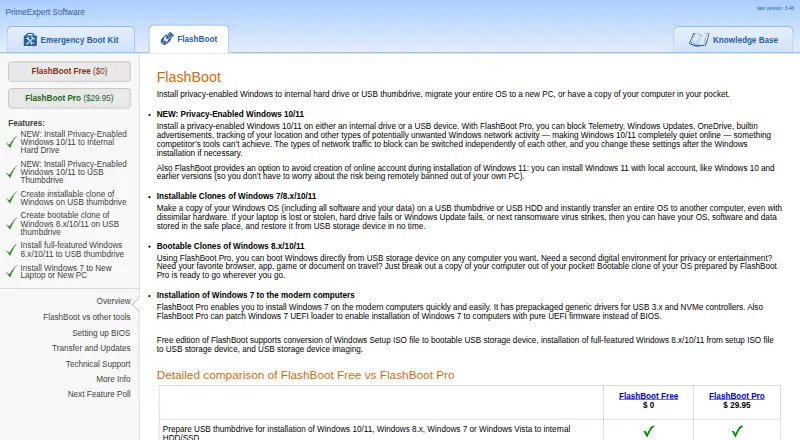
What FlashBoot is
FlashBoot is a Windows utility for preparing Windows installations on internal drives or USB storage, moving Windows to another PC, and making portable copies of a computer. The maker lists setup and cloning workflows for Windows 7, 8.x, 10, and 11, with available features depending on edition. FlashBoot Free can convert Windows setup media for USB, put Windows 8.x, 10, or 11 on USB as a full operating system, and save, restore, or copy USB images while retaining bootability. Pro adds privacy controls, Windows cloning, and driver integration for supported workflows. Its privacy options include registry tweaks and a DNS proxy to block selected kinds of Windows network activity, and it can set up Windows 11 without an online account. For full Windows on USB, the maker recommends USB 3.0, lists USB 2.0 as the minimum, and requires at least 16 GB. The Pro page lists $29.95, paid once, with lifetime upgrades included, but the purchase page says it is currently unavailable. FlashBoot runs on Windows and does not require activation.
Who it suits
FlashBoot suits Windows users who need to prepare installation media, move or clone Windows, or create bootable USB copies. The free edition covers USB setup and imaging; Pro adds privacy, cloning, and driver features, though purchase is currently unavailable.
What it does well
- Free edition includes USB setup and imaging
- USB images can retain bootability
- Pro includes Windows privacy controls and driver integration
- Maker says operation does not access the network
What to know first
- Windows only; no macOS or Linux app
- Pro purchase is currently unavailable
- Full Windows on USB needs at least 16 GB
Limits
FlashBoot Free covers Windows setup USB conversion, full Windows 8.x/10/11 on USB, and USB imaging. Privacy features, OS cloning, and driver integration are listed for Pro, whose $29.95 USD one-time purchase is currently unavailable.
Plans
| Plan | Billed and limits | Price |
|---|---|---|
| FlashBoot Free | Windows Setup USB conversion · Windows 8.x/10/11 full OS on USB · USB imaging | Free |
| FlashBoot Pro | The page lists $29.95; lifetime upgrades are included. · Purchase currently unavailable · Windows privacy features · OS cloning · driver integration | $29.95, paid once |
As prime-expert.com lists them, read 8 Oct 2026. The maker's own page has the final word.
Getting started
- Visit the FlashBoot website.
- Use a Windows computer to run FlashBoot.
- Choose the Free edition for setup USB conversion, full Windows on USB, or USB imaging.
- For full Windows on USB, use a drive with at least 16 GB; USB 3.0 is recommended and USB 2.0 is the minimum.
- Choose Pro for privacy controls, cloning, or driver integration when it is available for purchase.
Verdict
FlashBoot combines Windows setup, USB imaging, and edition-dependent cloning and privacy tools. The free edition has useful USB workflows, while the listed Pro purchase is unavailable at present.
Questions
How much does FlashBoot cost?
FlashBoot Free costs nothing. FlashBoot Pro is listed at $29.95 USD once, and its purchase page says it is currently unavailable.
What does FlashBoot Free include?
It supports converting Windows setup media for USB, running Windows 8.x, 10, or 11 as a full OS on USB, and USB imaging.
Which Windows versions does FlashBoot support?
The maker lists setup and cloning workflows for Windows 7, 8.x, 10, and 11, with feature availability varying by edition.
What does Pro add?
Pro adds privacy controls, OS cloning, and driver integration. It can also make installable clones with apps and data and bootable USB clones for Windows 8.x, 10, and 11.
What computer and USB drive do I need?
FlashBoot runs on Windows. For a full Windows installation on USB, the maker recommends USB 3.0, lists USB 2.0 as the minimum, and specifies at least 16 GB.
Does FlashBoot connect to the network or require activation?
The maker says it does not access the network during installation or operation and does not require activation.
Facts from FlashBoot's own pages
- Cloning
- FlashBoot Pro can create installable Windows clones with apps and data and bootable Windows 8.x/10/11 clones on USB storage. · prime-expert.com, 8 Oct 2026
- Driver integration
- FlashBoot Pro supports integrating USB 3.x, NVMe, AHCI/RAID, or user-supplied drivers into supported Windows installation and clone workflows. · prime-expert.com, 8 Oct 2026
- Hardware requirement
- For a full Windows installation on USB, the maker recommends USB 3.0, lists USB 2.0 as the minimum, and specifies at least 16 GB capacity. · prime-expert.com, 8 Oct 2026
- Maker
- PrimeExpert Software describes itself as a small software development company focused on system utilities, backup and data recovery, and security-related software. · prime-expert.com, 8 Oct 2026
- Network behavior
- The maker says FlashBoot does not access the network during installation or operation and does not require activation. · prime-expert.com, 8 Oct 2026
- Privacy controls
- FlashBoot Pro can apply Windows registry privacy tweaks and a DNS proxy to block selected types of Windows network activity. · prime-expert.com, 8 Oct 2026
- Privacy policy
- The maker says its products do not collect computer usage statistics, error reports, passwords, or other security-sensitive data from users' computers. · prime-expert.com, 8 Oct 2026
- Purchase status
- The FlashBoot Pro purchase page says it is currently unavailable for purchase. · prime-expert.com, 8 Oct 2026
- Purpose
- FlashBoot installs privacy-enabled Windows to an internal drive or USB, migrates Windows to another PC, and creates portable copies of a computer. · prime-expert.com, 8 Oct 2026
- Support
- FlashBoot support is provided by email at [email protected]. · prime-expert.com, 8 Oct 2026
- Updates
- The maker says FlashBoot users receive free lifetime upgrades and updates are downloaded and installed manually. · prime-expert.com, 8 Oct 2026
- USB imaging
- Both editions can save and restore USB storage images and copy a USB drive to another while retaining bootability. · prime-expert.com, 8 Oct 2026
- Windows 11 account setup
- FlashBoot provides an option to install Windows 11 without creating an online account. · prime-expert.com, 8 Oct 2026
- Windows 7 support
- FlashBoot Pro includes generic USB 3.x and NVMe drivers and can patch the Windows 7 UEFI loader for installation on modern computers. · prime-expert.com, 8 Oct 2026
- Windows versions
- The maker lists Windows 7, 8.x, 10, and 11 cloning and setup workflows, with feature availability varying by edition. · prime-expert.com, 8 Oct 2026
Where FlashBoot stands on Freedom251
- Bootable USB Software#13 of 38