Freedom251 › Bootable USB Software
MediCat USB
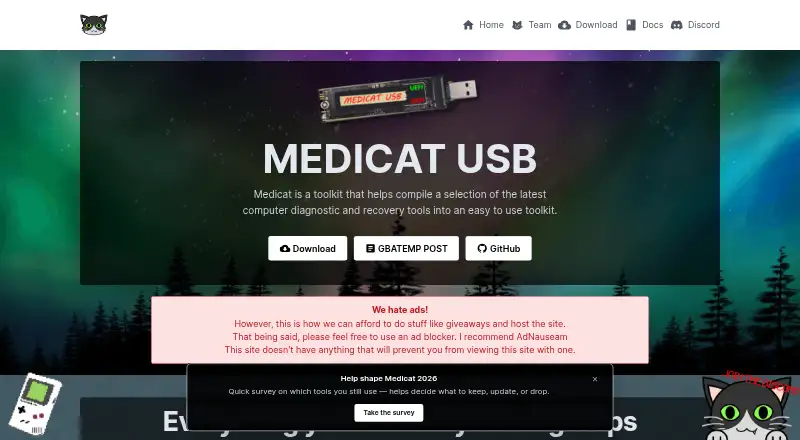
What MediCat USB is
MediCat USB is a bootable toolkit that brings computer diagnostic, repair and maintenance utilities together for use from a USB drive. Its listed tools cover data recovery, partition management, password recovery, system repair, backup, cloning and maintenance, as well as diagnostics. The toolkit supports UEFI and Legacy BIOS boot options, multiboot, persistent storage and both partition schemes. Windows and Linux installers are available: batch and Bash, respectively. For manual setup, the guide names Ventoy, 7-Zip and the latest MediCat release. The requirements page supports drives of 32 GB or larger and recommends USB 3.0 or above. Downloads are free, and optional donations are not required to access them. The site offers torrent, magnet, direct mirrors, Google Drive and Mega as download routes, and publishes MD5 and SHA1 hashes for MediCat.USB.v21.12.7z. Founded in 2014, MediCat identifies IT professionals, system administrators, computer repair technicians, power users and tech enthusiasts as its intended audience. The maker cautions that bundled tools may not be licensed for commercial use, leaving users responsible for checking their terms. It also provides the toolkit as-is without warranty and disclaims responsibility for data loss or hardware damage.
Who it suits
MediCat USB is aimed at IT professionals, system administrators, computer repair technicians, power users and tech enthusiasts. It suits people looking for a bootable drive toolkit with recovery, partition, repair and maintenance tools for Windows or Linux systems.
What it does well
- Free downloads with optional donations.
- Includes diagnostic, recovery, repair and maintenance tool categories.
- Supports UEFI and Legacy BIOS boot options.
- Provides Windows batch and Linux Bash installers.
- Offers several download methods and publishes file hashes.
- Supports multiboot and persistent storage.
What to know first
- A drive of at least 32 GB is supported.
- USB 3.0 or above is recommended.
- Bundled tools may not be licensed for commercial use.
- The maker provides no warranty and disclaims responsibility for data loss or hardware damage.
Limits
The toolkit is free, with optional donations. Bundled tools may not be licensed for commercial use, so users are responsible for checking their licenses.
Plans
| Plan | Billed and limits | Price |
|---|---|---|
| MediCat USB | Free downloads; optional donations | Free |
As medicatusb.com lists them, read 8 Oct 2026. The maker's own page has the final word.
Getting started
- Visit https://medicatusb.com/.
- Choose a download method: torrent, magnet, direct mirror, Google Drive or Mega.
- Prepare a drive of 32 GB or larger; USB 3.0 or above is recommended.
- For manual installation, obtain Ventoy, 7-Zip and the latest MediCat release.
- Use the batch installer for Windows or Bash installer for Linux, or follow the manual installation guide.
- For community support, visit the Medicat Discord.
Verdict
Choose MediCat USB if you want a free bootable toolkit spanning diagnostics, recovery, repair and maintenance, with Windows and Linux installer options. It may not suit commercial use unless you verify the licenses of the bundled tools, and its maker provides it without warranty.
Questions
How much does MediCat USB cost?
MediCat USB and its downloads are free. Donations are optional and not required for access.
Which operating systems does it support?
The listed platforms are Windows and Linux, with batch and Bash installers offered.
What drive is needed?
The requirements page supports drives of 32 GB or larger and recommends USB 3.0 or above.
What is needed for manual installation?
The manual guide names Ventoy, 7-Zip and the latest MediCat release.
Can MediCat be used commercially?
Bundled tools may not be licensed for commercial use. Users are responsible for checking their licenses.
Where can users get community support?
The troubleshooting guide directs users to the Medicat Discord.
Facts from MediCat USB's own pages
- Bootable toolkit
- MediCat is described as an all-in-one bootable USB solution for system diagnostics, repair, and maintenance. · medicatusb.com, 8 Oct 2026
- Boot compatibility
- The overview says MediCat supports UEFI and Legacy BIOS boot options. · medicatusb.com, 8 Oct 2026
- Downloads
- The homepage lists torrent, magnet, direct download mirrors, Google Drive, and Mega as download methods. · medicatusb.com, 8 Oct 2026
- Download verification
- The homepage publishes MD5 and SHA1 hashes for MediCat.USB.v21.12.7z. · medicatusb.com, 8 Oct 2026
- Drive requirement
- The requirements page says any drive of 32 GB or larger is supported and recommends USB 3.0 or above. · medicatusb.com, 8 Oct 2026
- Founded
- 2014 · medicatusb.com, 28 Sept 2026
- Included tools
- The overview lists diagnostic, data recovery, partition management, system repair, password recovery, backup, cloning, and maintenance tools. · medicatusb.com, 8 Oct 2026
- Installer
- The site offers batch and Bash installers for Windows and Linux. · medicatusb.com, 8 Oct 2026
- Intended users
- The overview identifies IT professionals, system administrators, computer repair technicians, power users, and tech enthusiasts as intended users. · medicatusb.com, 8 Oct 2026
- Price
- The maker says MediCat USB and its downloads are free, with donations optional and not required for access. · medicatusb.com, 8 Oct 2026
- Purpose
- MediCat compiles computer diagnostic and recovery tools into a toolkit. · medicatusb.com, 8 Oct 2026
- Safety disclaimer
- The maker says MediCat is provided as-is without warranty and disclaims responsibility for data loss and hardware damage. · medicatusb.com, 8 Oct 2026
- Setup
- The manual installation guide names Ventoy, 7-Zip, and the latest MediCat release as required software. · medicatusb.com, 8 Oct 2026
- Support
- The troubleshooting guide directs users to the Medicat Discord for community support. · medicatusb.com, 8 Oct 2026
- Use limits
- The overview warns that bundled tools may not be licensed for commercial use and puts responsibility for checking their licenses on users. · medicatusb.com, 8 Oct 2026
Where MediCat USB stands on Freedom251
- Bootable USB Software#11 of 38