Freedom251 › Bootable USB Software
Chromebook Recovery Utility
What Chromebook Recovery Utility is
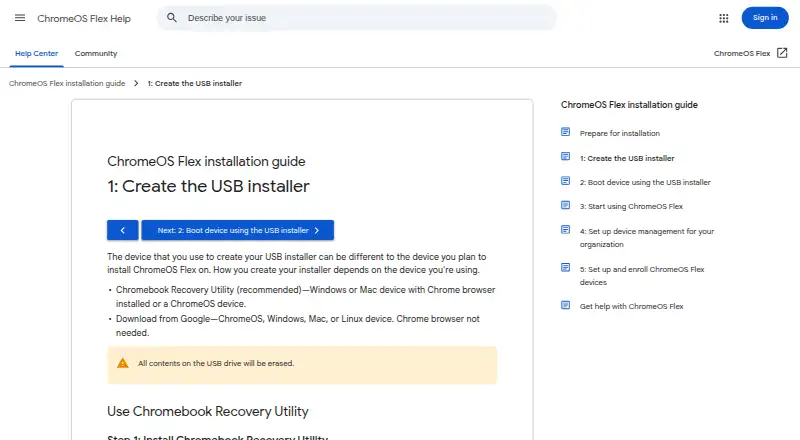
Chromebook Recovery Utility is a free Chrome extension for creating USB installer media for ChromeOS Flex. It runs from Chrome on ChromeOS, Windows, or Mac devices, and Google recommends it as the method for making the installer. In its workflow, select Google ChromeOS Flex as the manufacturer, choose ChromeOS Flex as the product, pick a USB drive, and create the media. The drive must provide at least 8 GB, and creating the installer erases all existing contents. The utility can also erase recovery media so the USB drive can be reused. Google recommends recreating the USB installer with this utility when installation fails. An alternative installer image supports bootable-media creation with dd or another utility without Chrome. The extension listing says its developer disclosed no user-data collection or use, and Google says it processes no personal data. ChromeOS Flex functionality is guaranteed only on certified device models.
Who it suits
It suits administrators installing ChromeOS Flex on Windows, Mac, or Linux devices who can use Chrome and an 8 GB-or-larger USB drive. Users comfortable with command-line or third-party utilities can instead use Google’s installer image.
What it does well
- Free Chrome extension
- Creates ChromeOS Flex USB media
- Works on ChromeOS, Windows, and Mac
- Can erase media for reuse
- No personal-data processing stated
What to know first
- Creating media erases USB contents
- Requires an 8 GB-or-larger USB drive
- Some Sandisk drives might not work
- Non-certified device performance is not guaranteed
Verdict
Chromebook Recovery Utility provides Google’s recommended browser-based route for making ChromeOS Flex installation media. Check the USB requirement and certified-device limits before proceeding.
Facts from Chromebook Recovery Utility's own pages
- Alternative creation method
- Google also provides a ChromeOS Flex installer image for users comfortable creating bootable USB drives with dd or third-party utilities. · support.google.com, 11 Oct 2026
- Alternative method
- Google also provides a ChromeOS Flex installer image for creating bootable USB media without Chrome browser, using dd or another utility. · support.google.com, 11 Oct 2026
- Browser extension
- Google’s installation guide says to add Chromebook Recovery Utility from the Chrome Web Store as a Chrome extension. · support.google.com, 11 Oct 2026
- ChromeOS Flex installer
- The utility can create a USB installer for ChromeOS Flex from ChromeOS, Windows, or Mac using the Chrome browser. · support.google.com, 11 Oct 2026
- Data disclosure
- The Chrome Web Store listing says the developer disclosed that the extension does not collect or use user data. · chromewebstore.google.com, 11 Oct 2026
- Erase USB contents
- Creating the installer erases all contents on the USB drive. · support.google.com, 11 Oct 2026
- Format media
- The utility can erase recovery media so the USB drive can be reused. · support.google.com, 11 Oct 2026
- Installer selection
- The utility’s workflow lets users select Google ChromeOS Flex as the manufacturer and ChromeOS Flex as the product. · support.google.com, 11 Oct 2026
- Intended users
- Google’s installation guide describes ChromeOS Flex installation as a process for admins installing it on Windows, Mac, or Linux devices. · support.google.com, 11 Oct 2026
- Privacy
- Google states that it processes no personal data as part of the service. · support.google.com, 11 Oct 2026
- Product limit
- Google only guarantees ChromeOS Flex functionality on certified device models; performance, functionality, and stability on non-certified devices are not guaranteed. · support.google.com, 11 Oct 2026
- Purpose
- Chromebook Recovery Utility burns a recovery image onto a separate device, such as a USB drive or SD card, for recovering a ChromeOS device. · support.google.com, 11 Oct 2026
- Recommended method
- Google recommends Chromebook Recovery Utility for creating the ChromeOS Flex USB installer. · support.google.com, 11 Oct 2026
- Recovery media
- The utility creates recovery media by selecting a model, choosing a USB drive, and creating the installer. · support.google.com, 11 Oct 2026
- Support
- Google directs users to the ChromeOS Flex Help Community and says support for certified devices is available to Chrome Enterprise, Chrome Education, or Google Workspace customers, depending on subscription. · support.google.com, 11 Oct 2026
- Supported creator devices
- The guide lists ChromeOS, Windows, and Mac devices with Chrome as devices for using the utility. · support.google.com, 11 Oct 2026
- Supported extension devices
- The Chrome Web Store listing says the extension can be used on M55+ Chromebooks, Windows, and Mac devices, and that recovery media creation on a Googlebook is unsupported. · chromewebstore.google.com, 11 Oct 2026
- Target users
- Google describes the direct installer-image method as intended for admins comfortable creating bootable USB drives with command-line or third-party utilities. · support.google.com, 11 Oct 2026
- USB erasure
- Creating the installer erases all contents on the USB drive. · support.google.com, 11 Oct 2026
- USB formatting
- Google recommends using Chromebook Recovery Utility to erase and reuse a ChromeOS Flex installer USB drive. · support.google.com, 11 Oct 2026
- USB requirement
- The ChromeOS Flex installation guide says the USB drive must have at least 8 GB of storage. · support.google.com, 11 Oct 2026
- USB requirements
- The ChromeOS Flex installation guide requires a USB drive of 8 GB or more and notes that some Sandisk and other drives might not work as installers. · support.google.com, 11 Oct 2026
Where Chromebook Recovery Utility stands on Freedom251
- Bootable USB Software#8 of 38