Freedom251 › Nintendo 64 Emulators
RustyN64
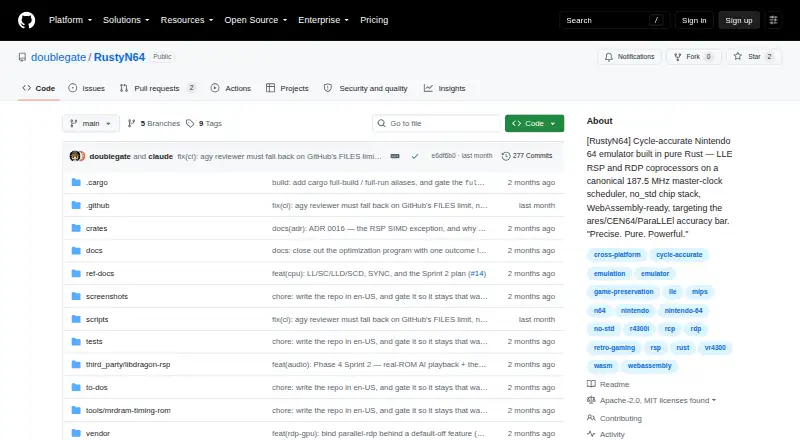
What RustyN64 is
RustyN64 is a free Nintendo 64 emulator written in pure Rust, designed around cycle-accurate emulation. Its CPU and coprocessors are coordinated by a shared 187.5 MHz master-clock timeline. Version 0.7.0 is described as its first playable release, showing picture, sound, and controller input with homebrew ROMs. The low-level graphics path matches Angrylion across 164 conformance vectors, while the project says its accuracy battery is still stubbed at 0%. It also states that the same seed, ROM, and input sequence produce identical framebuffer and audio. The egui frontend has save states, rewind, and run-ahead, but those features are off by default. A WebAssembly entry point runs a homebrew ROM and displays video on a 2D canvas; a fuller browser shell remains planned. Commercial support is limited: a title can start and execute game code but has not yet rendered a frame. Desktop builds are listed for Linux x64, macOS ARM64, and Windows x64. A GPU with a wgpu-supported backend is required, and commercial ROMs are not bundled.
Who it suits
RustyN64 may suit homebrew players and contributors interested in a cycle-accurate emulator project. Desktop users need a supported GPU backend, and those expecting commercial game compatibility should note the stated limitation.
What it does well
- Free and dual-licensed under MIT or Apache 2.0.
- First playable release demonstrates homebrew video, sound, and input.
- Frontend includes save states, rewind, and run-ahead.
- Browser entry point runs a homebrew ROM.
- Graphics path matches Angrylion across 164 conformance vectors.
What to know first
- Full browser shell remains roadmap work.
- A commercial title has not rendered a frame.
- Frontend features are off by default.
- Desktop use requires a wgpu-supported GPU backend.
Limits
The free RustyN64 plan is listed as free. Its first playable release demonstrates homebrew ROMs; a commercial title can boot and execute code but has not yet reached a rendered frame. The full browser shell remains roadmap work.
Plans
| Plan | Billed and limits | Price |
|---|---|---|
| RustyN64 | Open-source emulator · MIT or Apache-2.0 license | Free |
As github.com lists them, read 30 Sept 2026. The maker's own page has the final word.
Getting started
- Open the RustyN64 GitHub website.
- For desktop use, have Rust 1.96.0 and a GPU with a wgpu-supported Vulkan, Metal, or DX12 backend.
- On Linux, provide the listed audio, input, and window-system development headers.
- Use a homebrew ROM with the version 0.7.0 playable release or the WebAssembly browser entry point.
- Use save states, rewind, or run-ahead from the desktop frontend if needed; these features are off by default.
- Use legally owned cartridge dumps for commercial ROMs; the project does not bundle them.
RustyN64 is a cycle-accurate Nintendo 64 emulator written in pure Rust. It is best suited to homebrew play and to readers interested in emulation development; commercial-game support is still an early work in progress. Its carefully clocked core and deterministic output are promising, but not a substitute yet for a mature N64 library.
Overview
Version 0.7.0 is the project’s first playable release: homebrew ROMs can produce video and sound and accept controller input. A commercial title can boot and execute game code, but it has not reached a rendered frame, with that work deferred to Phase 7. That makes RustyN64 a poor choice for someone whose priority is playing a collection of commercial games.
The core schedules the CPU and coprocessors on a canonical 187.5 MHz master-clock timeline, using low-level emulation for the RSP and RDP. The project reports that its software RDP and VI scan-out bit-match Angrylion across 164 conformance vectors. That is a specific graphics result, not a broad accuracy verdict: the accuracy battery remains stubbed at 0%.
RustyN64 is dual-licensed under MIT or Apache License 2.0. Commercial Nintendo ROMs are not bundled; users are responsible for using dumps from cartridges they legally own.
Key features
- Deterministic output: The project says the same seed, ROM, and input sequence yield a bit-identical framebuffer and audio. That can be useful for repeatable development and testing, though it does not expand the current compatibility range.
- Video, audio, and controls: The frontend connects VI video output, AI audio, and SI controller input. Combined with the homebrew milestone, this makes the emulator playable for a narrower set of software rather than merely a core in progress.
- Save states, rewind, and run-ahead: These frontend options are included but off by default. They give users additional ways to manage play, while requiring deliberate activation.
- Browser demo: A WebAssembly entry point runs a homebrew ROM and displays video on a 2D canvas. The fuller browser shell remains roadmap work, so browser users should expect a demo rather than desktop-equivalent controls and features.
- Open development: The project invites code, testing, documentation, and design contributions, and provides contribution guidance and quality-gate instructions. Its chip and core crates forbid unsafe code, and the repository says the tree contains none.
Pricing
RustyN64 has one free plan: free. It is an open-source emulator under MIT or Apache-2.0, with save states, high-resolution rendering, and controller remapping. There are no paid tiers or plan-based feature trade-offs to weigh. The practical limits are compatibility and performance: no full-speed run path or headline performance measurements have been published, and commercial titles have not yet reached a rendered frame.
Platforms
Desktop builds are listed for Linux x64, macOS ARM64, and Windows x64, and are built and tested in CI. The frontend requires Rust 1.96.0 and a GPU with a wgpu-supported Vulkan, Metal, or DX12 backend. Linux also requires audio, input, and window-system development headers, a setup burden that may put off users looking for a ready-to-run desktop emulator. WebAssembly currently provides a homebrew browser demo, not the full shell.
Who it's for
RustyN64 is a sensible fit for homebrew players, emulator developers, and contributors who value a pure-Rust, clock-driven design and reproducible output. It is not the right pick for players seeking established commercial-game compatibility, measured full-speed performance, or a complete browser interface. The requirement to supply legally owned ROM dumps also means it does not provide games to get started.
Pros and cons
- Pro: A canonical clock and low-level RSP/RDP design offer a concrete, timing-focused emulation approach.
- Pro: Bit-identical output for matching seeds, ROMs, and inputs supports repeatable results.
- Pro: Free, dual-licensed software includes save states, rewind, run-ahead, high-resolution rendering, and controller remapping.
- Con: The first playable release is homebrew-focused; a commercial title has not yet produced a rendered frame.
- Con: The 164-vector graphics result sits alongside an accuracy battery still at 0%, so it should not be mistaken for comprehensive validation.
- Con: No full-speed run path or headline performance measurements are published, and desktop use depends on a supported GPU backend.
Alternatives
For a broader multi-platform option, RetroArch is free, open source, and runs on Android, iOS, Linux, macOS, web, and Windows; choose it when that wider platform reach matters more than RustyN64’s clock-focused design.
Virtual Jaguar is a free open-source emulator core that requires a libretro frontend such as RetroArch, so it is relevant when a frontend-dependent core is what you need.
CEN64 is a free open-source emulator for Linux, macOS, and Windows; its Mac build requires compiling from source, and it requires PIF data and ROM files. Choose it when those requirements fit your setup.
Gopher64 is a free downloadable emulator for Android, Linux, macOS, and Windows; its platform list makes it a candidate for Android users.
ares is a free, open-source multi-system emulator for Linux, macOS, and Windows; choose it when multi-system emulation is the priority.
Luna's Project64 is a free, GPLv2-licensed open-source option for Linux and Windows, distributed through GitHub Releases.
Mupen64Plus is a free N64 emulator with plugins and download bundles for supported operating systems; it is an alternative for readers seeking that bundled emulator-and-plugin approach.
BizHawk is a free MIT-licensed emulator with Windows and Unix releases.
Browse the Nintendo 64 Emulators category to compare more options.
Verdict
Choose RustyN64 if you want a free, open-source emulator for homebrew and value its timing model, deterministic output, or contribution path. Its clearest strength is the deliberate emulation architecture; its clearest drawback is that commercial compatibility and full-speed performance remain unfinished. Players who want to run commercial N64 games now should look elsewhere.
Verdict
RustyN64 combines a detailed emulation design with a playable homebrew-focused release and desktop builds for three operating systems. Its commercial compatibility remains limited, and the fuller browser shell is still planned.
Questions
How much does RustyN64 cost?
The RustyN64 plan is listed as free.
What license does it use?
RustyN64 is dual-licensed under MIT or Apache License 2.0.
Which desktop platforms are supported?
Built and tested desktop platforms listed by the project are Linux x64, macOS ARM64, and Windows x64. A WebAssembly browser demo is also available.
What are the desktop requirements?
The project specifies Rust 1.96.0 and a GPU with a wgpu-supported Vulkan, Metal, or DX12 backend. Linux also requires listed audio, input, and window-system development headers.
Does it support save states?
Yes. The desktop frontend includes save states, rewind, and run-ahead, with these features off by default.
Are commercial Nintendo ROMs included?
No. Commercial ROMs are not bundled; the README says users are responsible for using dumps from cartridges they legally own.
Facts from RustyN64's own pages
- Accuracy status
- The project says its commercial-ROM accuracy battery is stubbed at 0% and real-game visual-golden work has not started. · github.com, 30 Sept 2026
- Audience
- The project invites contributions in code, testing, documentation, and design, and provides a contribution guide and quality-gate instructions. · github.com, 29 Sept 2026
- Audio and controls
- The frontend connects VI video output, AI audio, and SI controller input to the game. · github.com, 30 Sept 2026
- Browser demo
- A WebAssembly browser entry point runs a homebrew ROM and displays video on a 2D canvas; the full browser shell is on the roadmap. · github.com, 29 Sept 2026
- Browser support
- A WebAssembly browser entry point runs a homebrew ROM and displays scan-out on a 2D canvas; the full browser shell is described as roadmap work. · github.com, 30 Sept 2026
- Compatibility limit
- A commercial title can boot and execute game code but does not yet reach a rendered frame; the project defers that work to Phase 7. · github.com, 30 Sept 2026
- Current release
- The repository describes v0.7.0 as its first playable release, demonstrated on homebrew ROMs. · github.com, 30 Sept 2026
- Desktop platforms
- The project lists Linux x64, macOS ARM64, and Windows x64 as built and tested in CI. · github.com, 30 Sept 2026
- Determinism
- The project states that the same seed, ROM, and input sequence produce a bit-identical framebuffer and audio. · github.com, 29 Sept 2026
- Emulation
- The project uses low-level emulation for the RSP and RDP, coordinated by a canonical 187.5 MHz master clock. · github.com, 29 Sept 2026
- Emulation architecture
- Its core uses a canonical 187.5 MHz master-clock timeline to schedule the CPU and coprocessors. · github.com, 30 Sept 2026
- Frontend
- The egui shell supports save-states, rewind, and run-ahead, with those frontend features off by default. · github.com, 29 Sept 2026
- Frontend features
- The frontend includes save states, rewind, and run-ahead, with these options off by default. · github.com, 30 Sept 2026
- Graphics
- The low-level RDP rasterizer and VI scan-out bit-match Angrylion across 164 conformance vectors, according to the project. · github.com, 30 Sept 2026
- Intended audience
- The project invites contributions in code, testing, documentation, and design, and describes itself as preserving video game history. · github.com, 30 Sept 2026
- License
- RustyN64 is dual-licensed under MIT or Apache License 2.0. · github.com, 30 Sept 2026
- Performance limit
- The project says it has not published headline performance measurements and does not yet have a full-speed run path. · github.com, 29 Sept 2026
- Platforms
- The project says Linux x64, macOS ARM64, and Windows x64 are built and tested in CI. · github.com, 29 Sept 2026
- Product
- RustyN64 is a cycle-accurate Nintendo 64 emulator written in pure Rust. · github.com, 29 Sept 2026
- Requirements
- The desktop frontend requires a GPU with a wgpu-supported backend, and Linux additionally requires listed audio, input, and window-system development headers. · github.com, 29 Sept 2026
- ROM handling
- The project says commercial Nintendo ROMs are not bundled and that users are responsible for using dumps from cartridges they legally own. · github.com, 30 Sept 2026
- Security and safety
- The repository says every chip crate and core crate forbids unsafe code and that there is zero unsafe code in the tree. · github.com, 30 Sept 2026
- System requirements
- The project specifies Rust 1.96.0 and a GPU with a wgpu-supported Vulkan, Metal, or DX12 backend; Linux also needs listed audio and windowing development headers. · github.com, 30 Sept 2026
- What it does
- RustyN64 is a cycle-accurate Nintendo 64 emulator written in pure Rust. · github.com, 30 Sept 2026
Where RustyN64 stands on Freedom251
- Nintendo 64 Emulators#16 of 24