Freedom251 › Multi-System Emulators
ares
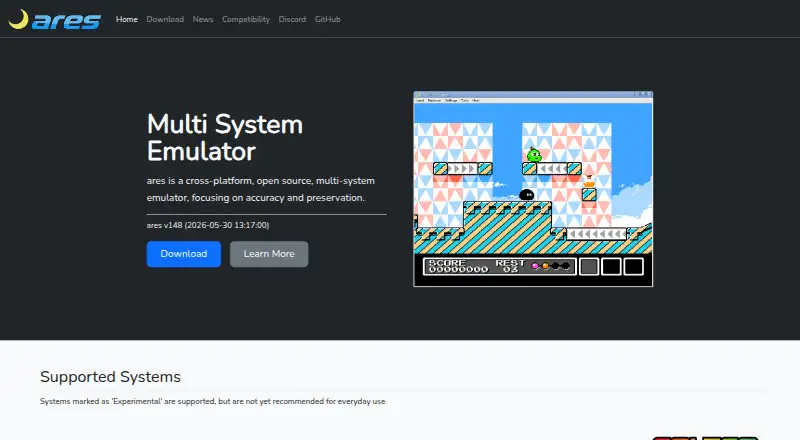
What ares is
ares is a free, open-source emulator for multiple systems, with a focus on accuracy and preservation. It runs on Windows, macOS, and Linux, and the project lists systems including Arcade, Atari 2600, WonderSwan, ColecoVision, NES, SNES, Nintendo 64, and PlayStation; some systems are experimental. Playback options include save states, run-ahead, rewind, and fast-forward. Pixel shaders and optional color correction adjust display characteristics, while Virtual Game-Pads let users configure controls for emulated systems. ares also includes basic debugging features, such as trace logging, for developing original software for supported systems. Its interface uses native-style components through WinAPI on Windows, Cocoa on macOS, and GTK2 or GTK3 on POSIX platforms. Windows builds support Windows 7 or higher, and macOS binaries require Catalina 10.15 and support Intel and Apple Silicon. Linux users are directed to compile from source or use third-party packages rather than official binaries. The source uses the ISC license.
Who it suits
ares suits users seeking an open-source emulator across Windows, macOS, and Linux, including people developing original software for supported systems. Linux users should be comfortable compiling from source or using third-party packages.
What it does well
- Free and open-source under the ISC license
- Supports save states, rewind, and fast-forward
- Offers pixel shaders and optional color correction
- Virtual Game-Pads adapt configured controls across systems
- macOS binaries support Intel and Apple Silicon
What to know first
- Some listed systems are experimental
- No official Linux binaries are provided
- Android is not supported
- A BIOS is required
Limits
Some systems are experimental, and a BIOS is required. Linux users are directed to compile from source or use third-party packages rather than official Linux binaries.
Plans
| Plan | Billed and limits | Price |
|---|---|---|
| ares | Open-source multi-system emulator | Free |
| Free | open-source emulator · downloadable source and binaries | Free |
As ares-emu.net lists them, read 2 Oct 2026. The maker's own page has the final word.
Getting started
- Visit the ares website
- Choose the build route for Linux, macOS, or Windows
- On Linux, compile from source or use a third-party package
- On Windows, use a supported Windows 7-or-later system
- On macOS, use Catalina 10.15 or later
- Provide a BIOS
Overview
ares is a free, open-source emulator for players and preservation-minded users who want one desktop application for a wide range of classic systems. Its breadth and playback controls make it a capable general-purpose option, though experimental support and a less direct Linux installation path are meaningful trade-offs.
The project focuses on accuracy and preservation and supports 34 console systems, alongside arcade emulation. Its catalogue includes Atari 2600, WonderSwan, ColecoVision, NES, SNES, Nintendo 64, and PlayStation; some systems are experimental, so users should not assume equal maturity across the range. A BIOS is required.
ares began as a higan fork in 2020; the project’s lineage reaches back to bsnes, which started in 2004 and was renamed higan in 2012. The source is distributed under the ISC license. Its hiro framework provides a native-style interface through WinAPI on Windows, Cocoa on macOS, and GTK2 or GTK3 on POSIX platforms.
Key features
Playback and display controls
Save states, rewind, run-ahead, and fast-forward give players several ways to manage a session, from returning to a saved point to changing playback timing. Pixel shaders and optional color correction let users shape the image and approximate characteristics of original displays. These options are useful for users who want control over presentation as well as emulation.
Controls and debugging
Virtual Game-Pads let users configure controls once and adapt them to different emulated systems, a practical advantage when moving among hardware with different layouts. Simple debugging features, including trace logging, also make ares relevant to developers working on original software for supported systems, though the debugging tools are described as simple rather than a full development suite.
Pricing
ares has one plan: ares costs nothing. It is an open-source multi-system emulator, with no paid tier or trial to weigh against the free plan. That makes it straightforward for users who want broad desktop coverage without a subscription; the main costs are the required BIOS and, for Linux users, potentially compiling from source or relying on a third-party package.
Platforms
ares runs on Linux, macOS, and Windows, but platform support comes with different requirements. Windows builds support Windows 7 or higher; AMD64 binaries require at least an Intel Nehalem or AMD Jaguar CPU architecture. macOS binaries require Catalina 10.15 and are universal for Intel and Apple Silicon.
Android is not supported. That makes ares a stronger fit for desktop users comfortable with their platform’s installation requirements than for anyone seeking a simple mobile option.
Who it's for
ares suits desktop players who value a broad system catalogue, configurable playback and display, and open-source software in one application. It is also worth considering for developers interested in trace logging for supported systems. Users focused on a particular experimental system should check its maturity, while Linux newcomers may prefer an emulator with official binaries and Android users will need another choice.
Pros and cons
- Pro: Coverage across 34 console systems plus arcade support gives users a wide range in one emulator.
- Pro: Save states, rewind, run-ahead, fast-forward, shaders, and color correction offer meaningful playback and image controls.
- Pro: Virtual Game-Pads can carry a control setup across emulated systems.
- Con: Some systems are experimental, so broad catalogue coverage does not guarantee consistent maturity.
- Con: Linux installation may require compiling from source or using third-party packages rather than an official binary.
- Con: A BIOS is required, and there is no Android version.
Alternatives
Choose Virtual Jaguar if you want a free emulator core across Android, iOS, Linux, macOS, web, and Windows and are prepared to use a libretro frontend such as RetroArch. MasterGear is an option for Android users or those seeking its Windows/Linux builds; its Android plan costs $430, paid once, while its Windows/Linux plan is free.
Emulicious may suit users wanting a free emulator for personal use on Linux, macOS, or Windows; commercial users should seek permission first. Genesis Plus GX is another free option for Linux or Windows, with a specific non-commercial license for its source code and a standalone GameCube/Wii build.
BizHawk is worth considering for users who want a free, MIT-licensed emulator with Windows and Unix releases. Dega is a free Linux/Windows option for non-commercial use only. PicoDrive offers a free open-source option for Linux and Windows, with release packages or ZIP archives installed manually.
MasterEmu is an Android alternative. For system-specific browsing, see Sega Master System emulators, TurboGrafx-16 emulators, SNES emulators, Nintendo 64 emulators, Sega CD emulators, and Game Boy Advance emulators.
Verdict
Choose ares if you want a free, open-source desktop emulator that combines wide system coverage with useful playback, display, and control options. Its main appeal is consolidating many systems without a paid plan; look elsewhere if you need Android support, official Linux binaries, or dependable maturity across every supported system.
Verdict
ares offers playback controls, display options, and a broad listed range of systems in a free, open-source package. Linux users should note the project’s preference for source compilation or third-party packages.
Questions
Is ares free?
Yes. The listed ares plan costs nothing, and the project is open source.
Which systems does ares support?
The listed systems include Arcade, Atari 2600, WonderSwan, ColecoVision, NES, SNES, Nintendo 64, and PlayStation. Some are experimental; 34 console systems are listed.
Which platforms can run ares?
ares supports Linux, macOS, and Windows. Android is not supported.
Does ares require a BIOS?
Yes, a BIOS is required.
What are ares's computer requirements?
Windows builds support Windows 7 or later; AMD64 binaries require at least Intel Nehalem or AMD Jaguar architecture. macOS binaries require Catalina 10.15 and support Intel and Apple Silicon.
What license does ares use?
Its source code is distributed under the ISC license.
Facts from ares's own pages
- Arch package
- Arch Linux distributes ares-emu 148-2 for x86_64 under the ISC license; the package is 4.2 MB and installs to 15.9 MB. · archlinux.org, 15 Oct 2026
- Build support
- The repository documents building on Windows, macOS, Linux and BSD using CMake-based workflows. · github.com, 15 Oct 2026
- Color correction
- Color correction can reproduce display characteristics of original hardware such as washed-out handheld screens and LCD ghosting. · ares-emu.net, 15 Oct 2026
- Command-line interface
- The executable accepts options for fullscreen, kiosk mode, shader selection, settings overrides, save-state loading and system selection. · github.com, 15 Oct 2026
- Components
- The project includes emulation cores plus libco, nall, hiro, ruby, mia and desktop-ui components. · ares-emu.net, 15 Oct 2026
- Debugger
- A built-in debugger provides simple tracing tools for development of original software. · ares-emu.net, 15 Oct 2026
- Development
- ares includes simple debugging features such as trace logging to aid development of original software for supported systems. · ares-emu.net, 2 Oct 2026
- Display features
- ares supports pixel shaders and optional color correction to emulate original display characteristics. · ares-emu.net, 2 Oct 2026
- Documentation depth
- Developer documentation includes platform-specific build guides with compiler, CMake, dependency and install steps. · github.com, 15 Oct 2026
- Dynamic rate control
- Audio and video can be synchronized to smooth output when emulated and host frame rates differ. · ares-emu.net, 15 Oct 2026
- Experimental systems
- Atari 2600, MSX, MSX2, PC-Engine CD, LaserActive, ZX Spectrum, Neo Geo and PlayStation are marked experimental on the official system list. · ares-emu.net, 15 Oct 2026
- Extensibility
- The command line supports loading multiple games, alternate settings files and custom slang shaders, but the project pages do not describe a hosted API or SDK. · github.com, 15 Oct 2026
- Founded
- 2020 · ares-emu.net, 23 Sept 2026
- FreeBSD distribution
- No official FreeBSD package is supplied, but ares is available through FreeBSD Ports. · ares-emu.net, 15 Oct 2026
- FreeBSD package
- FreshPorts lists ares 148_5, updated October 15, 2026, with ISC licensing and packages for several FreeBSD architectures. · freshports.org, 15 Oct 2026
- Hotkey limitation
- FreshPorts notes that game inputs and hotkeys share a binding space, which can inconvenience gamepad-only users. · freshports.org, 15 Oct 2026
- Input
- Virtual Game-Pads let users configure controls once and adapt them to each emulated system. · ares-emu.net, 2 Oct 2026
- Input complaint
- A Reddit user reported recurring controller disconnects that forced remapping and said profiles were not reliably remembered. · reddit.com, 15 Oct 2026
- Input mapping
- Virtual Game-Pads allow one control configuration to be adapted across different emulated systems. · ares-emu.net, 15 Oct 2026
- Input mapping complaint
- Another commenter said switching systems could overwrite controller mappings with unusable values and led them to move some setups elsewhere. · reddit.com, 15 Oct 2026
- License
- The source code is distributed under the ISC license. · ares-emu.net, 15 Oct 2026
- Linux build documentation
- The Linux guide covers dependency installation, cloning, CMake configuration, building and staging the runtime directory. · github.com, 15 Oct 2026
- Linux distribution
- The project does not publish official Linux binaries and directs users to compile from source or use known third-party packages. · ares-emu.net, 15 Oct 2026
- Linux support
- The project prefers that Linux users compile from source and links to third-party packages rather than providing official Linux binaries. · ares-emu.net, 2 Oct 2026
Where ares stands on Freedom251
- Multi-System Emulators#1 of 54
- Game Console Emulators#1 of 35
- TurboGrafx-16 Emulators#1 of 33
- Game Gear Emulators#1 of 31
- SNES Emulators#1 of 30
- Game Boy Advance Emulators#1 of 29
- Sega Genesis Emulators#1 of 29
- Sega Master System Emulators#1 of 25
- Nintendo 64 Emulators#1 of 24
- Sega CD Emulators#1 of 19