Freedom251 › Sega Master System Emulators
BizHawk
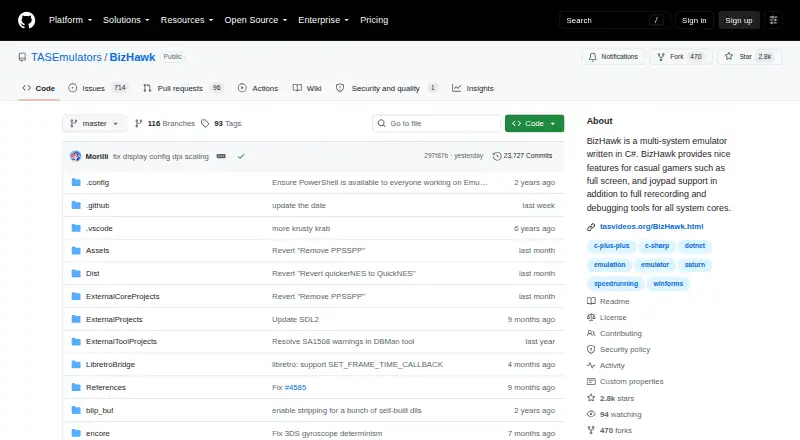
What BizHawk is
BizHawk is a free, multi-system emulator for Windows and Linux, with EmuHawk providing playback, recording, and debugging tools aimed at Tool-Assisted Speedrunners. Supported systems include 3DO, Apple II, arcade machines, Atari, Commodore, Nintendo, Sega, and PlayStation consoles. Players can use 10 hotkey-accessible save slots or create unlimited named savestates. Playback offers speed control, frame stepping, and rewind. Input can be recorded as TAS movies, and screenshots, audio, and video can be captured to files. Debugging tools can view, search, and edit memory across emulated hardware components. Lua or C#.NET can control the core and frontend; keyboard, mouse, and gamepad hotkeys are rebindable, with an input mapper for emulated gamepads and peripherals. The Linux version targets x86_64 CPUs and does not include the Mupen64Plus core for N64. Current BizHawk is not available for Android or iOS, while macOS use is limited to older releases or technical workarounds. The project recommends stable releases when stability matters.
Who it suits
BizHawk suits Tool-Assisted Speedrunners and users who want multi-system emulation with recording, playback, and debugging tools. It is intended for Windows and Linux users.
What it does well
- Free plan; the emulator is MIT-licensed.
- Supports many systems, including Nintendo, Sega, and PlayStation.
- Unlimited named savestates and 10 hotkey-accessible slots.
- Playback includes speed control, frame stepping, and rewind.
- Memory can be viewed, searched, and edited.
What to know first
- Linux omits Mupen64Plus for N64.
- The project targets x86_64 CPUs.
- Current releases are unavailable on Android and iOS.
- macOS support is limited to older releases or workarounds.
Plans
| Plan | Billed and limits | Price |
|---|---|---|
| BizHawk | MIT-licensed emulator; Windows and Unix releases | Free |
As github.com lists them, read 30 Sept 2026. The maker's own page has the final word.
Getting started
- Visit the BizHawk project website.
- Choose a Windows or Linux release for a supported platform.
- Use a system with an x86_64 CPU.
BizHawk is a free desktop emulator for users who need precise playback, recording, scripting, and debugging across many classic systems. It is especially well suited to Tool-Assisted Speedrunners, emulator developers, and researchers of game behavior; casual players wanting phone or Mac support should look elsewhere.
Overview
EmuHawk brings systems including 3DO, Apple II, arcade hardware, Atari and Commodore computers, Nintendo and Sega consoles, and PlayStation consoles into one C# application. Its value is the combination of broad emulation coverage with tools for manipulating play frame by frame, capturing media, and inspecting emulated hardware.
BizHawk is aimed at x86_64 computers. Current releases support Windows and Linux, while Android and iOS are unavailable. macOS is confined to older releases or technical workarounds, so it is a poor fit if one installation must cover modern desktop and mobile devices. Online multiplayer is not supported.
Key features
Playback and saves
Speed controls, frame stepping, and rewind let users isolate and reproduce exact moments instead of relying on normal real-time play. Ten hotkey-accessible save slots cover quick checkpoints, while unlimited named savestates are better for organizing experiments, routes, or multiple versions of a run.
Recording and capture
Input can be recorded as TAS movies, making the emulator a practical workspace for tool-assisted runs and repeatable demonstrations. Screenshots, audio, and video can also be saved to files, which suits documentation and analysis as well as finished presentations.
Debugging and scripting
Memory viewing, searching, and editing work across emulated hardware components. That gives advanced users a way to trace values and alter state directly, rather than treating the game as a black box. Lua and C# .NET can control the core and frontend programmatically, enabling automation and custom tooling for users comfortable with code.
Controls and emulation options
Keyboard, mouse, and gamepad hotkeys are rebindable, and an input mapper handles emulated gamepads and peripherals. Cheat support, shader support, rewind, and RetroAchievements broaden the feature set. The emulation format is listed as both, accommodating the project’s multi-system scope.
Pricing
BizHawk costs nothing. The free plan is the complete MIT-licensed emulator for Windows and Unix releases, with no trial period or paid tier described. That removes a purchase barrier for hobbyists and speedrunners, while the MIT license is permissive for the emulator components.
Licensing still needs care: the project says EmuHawk and DiscoHawk are MIT-licensed, but not every file bundled with releases may be freely shared. Users distributing a package should therefore check the status of included files rather than assuming the whole release has identical terms.
Platforms
Windows and Linux are the supported platforms. Linux provides most features and cores but omits the Mupen64Plus N64 core, a decisive limitation for anyone whose library centers on Nintendo 64. The x86_64 target also rules out unsupported CPU environments. macOS users are limited to older releases or workarounds, and there is no current Android or iOS version.
For stability-sensitive work, the project recommends stable releases. Development builds make sense when a particular change is required, but they are not the default choice for dependable long sessions. The security policy lists versions 2.11 and 2.10 as supported, advises updating where possible, and accepts vulnerability reports through GitHub.
Who it's for
Choose BizHawk if you want one desktop application for many retro platforms and need frame-accurate playback, TAS recording, memory inspection, or Lua/C# automation. Its hotkeys, named savestates, capture tools, and debugging access are substantially more useful to speedrunners, analysts, and developers than to players seeking a simple plug-and-play console front end.
It is not the right choice for mobile gaming, current macOS setups, online multiplayer, or Linux users who require the Mupen64Plus N64 core. Those constraints outweigh its breadth when platform coverage is the priority.
Pros and cons
- Pro: Extensive system coverage combines 3DO, computers, arcades, and major console families in one emulator.
- Pro: Frame stepping, speed control, rewind, TAS movies, and unlimited named savestates support repeatable tool-assisted work.
- Pro: Memory editing plus Lua and C# .NET control gives advanced users unusually deep automation and debugging access.
- Pro: The complete emulator is free, with cheat, shader, and RetroAchievements support.
- Con: Linux omits the Mupen64Plus N64 core, so platform breadth is not identical across desktop systems.
- Con: There is no current Android or iOS release, and macOS support depends on older versions or workarounds.
- Con: No online multiplayer makes it unsuitable for networked play.
- Con: Release bundles can include files whose redistribution rights differ from the MIT-licensed emulator components.
Alternatives
ares is a free, open-source multi-system emulator for Linux, macOS, and Windows, making it the better pick when current Mac support and open-source distribution matter more than BizHawk’s TAS and debugging toolkit.
Virtual Jaguar is free on Android, iOS, Linux, macOS, the web, and Windows, but requires a libretro frontend such as RetroArch; choose it for Jaguar-focused access across more device types.
MasterGear offers free Windows/Linux use and a 430.00 USD one-time Android plan, so it suits readers focused on its supported platforms who accept a separate Android purchase.
Emu198x is free on Linux, macOS, and Windows with 30 machine binaries, provided users supply ROMs, firmware, and media.
Emulicious is free for personal use on Linux, macOS, and Windows; commercial users must seek permission first.
Genesis Plus GX is a free Linux/Windows option with a specific non-commercial source license and a standalone GameCube/Wii build.
Clock Signal provides free open-source macOS and Linux builds plus source releases.
Dega is free for non-commercial use on Linux and Windows.
For a narrower console search, compare Sega Master System emulators, TurboGrafx-16 emulators, Sega Genesis emulators, Nintendo 64 emulators, and SNES emulators.
Verdict
BizHawk is the strongest choice for desktop Tool-Assisted Speedrunners and technically minded players who want broad retro coverage alongside frame control, recording, scripting, and memory debugging at no cost. Look elsewhere if you need mobile or modern macOS support, online multiplayer, or the full N64 core on Linux.
Verdict
BizHawk combines broad system support with tools for recording, scripting, and memory debugging. Check the platform and Linux core limitations before choosing it for a particular setup.
Questions
Is BizHawk free?
Yes. The BizHawk plan is listed as free, and the emulator is MIT-licensed.
Which platforms does it support?
Supported platforms are Windows and Linux. Current BizHawk is unavailable on Android and iOS; macOS support is limited to older releases or technical workarounds.
Does BizHawk support rewind and save states?
Yes. It has rewind, 10 hotkey-accessible save slots and unlimited named savestates.
Can users record gameplay or input?
EmuHawk can record input as TAS movies and capture screenshots, audio and video to files.
Does it support online multiplayer?
No. Online multiplayer is listed as unsupported.
What should Linux users know?
The Linux version supports most features and cores but omits Mupen64Plus for N64. The project targets x86_64 CPUs.
Facts from BizHawk's own pages
- Controls
- EmuHawk supports rebindable keyboard, mouse, and gamepad hotkeys and an input mapper for emulated gamepads and peripherals. · github.com, 30 Sept 2026
- Debugging
- The emulator provides memory viewing, searching, and editing across emulated hardware components. · github.com, 30 Sept 2026
- License and copyrighted files
- EmuHawk and DiscoHawk are under the permissive MIT License, but the project says not all files included with releases may be freely shared. · github.com, 30 Sept 2026
- Linux limitation
- The Linux version supports most features and cores but omits Mupen64Plus for N64, and the project targets x86_64 CPUs. · github.com, 30 Sept 2026
- Playback controls
- EmuHawk includes speed control with frame stepping and rewinding. · github.com, 30 Sept 2026
- Recording and media
- Users can record input as TAS movies and capture screenshots, audio, and video to files. · github.com, 30 Sept 2026
- Save states
- EmuHawk offers 10 save slots with hotkeys and unlimited named savestates. · github.com, 30 Sept 2026
- Scripting
- The core and frontend can be controlled programmatically with Lua or C#.NET. · github.com, 30 Sept 2026
- Security policy
- The security policy lists versions 2.11 and 2.10 as supported, warns users to update where possible, and accepts vulnerability reports through GitHub. · github.com, 30 Sept 2026
- Support and stability
- The project recommends stable releases for work requiring stability and suggests development builds only when a specific change is needed. · github.com, 30 Sept 2026
- Supported systems
- The project lists support for systems including 3DO, Apple II, arcade machines, Atari, Commodore, Nintendo, Sega, and PlayStation consoles. · github.com, 30 Sept 2026
- Unavailable platforms
- The project says current BizHawk is unavailable on Android and iOS, and macOS support is limited to older releases or technical workarounds. · github.com, 30 Sept 2026
- What it does
- EmuHawk is a multi-system emulator written in C# with recording, playback, and debugging tools aimed at Tool-Assisted Speedrunners. · github.com, 30 Sept 2026
Where BizHawk stands on Freedom251
- Sega Master System Emulators#2 of 25
- SNES Emulators#7 of 30
- Sega Genesis Emulators#8 of 29
- Nintendo 64 Emulators#7 of 24
- TurboGrafx-16 Emulators#10 of 33