Freedom251 › Sega Master System Emulators
Emu198x
What Emu198x is
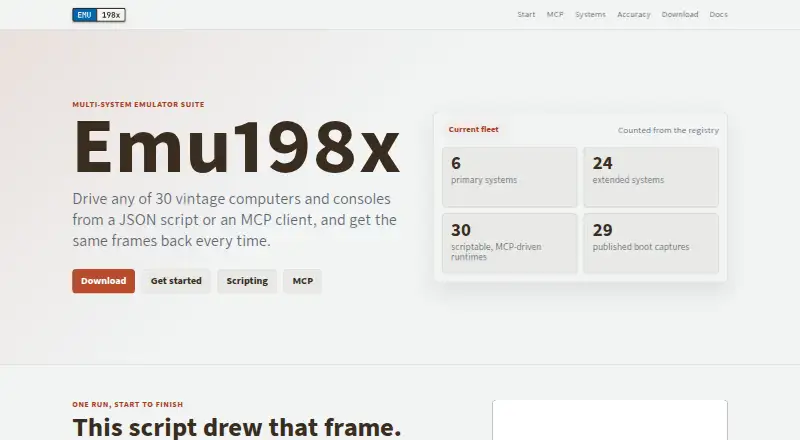
Emu198x is a free, open-source suite for emulating vintage computers and consoles through JSON scripts or an MCP client. Its registry lists 30 machines, with boot captures available for 29. Scripts can automate actions such as advancing frames, querying a CPU register, and saving screenshots; documentation also describes capturing frame sequences and audio. Each machine binary can act as an MCP server, exposing tools to run frames, inspect state, handle input, and capture output. MCP clients communicate with the binary over standard input and output using JSON-RPC. The maker says repeating a script run produces the same report and a byte-for-byte matching screenshot. Release archives are available for Windows, Linux, and macOS, including separate Apple silicon and Intel Mac builds. Emu198x does not include commercial ROMs, firmware, disks, tapes, or cartridges, so users must provide required files. The maker provides SHA-256 sums for checking downloaded archives and reports machine crate counts and boot-capture status without publishing accuracy percentages or maturity scores.
Who it suits
Emu198x suits users who want to automate vintage computer or console emulation with scripts or an MCP client. The 198x family also describes using it to run lesson programs and check and capture their output.
What it does well
- Free and open-source
- Registry covers 30 machines
- Supports JSON scripts and MCP clients
- Release archives cover Windows, Linux, and macOS
- SHA-256 sums available for release archives
What to know first
- Users must supply ROMs, firmware, and other media
- No Android support
Limits
The free plan includes 30 machine binaries and requires users to provide ROMs, firmware and media. Its MCP server has no network transport, notifications, resources, prompts or breakpoint support.
Plans
| Plan | Billed and limits | Price |
|---|---|---|
| Emu198x | Free software; 30 machine binaries; requires users to provide ROMs, firmware, and media | Free |
As emu198x.github.io lists them, read 8 Oct 2026. The maker's own page has the final word.
Getting started
- Visit https://emu198x.github.io/.
- Choose a release archive for Windows, Linux or macOS; select the Apple silicon or Intel build for macOS.
- Check the archive with its provided SHA-256 sum.
- Provide the ROMs, firmware and other media required for the machine you want to run.
- Use JSON scripts or connect an MCP client to an emulator binary over standard input and output.
Emu198x is a free, open-source multi-system emulator suite for running vintage computers and consoles from JSON scripts or an MCP client. It suits developers, educators, and preservation-minded users who need repeatable, machine-readable runs rather than only interactive play. Its broad desktop coverage and byte-for-byte capture claims are compelling, but the lack of bundled media and several MCP features limits it for general-purpose emulation.
Overview
Emu198x puts automation at the center of emulation. The registry covers 30 machines, with boot captures for 29 of them, giving the project unusually concrete visibility into which systems have working startup evidence. Its intended audience includes the Code198x lesson workflow, where programs are run and their output checked and captured, but the same approach fits regression tests, demonstrations, and reproducible documentation.
Determinism is the standout promise: the maker says identical scripts produce identical reports and byte-for-byte matching screenshots. That is valuable when a result must be compared in continuous integration or shared as an exact artifact. It is less important if you simply want to browse a game library with a controller. The accuracy page reports crate counts and boot-capture status for each system, but does not provide percentage scores or maturity ratings, so coverage evidence is useful without making a universal accuracy claim.
Key features
Scripted and MCP control
JSON scripts can advance frames, query a CPU register, and save screenshots without supervision. Every machine binary can also operate as an MCP server, exposing tools for frame execution, state inspection, input handling, and output capture. MCP clients communicate through JSON-RPC over standard input and output, which keeps integration straightforward for local automation and avoids requiring a separate network service.
The MCP implementation is intentionally narrow. It has no network transport, sends no notifications, advertises no resources or prompts, and lacks breakpoints. Those constraints make it a poor fit for distributed control, event-driven monitoring, or debugger-style workflows, even though frame stepping and state inspection cover many scripted test cases.
Capture and distribution
Runs can save screenshots, frame sequences, and audio, so an automated session can produce visual and sound evidence alongside its report. Release archives target Windows, Linux, and macOS, with separate Apple silicon and Intel macOS builds. SHA-256 checksums let security-conscious users verify downloaded archives before running them.
Media and system scope
Emu198x does not distribute commercial ROMs, firmware, disks, tapes, or cartridges. You must provide every required file, an important practical cost for newcomers and for systems whose setup depends on hard-to-find media. Android is not supported, so mobile users should choose another emulator.
Pricing
The Emu198x plan costs free. It includes free software and 30 machine binaries, with no paid tier or trial period to evaluate. The price is attractive for classrooms, open-source projects, and individual automation experiments, but it does not include ROMs, firmware, or other media; acquiring lawful copies remains your responsibility. There are no seat or usage quotas stated, so the main trade-off is technical setup rather than a subscription cap.
Platforms
Desktop release archives support Linux, Windows, and macOS. macOS downloads are split between Apple silicon and Intel builds, reducing architecture friction on current and older Macs. There is no Android version. The open-source license also makes the suite a better fit for users who need inspectable software or want to integrate it into a development workflow.
Who it's for
Choose Emu198x if you need scripted, repeatable emulation; machine-state queries; or captured screenshots, frame sequences, and audio for lessons, regression checks, or technical demonstrations. It is especially well suited to teams that already use MCP clients and can manage their own ROM and firmware files.
Look elsewhere if your priority is mobile play, networked MCP control, debugger breakpoints, or a turnkey library that supplies system media. The project’s boot-capture evidence is useful, but the absence of published accuracy percentages means readers needing quantified comparative accuracy will need another basis for selection.
Pros and cons
- Pros: 30 machine binaries cover a wide range of vintage systems; deterministic scripts can yield identical reports and byte-for-byte screenshots; MCP tools expose frames, state, input, and capture; screenshots, frame sequences, and audio can be saved; Windows, Linux, and both major Mac architectures are supported; SHA-256 checksums aid download verification; free and open source.
- Cons: users must supply all ROMs, firmware, disks, tapes, and cartridges; no Android build; MCP has no network transport or notifications, and offers no resources, prompts, or breakpoints; accuracy reporting stops at crate counts and boot-capture status rather than percentages or maturity scores.
Alternatives
For a broad, conventional emulator with an open-source codebase on Linux, macOS, and Windows, choose ares instead. Emulicious is a free personal-use option on the same three desktop platforms, though commercial users should obtain permission and it is not open source. If you specifically need Android or iOS availability, Virtual Jaguar supports those platforms as well as desktop and web, but requires a libretro frontend such as RetroArch.
MasterGear is a focused choice for Android, Windows, and Linux, with a free Windows/Linux plan and a 430.00 USD one-time Android plan. For Genesis-focused use, Genesis Plus GX is free on Linux and Windows, with source under a specific non-commercial license and a standalone GameCube/Wii build. BizHawk offers a MIT-licensed emulator with Windows and Unix releases. Clock Signal provides open-source macOS and Linux builds. Dega is free for non-commercial use on Linux and Windows.
For system-specific browsing, see Sega Master System Emulators; for a wider comparison set, see Multi-System Emulators.
Verdict
Emu198x is a strong choice for developers, educators, and preservation projects that value deterministic, scriptable desktop emulation with MCP control and rich capture output. Choose it for reproducible machine runs and open-source integration; look elsewhere if you need mobile support, networked MCP features, breakpoints, quantified accuracy scores, or supplied media.
Verdict
Emu198x combines scripted emulation with MCP control and capture tools across desktop platforms. Users need to bring any required ROMs, firmware, and other media themselves.
Questions
How much does Emu198x cost?
The listed plan is free: free.
Is Emu198x open source?
Yes. It is listed as open-source software.
Which platforms does it support?
Desktop release archives are provided for Windows, Linux and macOS, including separate Apple silicon and Intel Mac builds. Android is not supported.
How many systems does it cover?
The registry lists 30 machines, with boot captures available for 29.
Does Emu198x include ROMs and firmware?
No. Users must supply any required ROMs, firmware, disks, tapes or cartridges.
Can an MCP client control Emu198x?
Yes. Each machine binary can act as an MCP server, and clients communicate over standard input and output using JSON-RPC.
Facts from Emu198x's own pages
- Accuracy evidence
- The accuracy page reports per-system crate counts and boot-capture status and says it does not publish percentages or maturity scores. · emu198x.github.io, 8 Oct 2026
- Automation
- Every machine binary can act as an MCP server, exposing tools to run frames, inspect machine state, handle input, and capture output. · emu198x.github.io, 8 Oct 2026
- Capture
- The documentation describes saving screenshots, frame sequences, and audio from a run. · emu198x.github.io, 8 Oct 2026
- Desktop downloads
- Release archives are provided for Windows, Linux, and macOS, with separate Apple silicon and Intel macOS builds. · emu198x.github.io, 8 Oct 2026
- Deterministic runs
- The maker says the same script run produces an identical report and a screenshot matching byte for byte. · emu198x.github.io, 8 Oct 2026
- Download verification
- The maker provides SHA-256 sums for release archives so users can check downloaded files. · emu198x.github.io, 8 Oct 2026
- Integrations
- MCP clients can communicate with an emulator binary over standard input and output using JSON-RPC. · emu198x.github.io, 8 Oct 2026
- Intended audience
- The 198x family describes Emu198x as cross-platform, scriptable emulation used by Code198x to run lesson programs and check and capture their output. · code198x.com, 8 Oct 2026
- MCP constraints
- The MCP server has no network transport, pushes no notifications, advertises no resources or prompts, and does not support breakpoints. · emu198x.github.io, 8 Oct 2026
- Media requirements
- Emu198x does not distribute commercial ROMs, firmware, disks, tapes, or cartridges, so users must supply required files themselves. · emu198x.github.io, 8 Oct 2026
- Purpose
- Emu198x is a multi-system emulator suite for driving vintage computers and consoles from JSON scripts or an MCP client. · emu198x.github.io, 8 Oct 2026
- Scripting
- JSON scripts can run unattended actions such as advancing frames, querying a CPU register, and saving a screenshot. · emu198x.github.io, 8 Oct 2026
- System coverage
- The site lists 30 machines in its registry, with 29 boot captures available. · emu198x.github.io, 8 Oct 2026
Where Emu198x stands on Freedom251
- Sega Master System Emulators#3 of 25
- Multi-System Emulators#21 of 54