Freedom251 › Virtual machine software

QEMU
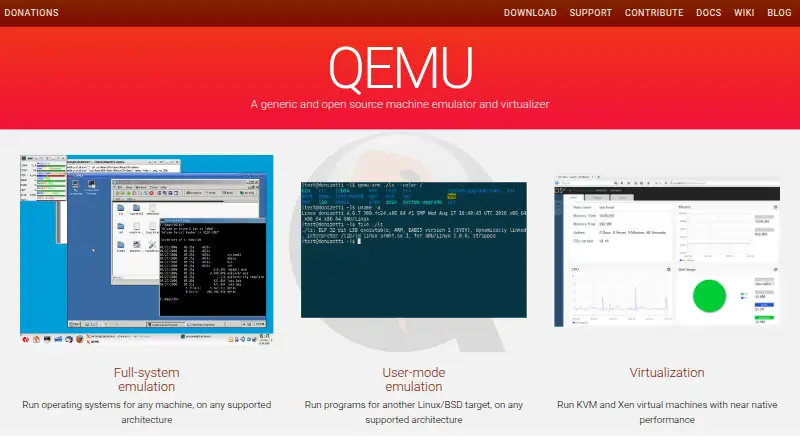
What QEMU is
QEMU is a free, open-source emulator and virtualizer for working with machines and processes built for different CPU architectures. Its system emulation models a whole machine, including its processor, memory, and devices, so a guest operating system can run. User-mode emulation instead launches a process compiled for one architecture on another. QEMU also includes command-line utilities such as qemu-img for creating, converting, and modifying disk images. It can work with KVM, Xen, and Hypervisor.Framework so guests can use the host CPU directly. The project lists Linux, macOS, FreeBSD, NetBSD, OpenBSD, and Windows as supported build platforms. Windows support is limited to 64-bit systems; macOS requires the latest version currently available, and support for the previous version is eventually dropped. For complex networking and storage configurations, QEMU recommends management tools such as virt-manager. It is available for Linux, macOS, and Windows, and is released under GNU GPL version 2, with some components under other specific licenses.
Who it suits
QEMU suits people who need to run guest operating systems or cross-architecture processes, or manage disk images from the command line. Its more complex networking and storage configurations may suit users working with tools such as virt-manager.
What it does well
- Supports both system and user-mode emulation.
- Includes qemu-img disk-image utilities.
- Can work with KVM, Xen, and Hypervisor.Framework.
- Available for Linux, macOS, and Windows.
- Free and open source.
What to know first
- Windows support is limited to 64-bit.
- macOS requires the latest available version.
- TCG use does not provide guest-isolation guarantees.
Plans
| Plan | Billed and limits | Price |
|---|---|---|
| QEMU | Free, open-source software | Free |
As qemu.org lists them, read 15 Oct 2026. The maker's own page has the final word.
Getting started
- Visit the QEMU website.
- Choose a supported build platform: Linux, macOS, FreeBSD, NetBSD, OpenBSD, or Windows.
- On Windows, use a 64-bit system; on macOS, use the most recent version currently available.
- On Linux, check whether your distribution packages QEMU.
- Use QEMU for system emulation, user-mode emulation, or its disk-image utilities.
- For complex networking and storage configurations, consider the project’s recommended management tools such as virt-manager.
QEMU is a free, open-source emulator and virtualizer for whole guest machines and processes built for another CPU architecture. It is best for technically capable users who value broad emulation and can work with command-line tools or add a management layer. The breadth is useful, but the host requirements and security distinction demand care.
Overview
QEMU spans two different needs: running a guest operating system on a virtual model of a machine, or launching an individual process built for a different CPU architecture. Its included disk-image utilities extend that range into preparing and modifying virtual storage. This makes QEMU a flexible foundation, though not necessarily a complete management experience: for complex networking and storage, QEMU recommends tools such as virt-manager from the libvirt project.
Key features
Whole-machine and process emulation
System emulation models a complete machine, including CPU, memory and devices, so a guest operating system can run. User-mode emulation instead runs processes compiled for another architecture. That distinction lets users address either whole-system or application-level workloads, but the two modes serve different purposes and should not be treated as interchangeable.
Disk utilities and host acceleration
Command-line tools such as qemu-img create, convert and modify disk images, a practical advantage for users who need to prepare virtual disks alongside emulation. QEMU can also work with KVM, Xen and Hypervisor.Framework to run guests directly on the host CPU. That accelerator integration is important for virtualization security: the security use case requires an accelerator such as KVM or HVF and a listed machine type. TCG non-virtualization use cases do not provide guest-isolation or security guarantees.
Management and support
QEMU leaves complex networking and storage configuration to management tools such as virt-manager, so users seeking a unified guided interface may need another layer. Support channels include documentation, technical and qemu-discuss mailing lists, IRC or Matrix, and the bug tracker. Potential security issues must be submitted as confidential GitLab issues, and responses have no SLA; organizations that require a defined response commitment should weigh that limitation.
Pricing
QEMU is free: its QEMU plan costs nothing under the GNU General Public License version 2, with some components under specific licenses. There is no paid tier to unlock core capabilities, making it a fit for users who can operate the software themselves. The trade-off is that support is through community channels rather than a stated response SLA.
Platforms
QEMU supports Linux, macOS and Windows, and its listed build platforms also include FreeBSD, NetBSD and OpenBSD. Linux users can get it through most distributions, including Arch, Debian/Ubuntu, Fedora, Gentoo, RHEL/CentOS and SUSE. Windows support is limited to 64-bit Windows. On macOS, QEMU requires the most recent version available, and support for the previous version is eventually dropped. These requirements make it a less suitable choice for users who need older macOS compatibility or 32-bit Windows.
Who it's for
QEMU suits developers, system administrators and technically confident users who need whole-machine emulation, cross-architecture process execution, or disk-image handling in one open-source tool. Multi-instance support and keyboard mapping are also listed capabilities. It is less compelling for users who want complex network and storage configuration managed in a polished, self-contained interface, or who need isolation guarantees from TCG non-virtualization use.
Pros and cons
- Pro: System and user-mode emulation cover both guest operating systems and processes built for another CPU architecture.
- Pro: qemu-img handles disk-image creation, conversion and modification without requiring a separate image utility.
- Pro: Free, open-source licensing and integration with KVM, Xen and Hypervisor.Framework support varied host workflows.
- Con: Complex networking and storage may require a separate management tool such as virt-manager.
- Con: Platform constraints exclude 32-bit Windows and require a current macOS version.
- Con: TCG non-virtualization use cases do not offer guest isolation or security guarantees, and security reports have no response SLA.
Alternatives
For a broader comparison, browse Hypervisor Software, Virtual machine software, Android emulators, Multi-System Emulators and Emulator Software.
- Proxmox VE is worth considering if its freemium model and listed Android, API, Linux, self-hosted, web and Windows platforms better suit your environment.
- Harvester is another free, open-source option for API, Linux, self-hosted and web environments.
- UTM is a free alternative for iOS and macOS; its free GitHub version has no automatic updates, while its Mac App Store plan costs $9.99, paid once.
- VMware Workstation Pro is free for 64-bit Intel or AMD PCs running Windows or Linux, with no subscription or license key required.
- KVM is a free Linux option whose kernel component is in mainline Linux and userspace component is in mainline QEMU.
- oVirt offers a free community edition for Linux, API, self-hosted and web environments.
- virt-manager is a free Linux and self-hosted option if you want a separate virtualization management tool.
- Xen Project Hypervisor provides free open-source hypervisor source releases for building, packaging and platform integration.
Verdict
Choose QEMU if you need flexible whole-machine or cross-architecture process emulation, disk-image utilities and an open-source tool that can pair with host accelerators. Its breadth and zero price are persuasive, but users needing a managed workflow, older macOS support or dependable isolation outside its specified virtualization security setup should look elsewhere.
Verdict
QEMU covers whole-machine and cross-architecture process emulation, with disk-image utilities included. Note its platform requirements and the distinction between virtualization security use and TCG non-virtualization use.
Questions
How much does QEMU cost?
The listed plan is free. QEMU is described as free and open source.
Which platforms does QEMU support?
The project lists Linux, macOS, FreeBSD, NetBSD, OpenBSD, and Windows as supported build platforms. Its desktop platforms are Linux, macOS, and Windows.
What does QEMU do?
It can emulate a complete machine to run a guest operating system, or launch processes built for one CPU architecture on another. It also includes qemu-img for creating, converting, and modifying disk images.
Is QEMU open source?
QEMU is released under GNU General Public License version 2, with some components under specific licenses.
What are the platform limits?
Only 64-bit Windows is supported. QEMU requires the most recent macOS version currently available, and support for the previous version is eventually dropped.
What does QEMU say about virtualization security?
The virtualization security use case requires an accelerator such as KVM or HVF and a listed machine type. TCG use outside virtualization does not provide guest-isolation or security guarantees.
Facts from QEMU's own pages
- Build requirements
- QEMU 11.1.50 requires at least Python 3.9 and Rust 1.83.0 for supported builds. · qemu.org, 15 Oct 2026
- CPU emulation
- Its Tiny Code Generator supports system and user emulation for numerous guest architectures. · qemu.org, 15 Oct 2026
- Desktop platforms
- Linux, macOS, Windows · qemu.org, 19 Sept 2026
- Developer extensibility
- The documentation covers QAPI-generated monitor commands, QMP, HMP and numerous interoperability protocols. · qemu.org, 15 Oct 2026
- Disk-image utility
- The qemu-img command-line tool creates, converts and modifies virtual disk images. · qemu.org, 15 Oct 2026
- Disk utility
- QEMU includes standalone command-line utilities such as qemu-img for creating, converting and modifying disk images. · qemu.org, 1 Oct 2026
- Documentation depth
- Official documentation includes user, system-emulation, device, security, interoperability and developer sections, with additional wiki material. · qemu.org, 15 Oct 2026
- Free plan
- Yes · qemu.org, 19 Sept 2026
- Full-system emulation
- It models complete machines so operating systems can run on supported architectures. · qemu.org, 15 Oct 2026
- Guest-agent API
- The QEMU Guest Agent also uses QMP-related protocol documentation for host applications to interact with guest operating systems. · qemu.org, 15 Oct 2026
- Hardware virtualization
- QEMU can work with KVM, Xen and Hypervisor.Framework so guests execute directly on host CPUs. · qemu.org, 15 Oct 2026
- Host architectures
- Official host architecture targets include Arm, PPC, RISC-V, s390x, SPARC and x86 with platform-specific accelerators. · qemu.org, 15 Oct 2026
- Hypervisors
- QEMU can work with KVM, Xen and Hypervisor.Framework to let guests run directly on the host CPU. · qemu.org, 1 Oct 2026
- Installation
- Linux distributions package QEMU, while macOS users can install it through Homebrew or MacPorts. · qemu.org, 15 Oct 2026
- Keyboard mapping
- Yes · qemu.org, 19 Sept 2026
- Latest release
- The download page lists QEMU 11.1.2 released on September 28, 2026. · qemu.org, 15 Oct 2026
- License
- QEMU and its manual are released under GNU General Public License version 2, although some components have specific licenses. · qemu.org, 15 Oct 2026
- Limit: beginner usability
- A Capterra reviewer says QEMU is unsuitable for casual users or people just starting out. · capterra.com, 15 Oct 2026
- Limit: dedicated support
- TechRadar reports that QEMU has no dedicated support team and relies on documentation and user guides. · techradar.com, 15 Oct 2026
- Limit: documentation complexity
- G2 reviewers commonly say the extensive options and documentation make the learning curve steep for newcomers. · g2.com, 15 Oct 2026
- Limit: interface and graphics
- TechRadar criticizes QEMU as complex, slow and lacking 3D support, with command-line use challenging for average users. · techradar.com, 15 Oct 2026
- Linux packaging
- QEMU is packaged by most Linux distributions, including Arch, Debian/Ubuntu, Fedora, Gentoo, RHEL/CentOS and SUSE. · qemu.org, 1 Oct 2026
- macOS support
- QEMU requires the most recent macOS version currently available, with support for the previous version eventually dropped. · qemu.org, 1 Oct 2026
- Management integration
- For complex networking and storage configurations, QEMU recommends management tools such as virt-manager from the libvirt project. · qemu.org, 1 Oct 2026
Where QEMU stands on Freedom251
- Virtual machine software#1 of 24
- Android emulators#1 of 19
- Emulator Software#3 of 39
- Multi-System Emulators#5 of 54
- Server Virtualization Software#3 of 22
- Hypervisor Software#4 of 26