Freedom251 › Virtualization Management Software
virt-manager
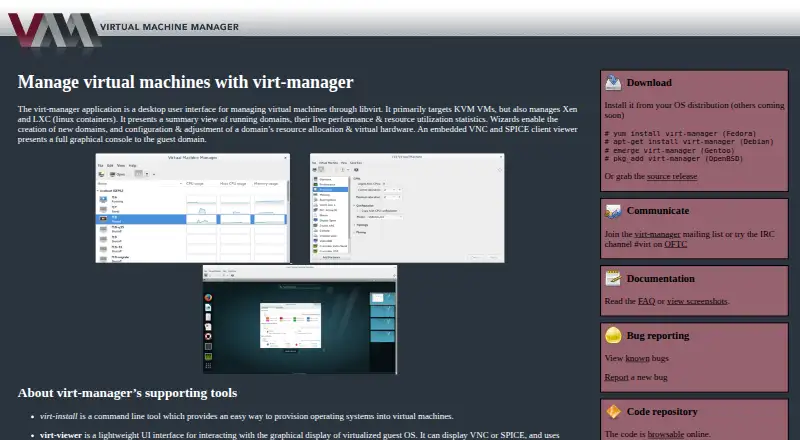
What virt-manager is
virt-manager is a free desktop interface for managing virtual machines through libvirt. It primarily targets KVM and also supports Xen and LXC. It can connect to local and remote hosts, show live performance and resource statistics for running domains, and use wizards to create domains and configure their resources and virtual hardware. An embedded VNC and SPICE viewer provides a graphical console for guest domains. The interface can also manage host virtual networks, storage pools, and network interfaces. Separate command-line tools support provisioning, cloning, and editing virtual machines. The project lists Linux and OpenBSD as host platforms, with installation through Fedora, Debian, Gentoo, and OpenBSD packages, as well as a source release. The FAQ says it is distributed under the GNU General Public License. The project provides documentation and a FAQ, directs user and support questions to GitHub Discussions, and uses GitHub for bug tracking. It recommends reporting distribution package issues to the operating system vendor first. Current releases are GPG signed, and the download page explains signature verification.
Who it suits
virt-manager suits users managing KVM, Xen, or LXC virtual machines through libvirt on Linux or OpenBSD hosts. It also provides command-line tools for provisioning, cloning, and editing virtual machines.
What it does well
- Supports KVM, Xen, and LXC through libvirt
- Connects to local and remote hosts
- Includes VNC and SPICE guest consoles
- Can manage host networks and storage pools
- Free and distributed under the GNU General Public License
What to know first
- Host platforms listed are Linux and OpenBSD
- Distribution package issues should go to the OS vendor first
- Discussion and support questions are directed to GitHub Discussions
Plans
| Plan | Billed and limits | Price |
|---|---|---|
| virt-manager | No paid plans or usage limits stated | Free |
As virt-manager.org lists them, read 4 Oct 2026. The maker's own page has the final word.
Getting started
- Choose an installation package for Fedora, Debian, Gentoo, or OpenBSD, or use the source release.
- Install virt-manager on a Linux or OpenBSD host.
- Connect to a local or remote hypervisor host.
- Use a setup wizard to create a domain and configure its resources and virtual hardware.
- Open a guest’s graphical console with the embedded VNC or SPICE viewer.
virt-manager is a desktop control panel for libvirt-based virtual machines, with KVM as its main target and additional Xen and LXC support. It is best suited to Linux administrators and developers managing their own hosts, especially when one graphical workspace must reach both local and remote hypervisors. Its strongest case is capable host-and-guest administration at no software cost; its narrow desktop and operating-system focus make it a poor fit for browser-first or broadly cross-platform teams.
Overview
The application brings virtual-machine and host administration into one desktop interface. You can connect to multiple hypervisors, including local and remote systems, then view running domains alongside live performance and resource-utilization statistics. That makes it practical for a small lab or several self-hosted machines without opening a separate management tool for every host.
Management extends beyond guests. virt-manager handles host virtual networks, storage pools, and network interfaces, so common infrastructure tasks sit beside VM operations. The project is released under the GNU General Public License. Fedora, Debian, Gentoo, and OpenBSD packages are provided alongside source, and current releases are GPG signed with documented verification steps.
Key features
Guest creation and hardware
Wizards create domains and configure resource allocation and virtual hardware. This guided path is useful when you want a graphical setup for memory, processors, storage, and devices while retaining libvirt-based configurations that other tools can use. More advanced or highly automated workflows can use the project's command-line tools for provisioning, cloning, and editing instead.
Consoles, snapshots, and acceleration
An embedded VNC and SPICE viewer gives graphical access to guest consoles without requiring a separate viewer application. VM snapshots are supported, providing a practical rollback point before risky changes. GPU acceleration is also supported, which benefits workloads that need accelerated graphics rather than basic text or server operation.
Monitoring and host control
Live utilization statistics help identify busy or under-provisioned domains while they are running. Host network, storage-pool, and interface controls make virt-manager more than a VM launch screen, although teams seeking centralized browser dashboards may prefer a different management layer.
Pricing
| Plan | Price | What it means |
|---|---|---|
| virt-manager | free | Free software with no paid plans or usage limits stated. |
There is no free trial because the software is free to use, and no subscription, seat quota, or renewal term is stated. That makes it suitable for individuals, labs, and organizations that want to deploy without licensing fees. The trade-off is that you manage the hosts, operating-system packages, and support process yourself rather than buying a vendor-backed service tier.
Platforms
virt-manager is offered for Linux and self-hosted environments, with host support for Linux and OpenBSD. It supports both guest architectures. The package choices cover Fedora, Debian, Gentoo, and OpenBSD, while a source release serves other installation workflows. There is no Windows, macOS, or web platform in its stated host coverage, so mixed-endpoint teams should not expect a single native desktop client across those systems.
Who it's for
Choose virt-manager if you administer Linux or OpenBSD virtualization, need local and remote libvirt connections, and want both guest consoles and host network and storage controls in a desktop application. It also suits developers who value graphical VM setup but still want command-line provisioning, cloning, and editing.
Look elsewhere when your priority is a browser-based control plane, a cross-platform desktop experience, or a packaged service with commercial support and defined licensing terms. Its self-hosted model assumes responsibility for the underlying operating systems and distribution packages.
Pros and cons
Pros
- No licensing cost: the sole plan is free, with no stated usage limits.
- Broad libvirt reach: one desktop can connect to multiple local and remote hypervisors and targets KVM while supporting Xen and LXC.
- Useful host scope: virtual networks, storage pools, and network interfaces are managed alongside guests.
- Practical guest access: embedded VNC and SPICE consoles, snapshots, GPU acceleration, and live utilization statistics cover everyday operations.
- Graphical and command-line workflows: wizards handle setup while companion tools support provisioning, cloning, and editing.
Cons
- Narrow host coverage: the stated desktop and host platforms are Linux and OpenBSD, excluding mainstream Windows and macOS desktops.
- Self-hosted responsibility: users handle deployment and package issues; the project directs distribution-package problems to the operating-system vendor.
- No paid service tier: there are no stated commercial support, seat-management, or hosted-management options.
Alternatives
Proxmox VE is the better choice if you want a freemium self-hosted platform with web and API access, Android, Windows, and Linux clients, and an optional Premium subscription priced per occupied physical CPU socket.
VMware Workstation Pro fits users needing a free desktop product for 64-bit Intel or AMD Windows or Linux hosts with no subscription or license key.
QEMU is a free, GPL-licensed open-source option spanning Linux, macOS, and Windows.
KVM is the direct open-source Linux virtualization component when you want the kernel and QEMU userspace rather than this desktop management layer.
Xen Project Hypervisor provides free open-source hypervisor releases for building and platform integration.
Multipass is a free way to prototype cloud launches locally across Linux, macOS, and Windows.
Oracle VirtualBox offers a freemium, GPLv3-licensed base package for supported desktop and server hosts.
GNOME Boxes is a free Linux desktop-only application for a simpler desktop virtualization focus.
Verdict
virt-manager is a strong recommendation for Linux or OpenBSD operators who need a free graphical front end to libvirt, with remote connections, host-resource controls, embedded consoles, snapshots, and command-line companions. Choose it for capable self-hosted administration without license fees; choose another product when you need Windows or macOS hosts, a browser and API control plane, or commercial service commitments.
Verdict
virt-manager provides a desktop interface for virtual machine and host resource management through libvirt. Its listed host support is Linux and OpenBSD, and the project routes package issues to operating system vendors.
Questions
How much does virt-manager cost?
The listed plan is free. No paid plans or usage limits are stated.
Is there a free trial?
No free trial is listed; virt-manager has a free plan.
Which host platforms are supported?
Linux and OpenBSD are listed as host platforms.
Which virtualization technologies does it support?
It manages virtual machines through libvirt, primarily targeting KVM and also supporting Xen and LXC.
Is virt-manager open source?
It is distributed under the GNU General Public License.
Where can users get support?
The project directs user and support questions to GitHub Discussions and provides documentation and a FAQ.
Facts from virt-manager's own pages
- Bug reporting
- The project uses GitHub for virt-manager bug tracking and recommends reporting distribution package issues to the OS vendor first. · virt-manager.org, 4 Oct 2026
- Connections
- Multiple hypervisor connections are supported, including connections to local and remote hosts. · virt-manager.org, 4 Oct 2026
- Distribution
- The download page lists installation through Fedora, Debian, Gentoo, and OpenBSD packages, as well as a source release. · virt-manager.org, 4 Oct 2026
- Free plan
- Yes · virt-manager.org, 20 Sept 2026
- GPU acceleration
- Yes · virt-manager.org, 20 Sept 2026
- Guest architecture
- both · virt-manager.org, 20 Sept 2026
- Guest console
- An embedded VNC and SPICE viewer provides a graphical console to guest domains. · virt-manager.org, 4 Oct 2026
- Host management
- The interface can manage host virtual networks, storage pools, and network interfaces. · virt-manager.org, 4 Oct 2026
- Host platforms
- Linux; OpenBSD · virt-manager.org, 20 Sept 2026
- License
- The FAQ says virt-manager is distributed under the GNU General Public License. · virt-manager.org, 4 Oct 2026
- Management interface
- desktop · virt-manager.org, 20 Sept 2026
- Monitoring
- It shows running domains with live performance and resource utilization statistics. · virt-manager.org, 4 Oct 2026
- Project status
- The project says it no longer uses mailing lists for discussion; developers may sometimes be found on the #virt IRC channel on OFTC. · virt-manager.org, 4 Oct 2026
- Purpose
- virt-manager is a desktop interface for managing virtual machines through libvirt, primarily targeting KVM and also supporting Xen and LXC. · virt-manager.org, 4 Oct 2026
- Release verification
- The download page says current virt-manager releases are GPG signed and explains how to verify signatures. · virt-manager.org, 4 Oct 2026
- VM snapshots
- Yes · virt-manager.org, 20 Sept 2026
- Support
- The project directs user and support questions to GitHub Discussions and provides documentation and a FAQ. · virt-manager.org, 4 Oct 2026
- Supporting tools
- The project also provides command-line tools for provisioning, cloning, and editing virtual machines. · virt-manager.org, 4 Oct 2026
- VM setup
- Wizards create domains and configure their resource allocation and virtual hardware. · virt-manager.org, 4 Oct 2026
Where virt-manager stands on Freedom251
- Virtualization Management Software#13 of 34
- Virtual machine software#10 of 24
- Hypervisor Software#17 of 26