Freedom251 › Nintendo 64 Emulators
Mupen64Plus
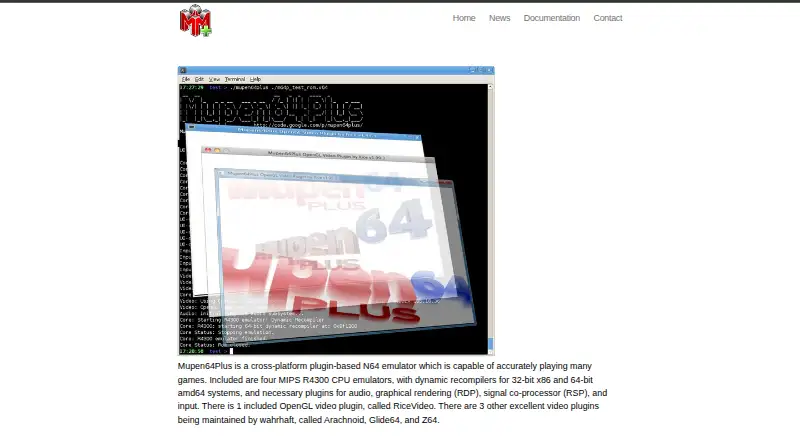
What Mupen64Plus is
Mupen64Plus is a free, cross-platform Nintendo 64 emulator for Linux, macOS, and Windows. Its plugin-based components handle audio, graphics, signal co-processing, and input. The emulation system includes four MIPS R4300 CPU emulators and dynamic recompilers for 32-bit x86 and 64-bit amd64 systems. The listed features include two OpenGL video plugins with high-resolution texture support, Rumble Pak support, LIRC infrared remote support, and a GameShark-compatible cheat system. Speed adjustment is designed to keep sound output smooth. A shared library interface supports integration with other systems and front-ends. Its download bundle provides a command-line-only console front-end; the project points to third-party front-ends for graphical options. The v2.6.0 release page lists prebuilt 64-bit downloads for Linux, Windows, and macOS, along with source code. Documentation covers keyboard and joystick setup, file locations, Linux rumble configuration, high-resolution textures, compatibility, and core and plugin parameters. Questions and bug reports can be raised through the listed community channels.
Who it suits
It suits people seeking a free Nintendo 64 emulator on Linux, macOS, or Windows, including users who are comfortable with a command-line console interface. Those wanting a graphical front-end can look to third-party options listed by the project.
What it does well
- Free to use
- Plugin components cover audio, graphics, and input
- GameShark-compatible cheat system included
- Prebuilt 64-bit downloads for three systems
What to know first
- Bundled console front-end is command-line only
- GUI options are third-party front-ends
- Listed release downloads are 64-bit
Plans
| Plan | Billed and limits | Price |
|---|---|---|
| Mupen64Plus | N64 emulator and plugins · download bundles for supported operating systems | Free |
As mupen64plus.org lists them, read 29 Sept 2026. The maker's own page has the final word.
Getting started
- Visit the Mupen64Plus website.
- Download a prebuilt 64-bit release for Linux, Windows, or macOS, or download the source code.
- Install and configure keyboard or joystick controls using the documentation.
- Choose an available plugin and review its parameters in the documentation.
- Use the included command-line console front-end, or consult the project’s third-party front-end options for a GUI.
Verdict
Mupen64Plus offers plugin-based emulation with cheats and high-resolution texture support across desktop systems. Its included interface is command-line-only, so graphical use requires a third-party front-end.
Questions
Is Mupen64Plus free?
Yes. The listed plan is free.
Which platforms are supported?
The listed platforms are Linux, macOS, FreeBSD, and Windows. The v2.6.0 release page lists prebuilt 64-bit downloads for Linux, Windows, and macOS.
Does the download include a graphical interface?
No. The included console front-end is command-line only; the project points users to third-party front-ends for GUI options.
Does Mupen64Plus support cheats and high-resolution rendering?
Yes. It includes a GameShark-compatible cheat system and OpenGL video plugins with high-resolution texture support.
What graphics renderer API does it list?
OpenGL.
Where can users ask questions or report bugs?
Users can ask questions or report bugs through the Google Group, submit bug reports on GitHub, or visit the #mupen64plus IRC channel on Libera.Chat.
Facts from Mupen64Plus's own pages
- Additional components
- The documentation lists third-party front-ends and plugins that are compatible with Mupen64Plus 2.0 but are not part of its distributed bundle. · mupen64plus.org, 29 Sept 2026
- Cheats and speed
- It includes a GameShark-compatible cheat system and speed adjustment with smooth sound output. · mupen64plus.org, 29 Sept 2026
- Controls
- Listed features include LIRC infrared remote support and Rumble Pak support. · mupen64plus.org, 29 Sept 2026
- Documentation
- Documentation covers keyboard and joystick setup, file locations, Linux rumble configuration, high-resolution textures, compatibility notes, and core and plugin parameters. · mupen64plus.org, 29 Sept 2026
- Downloads
- The v2.6.0 release page lists prebuilt 64-bit downloads for Linux, Windows, and macOS, as well as source code. · github.com, 29 Sept 2026
- Emulation
- It includes four MIPS R4300 CPU emulators and dynamic recompilers for 32-bit x86 and 64-bit amd64 systems. · mupen64plus.org, 29 Sept 2026
- Integration
- A shared library interface supports integration into other systems and front-ends. · mupen64plus.org, 29 Sept 2026
- Interface
- The download bundle includes a command-line-only console front-end; the site points users to third-party front-ends for GUI options. · github.com, 29 Sept 2026
- Plugins
- The project includes plugins for audio, graphics, signal co-processing, and input, including the RiceVideo OpenGL video plugin. · mupen64plus.org, 29 Sept 2026
- Purpose
- Mupen64Plus is a cross-platform, plugin-based Nintendo 64 emulator capable of accurately playing many games. · mupen64plus.org, 29 Sept 2026
- Security
- The official site and linked project pages opened for this research did not state security certifications or compliance claims. · mupen64plus.org, 29 Sept 2026
- Support
- Users can ask questions or report bugs through the Google Group, file bug reports on GitHub, or visit the #mupen64plus IRC channel on Libera.Chat. · mupen64plus.org, 29 Sept 2026
- Video features
- Its listed features include two OpenGL video plugins with high-resolution texture support. · mupen64plus.org, 29 Sept 2026
Where Mupen64Plus stands on Freedom251
- Nintendo 64 Emulators#9 of 24