Freedom251 › Email Scheduling Software

Right Inbox
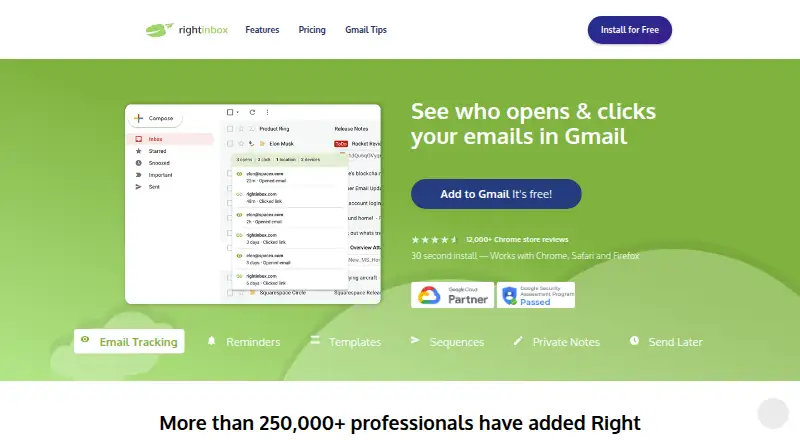
What Right Inbox is
Right Inbox is a Gmail productivity tool for tracking, scheduling, and automating email. It offers open, reply, and click tracking, real-time alerts, mail merge, reminders, templates, GIFs, and inbox pause. Send Later schedules messages for a chosen time, while Sequences can follow up when a recipient does not open or reply. Recurring Emails automate messages on daily, weekly, or monthly schedules. Its CRM feature syncs important threads through smart BCC and lists integrations including Salesforce, Pipedrive, HubSpot, Zoho, Highrise, Zapier, Greenhouse, SugarCRM, Nutshell, and OnePageCRM. Right Inbox works with Chrome, Safari, and Firefox, and is available as an extension, for macOS, and on the web. The free plan is for solo use, allows five emails per month, and excludes mail merge, Sequences, and CRM integration. Paid plans start at $7.95/user/mo billed annually. Right Inbox says it uses Google OpenID/OAuth2 authorization and offers support through a Help Center contact form.
Who it suits
It suits Gmail users who want email tracking, scheduled sending, or automated follow-ups. Sales and marketing users running customizable cold email campaigns may also find its mail merge and CRM functions relevant.
What it does well
- Tracks opens, replies, and clicks
- Schedules and repeats email messages
- Sequences can send follow-ups
- CRM sync supports smart BCC
- Works with Chrome, Safari, and Firefox
What to know first
- Free plan allows five emails monthly
- Free plan excludes mail merge
- Free plan excludes CRM integration
- Paid plans start at $7.95/user/mo annually
Limits
The free Limited plan permits five emails per month and is for solo use. It excludes mail merge, email sequences, CRM integration, and priority customer support, and caps templates and signatures at five each.
Plans
| Plan | Billed and limits | Price |
|---|---|---|
| Limited | Solo use only · 5 emails/month · 5 reminders/month · 5 templates maximum · 5 signatures maximum · no tracking, mail merge, sequences, CRM integration or priority support | Free |
| Team | yearly billing · Unlimited team members · unlimited listed features | $16.95 a year |
| Team | monthly · Unlimited team members · unlimited listed features | $19.95 a month |
| Professional | yearly billing · Per-user pricing · unlimited listed features | $7.95 a year |
| Professional | monthly · Per-user pricing · unlimited listed features | $9.95 a month |
As rightinbox.com lists them, read 15 Oct 2026. The maker's own page has the final word.
Getting started
- Visit the Right Inbox website.
- Choose the free Limited plan or a paid plan.
- Install the extension for Chrome, Safari, or Firefox, or use the macOS or web option.
- For Safari, use the Mac App Store installation flow and start Right Inbox with Gmail.
- Authorize access through Google's OpenID/OAuth2 flow.
Overview
Right Inbox is a Gmail-focused productivity extension for tracking messages, scheduling delivery, and automating follow-ups. It is most useful to sales and marketing users running personalized outreach, or to Gmail users who need dependable reminders and recurring sends. The main trade-off is scale: the free plan permits only five emails per month, while campaign and CRM functions sit behind paid plans.
Founded in 2014, Right Inbox runs as an extension and on macOS and the web. Chrome, Safari, and Firefox are supported, and Safari setup goes through the Mac App Store before opening Gmail. The company says more than 250,000 professionals use the product.
Key features
Send Later separates composition from delivery, letting users write at a convenient time and schedule messages for when recipients are more likely to read them. Open, reply, and click tracking, with real-time alerts, gives outreach teams a practical signal of engagement rather than leaving them to guess whether a message was seen.
Mail merge is designed for customizable cold-email campaigns, making Right Inbox more relevant to sales and marketing than a simple send-later add-on. Email Sequences can send follow-ups when the first message is not opened or answered, while Recurring Emails automate daily, weekly, or monthly messages. Reminders, templates, GIFs, and inbox pause round out the Gmail workflow.
CRM synchronization connects important email threads with Pipedrive, Salesforce, HubSpot, Zoho, Highrise, Zapier, Greenhouse, SugarCRM, Nutshell, OnePageCRM, and any CRM that supports smart BCC email sync. That is a meaningful advantage for teams already using one of those systems, but the integration is not part of the free tier.
Right Inbox says it cannot access a Gmail password and authorizes through Google OpenID/OAuth2 protocols. It also states that Google API information is handled under Google's API Services User Data Policy and Limited Use requirements. Payment details are not collected or stored by Right Inbox; third-party processing follows PCI-DSS standards. Support is available through a Help Center contact form, with responses usually within 24 hours.
Pricing
The Limited plan is free, for solo use, and can be upgraded at any time. It allows five emails per month, up to five templates and five signatures. Mail merge, Email Sequences, CRM integration, and priority customer support are excluded. That makes it suitable for occasional personal tracking or a cautious evaluation, not sustained outreach.
Professional costs $9.95 a month, billed monthly, with per-user pricing and unlimited features. It is the sensible fit for an individual who needs regular campaigns, automated follow-ups, or CRM syncing. Right Inbox also advertises paid access from $7.95 per user a month when billed annually, so the billing term matters when comparing the headline rates.
Team costs $19.95 a month, billed monthly, and includes unlimited team members and unlimited features. It is aimed at organizations that need shared access across a group rather than a single seat. The cheaper Limited plan gives up the core campaign and CRM tools; the paid plans remove those feature caps.
Platforms
Right Inbox supports Gmail through Chrome, Safari, and Firefox, with extension, macOS, and web availability. The product is therefore a fit for Gmail-centered workflows rather than a general-purpose, multi-provider email client.
Who it's for
Choose Right Inbox if your work is in Gmail and you need tracking plus scheduled delivery, conditional follow-ups, recurring messages, and CRM synchronization. Professional suits a solo sales or marketing operator; Team is the more natural choice when multiple users need the full feature set. Users sending only a handful of messages may manage on Limited, but the five-email allowance is too restrictive for most active outreach.
Pros and cons
- Pros: combines open, reply, and click tracking with real-time alerts; supports scheduled, recurring, and sequence-based follow-ups; connects with a broad set of named CRMs and smart-BCC systems; offers browser, macOS, and web access.
- Cons: the free plan allows only five emails monthly; mail merge, sequences, and CRM integration require payment; free users are limited to five templates and five signatures; Gmail is the supported email client.
Alternatives
For a broader comparison of tracking tools, see Email Tracking Software; for scheduling-focused options, see Email Scheduling Software; sales teams can compare Sales Email Tracking Software.
Mailbutler Smart Assistant is worth considering if you need Android, iOS, Linux, Windows, macOS, web, and extension support alongside a freemium plan. Pick Mailtrack when unlimited tracked emails on its free plan matter more than Right Inbox's broader automation. Boomerang suits users wanting Gmail send-later and reminders, with a free Basic plan offering 10 message credits monthly. Mixmax is an alternative for sequence-oriented outreach, with its free plan allowing 20 tracked emails and up to 50 sequence recipients per month. KudosCRM is a broader CRM option with a free tier for up to three users and 1,000 contacts. Relate Engage provides a free team plan with up to three sequences. Streak is a Gmail-based CRM alternative whose free plan includes 50 mail-merge sends per day. Yesware offers basic open and attachment tracking with a free plan capped at 10 campaign recipients monthly.
Verdict
Right Inbox is a strong choice for Gmail-based sales and marketing users who want tracking, scheduling, automated follow-ups, and CRM synchronization in one workflow. Its principal reason to choose it is the combination of engagement signals and outreach automation; its principal reason to look elsewhere is the extremely small free allowance and the paid-only campaign and CRM features.
Verdict
Right Inbox brings tracking, scheduling, and follow-up tools to Gmail, with CRM synchronization for listed services. The free tier is quite limited, so check its email allowance and feature exclusions against your needs.
Questions
Is Right Inbox free?
Yes. The Limited plan is free and is for solo use, with five emails per month.
How much do paid plans cost?
The listed starting price is $7.95/user/mo, billed annually. The Professional plan is listed at $9.95 a month billed monthly, and Team at $19.95 a month billed monthly.
Which email service does it support?
Right Inbox supports Gmail.
Which platforms and browsers are supported?
It is available as an extension, for macOS, and on the web. Browser support includes Chrome, Safari, and Firefox.
Does it integrate with CRMs?
Yes. It syncs important email threads with common CRM tools and any CRM supporting smart BCC email sync. Named integrations include Pipedrive, Salesforce, HubSpot, Zoho, Highrise, Zapier, Greenhouse, SugarCRM, Nutshell, and OnePageCRM.
How does Right Inbox handle Gmail authorization?
Right Inbox says it cannot access Gmail passwords and uses Google OpenID/OAuth2 authorization. It also says Google API information is handled under Google's API Services User Data Policy and Limited Use requirements.
Facts from Right Inbox's own pages
- Audience
- Email tracking and mail merge are presented for highly customizable cold email campaigns, including sales and marketing use cases. · rightinbox.com, 1 Oct 2026
- Browser support
- Right Inbox says it works with Chrome, Safari and Firefox and does not support other browsers. · rightinbox.com, 15 Oct 2026
- Company size and location
- LinkedIn lists Right Inbox as a privately held software company with 2–10 employees headquartered in Austin, Texas. · linkedin.com, 15 Oct 2026
- CRM integration
- The CRM feature syncs important email threads with common CRM tools and any CRM supporting smart BCC email sync. · rightinbox.com, 1 Oct 2026
- CRM sync
- CRM Sync pushes selected conversations from Gmail into a connected CRM without leaving Gmail. · rightinbox.com, 15 Oct 2026
- Deployment
- TrustRadius categorizes the product as SaaS, cloud or web-based and lists web, Mac, Windows, Linux and Chromebook operating systems. · trustradius.com, 15 Oct 2026
- Developer identity
- The Chrome Web Store listing names VoilaNorbert LLC as the extension developer and lists an Austin, Texas address. · chromewebstore.google.com, 15 Oct 2026
- Email tracking
- The product reports when messages are opened and when links are clicked. · rightinbox.com, 15 Oct 2026
- Embedded GIFs
- The composer can search for and insert animated GIFs. · rightinbox.com, 15 Oct 2026
- Follow-ups
- Sequences send follow-up emails if recipients do not open or reply to the first email. · rightinbox.com, 1 Oct 2026
- Founded
- LinkedIn lists the company as founded in 2014. · linkedin.com, 15 Oct 2026
- Gmail dependency
- The service is designed specifically for Gmail and is not compatible with other email services. · rightinbox.com, 15 Oct 2026
- Google API data policy
- The privacy policy says data received through Google APIs is handled under Google's API Services User Data Policy and Limited Use requirements. · rightinbox.com, 15 Oct 2026
- Help center coverage
- The help center includes articles for installation, scheduling, tracking, reminders, privacy, troubleshooting, sequences and mail merge. · help.rightinbox.com, 15 Oct 2026
- Inbox Pause
- Inbox Pause temporarily controls the flow of incoming Gmail messages to reduce interruptions. · rightinbox.com, 15 Oct 2026
- Installation
- The maker advertises installation in about 30 seconds through a browser extension. · rightinbox.com, 15 Oct 2026
- Limit: billing complaints
- Trustpilot reviewers report disputed charges continuing after cancellation and frustration with cancellation handling. · trustpilot.com, 15 Oct 2026
- Limit: feature gaps
- G2 reviewers mention missing subscription-management controls and a desire to print tracking details. · g2.com, 15 Oct 2026
- Limit: sending reliability
- G2 reviewers report that scheduled messages can remain stuck in drafts or require reinstalling the extension. · g2.com, 15 Oct 2026
- Limit: workflow bugs
- Capterra reviewers report problems saving sequences, preserving spacing and storing images in templates. · capterra.com, 15 Oct 2026
- Mail merge
- Mail Merge personalizes outreach sent to many recipients from Gmail. · rightinbox.com, 15 Oct 2026
- Owner and founder
- Crunchbase identifies Sujan Patel as founder and says Right Inbox was acquired by Ramp Ventures. · crunchbase.com, 15 Oct 2026
- Payment security
- Right Inbox says it never collects or stores payment details and that third-party payment processing complies with PCI-DSS standards. · rightinbox.com, 1 Oct 2026
- Praise: ease of use
- G2 reviewers repeatedly describe setup as very easy and the interface as simple or intuitive. · g2.com, 15 Oct 2026
Where Right Inbox stands on Freedom251
- Email Scheduling Software#6 of 30
- Email Tracking Software#11 of 43
- Sales Email Tracking Software#11 of 27
- Google Workspace Productivity Tools#9 of 22