Freedom251 › Google Workspace Utilities Software

Mailmeteor
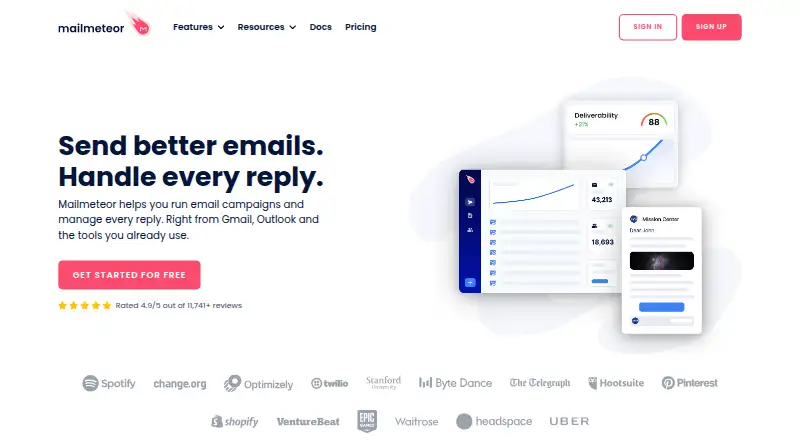
What Mailmeteor is
Mailmeteor runs personalized email campaigns and helps manage replies from Gmail, Outlook, and other tools. Users can create mail merges from Gmail, Outlook, Excel, Google Sheets, or Google Docs. Campaign features include tracking, scheduling, templates, attachments, audience segmentation, unsubscribe management, and conditional follow-ups. Its AI assistant can sort email, draft replies in the user's tone, and revise or shorten messages, but is currently available only for Gmail. Mailmeteor works with Zapier and its ecosystem of 5,000+ apps, and supports Google Sheets automations. Users can log sent email in a CRM such as Salesforce or HubSpot by adding that CRM's unique BCC address. The free Hobby plan costs nothing and includes 500 emails per month, templates, tracking, scheduling, and attachments. Paid plans start at $5.99 a month billed per user, with listed monthly and daily sending limits that vary by plan. Mailmeteor says customer data stays in the Google Spreadsheet by design and that it requests only essential permissions to send email.
Who it suits
Mailmeteor may suit sales teams, marketers, recruiters, founders, customer support teams, and freelancers who send personalized campaigns. It also supports mail merges from several email and spreadsheet tools.
What it does well
- Free Hobby plan includes 500 emails per month.
- Mail merges work with Gmail, Outlook, Excel, Sheets, and Docs.
- Campaigns include scheduling, tracking, and conditional follow-ups.
- Works with Zapier and Google Sheets automations.
- CRM logging is possible through a unique BCC address.
What to know first
- AI email assistant is currently available only for Gmail.
- Free Hobby use is limited to 500 emails per month.
- Paid plans have daily and monthly email limits.
Limits
Hobby includes 500 emails per month. Paid sending limits vary: Starter allows 5,000 per month and 250 per day, Premium 30,000 per month and 1,000 per day, and Professional 60,000 per month and 2,000 per day.
Plans
| Plan | Billed and limits | Price |
|---|---|---|
| Hobby | free · 500 emails/month · email templates · tracking · scheduling and attachments | Free |
| Premium | per user / month · 30,000 emails/month · 1,000 emails/day · 5 senders · follow-ups · Sheets Automations · email warmup · AI assistant · custom tracking domain | $17.99 a month |
| Professional | per user / month · 60,000 emails/month · 2,000 emails/day · 10 senders · inbox rotation · pipelines · higher limits · priority support | $35.99 a month |
| Starter | per user / month · 5,000 emails/month · 250 emails/day · 1 sender · Autopilot · shared templates · email verification · Zapier · Deliverability Hub | $5.99 a month |
As mailmeteor.com lists them, read 15 Oct 2026. The maker's own page has the final word.
Getting started
- Open the Mailmeteor website.
- Choose the free Hobby plan or a paid plan.
- Use the web platform or browser extension.
- Prepare campaigns from a supported source such as Gmail, Outlook, Excel, Sheets, or Docs.
Mailmeteor is a mail-merge and email campaign tool for Gmail, Outlook, spreadsheets, and documents. It best suits people and teams who want to personalize outreach and keep campaign replies manageable. Its campaign controls span scheduling, tracking, and follow-ups, but the right paid tier depends on how many emails and senders you need.
Overview
Mailmeteor brings personalized sending and reply management into workflows built around Gmail, Outlook, Excel, Google Sheets, or Google Docs. That breadth makes it a practical fit for freelancers and teams whose contact data already lives in those tools. The free plan is a useful way to start, but its 500-email monthly allowance is modest for ongoing outreach.
Key features
Users can build campaigns with templates, attachments, scheduling, audience segmentation, unsubscribe management, and conditional follow-ups. Open, link, and reply tracking help monitor engagement, while activity alerts offer another way to keep tabs on campaigns. These features make Mailmeteor more than a basic mail merge, though high-volume senders will need to plan around both daily and monthly caps.
The AI assistant can sort email, draft replies in the user's tone, and rewrite, improve, or shorten messages. It is available only for Gmail, which limits its appeal to Outlook users. Zapier connects Mailmeteor to an ecosystem of 5,000+ apps, and Google Sheets automations support spreadsheet-based workflows. Salesforce and HubSpot logging works through each CRM's unique BCC address rather than a native CRM integration.
Mailmeteor says it requests only the permissions needed to send email, not access to read, modify, or delete email data. It also says customer data stays in the Google Spreadsheet by design and that it complies with French data protection laws and GDPR. TAC Security audited its infrastructure and source code in November 2025 for CASA Tier 3 requirements and Google API usage.
Pricing
Mailmeteor has a free Hobby plan and three paid tiers, with paid prices billed per user per month. There is no free trial, so the free plan is the way to assess the product before paying.
- Hobby: free. It allows 500 emails/month and includes templates, tracking, scheduling, attachments, and Gmail, Sheets, and Excel support. It suits occasional or small campaigns, but has far less capacity than the paid tiers.
- Starter: $5.99 a month (billed per user / month). It raises capacity to 5,000 emails/month and 250 emails/day, with one sender, 50,000 contacts, Autopilot, email verification, and Zapier. This is the entry point for regular single-sender outreach, but it lacks the follow-ups, Sheets automations, and AI assistant included at Premium.
- Premium: $17.99 a month (billed per user / month). It includes 30,000 emails/month, 1,000 emails/day, five senders, and 500,000 contacts, plus follow-ups, Sheets automations, the AI email assistant, and warmup. It is the stronger fit for users running multiple campaigns or needing those tools; Gmail is still required for the assistant.
- Professional: $35.99 a month (billed per user / month). It allows 60,000 emails/month and 2,000 emails/day, with 10 senders, 1,000,000 contacts, inbox rotation, dedicated onboarding, and priority support. The extra capacity and support are aimed at larger outreach operations, rather than users who can stay within Premium's limits.
Hobby's free-plan cap is presented as 500 emails per month; the FAQ also describes free use up to 50 emails per day. Paid-plan quotas are constrained by both daily and monthly limits, so the monthly total alone does not determine how quickly a campaign can be sent.
Platforms
Mailmeteor is available as a web app and extension. Its mail merge works with Gmail, Outlook, Excel, Google Sheets, and Google Docs, but the AI assistant is Gmail-only.
Who it's for
Sales teams, marketers, recruiters, founders, customer support teams, and freelancers are among the audiences Mailmeteor describes. It makes the most sense for people who want personalized campaigns alongside scheduling, tracking, and reply management. Outlook users can still use campaign tools, but should look elsewhere if the Gmail-only assistant is essential.
Pros and cons
- Pro: Mail merge works across email, spreadsheet, and document workflows, so users need not keep campaign work in Gmail alone.
- Pro: Scheduling, tracking, segmentation, unsubscribe management, and conditional follow-ups cover key campaign tasks in one product.
- Pro: The free plan includes tracking, scheduling, and attachments, making it useful for low-volume evaluation without a trial.
- Con: Hobby is capped at 500 emails/month, making it a poor fit for sustained outreach.
- Con: The AI assistant is limited to Gmail, and CRM logging relies on BCC addresses rather than native integrations.
- Con: Paid plans have daily as well as monthly quotas, and higher capacity requires a higher per-user price.
Alternatives
Choose Mixmax if its free tier's 20 tracked emails/month and up to 50 sequence recipients/month better match your needs. Yesware is another freemium option, with basic open and attachment tracking, 10 campaign recipients/month, and a meeting scheduler on its free plan. Choose Apollo if its free plan's 900 credits per seat per year, two sequences, API access, and one intent topic fit your workflow. Hunter offers a free plan with 50 monthly credits, basic Discover filters, one connected email account, and 500 recipients per sequence.
Outplay offers a free-forever plan with one user, two mailboxes, and 2,000 active prospects/month. Senders.ai has a freemium model. Sequence-R offers an Individual plan at $16 a month, with three connected inboxes, inbox rotation, three active campaigns, 3,000 emails/month, and 1,000 active records. Salesloft is a paid alternative with package details available by contacting Salesloft.
For a wider shortlist, see Email Outreach Software, Email Scheduling Software, Mail Merge Software, and Email Tracking Software.
Verdict
Mailmeteor is a strong choice for individuals and teams who want mail merge, campaign management, and reply tracking in workflows spanning Gmail, Outlook, and spreadsheets. Its free plan supports small-scale use, while Premium and Professional add the capacity and follow-up tools for heavier campaigns. Look elsewhere if you need a Gmail-independent AI assistant, or if Hobby's modest quota is not enough and the paid per-user tiers do not fit your budget.
Verdict
Mailmeteor combines mail merges with campaign scheduling, tracking, and reply management. Its free Hobby plan has a 500-email monthly limit, while paid plans start at $5.99 a month billed per user.
Questions
Does Mailmeteor have a free plan?
Yes. Hobby is free and includes 500 emails per month, templates, tracking, scheduling, and attachments. Its FAQ also describes free use up to 50 emails per day.
How much do the paid plans cost?
Starter costs $5.99 per user per month, Premium costs $17.99 per user per month, and Professional costs $35.99 per user per month.
Which platforms does Mailmeteor support?
Mailmeteor is available as a web service and an extension.
Which tools can I use to create mail merges?
Mail merges can be created from Gmail, Outlook, Excel, Google Sheets, or Google Docs.
Does Mailmeteor have an AI email assistant?
Yes. It can sort email and draft or revise messages in the user’s tone, but is currently available only for Gmail.
Can Mailmeteor connect with Salesforce or HubSpot?
Sent email can be logged in CRMs such as Salesforce or HubSpot by adding the CRM’s unique BCC address.
Facts from Mailmeteor's own pages
- AI assistant
- The Gmail assistant can sort conversations, draft replies in the user’s tone and rewrite messages. · mailmeteor.com, 15 Oct 2026
- Automation
- Mailmeteor works with Zapier and its ecosystem of 5,000+ apps, and supports Google Sheets automations. · mailmeteor.com, 29 Sept 2026
- Browser requirement
- The Gmail extension is designed for Google Chrome and can also run in Chrome-compatible browsers such as Microsoft Edge. · mailmeteor.com, 15 Oct 2026
- Campaign tools
- Features include email tracking, scheduling, templates, attachments, audience segmentation, unsubscribe management, and conditional follow-ups. · mailmeteor.com, 29 Sept 2026
- Changelog: January 27 2026
- The January 27, 2026 release introduced an AI email assistant for Gmail inbox work. · mailmeteor.com, 15 Oct 2026
- Changelog: June 30 2026
- The June 30, 2026 release added Deliverability Hub and Inbox Rotation. · mailmeteor.com, 15 Oct 2026
- Company
- Mailmeteor describes itself as an independent software company located in Paris, France, and says it started Mailmeteor in 2018. · mailmeteor.com, 29 Sept 2026
- Company profile
- LinkedIn lists Mailmeteor in Paris, France, with 2–10 employees and partnership status. · linkedin.com, 15 Oct 2026
- CRM integration
- Mailmeteor says users can log sent email in CRMs such as Salesforce or HubSpot by adding the CRM's unique BCC address. · mailmeteor.com, 29 Sept 2026
- Custom extensibility
- A private-beta Gmail panel feature lets selected accounts display data returned by their own API endpoints. · mailmeteor.com, 15 Oct 2026
- Data protection
- Mailmeteor says it complies with French data protection laws and GDPR, and that customer data stays in the Google Spreadsheet by design. · mailmeteor.com, 29 Sept 2026
- Documentation
- The help center covers campaigns, templates, contacts, analytics, senders, automations, AI assistant features and troubleshooting. · mailmeteor.com, 15 Oct 2026
- Email assistant
- Its AI assistant can sort emails, draft replies in the user's tone, and rewrite, improve, or shorten emails; the assistant is currently available only for Gmail. · mailmeteor.com, 29 Sept 2026
- Email limits
- The pricing comparison lists daily limits of 250 emails for Starter, 1,000 for Premium, and 2,000 for Professional, alongside monthly limits of 5,000, 30,000, and 60,000. · mailmeteor.com, 29 Sept 2026
- Email providers
- Supported sending services are Gmail, Google Workspace, Outlook, Zoho and arbitrary SMTP servers with IMAP reply detection. · mailmeteor.com, 15 Oct 2026
- Follow-ups
- Automated follow-up sequences can react to events such as opens, clicks and replies. · mailmeteor.com, 15 Oct 2026
- Founded
- Mailmeteor’s own About page says the company started in 2018. · mailmeteor.com, 15 Oct 2026
- Free use
- The pricing page offers a free Hobby plan with 500 emails per month, while its FAQ describes free use up to 50 emails per day. · mailmeteor.com, 29 Sept 2026
- Headquarters
- Paris, France · mailmeteor.com, 23 Sept 2026
- Intended users
- The site describes use cases for sales teams, marketers, recruiters, founders, customer support teams, and freelancers. · mailmeteor.com, 29 Sept 2026
- Legal entity and founders
- Crunchbase lists the legal name Mailmeteor SAS and founders Corentin Brossault and Jean Dubrulle. · crunchbase.com, 15 Oct 2026
- Limit: G2 analytics
- G2 reviewers repeatedly ask for deeper reporting, bounce management and more advanced campaign analytics. · g2.com, 15 Oct 2026
- Limit: GetApp flexibility
- GetApp reviewers cite inflexible scheduling, template management, automation, customization and sending quotas as improvement areas. · getapp.com, 15 Oct 2026
- Limit: Trustpilot reliability
- Trustpilot reviewers report emails stuck in retrying, unclear failure states, tracking problems and restrictive provider sending limits. · trustpilot.com, 15 Oct 2026
Where Mailmeteor stands on Freedom251
- Google Workspace Utilities Software#1 of 12
- Email Outreach Software#3 of 34
- Email Tracking Software#5 of 43
- Email Scheduling Software#4 of 30
- Google Workspace for Marketing Software#2 of 13
- Mail Merge Software#6 of 27
- Google Workspace Productivity Tools#8 of 22