Freedom251 › Video Repair Software

RepairMyVideo
What RepairMyVideo is
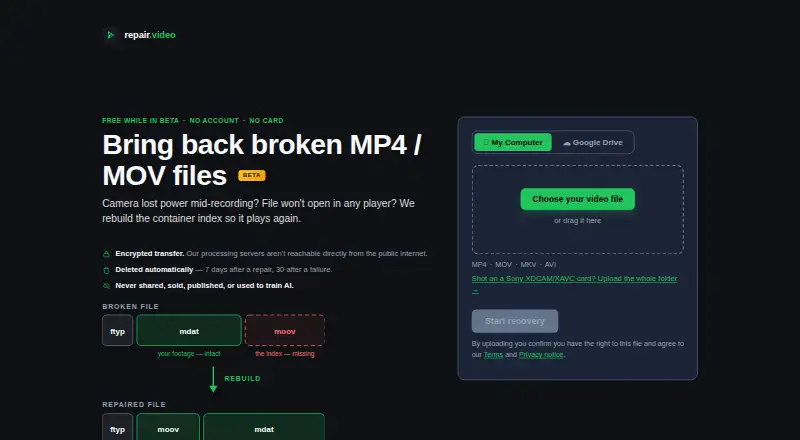
RepairMyVideo is a web service that attempts to restore damaged videos by rebuilding the container index so files can play again. It accepts MP4, MOV, MKV, and AVI files, with listed codec support including H.264, HEVC, MPEG-4, Canon Cinema MJPEG, and AverMedia c285 captures. Repairs run automatically, and an output must pass an automated playability check before it is offered. A healthy clip from the same camera is optional and may help when the damaged file's structure has been fully destroyed. Sony XDCAM/XAVC card folders can be uploaded for combination into one MP4, while Panasonic AVCHD and Canon Cinema recordings are handled as separate clips. Direct uploads can be up to 25 GB; browser-packaged camera-card folders work up to about 4 GB. Larger files can be supplied through a Google Drive link. The service is free during beta and includes analysis, repair, preview, and download. It cannot promise that a particular file will be recovered, and does not address missing or zero-byte files, DRM or streaming issues, or videos that play but look wrong.
Who it suits
RepairMyVideo may suit someone with a damaged supported video file or compatible camera-card footage to recover. It is not intended for missing or zero-byte files, DRM or streaming issues, or videos that play but look wrong.
What it does well
- Accepts MP4, MOV, MKV, and AVI files.
- Repair runs automatically with a playability check.
- Reference clip is optional.
- Direct uploads are listed up to 25 GB.
- Free during beta with preview and download.
What to know first
- Recovery of any particular file is not guaranteed.
- Missing and zero-byte files are not supported.
- Browser-packaged camera-card folders work up to about 4 GB.
- No recovery for videos that play but look wrong.
Limits
The free beta includes analysis, repair, preview and download, with direct uploads up to 25 GB. Browser-packaged camera-card folders work up to about 4 GB; larger files can use Google Drive. Recovery is not guaranteed, and some file problems are outside the service’s stated scope.
Plans
| Plan | Billed and limits | Price |
|---|---|---|
| Free during beta | Analysis, repair, preview and download included · No account · No payment card · Up to 25 GB direct upload · Larger files via Google Drive | Free |
As repairmyvideo.com lists them, read 15 Oct 2026. The maker's own page has the final word.
Getting started
- Open https://repairmyvideo.com/ in a web browser.
- Upload a supported video directly, or provide a Google Drive link for a larger file.
- Optionally provide a healthy clip from the same camera.
- For camera-card footage, upload a Sony XDCAM/XAVC folder or Panasonic AVCHD or Canon Cinema clips.
- Let automated analysis and repair run, then preview and download a result if offered.
Overview
RepairMyVideo is a web service for rebuilding the container index of damaged video files. It suits people whose supported footage will not play because of index damage, particularly those handling large files or camera-card recordings. Its main advantage is a free, automated repair-and-preview workflow; its main caveat is that it cannot promise recovery.
Key features
The service accepts MP4, MOV, MKV and AVI, with support for H.264, HEVC, MPEG-4, Canon Cinema MJPEG and AverMedia c285 captures. This is useful when a file's container structure is the problem, but it is not a broad video-restoration tool: it cannot help with missing or zero-byte files, DRM or streaming problems, or videos that play but look wrong.
Repairs run automatically, and an output must pass an automated playability check before it is offered. That keeps the process simple, while the check should not be taken as proof that the footage is complete or that every file can be recovered. Batch repair is supported, and a preview before download gives users a chance to inspect the offered result before saving it.
A healthy clip from the same camera is optional; it may help when the damaged file's structure is fully destroyed. Sony XDCAM/XAVC card folders can be uploaded for concatenation into one MP4, while Panasonic AVCHD and Canon Cinema recordings are handled as individual clips. Direct uploads go up to 25 GB, but camera-card folders packaged in the browser work up to about 4 GB. Larger files can be supplied through a Google Drive link, allowing the service to pull them directly from Google's servers.
Uploads and downloads use HTTPS/TLS, and processing servers are not directly reachable from the public internet. RepairMyVideo says footage is not shared, sold, published or used to train AI models. Files are automatically deleted seven days after successful repairs and 30 days after failures, subject to stated exceptions. A human reads and answers email, including deletion requests, questions and complaints.
Pricing
Free during beta: free. Analysis, repair, preview and download are included, with direct uploads up to 25 GB and larger files accepted via Google Drive. No payment details are collected. With no fee or payment commitment, it is an easy option for an occasional repair, though users should weigh that against the lack of a recovery guarantee. No trial is offered.
Platforms
RepairMyVideo runs on the web, so it does not require a desktop installation. Its browser-packaged camera-card folder workflow has a lower size ceiling than direct uploads; Google Drive is the route for larger files.
Who it's for
Choose RepairMyVideo when a supported video appears damaged because its container index needs rebuilding, especially if you want an automatic process, a preview before download, or batch handling. It is also a sensible first attempt for camera-card footage that fits the upload workflow. Look elsewhere if the file is missing or empty, affected by DRM or streaming issues, or plays with visual defects; this service does not address those problems.
Pros and cons
- Pros: The beta covers analysis through download at no charge, with no payment details collected.
- Pros: Automatic repair, batch support and preview make it possible to process and assess multiple candidate files without configuring a repair.
- Pros: Direct uploads support files up to 25 GB, with Google Drive offered for larger files.
- Pros: The service describes specific safeguards for transmission, server access, footage use and deletion, and provides human email support.
- Cons: Recovery is not guaranteed, and an automated playability check does not change that.
- Cons: The repair target is limited to container-index damage; several other common playback and picture problems are explicitly out of scope.
- Cons: Browser-packaged camera-card folders work only up to about 4 GB, well below the direct-upload limit.
Alternatives
For a broader comparison, browse Video Repair Software.
- IntactFile is worth considering for a cross-platform repair tool with a free daily quota and support for documents, archives and photos as well as video.
- VidRepair is a Windows option with all features and strategies in its free tier and an optional contribution model.
- Restore.Media may suit someone willing to pay per file for automatic recovery, with a free full-length low-resolution preview before the original-resolution download.
- EaseUS Video Repair offers a monthly Pro license with unlimited video, photo, file and audio repairs, plus AI credits and one desktop activation.
- Fix.Video offers paid repair packs, including a 10-file option with unlimited duration and file size.
- Kernel Video Repair is a desktop alternative for macOS and Windows, with a home license covering two computers and no file-size limit.
- VideoRepair is another freemium option for iOS, macOS and web.
- Tembrica Video Background Remover is an alternative for removing video backgrounds.
Verdict
RepairMyVideo is the right first stop for people with supported video files whose container index is damaged: it combines automatic, batch-capable repair with previews, large direct uploads and a free beta. Its narrow scope and no-guarantee terms are the reasons to look elsewhere when the footage has a different kind of problem or needs a dependable recovery outcome.
Verdict
RepairMyVideo offers automated index repair, preview, and download for supported damaged videos at no charge during beta. Recovery is not guaranteed, and the service lists several kinds of files and playback problems it cannot address.
Questions
How much does RepairMyVideo cost?
It is free during beta, and no payment details are collected.
Which video formats does it accept?
It accepts MP4, MOV, MKV and AVI. Listed codecs include H.264, HEVC, MPEG-4, Canon Cinema MJPEG and AverMedia c285 captures.
Do I need a reference clip?
No. A healthy clip from the same camera is optional and may help if the damaged file’s structure is fully destroyed.
Can I use it for camera-card recordings?
Sony XDCAM/XAVC card folders can be combined into one MP4. Panasonic AVCHD and Canon Cinema recordings are handled as individual clips.
Does RepairMyVideo guarantee that my file will be recovered?
No. The terms say it cannot promise that any particular file will be recovered fully or at all.
When are uploaded files deleted?
The service says files are automatically deleted 7 days after successful repairs and 30 days after failures, subject to stated exceptions.
Facts from RepairMyVideo's own pages
- Age and rights requirement
- Uploaders must own the file or have permission to process it and must be at least 16 years old. · repairmyvideo.com, 15 Oct 2026
- AI position
- RepairMyVideo says it rebuilds structure around the original streams and does not generate or enhance footage with AI. · repairmyvideo.com, 15 Oct 2026
- API and SDKs
- The reviewed official pages describe browser uploads and Google Drive links but do not document a public API or SDK. · repairmyvideo.com, 15 Oct 2026
- Automated verification
- A result is offered only after checks that the file parses and sampled frames decode, with end-to-end checks described for difficult repairs. · repairmyvideo.com, 15 Oct 2026
- Camera card support
- Sony XDCAM/XAVC card folders can be uploaded for concatenation into a single MP4; Panasonic AVCHD and Canon Cinema recordings are handled as individual clips. · repairmyvideo.com, 30 Sept 2026
- Camera sources
- The site lists phones, action cameras, DSLRs, drones, dashcams, screen recordings and Sony XDCAM/XAVC cards as source types. · repairmyvideo.com, 15 Oct 2026
- Company description
- RepairMyVideo identifies itself as an independent, single-purpose service operated by Avi, a video and multimedia professional, with a small team. · repairmyvideo.com, 15 Oct 2026
- Documentation
- Documentation consists mainly of public troubleshooting guides covering camera interruptions, Game Bar captures, untrunc, moov errors and ffmpeg limitations. · repairmyvideo.com, 15 Oct 2026
- Google Drive
- Users can provide a Google Drive link so the service can pull a file directly from Google's servers; larger files can use this method. · repairmyvideo.com, 30 Sept 2026
- Google Drive integration
- Google Drive is supported so the server can pull a file or camera-card folder directly without a local upload. · repairmyvideo.com, 15 Oct 2026
- Independent category listing
- Trustpilot classifies the business under data recovery service, software company and video production service. · trustpilot.com, 15 Oct 2026
- Infrastructure providers
- The privacy notice names Hetzner for hosting and backups, Cloudflare for DNS and proxying, Resend for recovery emails and Google for internal operational email. · repairmyvideo.com, 15 Oct 2026
- Licence
- The terms grant RepairMyVideo a limited licence to receive, store, copy and automatically analyze uploaded files for recovery; no open-source licence is stated. · repairmyvideo.com, 15 Oct 2026
- Limit: review sample
- Trustpilot warns that the company has not recently invited reviews and that the small review set may not be representative. · trustpilot.com, 15 Oct 2026
- No recovery guarantee
- The terms say the service cannot promise any particular file will be recovered, fully or at all. · repairmyvideo.com, 30 Sept 2026
- Other camera-card handling
- Panasonic AVCHD and Canon Cinema recordings are handled as individual clips rather than whole folders. · repairmyvideo.com, 15 Oct 2026
- Praise: difficult files
- Another reviewer said Repair.video recovered a file they considered impossible to recover. · trustpilot.com, 15 Oct 2026
- Praise: free service
- A reviewer praised the repair and follow-up and specifically said it was provided free of charge. · trustpilot.com, 15 Oct 2026
- Praise: recovery results
- A reviewer said the service recovered a 1.18 GB corrupted Canon 6D file and returned footage that worked perfectly. · trustpilot.com, 15 Oct 2026
- Preview
- Users can inspect a watermarked preview before downloading the full recovered file. · repairmyvideo.com, 15 Oct 2026
- Privacy
- The service says footage is not shared, sold, published or used to train AI models; files are automatically deleted 7 days after successful repairs and 30 days after failures, subject to stated exceptions. · repairmyvideo.com, 30 Sept 2026
- Privacy promise
- The privacy notice says uploaded footage is not sold, shared, published or used to train AI models. · repairmyvideo.com, 15 Oct 2026
- Processing
- Recovery is automated, and outputs must pass an automated playability check before they are offered as recovered files. · repairmyvideo.com, 30 Sept 2026
- Processing model
- The service says recovery is automated, with occasional human quality checks during beta and engineer review when a user requests investigation. · repairmyvideo.com, 15 Oct 2026
Where RepairMyVideo stands on Freedom251
- Video Repair Software#13 of 26