Freedom251 › Video Repair Software

EaseUS Video Repair
What EaseUS Video Repair is
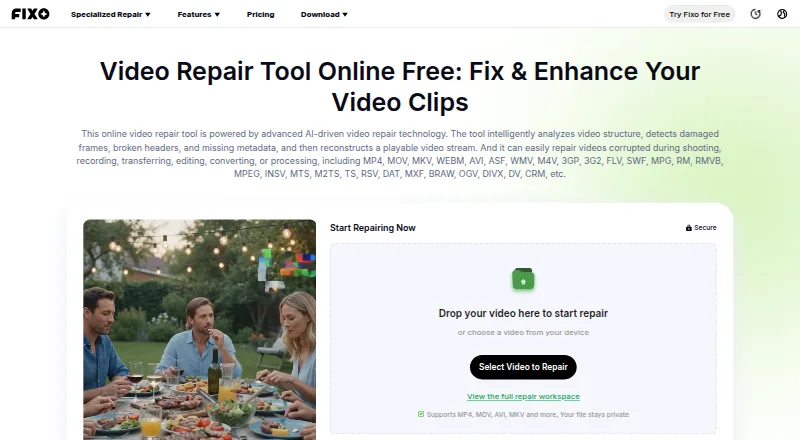
EaseUS Video Repair is a browser-based and desktop tool for repairing damaged or unplayable videos. It analyzes video structure for damaged frames, broken headers, and missing metadata, then reconstructs a playable stream. Listed repair targets include blurry, flickering, corrupted, lagging, stuttering, slow, shaky, or glitchy video, as well as missing audio, subtitles, and metadata. Online, users upload a video, have its data checked and repaired, preview playback, then download a separate repaired copy. The browser tool requires no installation and supports formats including MP4, MOV, MKV, WEBM, AVI, WMV, M4V, 3GP, FLV, MTS, MXF, and BRAW. Online repair requires an internet connection and is limited to files under 100 MB. EaseUS says a few videos can be repaired free; more files or advanced features require an upgrade. Desktop repair for Windows and macOS offers unlimited file size, local processing, offline use, and advanced and automatic repair. Repair Pro plans are $39.95 a month, $40.95 a year, or $99.95, paid once, each with one desktop activation.
Who it suits
It suits people trying to restore damaged video files from sources such as cameras, phones, drones, or SD cards. The online option fits smaller files and connected workflows, while desktop repair is intended for local or offline work and unlimited file size.
What it does well
- Repairs a range of video and metadata issues
- Preview playback before downloading a copy
- Browser access requires no installation
- Desktop option supports offline local processing
- A few videos can be repaired free
What to know first
- Online repair requires an internet connection
- Online files must be under 100 MB
- More files or advanced features require paid upgrade
Limits
The free option covers a few videos. Online repair requires internet and accepts files under 100 MB; paid upgrades are required for more files or advanced features. Each Repair Pro license supports one desktop activation.
Plans
| Plan | Billed and limits | Price |
|---|---|---|
| Repair Pro — 1 Month License | $39.95/month; auto-renew · Unlimited video, photo, file, and audio repairs · +1500 AI Credits/mo · one desktop activation | $39.95 a month |
| Repair Pro — 1 Year License | $40.95/year; auto-renew · Unlimited video, photo, file, and audio repairs · +3600 AI Credits/yr · one desktop activation | $40.95 a year |
| Repair Pro — Lifetime License | $99.95 one time · Unlimited video, photo, file, and audio repairs · +7200 AI Credits · one desktop activation | $99.95, paid once |
As repair.easeus.com lists them, read 28 Sept 2026. The maker's own page has the final word.
Getting started
- Visit the EaseUS Video Repair website
- Choose browser repair or the desktop option for Windows or macOS
- For browser repair, upload the video file
- Check and repair the video, then preview playback
- Download the separate repaired copy
EaseUS Video Repair is an AI-based utility for rebuilding damaged video files into playable streams. It suits photographers, creators, and anyone recovering footage from cameras, phones, drones, or memory cards, with both a no-install browser route and a desktop option. Its strongest case is broad format and fault coverage; its main trade-off is that the free browser workflow is tightly limited.
Overview
The software examines video structure for damaged frames, broken headers, and absent metadata, then reconstructs the stream. EaseUS positions it for files that are blurry, flickering, corrupted, unplayable, lagging, stuttering, slow, shaky, or glitchy, as well as clips missing audio, subtitles, or metadata. That breadth makes it more suitable than a narrowly focused “won’t open” fixer when a recording has several symptoms.
In a browser, you upload a file, let the service check and repair it, preview the result, and download a separate repaired copy. The original file is left untouched. No installation is needed, but the online route requires an internet connection and accepts files under 100 MB, so it is primarily a convenience option for short clips.
Key features
- Wide format coverage: The online tool supports formats including MP4, MOV, MKV, WEBM, AVI, WMV, M4V, 3GP, FLV, MTS, MXF, and BRAW, giving users a practical chance of working with footage from different devices.
- Automatic and batch repair: Automatic repair reduces setup for routine recovery, while batch repair is useful when several files were affected by the same incident.
- Preview before saving: Playback preview lets you check whether the repaired copy is usable before committing to a download.
- Camera and card sources: EaseUS names Canon, Nikon, Sony, GoPro, and DJI among supported camera sources, alongside phones, drones, and SD cards.
- Desktop recovery: The Windows and macOS application adds unlimited file size, local processing, offline use, advanced repair, and premium technical assistance. This is the appropriate route for large originals or sensitive footage that should remain on the computer.
- Separate-copy workflow: Keeping the source untouched is a sensible safeguard when a repair attempt needs to be repeated or compared with another result.
Pricing
A free plan allows a few video repairs. More files and advanced features require an upgrade, so it is best viewed as a way to assess the workflow rather than a dependable solution for a large archive. EaseUS also gives a pricing note of paid plans from $49.95/mo, while the specific Repair Pro plans are:
| Plan | Price and terms | What it includes |
|---|---|---|
| Repair Pro — 1 Month License | $39.95 a month, billed $39.95/month; auto-renew | Unlimited video, photo, file, and audio repairs; 1,500 AI Credits per month; one desktop activation |
| Repair Pro — 1 Year License | $40.95 a year, billed $40.95/year; auto-renew | Unlimited repairs across those file types; 3,600 AI Credits per year; one desktop activation |
| Repair Pro — Lifetime License | 99.95 USD once | Unlimited repairs; 7,200 AI Credits; one desktop activation |
The monthly license fits a short recovery project, although auto-renewal matters if it is not cancelled. The yearly plan has the stated annual billing and a larger credit allocation, while the lifetime license is the clearest choice for recurring use. Credits support credit-based features such as image and video generation and expire at the end of a monthly or yearly subscription term. Repair Pro works on the web and desktop with one account, but each license permits one desktop activation.
Platforms
EaseUS Video Repair is available on the web, Windows, and macOS. Browser access avoids installation for small files. Windows and macOS desktop repair are better suited to offline work, local privacy, and unlimited-size footage.
Who it's for
Choose it for mixed video damage, batches of clips, or footage from consumer cameras and drones when automatic processing and a before-save preview are useful. It is especially compelling for large files or confidential recordings that favor desktop, local, offline repair. It is a weaker fit if you only need occasional browser repairs above the free allowance, if your files exceed 100 MB but you do not want desktop software, or if one activation is insufficient.
Pros and cons
Pros
- Broad fault coverage: Targets playback, visual, audio, subtitle, and metadata problems rather than a single corruption pattern.
- Large-file desktop path: Unlimited file size and offline local processing remove the browser’s principal constraint.
- Safe review step: Preview and separate-copy download reduce the risk of overwriting an original.
- Batch capability: Multiple damaged clips can be handled in one repair workflow.
Cons
- Small online ceiling: Browser repairs are restricted to files under 100 MB and need an internet connection.
- Limited free use: Only a few videos are free, with payment required for more files or advanced features.
- Single desktop activation: One license cannot cover multiple desktop installations at once.
- Subscription renewal: Monthly and yearly plans auto-renew, and their credits expire with the term.
Alternatives
Video Repair Software is the broader directory list for comparing repair tools by platform and pricing.
- IntactFile suits users wanting API or Linux access and a free allowance of three repairs per day, with videos up to 50 MB.
- Untrunc is the better fit for a free, self-hosted GPL-2.0 tool with no usage or file-size limits, provided you can supply a healthy reference file.
- Minitooler Video Repair fits lighter browser jobs: its free tier allows three conversions daily for files up to 10 MB, while Pro is $5 per month.
- RepairMyVideo is worth considering for a browser beta that includes analysis, repair, preview, and download with uploads up to 25 GB.
- VidRepair is a Windows alternative offering all features without tiers or a trial, with an optional commercial license.
- Restore.Media is for per-file recovery, starting at $4.99 for automatic recovery and offering a low-resolution preview.
- Fix.Video suits buyers who prefer one-time file bundles, such as 10 files for $59 with unlimited duration and file size.
- Kernel Video Repair offers a $29 one-time home license for two computers with no file-size limitation and a 30-day money-back guarantee.
Verdict
EaseUS Video Repair is a strong choice for people repairing varied or numerous files who want automatic, batch-capable recovery and a desktop path for unlimited-size, offline processing. Pick it when format breadth, local handling, and preview-before-saving matter more than minimizing cost. Look elsewhere if your needs are occasional, browser-only, or better served by a free tool without a small online cap, auto-renewal, or one-desktop licensing.
Verdict
EaseUS Video Repair offers a browser workflow for smaller files and desktop repair for offline use and unlimited file size. The online size cap and paid upgrade requirement are important considerations for larger jobs or frequent repairs.
Questions
Is EaseUS Video Repair free?
It has a free plan that EaseUS says can repair a few videos. More files or advanced features require a paid upgrade.
What are the Repair Pro prices?
Repair Pro is $39.95 a month, $40.95 a year, or 99.95 USD one time. The monthly and yearly licenses auto-renew.
Which platforms are supported?
The service is listed for macOS, web, and Windows. The desktop option is described for Windows and macOS.
Does online repair require installation?
No. The online repair tool runs in a browser without installation, but it requires an internet connection.
What is the online file-size limit?
The product page lists online repair for files under 100 MB. Desktop repair supports unlimited file size.
Can the same account be used on web and desktop?
Yes. Repair Pro can be used on the web and desktop with the same account, and one license supports one desktop activation.
Facts from EaseUS Video Repair's own pages
- Browser access
- The online repair page says it runs in a browser with no installation required. · repair.easeus.com, 28 Sept 2026
- Company history
- EaseUS says it was formally established in 2004. · easeus.com, 28 Sept 2026
- Credits
- The pricing page says included AI Credits can be used for credit-based features such as image generation and video generation, and monthly and yearly plan credits expire at the end of the subscription term. · repair.easeus.com, 28 Sept 2026
- Desktop operating systems
- EaseUS's product article describes Fixo Video Repair as available for Windows and macOS. · repair.easeus.com, 28 Sept 2026
- Desktop option
- The product page describes desktop repair as supporting unlimited file size, advanced repair, automatic repair, local processing, offline use, and premium technical assistance. · repair.easeus.com, 28 Sept 2026
- Founded
- 2004 · repair.easeus.com, 28 Sept 2026
- Free use
- EaseUS says users can repair a few videos for free, with a paid upgrade required for more files or advanced features. · repair.easeus.com, 28 Sept 2026
- License use
- Repair Pro can be used on the web and desktop with the same account, and one license supports one desktop activation. · repair.easeus.com, 28 Sept 2026
- Online limit
- The comparison on the product page lists online repair file size as under 100 MB and says online repair requires an internet connection. · repair.easeus.com, 28 Sept 2026
- Privacy and security
- The product comparison says online files are processed over an encrypted connection and desktop repair offers privacy and local processing; the page also describes original files as untouched. · repair.easeus.com, 28 Sept 2026
- Purpose
- The AI-driven repair tool analyzes video structure, detects damaged frames, broken headers, and missing metadata, and reconstructs a playable video stream. · repair.easeus.com, 28 Sept 2026
- Repair issues
- The service describes repairs for blurry, flickering, corrupted, unplayable, lagging, stuttering, slow, shaky, or glitchy videos, as well as missing audio, subtitles, and metadata. · repair.easeus.com, 28 Sept 2026
- Supported formats
- The online tool lists support for formats including MP4, MOV, MKV, WEBM, AVI, WMV, M4V, 3GP, FLV, MTS, MXF, BRAW, and others. · repair.easeus.com, 28 Sept 2026
- Supported sources
- The service says it can repair videos from cameras, phones, drones, and SD cards, and names Canon, Nikon, Sony, GoPro, and DJI among camera brands. · repair.easeus.com, 28 Sept 2026
- Workflow
- Its online workflow is to upload the video, check and repair its data, preview playback, and download a separate repaired copy. · repair.easeus.com, 28 Sept 2026
Where EaseUS Video Repair stands on Freedom251
- Video Repair Software#2 of 26