Freedom251 › File repair tools

Untrunc
What Untrunc is
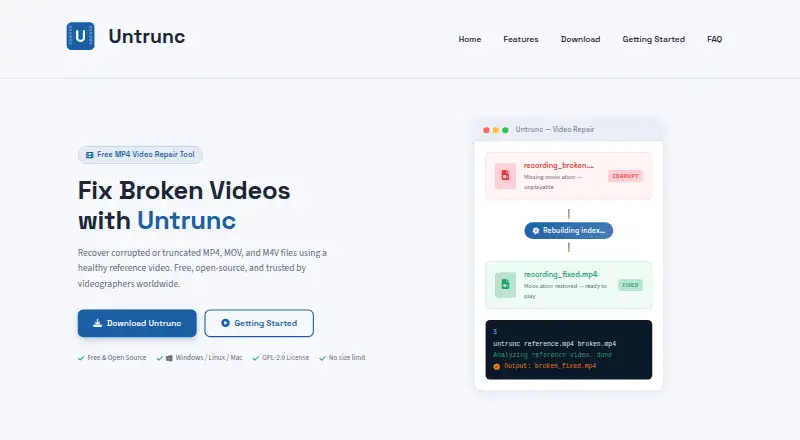
Untrunc is free software for repairing corrupted or truncated MPEG-4 video files. It uses a healthy reference video to rebuild missing or damaged index information, restoring file structure without re-encoding or changing the raw media data. It supports MP4, MOV, M4V, and 3GP containers, and requires the reference clip to come from the same camera with the same recording settings as the damaged file. Untrunc runs locally and offline, so video files are not uploaded and the software does not send telemetry. It has no file-size limit and can process files larger than available RAM in streaming mode. Windows downloads include a graphical interface and a command-line tool; other platforms have a command-line workflow. The software is available for Windows, macOS, and Linux, including self-hosted use. The site describes support for GoPro footage and Sony XAVC, with the anthwlock fork adding compatibility and performance improvements. An optional stretch mode can adjust audio duration to match the recovered video. Untrunc is open source under GPL-2.0 and free for personal and commercial use. It cannot recover empty files, damaged raw video data, or containers such as AVI and MKV.
Who it suits
Untrunc suits action-camera users, drone pilots, dashcam owners, screen recorders, security-camera operators, and videographers who have a damaged supported video file and a healthy reference from the same camera and recording settings. It is also suitable for people who want local repair on Windows, macOS, or Linux.
What it does well
- Free for personal and commercial use under GPL-2.0
- Repairs MP4, MOV, M4V, and 3GP containers
- Runs offline on local files without uploads or telemetry
- No file-size limit; streaming mode can exceed available RAM
- Windows download includes graphical and command-line interfaces
- Optional stretch mode can adjust recovered audio duration
What to know first
- Requires a healthy reference video from the same camera and settings
- Cannot recover empty files or corrupted raw video data
- Does not repair AVI or MKV containers
Limits
The free plan has no usage or file-size limits, but repair requires a healthy reference video from the same camera and recording settings. Untrunc cannot recover empty files, raw video data that is corrupted, or AVI and MKV containers.
Plans
| Plan | Billed and limits | Price |
|---|---|---|
| Free | Free to download and use; no license fees or subscriptions. · No usage or file-size limits · GPL-2.0 · Requires a healthy reference video from the same camera and recording settings | Free |
As untrunc.com lists them, read 9 Oct 2026. The maker's own page has the final word.
Getting started
- Visit https://untrunc.com/
- Choose the Windows download for a graphical interface or command-line tool, or follow the command-line workflow for another platform
- Provide the damaged video and a healthy reference video from the same camera and recording settings
- Run the repair locally; use optional stretch mode if audio duration needs adjustment
Untrunc is a free, open-source utility for repairing certain damaged or truncated MPEG-4 videos. It suits people with a healthy clip from the same camera and recording settings, especially those who want to keep footage on their own device. Its focused repair method is useful when a file’s structure is the problem, but it cannot fix damaged raw video data.
Overview
Untrunc reconstructs missing or damaged index metadata in MP4, MOV, M4V, and 3GP files. It rebuilds the file structure without re-encoding or modifying the underlying media, so it is aimed at files whose raw video data remains intact. It cannot recover empty files or repair corrupted raw video, and it does not support containers such as AVI or MKV.
A healthy reference video is essential. It should come from the same camera and use the same recording settings as the damaged file, which makes Untrunc a poor fit when no suitable clip is available. Repairs run offline on local files, with no uploads or telemetry—a meaningful privacy advantage for sensitive footage.
Key features
- Reference-based repair: The reference clip provides the basis for reconstructing file structure. Without a matching sample, the core repair workflow is unavailable.
- No re-encoding: Untrunc repairs structure without changing raw media data. That keeps the tool focused on metadata problems rather than attempting to restore damaged picture or sound data.
- Large-file handling: There is no file-size limit, and streaming mode can process files larger than available RAM. This is useful for long recordings without requiring a machine to hold the entire file in memory.
- Audio adjustment: Optional stretch mode can adjust audio duration to match the recovered video track, which may help when the recovered tracks differ in duration.
- Camera support: The project describes support for GoPro footage and Sony XAVC. The anthwlock fork adds compatibility and performance improvements.
- Local, open-source operation: The software runs offline, is released under GPL-2.0, and is free for personal and commercial use. Technical support is directed to the anthwlock GitHub Issues page; the informational website does not provide software support.
Pricing
Free — free. The software is free to download and use, with no license fees or subscriptions, no usage or file-size limits, and GPL-2.0 licensing. This is the only plan described, so there is no paid tier to add convenience or support. The trade-off is that users must supply a healthy reference video from the same camera and recording settings, and technical help is directed to the project’s issue tracker.
Platforms
Untrunc supports Windows, macOS, and Linux, with local repair on each. The Windows download includes both a graphical interface and a command-line tool; other platforms use a command-line workflow. That gives Windows users a GUI option, while users on macOS and Linux should be comfortable working from the command line.
Who it's for
Untrunc is aimed at action-camera users, drone pilots, dashcam owners, screen recorders, security-camera operators, and videographers whose MP4, MOV, M4V, or 3GP file has a structural problem and who can provide an appropriate reference recording. It is not the right choice for AVI or MKV files, empty files, footage with corrupted raw media, or situations where no matching reference exists.
Pros and cons
- Pros: Free for personal and commercial use, with no usage or file-size limits, so large repairs do not trigger a quota or subscription.
- Pros: Offline local processing with no uploads or telemetry suits users who want footage to stay on their device.
- Pros: Repair does not re-encode or modify raw media, preserving the original data while addressing file-structure problems.
- Cons: A healthy clip from the same camera and recording settings is required, which can rule it out when users lack a suitable reference.
- Cons: Support is narrow: it handles four listed MPEG-4 container formats and cannot repair empty files or corrupted raw video data.
- Cons: The command-line workflow on macOS and Linux may be less approachable than the Windows graphical interface.
Alternatives
For a different video repair workflow, IntactFile has a free plan with three repairs per day, videos up to 50 MB, and no-account use; it also supports documents, archives, and photos under their stated size caps. Choose it when those daily limits and broader file categories suit the job better than Untrunc’s reference-based local workflow.
Restore.Media charges $4.99, paid once for automatic recovery, billed per file with price varying by repaired file size; it offers a free full-length low-resolution preview and charges for original-resolution download. Consider it when that preview-and-download model fits better than Untrunc’s local repair method.
Fix.Video offers paid one-time file-repair packages, including a 10-file option for $59, paid once with unlimited duration, unlimited file size, and engineer support. It may suit users who prefer a packaged repair service with engineer support over Untrunc’s free reference-based approach.
Kernel Video Repair is a paid desktop alternative for macOS and Windows, priced at $29, paid once for a home license covering two computers; it includes video repair features, no file-size limitation, and a 30-day money-back guarantee. Choose it if those license terms and platform options suit your needs better.
DiskInternals ZIP Repair is a free Windows tool for ZIP files of any size, while Recovery Toolbox File Undelete Free is free for NTFS drives and Remo Repair Word repairs .doc and .docx files for free with no file-size limit on Windows. lzip is another free alternative.
See also Video Repair Software and File Repair Software.
Verdict
Choose Untrunc when a supported MPEG-4 file has a structural fault, you have a matching healthy reference, and you want unlimited, local repair without a fee. Its no-upload workflow and lack of file-size limits are strong advantages, but it is not a general video recovery tool: look elsewhere if the raw media is damaged, the container is unsupported, or you cannot provide the reference clip.
Verdict
Choose Untrunc if you need to repair a supported MPEG-4 file and can provide a matching healthy reference video. It offers free local repair with no file-size limit, but it cannot help when the raw video data is damaged or the file uses an unsupported container.
Questions
How much does Untrunc cost?
It is free to download and use, with no license fees or subscriptions.
Which video formats does it support?
It supports MP4, MOV, M4V, and 3GP containers.
Which platforms can I use it on?
Untrunc supports Windows, macOS, and Linux. The Windows download includes a graphical interface and command-line tool; other platforms have a command-line workflow.
Does Untrunc upload video files?
No. Repairs run offline on local files, with no video uploads or telemetry.
Is Untrunc open source?
Yes. It is described as open source under the GPL-2.0 license and free for personal and commercial use.
What does Untrunc need to repair a video?
It needs a healthy reference video from the same camera and recording settings as the damaged file.
Facts from Untrunc's own pages
- Audio sync
- An optional stretch mode can adjust audio duration to match the recovered video track. · untrunc.com, 9 Oct 2026
- Camera compatibility
- The site describes support for GoPro footage and Sony XAVC, with the anthwlock fork adding compatibility and performance improvements. · untrunc.com, 9 Oct 2026
- File-size limit
- The site says Untrunc has no file-size limit and can process files larger than available RAM using streaming mode. · untrunc.com, 9 Oct 2026
- Intended users
- The site names action-camera users, drone pilots, dashcam owners, screen recorders, security-camera operators, and videographers as users. · untrunc.com, 9 Oct 2026
- Interfaces
- The Windows download includes a command-line tool and a graphical interface; the site also describes a command-line workflow for other platforms. · untrunc.com, 9 Oct 2026
- License
- The software is described as open source under the GPL-2.0 license and free for personal and commercial use. · untrunc.com, 9 Oct 2026
- Limitations
- The site says Untrunc cannot recover empty files, raw video data that is itself corrupted, or non-MPEG-4 containers such as AVI and MKV. · untrunc.com, 9 Oct 2026
- Platforms
- The site lists Windows binaries and Linux and macOS options through source builds, Docker, Snap, or Homebrew. · untrunc.com, 9 Oct 2026
- Privacy
- The site says repairs run offline on local files, with no video uploads or telemetry. · untrunc.com, 9 Oct 2026
- Purpose
- Untrunc repairs corrupted or truncated MPEG-4 video files by using a healthy reference video to reconstruct missing or damaged index metadata. · untrunc.com, 9 Oct 2026
- Reference requirement
- The reference video should come from the same camera and use the same recording settings as the damaged file. · untrunc.com, 9 Oct 2026
- Repair method
- It rebuilds the file structure without re-encoding or modifying the raw media data. · untrunc.com, 9 Oct 2026
- Support
- The site directs users to the anthwlock GitHub Issues page for technical support and says the informational website does not provide software support. · untrunc.com, 9 Oct 2026
- Supported formats
- The site lists MP4, MOV, M4V, and 3GP as supported container formats. · untrunc.com, 9 Oct 2026
Where Untrunc stands on Freedom251
- File repair tools#2 of 33
- File Repair Software#9 of 34
- Video Repair Software#7 of 26