Freedom251 › File Repair Software

IntactFile
What IntactFile is
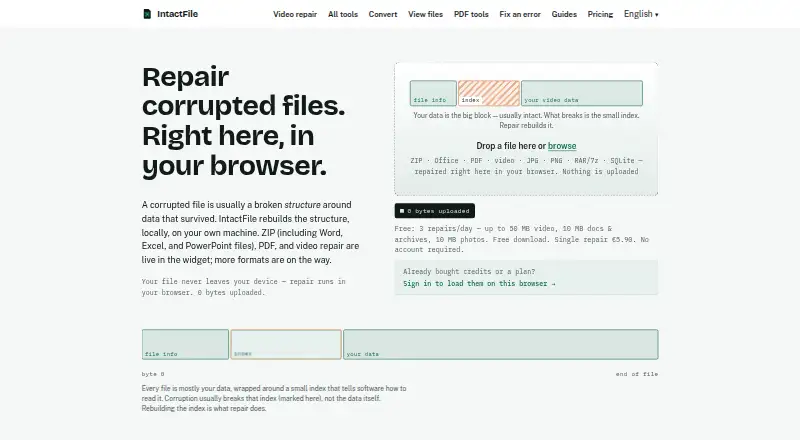
IntactFile is a browser-based repair tool for corrupted videos, PDFs, ZIP, RAR and 7z archives, Office documents, JPG and PNG photos, and SQLite databases. Its repair engines run on the user's device, and the maker says files are not uploaded. The tool rebuilds file structure around data that remains, such as damaged headers or missing indexes. Diagnosis is free for each file, so users can inspect the problem before deciding whether to pay for a repair. Repairs are checked against structural rules for their file format, and a failed repair is not charged. IntactFile cannot recover overwritten data, footage never written to disk, or files containing only zero bytes. The Free plan allows three repairs per day, with video limited to 50 MB and documents, archives and photos limited to 10 MB. Paid options include single repairs and credit packs, as well as annual Pro and Business plans. Business adds CLI, SDK and MCP server tools; developer repairs require an active Business subscription and Node 22 or later.
Who it suits
IntactFile suits people who need to diagnose or repair supported corrupted files while keeping processing on their own device. Developers needing CLI, SDK or MCP repair access need the Business subscription and Node 22 or later.
What it does well
- Diagnosis is free for every file.
- Files are processed locally, not uploaded, according to the maker.
- Failed repairs are not charged.
- Free plan includes three repairs per day.
- Refunds are available within 14 days.
What to know first
- Free video repair is limited to 50 MB.
- Free documents, archives and photos are limited to 10 MB.
- It cannot restore overwritten data or zero-byte files.
- Developer repairs require Business and Node 22 or later.
Limits
The Free plan allows three repairs per day, with a 50 MB video limit and 10 MB limits for documents, archives, and photos. Pro allows 30 repairs per month with rollover up to three times; Business allows 100 repairs per month. IntactFile cannot restore overwritten data, footage never written to disk, or files containing only zero bytes.
Plans
| Plan | Billed and limits | Price |
|---|---|---|
| Free | 3 repairs/day · video up to 50 MB · documents/archives/photos up to 10 MB · ads · no account | Free |
| Pack of 3 | one-time · 3 credits · €4.63/repair · credits never expire | €13.90, paid once |
| Business | €199/year · 100 repairs/month · batch up to 100 · CLI · SDK · MCP server · developer docs | €199 a year |
| Pack of 5 | one-time · 5 credits · €4.18/repair · credits never expire | €20.90, paid once |
| Custom pack (11–100) | €3.65 × N · 11–100 repair credits · credits never expire | €3.65, paid once |
| Custom pack | €3.65 × N for 11–100 repairs · 11–100 credits · credits never expire | €3.65, paid once |
| Pack of 10 | one-time · 10 credits · €3.79/repair · credits never expire | €37.90, paid once |
| Single repair | one-time · 1 repair · any file size · credits never expire | €5.90, paid once |
The first 8 of 9 plans, as intactfile.com lists them, read 14 Oct 2026. The maker's own page has the final word. Every plan
Getting started
- Open https://www.intactfile.com/ in a browser.
- Choose a file for a free diagnosis.
- Review the diagnosis before deciding whether to repair.
- Choose the Free plan or a paid repair option if needed.
- For developer repairs, use Business with Node 22 or later.
Overview
IntactFile is a browser-based repair service for damaged media, documents, archives and SQLite databases. It is best suited to people who still have the underlying file data and want to check whether structural damage can be repaired before spending a credit. Its broad format coverage and local processing are useful, but it cannot restore data that has been overwritten or never saved.
Key features
Repair across file types
IntactFile handles video, PDF, ZIP/RAR/7z archives, DOCX/XLSX/PPTX documents, JPG/PNG photos and SQLite databases. Its method rebuilds file structure around surviving data, for example by addressing a damaged header or missing index. That makes it a candidate for structural corruption across several categories, not a substitute for data recovery when the contents themselves are gone.
Free diagnosis, checked repairs
Every file can be diagnosed for free before you commit to a repair. IntactFile checks completed repairs against structural rules for their format, and does not charge for a failed repair. Preview before saving and batch repair add useful control, especially when processing several files.
Local processing and privacy
The repair engines run on the user's device, and IntactFile says files are not uploaded. Its privacy policy allows anonymous analytics to capture the file format, repair outcome, damage class, duration and a coarse size bucket, but not file names or contents. Stripe processes payments; IntactFile says card details go to Stripe rather than to the maker.
Local processing does not remove every privacy consideration, but it does mean the repair workflow is designed to keep file contents on the user's device. Support runs through one monitored email inbox, without a ticket system or chatbot.
Pricing
The Free plan costs nothing and includes three repairs per day without an account. It caps video at 50 MB and documents, archives and photos at 10 MB; those limits make it a sensible starting point for diagnosis and small files, but not a complete option for larger repairs.
For occasional larger jobs, the Single repair costs €5.90, paid once for one repair of any file size. The Pack of 3 costs €13.90, paid once and the Pack of 5 costs €20.90, paid once; both cover any supported format and their credits never expire. The Custom pack (11–100) costs €3.65, paid once, billed €3.65 × N, for 11–100 credits that never expire. These one-time options suit irregular use, though the larger packs require paying for credits in advance.
The Pack of 10 costs €37.90, paid once for 10 credits that never expire. Unlike the Pack of 3 and Pack of 5, its stated terms do not specify any file-size allowance, so it should not be treated as an any-size option.
Pro costs €4.92 a year, billed annually at €59/year. It includes 30 repairs per month, rollover up to three times, batch repair for up to 20 files and repair history. It fits regular individual use better than buying credits one at a time, but unused repairs are only carried over within that stated limit.
Business costs €16.58 a year, billed annually at €199/year. It includes 100 repairs per month, batches of up to 100 files and CLI, SDK and MCP server access. Those developer tools require an active Business subscription for repairs and Node 22 or later; the plan is the relevant choice for automated workflows, not simply for a larger one-off repair. Refunds are available within 14 days, no questions asked.
Platforms
IntactFile supports web use and API/CLI/SDK access. Its platforms are listed as API, Linux, macOS, web and Windows; the repair engines run locally in the browser, while CLI, MCP server and Node SDK repairs are available to Business subscribers.
Who it's for
Choose IntactFile when a damaged file may still contain recoverable data, you need support for more than one file category, or you want a free diagnosis before deciding whether to pay. Its free plan is more useful for smaller files, while one-time credits make sense for occasional larger repairs and Pro suits recurring individual workloads. It is a poor fit if the file was overwritten, never written to disk, or contains only zero bytes.
Pros and cons
- Pro: Free diagnosis for every file and no charge for failed repairs reduce the risk of paying before knowing whether repair is viable.
- Pro: Local browser processing and no upload of files, according to IntactFile, may suit users handling sensitive documents or media.
- Pro: The one-time credits never expire, so occasional users need not fit repairs into a subscription period.
- Con: The free plan's 10 MB caps for documents, archives and photos, and 50 MB cap for video, exclude many larger files.
- Con: Structural repair cannot recover overwritten data, footage never written to disk or zero-byte files.
- Con: Business developer repairs require both an active subscription and Node 22 or later, adding an ongoing cost and runtime requirement.
Alternatives
For video-specific comparisons, see Video Repair Software; for a broader shortlist, see File Repair Software.
- Restore.Media is a paid video-repair alternative with a free full-length low-resolution preview and original-resolution download after payment; its automatic recovery costs $4.99, paid once per file, with price varying by repaired file size.
- Fix.Video is another paid video-focused option; its 10-file repair plan costs $59, paid once and includes unlimited duration, unlimited file size and engineer support.
- PDF Repair Toolbox is a freemium alternative for readers focused on PDF repair, with web and Windows platforms.
- Untrunc is a free alternative for readers who want a video repair tool on Windows, macOS or Linux.
- DiskInternals ZIP Repair is a free Windows option for ZIP repair.
- Remo Repair Word is a free Windows option for Word repair.
- lzip is a free option for Linux, macOS and Windows.
- Recovery Toolbox File Undelete Free is a free Windows alternative.
Verdict
IntactFile is a strong fit for people who need to diagnose and repair structurally damaged files across several formats while keeping repair local to their device. Free diagnosis, checked results and non-expiring one-time credits make it approachable for occasional jobs. Look elsewhere if the data has been overwritten or never saved, or if the free plan's size caps rule out the file you need to repair.
Verdict
IntactFile covers several common file formats and offers free diagnosis before a repair decision. Its recovery limits and free-plan size caps matter, particularly for large files or data that was overwritten.
Questions
Is IntactFile free?
Yes. The Free plan costs nothing and allows three repairs per day, with file-size limits by category.
What do paid plans cost?
A Single repair costs €5.90, paid once. Custom packs cost €3.65 per credit for 11–100 credits. Other packs include 3 credits for 13.90 EUR, 5 for 20.90 EUR, and 10 for 37.90 EUR. Annual plans are Pro at €59 a year and Business at €199 a year.
Which file types does it repair?
It supports video, PDF, ZIP/RAR/7z archives, DOCX/XLSX/PPTX, JPG/PNG photos, and SQLite databases.
Where does IntactFile process files?
The repair engines run on the user's device in the browser, and the maker says files are not uploaded. Business developer tools also process locally on the machine.
Does IntactFile have developer tools?
Business subscribers can repair through the CLI, an MCP server, or a Node SDK. Developer repairs require an active Business subscription and Node 22 or later.
Can it recover overwritten files?
No. It cannot restore overwritten data, footage never written to disk, or files that contain only zero bytes.
Facts from IntactFile's own pages
- Advertising
- Free pages use Google AdSense cookies, while the Pro and Business app is described as ad-free. · intactfile.com, 14 Oct 2026
- Archive formats
- Archive support includes ZIP, RAR and 7z, with ZIP also covering Office containers. · intactfile.com, 14 Oct 2026
- Archive limits
- The GitHub engine supports store and deflate methods but does not decrypt password-protected archives or guess passwords. · github.com, 14 Oct 2026
- Authentication
- CLI authentication supports password login or a one-time email link, with credentials stored locally in ~/.config/intactfile/config.json at mode 0600. · intactfile.com, 14 Oct 2026
- Benchmark limitation
- The benchmark uses deliberately constructed failures rather than a random sample of real-world damaged files. · intactfile.com, 14 Oct 2026
- Benchmark overall
- A synthetic 200-file benchmark produced usable output for 68.5% of inputs and 65.1% of damaged files. · intactfile.com, 14 Oct 2026
- Benchmark strongest formats
- The benchmark reports 95.8% usable PDF recovery and 87.5% usable ZIP recovery. · intactfile.com, 14 Oct 2026
- Benchmark weakest formats
- The benchmark reports 23.5% usable recovery for 7z/RAR and 57.8% for general video. · intactfile.com, 14 Oct 2026
- CLI installation
- The documented CLI installation command is npm install -g @intactfile/cli. · intactfile.com, 14 Oct 2026
- Company identity
- The press material describes IntactFile as founded in 2026 by an independent developer in the EU. · intactfile.com, 14 Oct 2026
- Developer requirement
- The developer tools require an active Business subscription for repairs and Node 22 or later. · intactfile.com, 30 Sept 2026
- Developer runtime
- The developer documentation requires Node 22 or later because the SQLite engine uses built-in node:sqlite. · intactfile.com, 14 Oct 2026
- Developer tools
- Business subscribers can repair through a CLI, Node SDK or MCP server; diagnosis remains free. · intactfile.com, 14 Oct 2026
- Diagnosis
- Every file receives a free diagnosis before a user decides whether to pay for repair. · intactfile.com, 14 Oct 2026
- Free diagnosis
- Diagnosis is free for every file so users can see what is wrong before deciding whether to repair it. · intactfile.com, 30 Sept 2026
- Independent ZIP project
- The public GitHub project intactfile-zip-repair describes a pure TypeScript browser-and-Node ZIP/OOXML engine with no WASM, native code or temporary files. · github.com, 14 Oct 2026
- Limits
- It cannot restore overwritten data, footage never written to disk, or files that contain only zero bytes. · intactfile.com, 30 Sept 2026
- Local processing
- The repair engine runs locally in the browser using WebAssembly and TypeScript, with the site stating that zero file bytes are uploaded. · intactfile.com, 14 Oct 2026
- Maker size
- The contact page says one person builds and maintains IntactFile and reads its support inbox. · intactfile.com, 14 Oct 2026
- MCP installation
- The documented MCP installation command is npx -y @intactfile/mcp. · intactfile.com, 14 Oct 2026
- NPM API surface
- The package lists entry points for format detection plus ZIP, PDF, video, JPEG, PNG, SQLite and archive repair. · npmjs.com, 14 Oct 2026
- NPM package status
- The @intactfile/engines package is published as version 0.3.0 with an UNLICENSED designation and requires a Business subscription for programmatic repairs. · npmjs.com, 14 Oct 2026
- Office formats
- Supported Office formats listed are DOCX, XLSX and PPTX. · intactfile.com, 14 Oct 2026
- Official limit inconsistency
- The press page lists free caps of 500 MB video, 100 MB documents/archives and 50 MB photos, conflicting with pricing and terms pages that list 50/10/10 MB. · intactfile.com, 14 Oct 2026
Where IntactFile stands on Freedom251
- File Repair Software#1 of 34
- File repair tools#1 of 33
- Video Repair Software#1 of 26