Freedom251 › File repair tools
Remo Repair Word
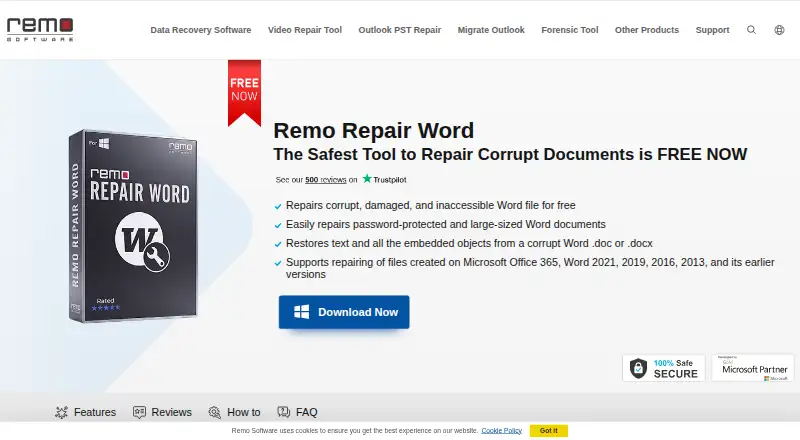
What Remo Repair Word is
Remo Repair Word is a Windows tool for repairing damaged or corrupt Microsoft Word documents in .doc and .docx formats. It scans a selected file, extracts text and other objects, then creates a repaired document without changing the original. The product page says it can recover text, formatting, OLE objects, and fields such as hyperlinks, and it offers a preview before saving. The maker says repair runs offline in read-only mode, with the source document kept intact and not sent to anyone. Supported Windows versions include Windows 11, Windows 10, and previous versions; listed Word document compatibility includes files created in Word 2003, 2007, 2010, 2013, 2016, and 2019. The maker says there is no file size limit. The free plan repairs DOC and DOCX files on Windows. The product page lists free technical support and 24/7 live chat. Remo says it was founded in 2011 and launched this product in 2013. It repairs damaged documents, but does not recover deleted Word documents.
Who it suits
Remo Repair Word suits Windows users with damaged or corrupt DOC or DOCX documents who want to preview a repair before saving. It is not for recovering deleted Word files.
What it does well
- Repairs DOC and DOCX documents for free.
- Leaves the original source file unchanged.
- Works offline in read-only mode.
- No file size limit stated.
- Includes preview before saving.
What to know first
- Windows platform only.
- Does not recover deleted Word documents.
Plans
| Plan | Billed and limits | Price |
|---|---|---|
| Remo Repair Word | Repairs .doc and .docx files · no file size limit · Windows | Free |
| Free | DOC/DOCX repair · Windows desktop · no stated file-size limit | Free |
As remosoftware.com lists them, read 7 Oct 2026. The maker's own page has the final word.
Getting started
- Visit the Remo Repair Word product page
- Use the Windows software to select a DOC or DOCX document
- Scan the selected document
- Preview the repair and save the repaired file
Remo Repair Word is a Windows utility for repairing damaged DOC and DOCX files. It is most useful when a Word document still exists but has become corrupt or unreadable. Its focused repair workflow is a sensible free option, but it is not a general file-recovery tool.
Overview
The software scans a selected document, extracts its contents, and creates a repaired file without changing the original. It can recover text, formatting, OLE objects, and fields such as hyperlinks, and supports a preview before saving. Preserving document structure—not merely retrieving plain text—makes it a better fit for files where formatting and embedded objects matter.
Remo says repairs run offline in read-only mode, keeping the source document on the local machine and intact. That is a useful safeguard for sensitive or important files. The trade-off is a narrow remit: the tool addresses DOC and DOCX corruption, not deleted-file recovery or other file types.
Key features
- DOC and DOCX repair: Covers both listed Word formats, including older DOC documents, rather than offering broad file-recovery capabilities.
- Content recovery and preview: Text, formatting, OLE objects, and fields including hyperlinks can be recovered, with a preview available before saving. That lets users inspect the output before creating a repaired copy.
- Read-only, offline operation: The source remains unchanged and is not sent elsewhere during the process, a meaningful advantage when document privacy or preservation matters.
- Broad document compatibility: Remo lists Word files from versions 2003, 2007, 2010, 2013, 2016, and 2019, plus Windows 11, Windows 10, and previous Windows versions.
- No file-size ceiling: The maker says there is no size limit for documents repaired with the tool, which avoids a stated cap when dealing with large files.
Pricing
Remo Repair Word — free: The free plan repairs DOC and DOCX files, has no file-size limit, and runs on Windows. It suits someone who needs a focused repair without paying or choosing among paid tiers. The published plan terms give no reason to expect a quota or seat restriction, but this is a Word-repair utility rather than a broader recovery package.
Remo lists free tech support and 24/7 live chat support. The company says it was founded in 2011 and launched Remo Repair Word in 2013.
Platforms
Remo Repair Word is for Windows, with support stated for Windows 11, Windows 10, and previous Windows versions. It is not the right choice for someone who needs a Mac, Linux, mobile, or browser-based repair workflow.
Who it's for
Choose it when you have a damaged DOC or DOCX file and want to attempt a local repair while keeping the source untouched. The preview and recovery of formatting and embedded objects are especially relevant when the document contains more than plain text. If the file was deleted rather than damaged, this is the wrong tool; Remo says it does not recover deleted Word documents.
Pros and cons
- Pro: Repairs both DOC and DOCX and can recover formatting, OLE objects, and fields, making it useful for preserving document structure.
- Pro: Offline, read-only operation protects the original and keeps the document local.
- Pro: The free plan has no file-size limit, and previewing before saving provides a check on the repair result.
- Con: It is limited to Word document corruption and cannot recover deleted documents.
- Con: Windows is the only supported platform, so users on other systems need another option.
Alternatives
File Repair Software is a useful starting point if you want to compare tools across the broader file-repair category rather than focus on Word documents.
For a wider mix of document, archive, photo, and video repair, consider IntactFile. Its free tier allows three repairs a day, with limits of 50 MB for video and 10 MB for documents, archives, and photos; it supports more platforms than Remo.
Untrunc is a free option for a different repair need: it has no usage or file-size limits, but it requires a healthy reference file and is aimed at video rather than Word documents.
If the damaged file is a ZIP archive, DiskInternals ZIP Repair is a free Windows tool that supports ZIP files of any size.
For deleted files on NTFS drives, Recovery Toolbox File Undelete Free is the more relevant choice; Remo Repair Word does not recover deleted documents.
Restore.Media is for media recovery across several platforms, with automatic recovery billed per file at $4.99, paid once and a free full-length low-resolution preview.
For video repair, Fix.Video offers paid file-repair packs, including a 10-file plan at $59, paid once; it is not a Word-document substitute.
Kernel Video Repair is another video-focused alternative, with a $29, paid once home license for two computers and no file-size limitation.
lzip is a free alternative for users who need a compression utility rather than document repair.
Verdict
Remo Repair Word is a good fit for Windows users with an existing damaged DOC or DOCX document who value a free repair attempt, local processing, and an untouched source file. Its main reason to choose it is that focused combination; its main reason to look elsewhere is equally clear: deleted documents and non-Word files are outside its scope.
Verdict
Remo Repair Word focuses on repairing damaged Word documents while preserving the original file. Its stated scope excludes deleted documents, so it is suited to corruption or damage rather than file recovery.
Questions
How much does Remo Repair Word cost?
The product is free.
Which file formats does it repair?
It repairs DOC and DOCX files.
Which platforms does it support?
It supports Windows 11, Windows 10, and previous Windows versions.
Does it recover deleted Word documents?
No. It repairs corrupt or damaged documents but does not recover deleted Word documents.
Does repair send my document to anyone?
The maker says the software works offline in read-only mode and does not send the source document to anyone.
Who makes Remo Repair Word?
Remo makes the product. The company says it was officially founded in 2011 and launched Remo Repair Word in 2013.
Facts from Remo Repair Word's own pages
- API and SDKs
- The product page documents a standalone browse, repair, preview and save workflow and provides no public API or SDK information. · remosoftware.com, 15 Oct 2026
- Company history
- Remo says it was officially founded in 2011 and launched Remo Repair Word in 2013. · remosoftware.com, 7 Oct 2026
- Company profile
- LinkedIn lists Remo Software as a privately held software-development company founded in 2011 with 51–200 employees and headquarters in Bengaluru, Karnataka. · linkedin.com, 15 Oct 2026
- Company size and ownership
- Crunchbase describes Remo Software as a private Bangalore company with 11–50 employees; it does not disclose a funding amount on the opened profile. · crunchbase.com, 15 Oct 2026
- Deleted-file limitation
- Remo Repair Word does not recover deleted documents; the maker directs that use case to Remo Recover Windows or Mac. · remosoftware.com, 15 Oct 2026
- Fields and hyperlinks
- The advertised recovery scope includes fields and hyperlinks. · remosoftware.com, 15 Oct 2026
- File-size limit
- The FAQ says no file-size limit is imposed on the source Word document. · remosoftware.com, 15 Oct 2026
- Formatting recovery
- The product says it recovers document formatting. · remosoftware.com, 15 Oct 2026
- Founded
- 2011 · remosoftware.com, 28 Sept 2026
- Headquarters
- Bengaluru, Karnataka, India · remosoftware.com, 28 Sept 2026
- How it works
- The software scans a selected document, extracts text and other objects, and creates a healthy file without altering the original source file. · remosoftware.com, 7 Oct 2026
- Integrations
- No third-party integrations are described on the official Remo Repair Word page. · remosoftware.com, 15 Oct 2026
- Legal name
- Crunchbase identifies the legal entity as Remo Software Private Limited and lists Hamid Imtiaz and Omer Faiyaz as founders. · crunchbase.com, 15 Oct 2026
- Licence terms
- The EULA grants a non-exclusive licence; a single-user purchase permits one installation for internal use on one computer, with an archival copy allowed. · remosoftware.com, 15 Oct 2026
- Limit: changelog availability
- FileHippo reports that no changelog information was available for version 2.0.0.28. · filehippo.com, 15 Oct 2026
- Limit: classic interface
- The same comparison says the Remo utility can feel more like a classic tool than a modern suite. · repairit.wondershare.com, 15 Oct 2026
- Limit: narrow format scope
- An independent comparison describes Remo File Fixer as focused on Word, Excel, PowerPoint, PSD, ZIP and RAR rather than broad image and video coverage. · repairit.wondershare.com, 15 Oct 2026
- Limit: stale licensing information
- FileHippo lists version 2.0.0.28 as Demo and says licensed functionality requires purchase, which conflicts with Remo's current claim that Repair Word is free. · filehippo.com, 15 Oct 2026
- Limit: support-review caveat
- Trustpilot warns that the company has not recently invited reviews, so its review sample may not represent current experience. · trustpilot.com, 15 Oct 2026
- Notable dated update
- Remo's homepage lists an article about importing PST files into New Outlook published March 30, 2026. · remosoftware.com, 15 Oct 2026
- Not for deleted files
- The FAQ says Remo Repair Word fixes corrupt or damaged documents but does not recover deleted Word documents. · remosoftware.com, 7 Oct 2026
- Offline operation
- The product page says processing works offline so the document is not sent to another party. · remosoftware.com, 15 Oct 2026
- OLE recovery
- Embedded OLE objects are among the elements the product says it can recover. · remosoftware.com, 15 Oct 2026
- Output location
- Recovered contents can be saved to any destination accessible to the computer. · fileeagle.com, 15 Oct 2026
Where Remo Repair Word stands on Freedom251
- File repair tools#5 of 33
- File Repair Software#10 of 34