Freedom251 › Video Repair Software
Minitooler Video Repair
What Minitooler Video Repair is
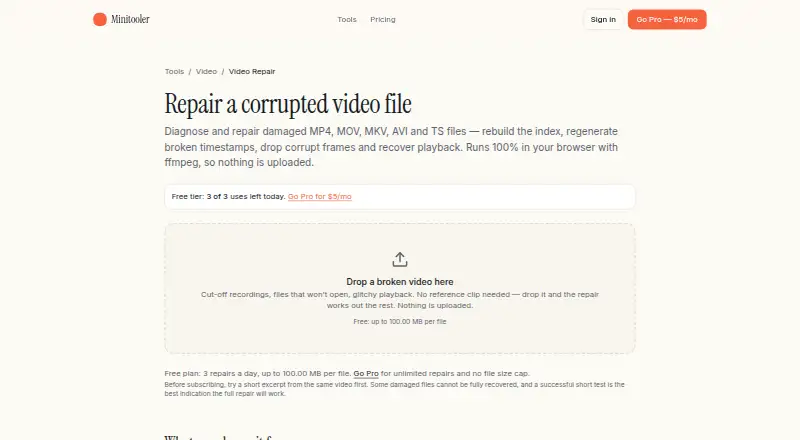
Minitooler Video Repair is a browser-based tool for diagnosing and repairing damaged videos that will not play, seek, or display the right length. It accepts MP4, MOV, MKV, AVI, WebM, and TS files, including files that will not open. Automatic repair can rebuild an index, regenerate timestamps, discard corrupt packets, or remove a damaged audio track; it tries lossless repacking first and re-encoding only as a last resort. Diagnosis and repair run in the browser using ffmpeg compiled to WebAssembly, and the page says files are not uploaded or stored. No account or email is required, and repaired results have no watermark. The Free plan covers every tool; the Video Repair page allows three repairs a day and files up to 100.00 MB per file. Pro costs $5/mo and provides unlimited repairs with no file-size cap, every future tool, and priority support. The page notes that some browser-undecodable streams or truncated files without an index may cause problems.
Who it suits
It suits people repairing crashed recordings, interrupted phone or camera clips, unseekable videos, or drone and dashcam footage. Its local browser processing may also suit users handling sensitive or unreleased material.
What it does well
- Supports six listed video formats.
- Repair runs locally in the browser.
- Lossless repacking is attempted before re-encoding.
- No signup or email required; no watermark.
- Pro removes repair-count and file-size limits.
What to know first
- Free repairs are limited to three per day.
- Free file limit is 100.00 MB per file.
- Some browser-undecodable streams may cause problems.
- Truncated files without an index may be difficult to repair.
Limits
The Video Repair page describes Free as allowing three repairs a day and files up to 100.00 MB each, while the pricing plan details state files up to 10 MB. Pro removes the repair-count and file-size limits, subject to the device.
Plans
| Plan | Billed and limits | Price |
|---|---|---|
| Free | $0 forever · 3 conversions per day · Files up to 10 MB · No account required | Free |
| Pro | $5/month · Unlimited conversions · No file-size limit (only your device) · Every future tool included · Priority support | $5 a month |
As minitooler.com lists them, read 9 Oct 2026. The maker's own page has the final word.
Getting started
- Open the Video Repair page in a web browser.
- Choose a supported video file from the device.
- Run the automatic diagnosis and repair.
- Save the repaired result; no account or email is required.
- Choose Pro through checkout for unlimited repairs and no file-size cap, if needed.
Overview
Minitooler Video Repair is a browser tool that automatically tries to fix damaged video files. It suits people who want to attempt a repair without creating an account or sending a recording to a service. Its local workflow and free daily allowance are useful, though a 100 MB free file cap and browser decoding limits rule out some jobs.
Key features
The tool handles problems such as videos that will not play or seek correctly, or that show the wrong duration. It starts by repacking the file: the original video and audio are copied unchanged into a new container. If that does not suffice, it can rebuild the index, regenerate timestamps, discard corrupt packets, remove a damaged audio track, or re-encode as a last resort. This automatic sequence is a practical first try for structural damage, while re-encoding provides a more involved fallback.
It accepts MP4, MOV, MKV, AVI, WebM, and TS files, including files that will not open. The intended cases include crashed screen recordings, interrupted phone and camera clips, unseekable videos, and drone or dashcam footage. Repaired files have no watermark, and no signup or email is required.
Diagnosis and repair run in the browser using ffmpeg compiled to WebAssembly. Minitooler says the file stays on the device and is not uploaded or stored, which makes the tool a sensible option for sensitive recordings or unreleased material. The browser still has to decode the stream: some streams may not be supported, and truncated files with an unwritten index may remain difficult to repair. Automatic repair cannot remove those compatibility limits.
Pricing
The Free plan costs nothing, billed $0 forever. It provides access to every tool, requires no account, and permits 3 repairs a day with files up to 100.00 MB each on the Video Repair page. That is enough to try several small clips, but the daily quota and size ceiling make it a poor fit for larger recordings or repeated repair work.
Pro costs $5 a month, billed $5/month. It includes unlimited repairs, no file-size limit beyond what the device can handle, every future tool, and priority support. It is the better fit for frequent use or files over the free cap; the local processing model means the user's device remains the practical constraint. Checkout runs through Stripe, with tax calculated based on the buyer's location.
Platforms
Minitooler Video Repair runs on the web, with diagnosis and repair performed locally in the browser. That avoids uploading the video, but the repair depends on browser decoding and the device doing the work.
Who it's for
Choose it for a no-account first attempt at repairing a small damaged clip, especially when keeping the recording on your device matters. Free access suits occasional repairs under 100.00 MB. Pro is more appropriate for larger files or regular use, provided the browser can decode the video. Look elsewhere if you need a desktop workflow or the file's stream cannot be decoded by a browser.
Pros and cons
Pros
- Local browser processing keeps the file on the device, a meaningful privacy advantage for sensitive footage.
- Lossless repacking preserves the original audio and video as a first repair attempt.
- The free plan allows 3 repairs a day, with no signup and no watermark.
- Pro removes the repair quota and file-size cap, subject to device capacity.
Cons
- Free repairs are limited to files up to 100.00 MB, which excludes many long or high-resolution recordings.
- Browser decoding can prevent repair of some streams, and a truncated file with no index may still be problematic.
- Pro's no-size-cap promise is bounded in practice by the user's device.
Alternatives
Video Repair Software is the broader category directory for readers comparing repair tools.
- IntactFile is a freemium option with web, desktop, Linux, and API platforms; consider it if you need those platform choices or repairs for documents, archives, and photos as well as video.
- Untrunc is free, has no usage or file-size limits, and runs on Linux, macOS, Windows, or self-hosted setups; choose it if you want a desktop or self-hosted option. It requires a healthy reference video.
- RepairMyVideo is free during beta and supports direct uploads up to 25 GB; consider it if you need to work with larger files and accept an upload-based workflow.
- VidRepair is a free Windows option with all features and strategies; choose it if you want a Windows application rather than a browser tool.
- Restore.Media charges $4.99, paid once for automatic recovery, per file, with price varying by repaired file size; consider it if a one-off, per-file purchase better suits your needs.
- EaseUS Video Repair offers a Repair Pro plan for $39.95 a month with auto-renewal, unlimited video, photo, file, and audio repairs, 1,500 AI credits monthly, and one desktop activation; consider it if those broader repair types and credits justify the higher monthly price.
- Fix.Video offers a 10-file repair plan for $59, paid once, with unlimited duration, unlimited file size, and engineer support; consider it if those stated limits and support suit a paid, finite repair batch.
- Kernel Video Repair costs $29, paid once for a home license covering two computers, with no file-size limitation and a 30-day money-back guarantee; consider it if you prefer a paid macOS or Windows desktop license.
Verdict
Minitooler Video Repair is a good first stop for people who want a private, no-signup repair attempt, particularly for small clips and structural problems that may be fixed by lossless repacking. The free daily allowance makes it easy to try; Pro is a clear step up for larger or frequent jobs. Choose another tool when browser decoding fails, the file exceeds what your device can manage, or a desktop or self-hosted workflow matters more.
Verdict
Minitooler Video Repair offers local, automatic repair with a free daily allowance and a $5/mo Pro option. Check the file limits and the stated compatibility caveats before relying on it for a particular video.
Questions
How much does Minitooler Video Repair cost?
The Free plan costs nothing, billed $0 forever. Pro costs $5 a month, billed $5/month. Tax is calculated at checkout based on the buyer's location.
What does the Free plan include?
It provides access to every tool. The Video Repair page allows three repairs per day and files up to 100.00 MB, while the plan details state a 10 MB file limit.
Which file formats does it support?
The listed formats are MP4, MOV, MKV, AVI, WebM, and TS. It also accepts files that will not open at all.
Does it upload videos?
Minitooler says diagnosis and repair run in the browser using ffmpeg compiled to WebAssembly, and that the file is not uploaded or stored.
Do I need an account, and is there a watermark?
No signup or email is required, and the repaired result has no watermark.
What does Pro add?
Pro provides unlimited repairs with no file-size cap, every future tool, and priority support.
Facts from Minitooler Video Repair's own pages
- Account and watermark
- The page says no signup or email is required and the repaired result has no watermark. · minitooler.com, 9 Oct 2026
- Checkout
- Checkout is handled by Stripe, and tax is calculated automatically based on the buyer’s location. · minitooler.com, 8 Oct 2026
- Compatibility limitation
- The page says a file may contain a stream that the browser simply cannot decode, and identifies truncated files whose index was never written as a possible problem. · minitooler.com, 9 Oct 2026
- Formats
- The page lists MP4, MOV, MKV, AVI, WebM, and TS as supported formats, and also accepts files that will not open at all. · minitooler.com, 9 Oct 2026
- Free access
- The Free plan provides access to every tool. · minitooler.com, 8 Oct 2026
- Free usage limit
- The Video Repair page says the free plan allows 3 repairs a day and files up to 100.00 MB per file. · minitooler.com, 9 Oct 2026
- Local processing
- Diagnosis and repair run in the browser using ffmpeg compiled to WebAssembly, and the page says the video is not uploaded or stored. · minitooler.com, 9 Oct 2026
- Paid usage limit
- The Video Repair page says Pro provides unlimited repairs and no file-size cap. · minitooler.com, 9 Oct 2026
- Payment
- The pricing page says checkout is secured by Stripe and tax is calculated at checkout based on the user's location. · minitooler.com, 9 Oct 2026
- Plan coverage
- The Pro plan includes every future tool. · minitooler.com, 8 Oct 2026
- Privacy
- The page says the file remains on the user's device during diagnosis and repair, including for sensitive recordings or unreleased material. · minitooler.com, 9 Oct 2026
- Purpose
- The browser-based video repair tool diagnoses and repairs damaged videos that will not play, seek, or show the right length. · minitooler.com, 9 Oct 2026
- Quality
- The repair description says the initial repacking step copies the original video and audio untouched into a new container. · minitooler.com, 9 Oct 2026
- Repair process
- It can repack a video losslessly, rebuild its index, regenerate timestamps, discard corrupt packets, drop a damaged audio track, or re-encode as a last resort. · minitooler.com, 9 Oct 2026
- Runs locally
- Minitooler says its tools run locally in the browser. · minitooler.com, 8 Oct 2026
- Support
- The site invites users who need help or a missing tool to email [email protected], and Pro pricing includes priority support. · minitooler.com, 9 Oct 2026
- Use cases
- The page names crashed screen recordings, interrupted phone or camera clips, unseekable videos, and drone or dashcam footage as use cases. · minitooler.com, 9 Oct 2026
- Video Repair page
- The Video Repair page is titled “Online Video Repair in-browser.” · minitooler.com, 8 Oct 2026
Where Minitooler Video Repair stands on Freedom251
- Video Repair Software#10 of 26