Freedom251 › Video Repair Software
VideoRepair
What VideoRepair is
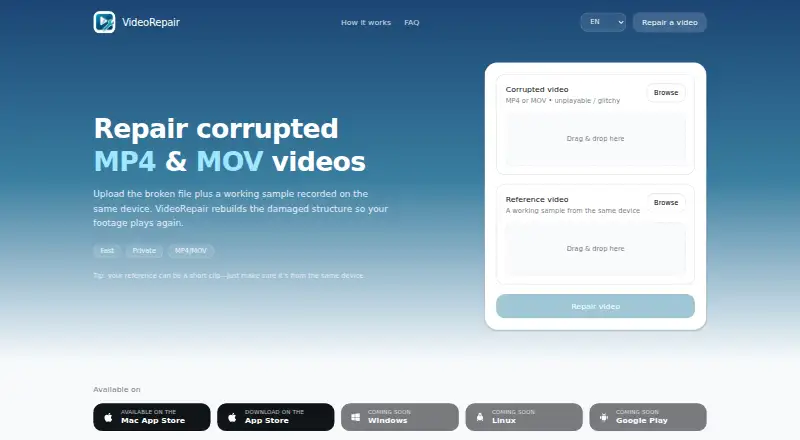
VideoRepair repairs corrupted or unplayable MP4 and MOV videos by rebuilding damaged file structure. Its automatic workflow requires a working reference clip recorded with the same device; using the same camera settings helps reconstruct container metadata. The homepage describes providing the damaged video and reference sample, then downloading the repaired file. The reference can be short, and repair time depends on file size and damage level, typically taking minutes. The homepage says files are processed for repair and can be deleted at any time. The App Store listing says repair happens locally on the device, without uploading files or using cloud processing. Compatible sources named in that listing include GoPro, DJI, Sony, Canon, Blackmagic, action cameras, and dashcams. The service is listed for iOS, macOS, and web. App compatibility requires iOS 18.1 or later, iPadOS 18.1 or later, or macOS 15.1 or later. Lifetime access is listed at €99.99, paid once. Windows, Linux, and Google Play are marked as coming soon.
Who it suits
VideoRepair suits people with damaged MP4 or MOV files who can provide a working clip from the same device. Its listed platforms and compatibility requirements are relevant to iOS, iPadOS, and macOS users.
What it does well
- Repairs corrupted or unplayable MP4 and MOV files
- Automatic repair uses a reference clip from the same device
- Repair runs locally on the device, according to the App Store listing
- Lifetime access listed at €99.99, paid once
What to know first
- A working reference clip is required
- iOS, iPadOS, and macOS versions have minimum requirements
- Windows, Linux, and Google Play are coming soon
Limits
Repair requires a working reference clip recorded with the same device. The linked Apple listings specify iOS 18.1 or later, iPadOS 18.1 or later, and macOS 15.1 or later.
Plans
| Plan | Billed and limits | Price |
|---|---|---|
| Lifetime access | Lifetime access 99,99 € · Lifetime access | €99.99, paid once |
As videorepair.app lists them, read 4 Oct 2026. The maker's own page has the final word.
Getting started
- Open https://videorepair.app/.
- Choose the web workflow or use the linked Mac App Store or App Store listing.
- Provide the corrupted or unplayable MP4 or MOV video.
- Add a working reference clip recorded with the same device and, ideally, camera settings.
- Download the repaired file.
Verdict
VideoRepair rebuilds damaged MP4 and MOV files using a working sample from the same device, so having that reference is essential. Check the listed operating-system requirements before choosing it.
Questions
What video formats does VideoRepair repair?
It repairs corrupted or unplayable MP4 and MOV videos.
Do I need to provide another video?
Yes. Repair requires a working reference clip recorded with the same device; a short clip can work. Matching camera settings help rebuild container metadata.
Which platforms are available?
VideoRepair is listed for iOS, macOS, and web. Windows, Linux, and Google Play are listed as coming soon.
How much does VideoRepair cost?
Lifetime access costs €99.99, paid once.
Does it upload videos for repair?
The App Store listing says repair happens locally on the device, without upload or cloud processing. The homepage says files are processed for repair and can be deleted anytime.
Who provides the app?
The App Store listing names Ludovic Bouguerra as the provider.
Facts from VideoRepair's own pages
- App compatibility
- The listing specifies iOS 18.1 or later, iPadOS 18.1 or later, and macOS 15.1 or later. · apps.apple.com, 4 Oct 2026
- Audio repair
- The App Store version history says audio track repair functionality was enhanced in version 2.0. · apps.apple.com, 4 Oct 2026
- Available platforms
- The homepage links to the Mac App Store and App Store, and lists Windows, Linux, and Google Play as coming soon. · videorepair.app, 4 Oct 2026
- Data collection
- The App Store privacy section says the developer reports that the app collects no data; Apple says this information has not been verified. · apps.apple.com, 4 Oct 2026
- Developer
- The App Store listing names Ludovic Bouguerra as the provider and links to the developer website and privacy policy. · apps.apple.com, 4 Oct 2026
- Local processing
- The App Store listing says repair happens locally on the device, with no upload or cloud processing. · apps.apple.com, 4 Oct 2026
- Privacy
- The homepage says files are processed for repair and can be deleted anytime. · videorepair.app, 4 Oct 2026
- Purpose
- VideoRepair repairs corrupted or unplayable MP4 and MOV videos by rebuilding their damaged structure. · videorepair.app, 4 Oct 2026
- Reference clip
- Repair requires a working sample recorded with the same device; the homepage says it can be a short clip. · videorepair.app, 4 Oct 2026
- Reference metadata
- A reference video recorded with the same device and camera settings helps rebuild container metadata. · videorepair.app, 4 Oct 2026
- Repair time
- Repair time depends on file size and damage level and typically takes minutes. · videorepair.app, 4 Oct 2026
- Supported cameras
- The App Store listing names GoPro, DJI, Sony, Canon, Blackmagic, action cameras, and dashcams as compatible sources. · apps.apple.com, 4 Oct 2026
- Workflow
- The homepage describes uploading the corrupted video, adding a reference sample, and downloading the repaired file. · videorepair.app, 4 Oct 2026
Where VideoRepair stands on Freedom251
- Video Repair Software#12 of 26