Freedom251 › Social Media Design Software
Poster App Lab
What Poster App Lab is
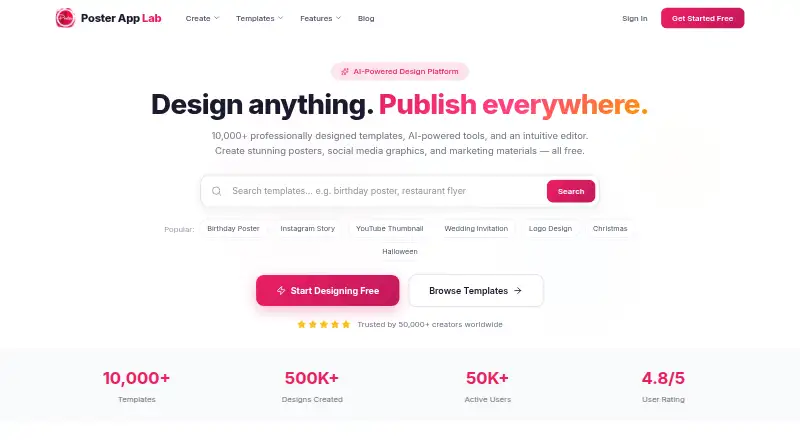
Poster App Lab is a design platform for creating posters, social graphics, flyers, and marketing materials. It advertises more than 10,000 templates and an AI feature that generates layouts from a description of the user’s vision. The advertised drag-and-drop editor includes layers, smart alignment, text tools, filters, and a canvas. Designs can be adapted for Instagram, Facebook, YouTube, LinkedIn, and other destinations, then downloaded as PNG, JPG, PDF, or SVG files. Export options include 300 DPI print-ready output and web-optimized output. A Brand Kit stores colors, fonts, and logos for applying a brand identity, and users can share designs directly to social media. The free plan costs nothing and includes the templates, listed export formats, and print-ready output. The service lists Android, iOS, macOS, and web availability, but its browser editor page says the editor is coming soon while performance and the asset library are being polished. Its terms grant a personal, non-commercial license; premium features are for paid users.
Who it suits
Poster App Lab may suit people making posters, social graphics, flyers, or marketing materials who want templates and multiple export formats. Its stated license is for personal, non-commercial use, so it may not fit commercial work.
What it does well
- Advertises more than 10,000 templates.
- Exports PNG, JPG, PDF, and SVG.
- Free plan includes 300 DPI print-ready output.
- Brand Kit stores colors, fonts, and logos.
What to know first
- Browser editor is listed as coming soon.
- License is limited to personal, non-commercial use.
- Premium features are for paid users.
Limits
The Free plan costs nothing and includes 10,000+ templates, PNG, JPG, PDF, and SVG export, and 300 DPI print-ready output. Premium features are for paid users, and the terms restrict the license to personal, non-commercial use.
Plans
| Plan | Billed and limits | Price |
|---|---|---|
| Free | Free forever · 10,000+ templates · PNG/JPG/PDF/SVG export · 300-DPI print-ready output | Free |
As posterapplab.com lists them, read 14 Oct 2026. The maker's own page has the final word.
Getting started
- Visit https://posterapplab.com/.
- Choose a listed platform: Android, iOS, macOS, or web.
- Use the Free plan at no cost.
- Create a design with a template or an AI-generated layout.
- Export the design or share it directly to social media.
Poster App Lab is an AI-assisted design platform for posters, social graphics, flyers, and marketing artwork. It suits individuals and small teams who want template-led creation with print and web exports across mobile and desktop platforms. Its broad advertised toolkit is appealing, but the unfinished browser editor and personal-use license make it a poor fit for some professional workflows.
Overview
Poster App Lab combines more than 10,000 professionally designed templates with AI layout generation, a drag-and-drop canvas, resizing tools, brand controls, and multiple download formats. You can describe a visual idea and receive a proposed layout, then refine it with the editor’s layers, smart alignment, text tools, and filters.
The service is offered on Android, iOS, macOS, and the web. Web access needs caution: the browser editor is described as coming soon while performance and the asset library are being polished. The published feature set therefore points to the intended product rather than a fully available browser workflow.
The terms grant a revocable, non-exclusive, non-transferable license for personal, non-commercial use. That restriction is decisive for agencies, businesses, and anyone producing paid client or commercial campaign material.
Key features
Templates and AI design
A library exceeding 10,000 templates gives users a substantial starting point for posters, flyers, social posts, and marketing materials. The AI feature can turn a description of your vision into a layout, which is useful when you need a draft quickly rather than starting from a blank canvas. The published facts do not establish how much refinement a generated design will require.
Editing and resizing
The advertised editor provides layers, smart alignment, text controls, filters, and an intuitive canvas. Those tools should suit users who need to adjust hierarchy, spacing, typography, and visual treatment after selecting a template or AI draft. Auto-resize adapts work for Instagram, Facebook, YouTube, LinkedIn, and other destinations, reducing the need to rebuild the same artwork in several dimensions. Custom dimensions are also supported.
Branding and sharing
Brand Kit stores colors, fonts, and logos and applies that identity in one click. It is a practical advantage for repeat campaign work, although the facts do not define the number of brands or assets allowed. Designs can be exported or shared directly to social media in one click.
Export and storage considerations
Downloads support PNG, JPG, PDF, and SVG. Print-ready output is offered at 300 DPI, while web-optimized output targets online use, giving users a clearer choice between production and screen delivery. Editor state, drafts, and preferences use localStorage, sessionStorage, and IndexedDB. The privacy policy says saved designs may contain images and text, and analytics may include usage, crash, device, UUID, location, and language data.
Pricing
Free
free, free forever. The plan includes 10,000-plus templates, PNG, JPG, PDF, and SVG export, and 300 DPI print-ready output. It is a strong way for individuals to explore the template and export workflow without a subscription. The terms still limit use to personal, non-commercial work, and premium features are reserved for paid users. No paid plan price, seat allowance, quota, or trial terms are published, so teams needing commercial rights or premium capabilities should seek clarification before committing.
Platforms
Poster App Lab is listed for Android, iOS, macOS, and the web. Mobile and desktop listings broaden access, while the browser editor’s coming-soon status means web-based creation may not yet match the advertised workflow.
Who it's for
Choose Poster App Lab for personal posters, social content, flyers, and marketing concepts when a large template library, AI-generated starting points, brand presets, and print-ready exports matter. It is less suitable for commercial operators, agencies, or client work because the license is personal and non-commercial, and for browser-first users who need an editor that is available now.
Pros and cons
Pros
- 10,000-plus templates: provides many ready-made starting points across common promotional formats.
- AI layout generation: converts a written design idea into an initial composition.
- Flexible output: PNG, JPG, PDF, SVG, 300 DPI print files, and web-optimized exports cover both print and digital delivery.
- Brand Kit and auto-resize: supports consistent identity and adaptation for major social destinations.
- Free forever plan: gives personal users broad template and export access at no charge.
Cons
- Personal, non-commercial license: rules out ordinary paid client and business usage unless terms change.
- Browser editor coming soon: web users may not have the advertised editing experience yet.
- Unpublished paid-plan terms: buyers cannot compare commercial pricing, seats, quotas, or premium allowances.
- Data and analytics collection: saved designs and several device and usage signals are covered by the privacy policy.
Alternatives
Canva Video is the better choice when you need Windows alongside mobile, desktop, and web access, 5GB of cloud storage, and 1.6 million-plus templates on its free plan.
CapCut fits mobile-focused editing and offers basic tools, free templates, and cloud storage.
Visme is preferable for presentation-style projects, with 500MB storage and up to 50 slides or pages per project on Basic.
Adobe Express Video suits users who want 155,000-plus templates, 5GB storage, and 25 generative credits monthly on Free.
Desygner is a stronger fit for small collaboration, offering three users, 100 projects, and 20 AI credits monthly on Free.
PosterMaker.co.uk is a straightforward free online poster, flyer, infographic, and banner designer.
PosterMyWall is worth choosing for free downloads, more than one million design and email templates, and one-account social publishing.
Simplified is aimed at broader campaign work, with storage and AI design and writing allowances that increase on paid plans.
For more category comparisons, see Poster Maker Software, Social Media Design Software, and Poster Design Software.
Verdict
Poster App Lab is a sensible free choice for personal creators who want AI-assisted layouts, a large template base, brand controls, resizing, and print-ready exports. Look elsewhere if you need commercial rights, dependable browser editing today, or transparent paid-plan and team terms.
Verdict
Poster App Lab lists a broad set of design and export features, including a free plan. The browser editor’s stated coming-soon status and the non-commercial license are important constraints to check.
Questions
Is Poster App Lab free?
Yes. Its Free plan costs nothing and is described as free forever.
Which platforms are listed?
Android, iOS, macOS, and web. The browser editor page says the editor is coming soon while performance and the asset library are being polished.
What file formats can I export?
PNG, JPG, PDF, and SVG. The listed plan also includes 300 DPI print-ready output.
Can I resize designs for social platforms?
The auto-resize feature adapts designs for Instagram, Facebook, YouTube, LinkedIn, and other destinations.
What does the Brand Kit do?
It stores brand colors, fonts, and logos and applies a brand identity in one click.
What does the license allow?
The terms grant a revocable, non-exclusive, non-transferable license for personal, non-commercial use. Premium features are available to paid users.
Facts from Poster App Lab's own pages
- Account requirement
- Signup is optional for basic use, but accounts are required for multi-device access and subscriptions. · pro-api.posterapplab.com, 14 Oct 2026
- AI design
- Its AI-powered design feature generates professional layouts from a description of the user’s vision. · posterapplab.com, 30 Sept 2026
- AI design generator
- The AI generator is intended to turn a text description into a layout with selected typography, imagery and colour, but the feature page says it is coming soon. · posterapplab.com, 14 Oct 2026
- Android requirements and distribution
- The Android listing shows an Everyone content rating, 100K+ downloads and an update dated 9 October 2026. · play.google.com, 14 Oct 2026
- API and developer documentation
- The opened maker site exposes product, template, feature and blog pages but no public API reference, SDK documentation or developer portal. · posterapplab.com, 14 Oct 2026
- Auto-resize
- The home page says designs can be adapted for Instagram, Facebook, YouTube, LinkedIn and other destinations. · posterapplab.com, 14 Oct 2026
- Backup behavior
- The terms say server backup may require registration; otherwise designs are stored locally and are deleted if the app is removed. · pro-api.posterapplab.com, 14 Oct 2026
- Brand kit
- The planned Brand Kit stores logos, colour palettes and fonts and applies them to designs, but the page says asset uploading and cross-design synchronization are unfinished. · posterapplab.com, 14 Oct 2026
- Company ownership
- ZaubaCorp names Jagwinder Singh, Manwinder Singh and Jagmeet Singh as designated partners. · zaubacorp.com, 14 Oct 2026
- Data collected
- The privacy policy says designs may include images and entered text, while usage data can include crash reports, device details, UUID, location, language and app activity. · pro-api.posterapplab.com, 14 Oct 2026
- Data storage
- The cookie policy says localStorage, sessionStorage, and IndexedDB are used for editor state, drafts, and preferences, while performance technologies do not carry payment details, raw design content, or uploaded images. · posterapplab.com, 30 Sept 2026
- Editor
- The planned browser editor includes layers, alignment guides, text controls, filters and export tools, but its page says it is still coming soon. · posterapplab.com, 14 Oct 2026
- Editor status
- The browser editor page says the editor is coming soon while performance and the asset library are being polished. · posterapplab.com, 30 Sept 2026
- Export
- Designs can be downloaded as PNG, JPG, PDF, or SVG files, with print-ready output at 300 DPI or web-optimized output. · posterapplab.com, 30 Sept 2026
- Export formats
- The service advertises PNG, JPG, PDF and SVG downloads, including 300-DPI print-ready output. · posterapplab.com, 14 Oct 2026
- Founded/incorporated
- ZaubaCorp records the LLP incorporation date as 9 October 2019. · zaubacorp.com, 14 Oct 2026
- Headquarters
- The Google Play developer listing gives Poster App LLP's address in Mohali, Punjab, India. · play.google.com, 14 Oct 2026
- Instagram Post templates
- The home page lists more than 1,200 Instagram Post templates. · posterapplab.com, 14 Oct 2026
- Instagram Story templates
- The home page lists more than 1,800 Instagram Story templates. · posterapplab.com, 14 Oct 2026
- Integrations
- The Google Play description names sharing to Instagram, Facebook, WhatsApp and LinkedIn. · play.google.com, 14 Oct 2026
- Invitation templates
- The home page lists more than 800 invitation templates. · posterapplab.com, 14 Oct 2026
- Legal entity
- ZaubaCorp lists POSTER APP LLP as an active Indian limited-liability partnership with LLPIN AAQ-7505. · zaubacorp.com, 14 Oct 2026
- Licence
- The terms grant a revocable, non-exclusive, non-transferable licence for personal, non-commercial use and prohibit commercial exploitation or reverse engineering. · pro-api.posterapplab.com, 14 Oct 2026
- License limit
- The terms grant a revocable, non-exclusive, non-transferable license for personal, non-commercial use and say premium features are available to paid users. · pro-api.posterapplab.com, 30 Sept 2026
Where Poster App Lab stands on Freedom251
- Social Media Design Software#9 of 44
- Poster Maker Software#11 of 41
- Poster Design Software#15 of 39