Freedom251 › Social Media Template Libraries

Mojo
by Mojo
What Mojo is
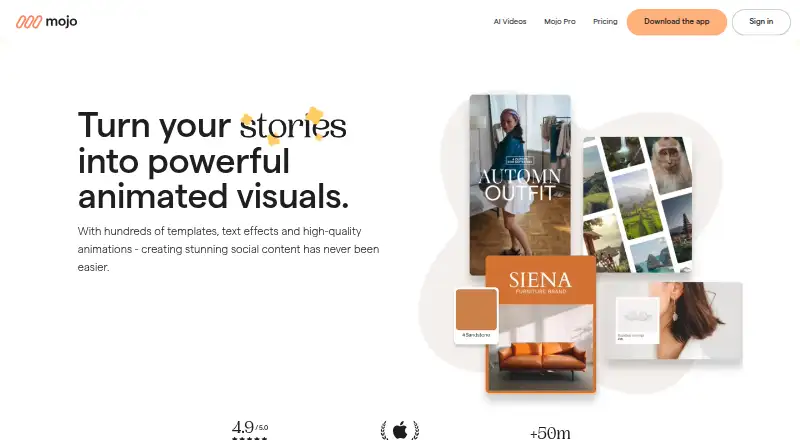
Mojo is a video creation app for making animated content for social networks, available on Android, iOS, and the web. Its editor supports media splitting, background removal, clip animations, overlays, text styling, video effects, voiceovers, and subtitles. Users can resize content for social formats and share it to social platforms from the app. Audio options include trending sounds from Instagram or TikTok, stock music, uploaded tracks, and audio extracted from videos. Mojo Pro adds more than 500 animated templates and lets users apply their own fonts, logos, and colors. Pro also lists background removal and auto captions. Pro AI includes 50 credits per month, with one credit used for each generation. Free includes templates and royalty-free music, photos, and videos. Pro costs $4.99 a month, billed annually; Pro AI costs $8.33 a month, billed annually. A 7-day trial is listed. Free has self-serve support, while Pro has chat support. Mojo Teams is for 1–10 people, and its custom enterprise plan has a 10-person minimum with pricing on demand.
Who it suits
Mojo suits individuals making animated social videos, especially those who want templates, branded content, or captions. Teams may fit professionals working together, though team plan pricing is on demand.
What it does well
- Available on Android, iOS, and web.
- Pro includes more than 500 animated templates.
- Supports social-format resizing and sharing.
- Pro AI includes 50 monthly generation credits.
- A 7-day trial is listed.
What to know first
- Pro pricing is billed annually.
- Free support is self-serve.
- Custom enterprise plan has a 10-person minimum.
Limits
Mojo Pro AI includes 50 credits per month, and each generation consumes one credit; additional credits are available to buy. The Free plan includes free templates and royalty-free media, while custom fonts, logos and colors and auto captions are listed with Pro.
Plans
| Plan | Billed and limits | Price |
|---|---|---|
| Mojo Free | Free templates · royalty-free music, photos and videos · share across social platforms | Free |
| Mojo Pro | Per month, billed annually in USD · Animated templates, text styles, stickers and video effects · custom fonts, logos and colors · resize formats · background removal · auto captions | $4.99 a month |
| Mojo Pro AI | Per month, billed annually in USD · Everything in Mojo Pro · 50 credits per month (50 video generations) · shorter wait times · watermark removal · additional credits available to buy | $8.33 a month |
| Mojo Teams | Pricing on demand · Minimum 10 people · approval workflows · dedicated support team · built-in security and compliance · integrations with other tools | On request |
As mojo-app.com lists them, read 30 Sept 2026. The maker's own page has the final word.
Getting started
- Visit https://mojo-app.com/.
- Choose Android, iOS or the web.
- Start with the Free plan or use the 7-day trial.
- Choose Pro or Pro AI for paid features; both are billed annually at the listed monthly rates.
- For team features, consider Mojo Teams, listed for 1–10 people.
Mojo is a social video creation app for making animated posts with templates, editing tools, audio, and brand controls. It is best suited to individual creators and small marketing teams that publish regularly across social networks. The free tier is a useful way to start, while professional branding and AI generation require paid plans.
Overview
Mojo focuses on short-form social content rather than broad, general-purpose video production. Its Android, iOS, and web versions let users build animated videos, adapt them to social formats, and share directly to social platforms. The workflow favors template-led production, which can shorten the path from idea to publishable post but gives less appeal to editors seeking a fully open-ended production environment.
Mojo is made by Mojo, headquartered in New York, New York, United States. The company says it uses appropriate security measures to guard data against unauthorized access, disclosure, modification, or destruction. When personal data would be sent to third-party AI services for video generation or speech-to-text, the app requests explicit consent in the app.
Key features
Mojo Pro provides more than 500 animated templates, plus text styles, stickers, and video effects. That breadth gives social creators many starting points and reduces repetitive layout work, although the expanded template selection is tied to a paid tier.
The editor handles media splitting, clip animation, overlays, text styling, background removal, video effects, voiceovers, and subtitles. Auto captions are included in Pro, making that tier more practical for spoken social videos. Background removal and animated clips are especially useful for creator-led posts and product promotion, while users needing only basic cuts may not need the paid feature set.
Brand controls let Pro users apply their own fonts, logos, and colors. Mojo also offers a brand kit, so recurring campaigns can keep a consistent visual identity instead of relying on one-off template styling. Content can be resized for different social formats, exported at up to 4K, and shared to social platforms from the app. Watermark-free export is available in Pro AI.
Audio options include trending sounds from Instagram or TikTok, stock music, uploaded tracks, and audio extracted from videos. Text-to-video is supported through the AI offering. Mojo Pro AI supplies 50 credits per month, with one credit consumed by each generation, and allows additional credits to be purchased. Shorter wait times are part of that plan.
Pricing
Mojo uses a freemium model and offers a 7-day trial. The free plan has no cost and includes free templates, royalty-free music, photos, and videos, with sharing across social platforms. It is suitable for occasional personal posts, but it does not include the paid branding, resizing, background-removal, or auto-caption feature set.
Mojo Pro: $4.99 per month, billed annually in USD. It adds animated templates, text styles, stickers, video effects, custom fonts, logos and colors, social-format resizing, background removal, and auto captions. This is the sensible tier for an individual creator or small business that needs branded, repeatable output without AI-generation quotas.
Mojo Pro AI: $8.33 per month, billed annually in USD. It includes everything in Pro, 50 monthly credits for 50 video generations, shorter wait times, watermark removal, and the option to buy additional credits. Choose it when generated video is central to your workflow; otherwise, Pro costs less and covers the core editing and branding needs.
Mojo Teams: custom pricing, billed on demand, for 1–10 people. It adds approval workflows, a dedicated support team, built-in security and compliance, and integrations with other tools. The minimum makes it unsuitable for a solo user, but relevant to a small professional group that needs review and collaboration controls. The enterprise plan requires at least 10 people and is priced on demand.
Free users receive self-serve support, while Pro users receive chat support. That difference matters when publishing schedules make troubleshooting time-sensitive.
Platforms
Mojo runs on Android, iOS, and the web. The combination suits mobile-first creators who also want browser access, while teams should confirm that the individual plans provide the collaboration controls they require before choosing Teams.
Who it's for
Mojo Pro is designed for individuals producing branded social videos, including creators, marketers, and small businesses that benefit from templates, captions, resizing, and reusable brand assets. Pro AI is for users who will make enough generated videos to justify its monthly credit allocation. Teams is aimed at professionals working together, especially where approvals, support, security, compliance, and tool integrations are part of the process.
It is less compelling for editors seeking a broad, non-social video suite, or for organizations that need more than the 1–10-person Teams range without moving to custom enterprise terms.
Pros and cons
Pros
- Strong social focus: Resizing and direct social sharing support a publish-oriented workflow.
- Useful brand controls: Custom fonts, logos, colors, and a brand kit help maintain consistent campaigns.
- Capable editor: Splitting, overlays, animation, background removal, effects, voiceovers, subtitles, and captions cover common social production tasks.
- Clear AI allowance: Pro AI includes 50 credits monthly, making generation capacity easier to budget.
- Broad access: Android, iOS, and web versions accommodate mobile and browser workflows.
Cons
- Key tools are paywalled: Branding, resizing, background removal, and auto captions require Pro.
- AI usage is metered: Pro AI consumes one credit per generation, with extra credits costing more.
- Limited free support: Free users receive self-serve help rather than chat support.
- Team entry point is high: Teams starts at 1–10 people, and enterprise requires a 10-person minimum.
Alternatives
For a wider design-led toolkit, consider Canva Video, whose free plan includes 5GB of cloud storage, more than 1.6 million templates, and up to 20 Standard or Premium AI uses. Choose Content Drifter instead if you need scheduled publishing and AI quotas across multiple workspaces; its free plan allows eight AI posts, ten publishes, and eight AI images per month.
FotoJet is a simpler option with basic editing, templates, resources, and a free online collage maker; its Plus plan costs $6.99 per month. Desygner suits users wanting a free three-user workspace, 100 projects, 20 AI credits per month, and 5GB of storage. Poster App Lab is a fit for print-oriented template work, offering 10,000-plus templates and PNG, JPG, PDF, and SVG export on its free plan.
SCRL is another freemium social-creation option for Android, iOS, and web. Unfold is a freemium alternative for story-sharing tools. For broader category comparisons, see Social Media Design Software, Social Media Video Makers, Social Media Template Libraries, and Video Editing Software.
Verdict
Choose Mojo if you want template-driven social video creation with dependable branding, captions, resizing, and mobile-to-web access. Pro is the best balance for most individuals; Pro AI makes sense when 50 monthly generations and watermark-free output justify the higher annual rate. Look elsewhere if you need a general editing suite, a larger collaboration structure than Mojo Teams supports, or uncapped AI generation.
Verdict
Mojo combines social video editing tools with templates, audio options, and brand customization. Compare the annual billing terms and support levels before choosing between Free, Pro, and Pro AI.
Questions
What does Mojo cost?
Mojo Free costs nothing. Pro is $4.99 a month billed annually, and Pro AI is $8.33 a month billed annually. Teams pricing is on demand.
Is there a free plan or trial?
Yes. Mojo has a Free plan and offers a 7-day trial.
Which platforms does Mojo support?
Mojo is available on Android, iOS and the web.
What does Pro AI include?
It includes everything in Mojo Pro and 50 credits per month. Each generation uses one credit, and additional credits are available to buy.
Does Mojo have team plans?
Mojo Teams is listed for 1–10 people and includes approval workflows, dedicated support, security and compliance features, and integrations with other tools. Enterprise has a 10-person minimum and pricing on demand.
What support comes with the plans?
The Free plan lists self-serve support, while Pro lists chat support.
Facts from Mojo's own pages
- AI credits
- Mojo Pro AI includes 50 credits per month, and each generation consumes one credit. · mojo-app.com, 30 Sept 2026
- AI data processing
- Before sharing personal data with third-party AI services for video generation or speech-to-text, Mojo asks users for explicit in-app consent. · mojo-app.com, 30 Sept 2026
- Branding
- Pro lets users create branded content using their own fonts, logos and colors. · mojo-app.com, 30 Sept 2026
- Editing
- The editor supports media splitting, background removal, clip animations, overlays, text styling, video effects, voiceovers and subtitles. · help.mojo-app.com, 30 Sept 2026
- Free plan
- Yes · mojo-app.com, 19 Sept 2026
- Headquarters
- New York, New York, United States · mojo-app.com, 28 Sept 2026
- Integrations
- The help center says users can add trending sounds from Instagram or TikTok, stock music, uploaded tracks, or audio extracted from videos. · help.mojo-app.com, 30 Sept 2026
- Intended users
- Mojo describes Pro as designed for individuals and Teams as intended for professionals who work together and need collaboration tools. · mojo-app.com, 30 Sept 2026
- Product
- Mojo is a mobile video content creation app for making animated videos for social networks. · mojo-app.com, 30 Sept 2026
- Security and privacy
- Mojo says it uses appropriate security measures to prevent unauthorized access, disclosure, modification or destruction of data. · mojo-app.com, 30 Sept 2026
- Social formats
- Users can resize content for social formats and share it to social platforms from the app. · mojo-app.com, 30 Sept 2026
- Support
- The pricing page lists self-serve support for Free and chat support for Pro. · mojo-app.com, 30 Sept 2026
- Team plan limits
- Mojo Teams is listed for 1–10 people, while the custom enterprise plan has a 10-person minimum and pricing on demand. · mojo-app.com, 30 Sept 2026
- Templates
- Mojo Pro includes more than 500 animated templates. · mojo-app.com, 30 Sept 2026
Where Mojo stands on Freedom251
- Social Media Template Libraries#8 of 41
- Social Media Design Software#10 of 44
- Video Editing Software#44 of 155
- Social Media Video Makers#12 of 29