Freedom251 › Poster Maker Software
PosterMaker.co.uk
What PosterMaker.co.uk is
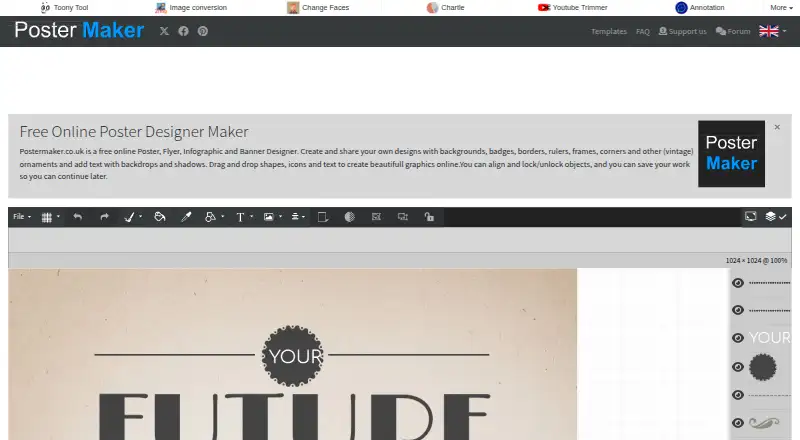
PosterMaker.co.uk is a free online designer for posters, flyers, infographics, and banners. It is listed for Android, iOS, and the web, and supports custom dimensions and built-in stock assets. Its tools include backgrounds, badges, borders, rulers, frames, corners, vintage ornaments, text backdrops and shadows, shapes, and icons. Users can drag and drop shapes, icons, and text, align objects, and lock or unlock them. On touch screens, one finger moves an object while two fingers scale and rotate it. Work can be saved and shared online, downloaded as JPG or PNG, or saved in the site's .poster format. The site also offers printing and links to order a mug, poster, or t-shirt. PosterMaker.co.uk is published and maintained by Zygomatic.nl. For questions or remarks, users can contact the site through a form; it recommends checking the FAQ first. Zygomatic says it processes personal data under applicable data protection laws, including the EU GDPR, and takes measures to reduce misuse and unauthorized access.
Who it suits
PosterMaker may suit people who want to create posters, flyers, infographics, or banners online or on a mobile device. Its touch controls and online save-and-share options may also suit users working on touch screens or sharing designs online.
What it does well
- Free plan costs nothing.
- Supports custom dimensions and built-in stock assets.
- Exports designs as JPG or PNG.
- Touch gestures move, scale, and rotate objects.
- Online save and share are offered.
What to know first
- The site uses cookies, including advertising cookies.
- Third-party personalized ads are displayed.
- Described personal data may be retained up to 26 months.
Plans
| Plan | Billed and limits | Price |
|---|---|---|
| Free | Free online poster, flyer, infographic and banner designer | Free |
As postermaker.co.uk lists them, read 9 Oct 2026. The maker's own page has the final word.
Getting started
- Visit the PosterMaker.co.uk website or use it on Android or iOS.
- Choose a poster, flyer, infographic, or banner design.
- Set custom dimensions if needed and arrange assets with drag and drop.
- Save and share online, download a JPG or PNG, or save a .poster file.
- Use the site’s printing option or follow its links to order a mug, poster, or t-shirt.
PosterMaker.co.uk is a free browser-based design tool for creating posters, flyers, infographics and banners. It suits individuals, clubs and small teams that need straightforward layouts across web and mobile rather than a full publishing suite. Its strongest case is the combination of object-level controls, custom dimensions and direct routes to printing or merchandise; readers needing deep collaboration, large asset libraries or generous cloud storage should look elsewhere.
Overview
PosterMaker.co.uk focuses on visual layouts that can be assembled from built-in assets and adjusted precisely. Backgrounds, badges, borders, rulers, frames, corners, vintage ornaments, text backdrops, shadows, shapes and icons cover common poster-making needs without requiring separate downloads. Custom dimensions are supported, which is important when a standard template does not match a print specification or social format.
The service is published and maintained by Zygomatic.nl, an online publisher operating since 2003. Its privacy policy says personal data is handled under applicable data-protection law, including the EU GDPR, with security measures intended to reduce misuse and unauthorised access. Cookies include Google Analytics and advertising cookies, and third-party personalised advertising is displayed. Data used for statistical purposes may be retained for up to 26 months, subject to legal obligations.
Key features
Layout and object control
Drag-and-drop editing lets you place shapes, icons and text, then align objects and lock or unlock them. Locking is useful once a background or guide element is positioned; alignment controls help produce cleaner compositions than freehand placement alone. On touch screens, one finger moves an object while two fingers scale and rotate it, making the editor workable on phones and tablets as well as desktops.
Saving, export and fulfilment
Projects can be saved and shared online. Poster files use the service’s .poster format, while finished artwork can be downloaded as JPG or PNG. Those formats cover ordinary digital sharing and image-based printing, but the published export options do not include PDF or SVG. The site also offers printing and links for ordering a mug, poster or t-shirt, giving a direct path from design to physical product.
Support
Questions and remarks can be sent through a contact form, with the FAQ recommended as the first stop. That is a basic support route rather than a documented live-service or priority support channel.
Pricing
The Free plan costs nothing and includes the online poster, flyer, infographic and banner designer. There are no stated seat charges, usage quotas, trial periods or renewal fees. Because the product is free, it is a practical starting point for one-off designs, personal projects and small organisations that do not want a subscription. The trade-off is a lack of published paid tiers for expanded storage, collaboration or advanced exports; readers who need those capabilities must consider another platform.
Platforms
PosterMaker.co.uk runs on the web and has Android and iOS support. That mix suits users who move between a computer and touch devices, with gesture controls making mobile editing more viable than a desktop-only workflow.
Who it's for
Choose it for event posters, notices, simple promotional flyers, infographics and banners where custom sizing and direct image export matter. It is also a sensible fit when ordering a physical poster, mug or t-shirt from the same ecosystem is useful. It is less suitable for teams seeking explicit multi-seat plans, or for workflows built around PDF/SVG delivery, extensive cloud storage or sophisticated campaign management.
Pros and cons
- Pros: Free access covers all stated design types, including posters, flyers, infographics and banners.
- Pros: Custom dimensions, alignment and lock/unlock controls support more deliberate layouts.
- Pros: Built-in assets and touch gestures reduce the need for separate sourcing and make phone editing practical.
- Pros: Online sharing, .poster files and JPG/PNG downloads provide several save and handoff options.
- Cons: Export is limited to JPG and PNG in the published feature set, with no stated PDF or SVG output.
- Cons: No paid upgrade path or published collaboration quotas are provided for organisations that outgrow a basic editor.
- Cons: Analytics, advertising cookies and personalised third-party ads may concern privacy-focused users.
Alternatives
For a wider comparison, see the Poster Maker Software list.
- Canva Video is the better pick when you want 1.6M-plus templates, 5GB cloud storage and up to 20 Standard or Premium AI uses on its free plan across more desktop and mobile platforms.
- CapCut suits mobile-focused editing with free templates and cloud storage.
- Visme is preferable for presentation-style projects; its Basic plan includes 500MB storage and 50 slides or pages per project.
- Adobe Express Video is a stronger choice for template-heavy work, offering 155,000-plus templates, 5GB storage and 25 generative credits per month free.
- Desygner fits small teams needing three users, 100 projects, 20 AI credits monthly and 5GB storage on its free plan.
- Poster App Lab is an alternative when free-forever access and PNG, JPG, PDF and SVG export at 300 DPI are priorities.
- PosterMyWall offers free downloads, more than one million design and email templates, one social account publishing and a content planner.
- Simplified is an option for broader content workflows, with a free-forever plan and 1GB storage.
Verdict
PosterMaker.co.uk is a sound choice for individuals and small organisations that want a no-cost, touch-friendly poster editor with custom sizing, precise object placement and JPG/PNG downloads, plus optional printed products. Look elsewhere if your work depends on PDF or SVG export, substantial cloud storage, formal team administration or a richer publishing and campaign toolkit.
Verdict
PosterMaker.co.uk offers design tools, object controls, and several ways to save or share finished work. It also connects design creation with printing and product-order links.
Questions
Is PosterMaker.co.uk free?
Yes. The Free plan is listed as free.
Which platforms does PosterMaker.co.uk support?
It is available on Android, iOS, and the web.
What file formats can I download?
You can download images as JPG or PNG, or save a poster file in .poster format.
Can I print designs or order products?
The site offers printing and links to order a mug, poster, or t-shirt.
Who publishes PosterMaker.co.uk?
Zygomatic.nl publishes and maintains the service.
How can users contact the site?
Users can send remarks or questions through a contact form. The site recommends checking its FAQ first.
Facts from PosterMaker.co.uk's own pages
- Advertising and cookies
- The site uses cookies, including Google Analytics and advertising cookies, and displays third-party personalized ads. · postermaker.co.uk, 9 Oct 2026
- Data retention
- Zygomatic says it retains the described personal data for up to 26 months for statistical purposes, subject to legal retention obligations. · postermaker.co.uk, 9 Oct 2026
- Design tools
- It offers backgrounds, badges, borders, rulers, frames, corners, vintage ornaments, text backdrops and shadows, shapes and icons. · postermaker.co.uk, 9 Oct 2026
- Design types
- PosterMaker is a free online designer for posters, flyers, infographics and banners. · postermaker.co.uk, 9 Oct 2026
- Editing
- Users can drag and drop shapes, icons and text, align objects, and lock or unlock them. · postermaker.co.uk, 9 Oct 2026
- Headquarters
- Amersfoort, Netherlands · postermaker.co.uk, 28 Sept 2026
- Maker history
- Zygomatic describes itself as an online publisher since 2003 focused on websites and online games. · zygomatic.nl, 9 Oct 2026
- Print and products
- The site offers printing and links to order a mug, poster or t-shirt. · postermaker.co.uk, 9 Oct 2026
- Privacy
- Zygomatic says it processes personal data in accordance with applicable data protection laws, including the EU GDPR. · postermaker.co.uk, 9 Oct 2026
- Publisher
- PosterMaker.co.uk is published and maintained by Zygomatic.nl. · postermaker.co.uk, 9 Oct 2026
- Save and export
- The site offers online save and share, poster files in .poster format, and image downloads in JPG or PNG. · postermaker.co.uk, 9 Oct 2026
- Security
- Zygomatic says it takes security measures to reduce misuse of and unauthorized access to personal data. · postermaker.co.uk, 9 Oct 2026
- Support
- Users can send remarks or questions through a contact form, and the site recommends checking its FAQ first. · postermaker.co.uk, 9 Oct 2026
- Touch support
- On touch screens, one finger moves an object and two fingers scale and rotate it. · postermaker.co.uk, 9 Oct 2026
Where PosterMaker.co.uk stands on Freedom251
- Poster Maker Software#18 of 41