
Plakar
by Plakar
What Plakar is
Plakar is a computer backup product for Linux, macOS, and Windows. It supports mixed backup scope, with file-level restore for recovering individual files, and includes ransomware protection. Plakar also supports self-hosted deployment and an API. Its Free plan costs nothing and covers up to 500 GB of managed data with no time limit. That plan includes deploying the Plakar Control Plane on infrastructure you own, making it an option for people who want the control plane hosted on their own systems. Plakar offers a Community plan for qualifying nonprofits, startups, war-zone organizations, and other eligible organizations. Enterprise is consumption-based, includes premium support, and requires contacting sales for pricing. The maker is Plakar, founded in 2024 and headquartered in Paris, France. The combination of cross-platform computer backup, file restore, ransomware protection, and self-hosted deployment gives individuals and organizations several ways to run and manage backups, while the Free plan sets a clear ceiling at 500 GB of managed data.
Who it suits
Plakar suits people or organizations looking for computer backup on Linux, macOS, or Windows, with file-level restore and ransomware protection. Its Free plan is suited to users who can run the Control Plane on their own infrastructure and manage no more than 500 GB of data; qualifying organizations may also consider Community.
What it does well
- Runs on Linux, macOS, and Windows
- Supports mixed backup scope
- Restores files individually
- Includes ransomware protection
- Free plan allows up to 500 GB with no time limit
- Supports self-hosting and an API
What to know first
- Free plan is capped at 500 GB of managed data
- Free plan requires infrastructure you own
- Enterprise pricing requires contacting sales
Limits
The Free plan covers up to 500 GB of managed data and has no time limit. It includes deployment of the Plakar Control Plane on infrastructure you own.
Plans
| Plan | Billed and limits | Price |
|---|---|---|
| Free | up to 500GB managed data · Control Plane deployed on your infrastructure | Free |
| Community | for qualifying nonprofits · startups under 3 years and pre-Series A · war-zone organizations · eligible contributors or community members | On request |
| Enterprise | consumption-based · premium support · contact sales | On request |
As plakar.io lists them, read 21 Oct 2026. The maker's own page has the final word.
Getting started
- Visit https://www.plakar.io/
- Choose the Free plan for up to 500 GB of managed data
- Prepare infrastructure you own for the Plakar Control Plane deployment
- Use a supported platform: Linux, macOS, or Windows
Plakar is a computer backup product for Linux, macOS, and Windows, with file restores and ransomware protection. It is best suited to people who want a free allowance and the option to run its control plane on infrastructure they own. Its 500 GB free cap is a clear starting point; growing beyond it means moving to a plan with custom pricing.
Overview
Plakar combines computer backup with a choice of deployment approach: its Free plan puts the Plakar Control Plane on infrastructure you own, while supported platforms also include self-hosted deployment and an API. That makes it a credible fit for users who want control over where the service runs. The core trade-off is scale: Free stops at 500 GB of managed data, and the paid Enterprise plan is priced through sales.
File restore gives users a way to recover individual items rather than treating every recovery as an all-or-nothing computer restore. Ransomware protection is another practical reason to consider it. The published feature set does not describe recovery workflows or protection details, so buyers who need those specifics should settle them before committing.
Key features
- Computer backup: Plakar covers computer backup across Linux, macOS, and Windows, making it relevant to mixed desktop environments.
- File restore: Restoring individual files is useful when only a small part of a backup needs recovery.
- Ransomware protection: This is a meaningful part of the product’s appeal for backup buyers concerned about malicious changes to their data.
- Self-hosted deployment and API: These expand the deployment choices beyond the three desktop operating systems.
Pricing
Free — free. The plan covers up to 500 GB of managed data with no time limit, and includes Plakar Control Plane deployment on infrastructure you own. It is a strong way to begin without a recurring bill, provided the cap suits your backup needs.
Community — custom pricing. This plan is available to qualifying nonprofits, startups, war-zone organizations, and other eligible groups. It is aimed at organizations that meet those criteria; it is not a general low-cost upgrade for everyone.
Enterprise — custom pricing. This consumption-based plan includes premium support and requires contacting sales for pricing. It is the relevant route for needs beyond Free, but buyers must speak with sales to understand the cost.
Platforms
Plakar supports Linux, macOS, and Windows for computer backup. Its supported platform set also includes self-hosted deployment and API access, giving technically oriented users additional ways to work with it.
Who it's for
Plakar is a good fit for individuals and organizations backing up computers across multiple operating systems, especially when file-level recovery, ransomware protection, or self-hosting matters. The Free plan suits users who can stay within 500 GB and want an ongoing option without a time limit. Organizations that qualify for Community may have another route, while larger or support-sensitive deployments should assess Enterprise pricing directly.
It is less suitable for buyers who need more than 500 GB at a published free price, or who require a known Enterprise budget before speaking with sales.
Pros and cons
- Pro: The Free plan has no time limit, so the 500 GB allowance can serve as a lasting option rather than a short trial.
- Pro: Computer backup spans Linux, macOS, and Windows, which suits households or teams with mixed systems.
- Pro: File restores and ransomware protection address practical recovery concerns.
- Pro: The Free plan includes deployment on infrastructure the user owns, supporting a self-hosted setup.
- Con: Free is capped at 500 GB, limiting its fit for larger backup sets.
- Con: Enterprise uses custom, consumption-based pricing, so cost requires a sales conversation.
- Con: Community eligibility is restricted to qualifying organizations, leaving most buyers with Free or Enterprise.
Alternatives
For computer backup, Backup software is the broader category to compare. If your needs center on container workloads, browse Container Backup Software; for Kubernetes environments, see Kubernetes Backup Software.
Velero is a free alternative described as an open-source tool for cloud or on-premises use. Consider it when that deployment focus fits your needs better than Plakar’s computer backup.
Google Kubernetes Engine has a free tier with $74.40 in monthly credits per billing account, applied to zonal and Autopilot clusters. It is the alternative to consider when those Kubernetes cluster credits suit the intended use.
KubeSphere Backup offers a free plan for 2 protected applications, 3 days of retention, and a 10 GB hosted repository. Its defined application and repository limits may suit a small, short-retention backup need.
Rancher offers a free, open-source platform experience with community support. Choose it when that platform and support model is the priority.
Storware Backup & Recovery offers a free license without technical support and a 60-day trial covering up to 20 virtual environments. It may fit buyers looking for those license or trial terms.
Veeam Agent for Mac is limited to macOS and its free edition allows one backup job, with no direct backup to object storage. It is a narrower option for Mac-only users whose needs fit those limits.
Vinchin Backup & Recovery has a permanent free edition that protects up to 3 virtual machines. Consider it when that virtual machine allowance matches the workload.
Afi Kubernetes Backup offers free licenses by request for environments protecting fewer than 10 nodes. It is an option for qualifying small Kubernetes environments.
Verdict
Choose Plakar if you need computer backup across Linux, macOS, or Windows and value file restores, ransomware protection, or self-hosted deployment. Its no-time-limit Free plan makes a useful starting point for up to 500 GB. Look elsewhere if you need a larger free allowance or want Enterprise pricing without contacting sales.
Verdict
Choose Plakar if you need computer backup across Linux, macOS, or Windows and value file restores, ransomware protection, or self-hosted deployment. The Free plan gives up to 500 GB without a time limit; look elsewhere if you need a larger free allowance or want Enterprise pricing without contacting sales.
Questions
Is Plakar free?
Yes. The Free plan costs nothing and has no time limit.
How much data does the Free plan cover?
It covers up to 500 GB of managed data.
Which platforms does Plakar support?
Plakar runs on Linux, macOS, and Windows. Supported environments also include self-hosted use and an API.
Can Plakar restore individual files?
Yes. File is listed as a restore mode.
Does Plakar offer an Enterprise plan?
Yes. Enterprise is consumption-based, includes premium support, and requires contacting sales for pricing.
Who can qualify for the Community plan?
It is available to qualifying nonprofits, startups, war-zone organizations, and other eligible organizations.
Facts from Plakar's own pages
- API and automation
- The product exposes actions through a CLI, SDK and API, and its documentation includes API automation accounts, webhooks and infrastructure-as-code references. · docs.plakar.io, 21 Oct 2026
- Backup scope
- mixed · plakar.io, 19 Sept 2026
- Company facts
- LinkedIn lists Plakar as a privately held Paris technology company founded in 2024 with 2–10 employees. · linkedin.com, 21 Oct 2026
- Compliance
- Control Plane provides SLA retention policies, country-based data residency enforcement and legal holds for restore points or resources. · docs.plakar.io, 21 Oct 2026
- Computer backup
- Yes · plakar.io, 19 Sept 2026
- Control Plane
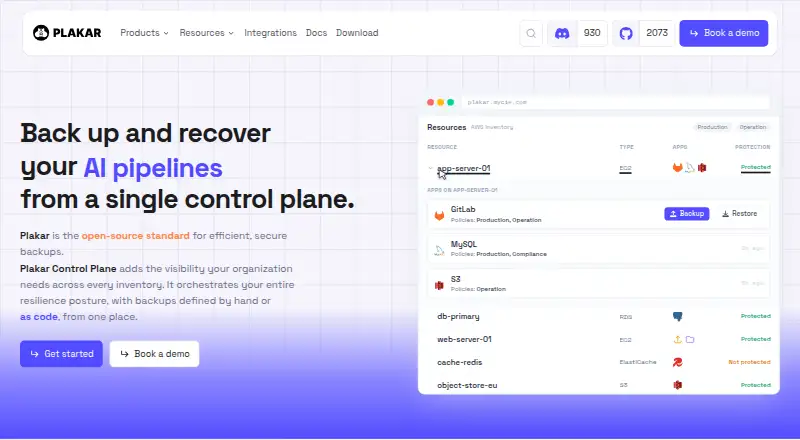
- Control Plane is a self-hosted virtual appliance with a web interface for centralized inventory, scheduling, backup and restore management. · plakar.io, 21 Oct 2026
- Crunchbase investors
- Crunchbase lists Plakar as founded in 2024 in Paris and backed by Seedcamp, HelloWorld, Kima Ventures, Motier Ventures and other investors. · crunchbase.com, 21 Oct 2026
- Deduplication
- The software content-addresses data, deduplicates chunks, compresses them and stores them in immutable packfiles. · github.com, 21 Oct 2026
- Documentation depth
- Community documentation covers installation, quickstarts, scheduling, stores, integrations, command syntax, Go SDK references and operational explanations; separate Control Plane docs cover administration and deployment. · plakar.io, 21 Oct 2026
- Encryption
- Backups are encrypted on the source before reaching storage, including snapshot metadata and indexes. · docs.plakar.io, 21 Oct 2026
- Founded
- 2024 · plakar.io, 28 Sept 2026
- Free plan
- Yes · plakar.io, 19 Sept 2026
- Funding
- A 2025 legal-firm announcement says Plakar raised a $3 million seed round led by Seedcamp with other venture and angel investors. · parallel.law, 21 Oct 2026
- Go SDK
- The Go Kloset SDK lets developers implement importer, exporter and custom storage plugins communicating with Plakar over gRPC on stdin and stdout. · docs.plakar.io, 21 Oct 2026
- Headquarters
- Paris, France · plakar.io, 28 Sept 2026
- Independent review coverage
- AlternativeTo reports no comments or user reviews for Plakar and lists it as free, open source and ISC-licensed. · alternativeto.net, 21 Oct 2026
- Independent snapshots
- Each snapshot is self-contained, so deleting one snapshot does not break restoration of another. · docs.plakar.io, 21 Oct 2026
- Install methods
- Installation is documented through APT, DNF, Homebrew, Windows archives, Go install, Arch AUR and source builds. · plakar.io, 21 Oct 2026
- Integrations
- Documented connectors include S3, SFTP/SSH, HTTP, Dropbox, Google Drive, OneDrive, Proton Drive, Proxmox, Kubernetes, PostgreSQL, MySQL/MariaDB, MongoDB, Azure Blob, WebDAV, FTP, IMAP, SMB/CIFS and NFS. · plakar.io, 21 Oct 2026
- Latest version
- The official download page identifies v1.1.7 as the current stable Plakar release. · plakar.io, 21 Oct 2026
- Licence
- The Plakar repository and Kloset engine are released under the permissive ISC licence. · github.com, 21 Oct 2026
- Limit: cache exhaustion bug
- A public GitHub issue describes backups failing when Plakar's cache drive is full and reports that automatic cleanup did not occur before successful completion. · github.com, 21 Oct 2026
- Limit: slow-disk performance
- An independent 2023 benchmark reported heavy memory use, swapping and intensive disk I/O on inexpensive mechanical disks, while SSD performance was much better. · poolp.org, 21 Oct 2026
- Notable news: v1.1.3
- The June 16, 2026 release article describes a new terminal UI, multi-directory backups, rewritten FUSE and HTTP mounts, package management, lower memory use and roughly 95% faster restores in company tests. · plugins.plakar.io, 21 Oct 2026
Where Plakar stands on Freedom251
- Backup software#4 of 151
- Kubernetes Backup Software#1 of 31
- Container Backup Software#1 of 28
- Data Backup Software#2 of 25