UrBackup
by UrBackup
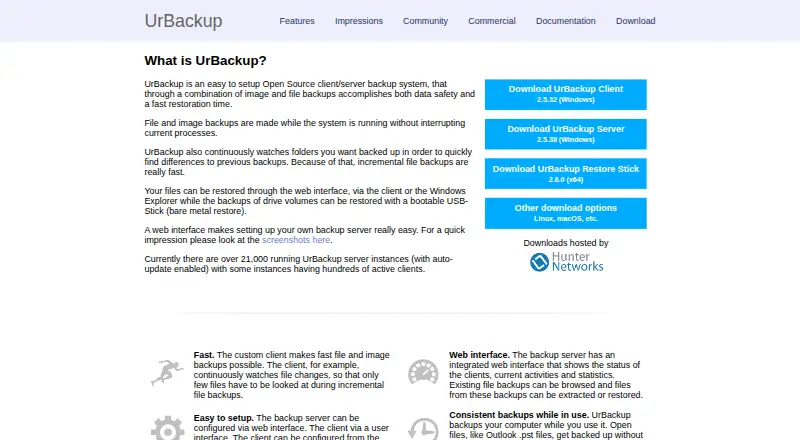
What UrBackup is
UrBackup is backup software for computers, mobile devices, and servers, with versions for Windows, macOS, Linux, and Android. It supports file and image backups through a self-hosted server, and its listed restore options cover mixed modes. Ransomware protection is also included. The UrBackup core plan is AGPLv3+ open-source software, with no plan price listed, and a free plan is available. The paid Change block tracking option for the Windows client costs €15.50 a month per client, excluding VAT. It speeds up incremental file and image backups, includes 2.x updates, and works with UrBackup Server 2.x. A separate client supports Microsoft Hyper-V 2016 or later, backing up virtual machine disks as images and restoring those images to VHD or VHDX. UrBackup is made by a company based in Ulm, Germany.
Who it suits
UrBackup suits people and organizations seeking file or image backups for computers, mobile devices, or servers. Its self-hosted core may suit those who want to run the backup server themselves.
What it does well
- Backs up computers, mobile devices, and servers
- Supports file and image backups
- Includes ransomware protection
- Free plan available
What to know first
- Change block tracking costs €15.50 a month per client
- Change block tracking price excludes VAT
Limits
The listed change block tracking option costs €15.50 a month per client, excluding VAT, and works with UrBackup Server 2.x. The Hyper-V client supports Microsoft Hyper-V 2016 or later.
Plans
| Plan | Billed and limits | Price |
|---|---|---|
| UrBackup core | AGPLv3+ open-source software · File and image backups · Self-hosted server | On request |
| Change block tracking for UrBackup Client on Windows | 15.50€ excl. VAT per Client · Speeds up incremental image and file backups · Includes 2.x updates · Works with UrBackup Server 2.x | €15.50 a month |
| UrBackup Client for Microsoft Hyper-V 2.x | Supports Microsoft Hyper-V 2016 or later · Backs up VM disks as images · Restores images to VHD/VHDX | On request |
| UrBackup open-source server and clients | file and image backups · unlimited clients · self-hosted | Free |
| Infscape virtual appliance community edition | maximum 10 clients · maximum 20TB storage · commercial use allowed | Free |
| Infscape AWS/Azure appliance storage | about $0.012-$0.023 per GB/month after deduplication and compression · AWS or Azure appliance · S3 or Azure Blob storage · one-month appliance trial | $0.01 a month |
| Change block tracking for Windows client | 15.50€ excl. VAT per client · per-client license · includes UrBackup 2.x updates | €15.50, paid once |
As urbackup.org lists them, read 20 Sept 2026. The maker's own page has the final word.
Getting started
- Visit the UrBackup website.
- Choose the UrBackup core plan for AGPLv3+ software and a self-hosted server.
- Use a supported platform: Windows, macOS, Linux, or Android.
- For Windows change block tracking, choose the option billed at €15.50 a month per client, excluding VAT.
- For Hyper-V 2016 or later, use the UrBackup Client for Microsoft Hyper-V 2.x.
UrBackup is a self-hosted backup platform covering files and disk images across computers, servers, and mobile devices. It is best for technically capable users who want an open-source server they operate themselves, with optional Windows acceleration and Hyper-V support. The trade-off is clear: control and broad coverage come with infrastructure responsibility and a per-client charge for faster Windows incrementals.
Overview
UrBackup combines client software with a server that you host and manage. Its mixed backup scope and restore modes let one deployment address file protection and full-image recovery rather than forcing a single format. Computer, mobile, and server backup are all supported, and ransomware protection is included.
The core is AGPLv3+ open-source software from UrBackup, headquartered in Ulm, Germany. That licensing and self-hosted design suit organizations that want control of storage and operations. They are a poor fit for anyone looking for a fully managed cloud service with no server administration.
Key features
File and image protection
UrBackup core handles both file backups and image backups. File protection is useful for restoring individual data, while images address broader system recovery; having both in one system is practical for mixed environments.
Broad device coverage
Support spans Windows, macOS, Linux, and Android. The combination of computer, server, and mobile coverage makes UrBackup suitable for heterogeneous fleets instead of a single operating-system estate.
Windows change block tracking
The paid Change block tracking for UrBackup Client on Windows option speeds incremental image and file backups. It includes 2.x updates and works with UrBackup Server 2.x, so it targets deployments where shorter incremental windows matter and a per-client subscription is acceptable.
Hyper-V virtual machines
The UrBackup Client for Microsoft Hyper-V 2.x supports Microsoft Hyper-V 2016 or later. It backs up virtual-machine disks as images and restores those images to VHD or VHDX, making it a focused choice for Hyper-V administrators rather than a general-purpose client upgrade.
Ransomware protection
Included ransomware protection adds a security layer to the backup offering, an important consideration when backups are part of a recovery plan rather than merely an archive.
Pricing
UrBackup uses a freemium model. The free UrBackup core plan is AGPLv3+ open-source software with file and image backups on a self-hosted server; its price is custom pricing. It is the natural starting point for users willing to provide and operate the server themselves.
Change block tracking for UrBackup Client on Windows costs €15.50 a month, billed at 15.50€ excluding VAT per client. It accelerates incremental image and file backups, includes 2.x updates, and requires UrBackup Server 2.x. Because billing is per client and VAT is excluded, costs rise directly with the number of Windows clients.
UrBackup Client for Microsoft Hyper-V 2.x has custom pricing. It supports Hyper-V 2016 or later, image-based VM-disk backups, and restoration to VHD/VHDX. This is the relevant paid path for virtualized workloads, while the core plan remains the broader self-hosted foundation.
Platforms
Clients and supported deployments cover Android, Linux, macOS, and Windows. That range supports mixed personal, business, and server estates, with the Hyper-V option extending coverage to Microsoft virtualization environments.
Who it's for
Choose UrBackup if you can run a server and want open-source control over file and image backups across several device types. It is especially suitable for organizations with Windows clients that benefit from faster incremental jobs, or Hyper-V environments needing image-based VM recovery.
Look elsewhere if you want a hosted service, prefer one predictable subscription covering infrastructure, or do not want to administer backup storage and servers. The Windows acceleration add-on also demands a per-client budget, so large fleets should account for that scaling model.
Pros and cons
- Pro: File and image backups in the open-source core cover both granular recovery and whole-system restoration.
- Pro: Windows, macOS, Linux, and Android support accommodates mixed fleets.
- Pro: Computer, mobile, and server backup plus ransomware protection broaden its recovery role.
- Pro: Hyper-V 2016-or-later support includes image backup and VHD/VHDX restoration.
- Con: The core is self-hosted, so you are responsible for running the server and its storage.
- Con: Faster Windows incrementals require €15.50 a month per client, excluding VAT.
Alternatives
IDrive is a better fit when you want a freemium, hosted-oriented service with Android, iOS, Linux, macOS, web, and Windows coverage, plus a 100 GB Basic tier and a 0.25 USD-per-month 100 GB Mini plan for one user.
EaseUS Todo Backup suits macOS and Windows users seeking a desktop backup tool with a free plan for file, system, disk, and partition recovery, or a 39.95 USD-per-year Home Yearly plan with 1 TB cloud storage for one computer.
Infrascale Workstation Backup is preferable for cloud, storage-based subscriptions with 1 TB increments, unlimited endpoint devices, and unlimited retention.
BDRShield Endpoint Backup is an alternative for teams wanting endpoint backup with subscription or perpetual licensing and custom enterprise quotes.
Datto Endpoint Backup for Windows uses consumption-based pricing tied to storage used and has no free plan.
Backblaze Computer Backup is for users who want unlimited backup data on a hosted service, priced at $9 a month monthly or $8.25 a month on its yearly option.
NinjaOne is a paid endpoint-management alternative with pricing starting at $1.50 per device per month at 10,000 endpoints.
Axcient x360Recover is another paid, usage-based option whose endpoint rates vary by workstation or server.
For broader comparisons, see Endpoint Backup Software, Continuous Data Protection Software, Backup and Disaster Recovery Software, NAS Backup Software, and Backup software.
Verdict
UrBackup is a strong choice for technically capable users who want an open-source, self-hosted system covering files, images, computers, servers, and mobile devices. Its main reason to choose it is control with broad backup formats and platforms; its main reason to look elsewhere is the need to operate the server, with Windows acceleration adding a recurring per-client cost.
Verdict
UrBackup covers computer, mobile, and server backups, with file and image options and ransomware protection. Check the paid client add-on’s per-client monthly cost and VAT exclusion if you need change block tracking.
Questions
Is UrBackup free?
A free plan is available. UrBackup core is listed as AGPLv3+ open-source software, with no price listed for that plan.
What does the paid option cost?
Change block tracking for the UrBackup Client on Windows costs €15.50 a month per client, excluding VAT.
Which platforms does UrBackup support?
The listed platforms are Windows, macOS, Linux, and Android.
Is UrBackup open source?
The UrBackup core plan is AGPLv3+ open-source software and uses a self-hosted server.
Does UrBackup support Hyper-V backups?
A separate client supports Microsoft Hyper-V 2016 or later, backs up VM disks as images, and restores images to VHD or VHDX.
Facts from UrBackup's own pages
- Alerts
- Email notifications can warn users or administrators when a machine has missed backups for a configured period. · urbackup.org, 21 Oct 2026
- API authentication
- The Python API supports UrBackup credentials and optional HTTP basic authentication, with legacy dictionary and typed dataclass interfaces. · python-urbackup.readthedocs.io, 21 Oct 2026
- Appliance capabilities
- The Infscape appliance adds cloud or S3 archival, cached RAID, encryption, compression, replication and CBT support. · urbackup.org, 21 Oct 2026
- Backup modes
- It supports both full and incremental file and image backups for whole partitions or selected directories. · urbackup.org, 21 Oct 2026
- Backup scope
- mixed · urbackup.org, 20 Sept 2026
- Changed sectors
- Incremental image jobs send only used disk sectors that changed since the prior image. · urbackup.org, 21 Oct 2026
- Client platforms
- Official clients are provided for Windows, Linux and macOS, with additional FreeBSD client support listed in the feature documentation. · urbackup.org, 21 Oct 2026
- Commercial CBT
- The Windows change-block-tracking driver is separate from the AGPL client and requires a per-client purchase. · urbackup.org, 21 Oct 2026
- Commercial Hyper-V
- A paid Hyper-V client supports Hyper-V 2016 or later, VM disk image backups and VHD or VHDX restores. · urbackup.org, 21 Oct 2026
- Company
- Infscape UG (haftungsbeschränkt) is identified as the commercial entity behind UrBackup and is based in Germany. · zoftwarehub.com, 21 Oct 2026
- Computer backup
- Yes · urbackup.org, 20 Sept 2026
- Contributor terms
- Mainline contributors must sign a CLA that keeps AGPLv3+ licensing while allowing additional licensing by the project. · urbackup.org, 21 Oct 2026
- Deduplication
- Identical files on different computers are stored once through file-level deduplication. · urbackup.org, 21 Oct 2026
- Deployment scale
- The official site reports more than 21,000 running server instances with automatic updates enabled. · urbackup.org, 21 Oct 2026
- Developer API
- A community Python package exposes authenticated methods for status, usage, settings, users, backups, actions and installer downloads. · python-urbackup.readthedocs.io, 21 Oct 2026
- Documentation
- Official documentation includes an administration manual, FAQ, system-support guide, database backup guides and Hyper-V instructions. · urbackup.org, 21 Oct 2026
- Founded
- An independent company profile states that Martin Raiber founded UrBackup in 2011. · zoftwarehub.com, 21 Oct 2026
- Free plan
- Yes · urbackup.org, 20 Sept 2026
- Headquarters
- Ulm, Germany · urbackup.org, 28 Sept 2026
- Image formats
- Images can be written as Microsoft VHD or VHDX files and as raw images on btrfs, ZFS, ReFS and XFS. · urbackup.org, 21 Oct 2026
- Image limitation
- Windows image backups require NTFS and primary MBR or GPT partitions; dynamic volumes are not officially supported. · urbackup.org, 21 Oct 2026
- Incremental efficiency
- Incremental file jobs calculate directory differences and transmit only changed files. · urbackup.org, 21 Oct 2026
- Limit: configuration
- Reviewers report that initial server setup can be daunting and that first image backups can consume substantial time and resources. · capterra.com, 21 Oct 2026
- Limit: encryption and support
- TechRadar says built-in encryption is absent and support choices are limited, making the product better suited to technically experienced users. · techradar.com, 21 Oct 2026
Where UrBackup stands on Freedom251
- Backup software#2 of 151
- Continuous Data Protection Software#1 of 28
- Endpoint Backup Software#1 of 22
- Server Backup Software#2 of 33
- NAS Backup Software#3 of 45
- Backup and Disaster Recovery Software#3 of 36
- Data Backup Software#4 of 25