Freedom251 › Endpoint Backup Software

BDRShield Endpoint Backup
What BDRShield Endpoint Backup is
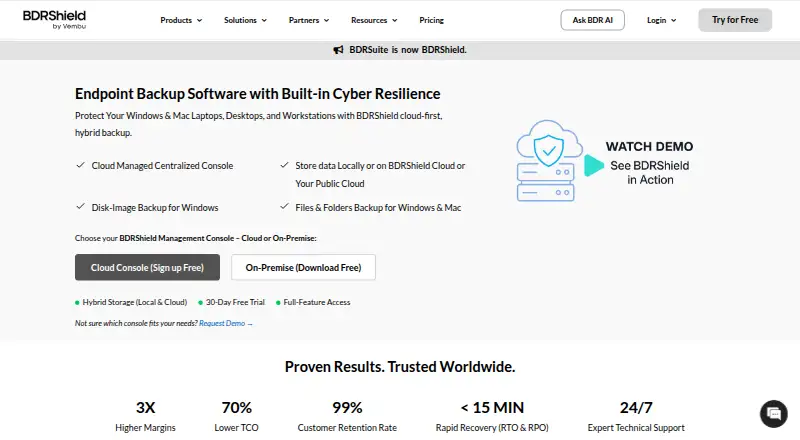
BDRShield Endpoint Backup backs up endpoint files and folders and provides Windows disk image backups for recovery after data loss or cyberattacks. Backups can be stored locally, in BDRShield Cloud, or in customer cloud storage such as S3, Azure Blob, Google Cloud, MinIO, and Wasabi. Windows and Mac backups can be managed through a cloud console or a self-hosted centralized console, with hosts added by CSV or AD/LDAP integration. Scheduling supports incremental or synthetic full backups, and the product advertises a 15-minute RPO. Recovery choices include bare-metal, files and folders, disks or partitions, and instant recovery; backed-up endpoints can also boot as VMs on VMware, Hyper-V, or KVM. Listed security measures include immutable and air-gapped backups, malware scanning before backup and restore, MFA, and AES-256 encryption in transit and at rest. Retention can be set by version count or time period. Job reports and automated email alerts cover successful, failed, or missed tasks. Pricing is by custom quote, with subscription and perpetual licenses available.
Who it suits
BDRShield describes the product for organizations, including SMBs and enterprises, and managed service providers. It supports Windows, Linux, and Mac endpoints.
What it does well
- Offers local, vendor-cloud, and customer-cloud storage
- Supports bare-metal and instant recovery
- Backed-up endpoints can boot as VMs
- Includes immutable and air-gapped backup options
- Reports and alerts cover backup job outcomes
What to know first
- Pricing requires a custom quote
- Endpoint backup is priced per endpoint
- No listed free plan or trial details
Plans
| Plan | Billed and limits | Price |
|---|---|---|
| Free Edition | free forever · 10 endpoints · 10 VMs · 10 Microsoft 365 users · 10 Google Workspace users · 10 AWS EC2 instances · 10 Azure VMs · community support | Free |
| 30-Day Free Trial | 30 days · Full-featured Enterprise access | Free |
| Endpoint/Workstation Backup | 1 endpoint per year · Endpoint backup module | $12 a year |
| Standard Cloud BDRShield | per user per year · 50 GB cloud storage included | $30 a year |
| Enterprise Cloud BDRShield | per user per year · 50 GB cloud storage included | $48 a year |
| Enterprise Edition — Endpoint/Workstation Backup | Custom quote; subscription and perpetual licenses are available. · Per endpoint · Windows, Linux, or Mac endpoint | On request |
As bdrshield.com lists them, read 15 Oct 2026. The maker's own page has the final word.
Getting started
- Visit the BDRShield Endpoint Backup website.
- Review the Enterprise Edition for endpoint or workstation backup.
- Choose subscription or perpetual licensing if pursuing the paid edition.
- Use the free plan or 30-day trial offered by the product.
- Manage Windows and Mac backups through the cloud console or a self-hosted centralized console.
- Import hosts by CSV or add them through AD/LDAP integration.
Overview
BDRShield Endpoint Backup is endpoint protection software for organizations backing up workstations and recovering from data loss or cyberattacks. It is best suited to SMBs, enterprises, and managed service providers that need centralized administration and multiple recovery routes. Its broad storage and recovery choices are compelling, but custom per-endpoint pricing makes cost comparison a necessary first step.
Key features
Backup and storage
BDRShield backs up endpoint files and folders, with disk-image backup for Windows. Scheduled incremental and synthetic full backups support different backup routines, while the advertised 15-minute RPO targets a short interval between recovery points. Retention can be set by version count or time period, giving administrators control over backup history.
Backups can be stored locally, in BDRShield Cloud, or in customer cloud storage including S3, Azure Blob, Google Cloud, MinIO, and Wasabi. This breadth suits organizations that want to use existing storage or choose where backup data resides; it also leaves the storage decision and its operational implications with the buyer.
Management, recovery, and security
Windows and Mac backups can be administered through a cloud console or a self-hosted centralized console. Hosts can be imported by CSV or added through AD/LDAP integration, giving teams more than one route to onboard endpoints. Recovery spans files and folders, disks or partitions, bare-metal restoration, and instant recovery. Backed-up endpoints can also boot as VMs on VMware, Hyper-V, or KVM, a useful range for organizations that need recovery options beyond restoring individual files.
BDRShield describes immutable and air-gapped backups, malware scanning before backup and restore, MFA, and end-to-end AES-256 encryption in transit and at rest. Job-level reports and automated email alerts flag successful, failed, or missed tasks. The product also advertises 24/7 expert technical support.
Pricing
The Enterprise Edition for endpoint or workstation backup is priced by custom quote, billed per endpoint, and supports Windows, Linux, or Mac endpoints. Subscription and perpetual licenses are available. This model may suit organizations that want a quote for their deployment, but buyers cannot compare a published per-endpoint rate before contacting the vendor.
The pricing model is freemium, and a free plan and 30-day trial are offered. No free-plan cap or included entitlement is stated, so organizations should confirm what the free option covers before treating it as a production plan. The Enterprise Edition is the defined paid offering; no cheaper paid tier or renewal terms are given.
Platforms
The product supports Linux, macOS, Windows, web, and self-hosted deployment. Its centralized management is described for Windows and Mac endpoint backups, while the Enterprise Edition supports Windows, Linux, or Mac endpoints. The mix of cloud and self-hosted options gives teams a choice of management model, though buyers should confirm platform-specific capabilities against their fleet.
Who it's for
BDRShield is aimed at organizations ranging from SMBs to enterprises, as well as managed service providers. It is a strong fit when administrators value several restore paths, selectable storage destinations, and centralized management. It is less suited to buyers who need predictable public pricing or a clearly defined free-plan allowance before engaging a vendor.
Pros and cons
- Pros: Recovery covers files, disks, partitions, bare metal, instant recovery, and VM booting, giving teams several ways to respond to different recovery needs.
- Pros: Local, vendor-cloud, and customer-cloud storage options let organizations choose a destination that fits their setup.
- Pros: Cloud or self-hosted centralized management, CSV import, and AD/LDAP onboarding provide practical options for administering endpoints.
- Cons: Per-endpoint custom pricing makes budget comparisons harder without requesting a quote.
- Cons: The free plan's cap and included features are not defined, limiting its usefulness as a basis for evaluating a deployment.
Alternatives
Endpoint Backup Software is the broader category page for comparing endpoint backup products.
Consider IDrive if you want a freemium alternative with a published 100 GB, one-user IDrive Mini plan at $0.25 a month; its Basic plan has 10 GB of storage. Choose EaseUS Todo Backup if you need a free Windows or macOS option for file, system, disk, and partition backup and recovery, or a published Home Yearly plan at $39.95 a year for one computer and 1 TB cloud storage.
Datto Endpoint Backup for Windows is an option for buyers seeking consumption-based pricing tied to storage used, with a quote required.
UrBackup is a freemium, self-hosted alternative with open-source file and image backup software. Backblaze Computer Backup may suit buyers who prefer a paid plan with unlimited backup data, including a Monthly plan at $9 a month.
NinjaOne is an endpoint management alternative with a listed starting price of $1.50 per device per month at 10,000 endpoints. Axcient x360Recover is another alternative.
Verdict
BDRShield Endpoint Backup is a credible choice for organizations and MSPs that need flexible backup destinations, centralized administration, and recovery from individual files through full systems. The combination of varied restore paths and security controls is its strongest reason to choose it. Look elsewhere if you need a predictable public price or a free plan with a defined capacity before making a decision.
Verdict
BDRShield combines endpoint backup, several recovery paths, and flexible storage and management options. Buyers should note that pricing is by custom quote and charged per endpoint.
Questions
Is there a free plan or trial?
Yes. BDRShield lists a free plan and a 30-day trial.
Which endpoint operating systems are supported?
The supported endpoint operating systems are Windows, Linux and Mac.
Where can backups be stored?
Backups can be stored locally, in BDRShield Cloud, or in customer cloud storage such as S3, Azure Blob, Google Cloud, MinIO and Wasabi.
What recovery methods are available?
Options include file and folder, disk or partition, bare-metal and instant recovery. Backed-up endpoints can also be booted as VMs on VMware, Hyper-V or KVM.
How is the Enterprise Edition licensed and priced?
It is available by custom quote, with subscription and perpetual licenses. Licensing is per endpoint for Windows, Linux or Mac.
What security measures does the product describe?
BDRShield describes immutable and air-gapped backups, malware scanning before backup and restore, MFA, and AES-256 encryption in transit and at rest.
Facts from BDRShield Endpoint Backup's own pages
- API
- BDRShield exposes an HTTP Web Services API for backup actions, job monitoring, recovery status and configuration automation. · bdrshield.com, 15 Oct 2026
- Bulk onboarding
- Endpoints can be added in bulk through CSV upload or integrated with Active Directory and LDAP. · bdrshield.com, 15 Oct 2026
- Company legal name
- Crunchbase identifies the maker's legal name as Vembu Technologies Pvt Ltd and names Sekar Vembu as founder and CEO. · crunchbase.com, 15 Oct 2026
- Company size
- LinkedIn places Vembu Technologies in the 201–500 employee range and displays 282 employees. · in.linkedin.com, 15 Oct 2026
- Disk-image backup
- Windows disk-image jobs capture the operating system, applications, configurations and other machine data for whole-system recovery. · support.bdrshield.com, 15 Oct 2026
- Documentation
- The technical-documentation hub links user guides, API automation material, evaluator guides, workload guides, best-practices guidance, release notes and upgrade instructions. · bdrshield.com, 15 Oct 2026
- Encryption
- Backup data is protected with AES-256 encryption in transit and at rest, using either system-generated or customer-selected keys. · bdrshield.com, 15 Oct 2026
- Endpoint coverage
- Endpoint protection covers Windows, Linux and Mac computers through file/folder backup, with Windows also supporting disk-image backup. · bdrshield.com, 15 Oct 2026
- File and folder backup
- The endpoint product backs up selected files and folders on Windows and Mac devices. · bdrshield.com, 15 Oct 2026
- Headquarters
- Chennai, Tamil Nadu, India · bdrshield.com, 23 Sept 2026
- Integrations
- Supported backup environments include VMware, Hyper-V, Proxmox, KVM, oVirt, AWS, Azure, Microsoft 365, Google Workspace, SQL Server, PostgreSQL, MySQL, Exchange and SharePoint. · bdrshield.com, 15 Oct 2026
- Licence status
- The documentation points users to a Vembu EULA and describes subscription and perpetual commercial licensing; no open-source licence is identified on the reviewed pages. · support.bdrshield.com, 15 Oct 2026
- Limit: Gartner complaint
- The sole Gartner Peer Insights reviewer said earlier releases often failed backups for unclear reasons, although the current release met expectations. · gartner.com, 15 Oct 2026
- Limit: licensing clarity
- SaaSworthy reviewers describe the licensing model as confusing and say it can lead to incorrect purchases. · saasworthy.com, 15 Oct 2026
- Limit: reliability and cleanup
- A TrustRadius reviewer reported failed or slow jobs, unsuccessful restores, difficult cleanup of old data and weak support for clustered Hyper-V environments. · trustradius.com, 15 Oct 2026
- Limit: restore experience
- Independent feedback cites unintuitive restore workflows, slow restores and a restore interface that needs improvement. · saasworthy.com, 15 Oct 2026
- Limit: support access on free tier
- A Trustpilot reviewer liked the free product and support response but noted that Free Edition users must start in the forum and do not receive a dedicated contact. · trustpilot.com, 15 Oct 2026
- Maker headquarters and founding
- LinkedIn lists Vembu Technologies headquarters in Pleasanton, California, and says it was founded in 2002. · in.linkedin.com, 15 Oct 2026
- Management
- Windows and Mac endpoint backups can be managed through a cloud console or a self-hosted centralized console. · bdrshield.com, 30 Sept 2026
- Management consoles
- The product offers a cloud management console and a self-hosted centralized console, with Windows, Linux and Docker installers for on-premises deployment. · bdrshield.com, 15 Oct 2026
- Monitoring
- Job-level reports and automated email alerts cover successful, failed, or missed backup tasks. · bdrshield.com, 30 Sept 2026
- Notable release
- The download page lists BDRShield version 9.2.0 Update 2 as released on September 1, 2026. · bdrshield.com, 15 Oct 2026
- Onboarding
- Hosts can be imported by CSV or added through AD/LDAP integration. · bdrshield.com, 30 Sept 2026
- Praise: ease of setup
- Independent reviews repeatedly describe setup, configuration and the web administration interface as straightforward, especially for simpler environments. · saasworthy.com, 15 Oct 2026
Where BDRShield Endpoint Backup stands on Freedom251
- Endpoint Backup Software#2 of 22