Papeeria
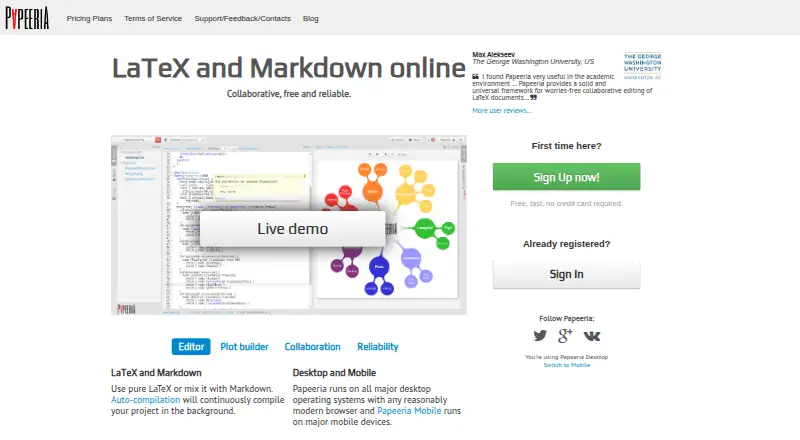
What Papeeria is
Papeeria is an online LaTeX editor that also supports combining LaTeX with Markdown. It compiles projects continuously in the background and provides a full TeX Live environment in the browser. Editing tools include real-time collaboration, margin discussions, autocompletion, spellchecking, and an instant math preview. Its template gallery includes CVs, ACM journal papers, and math presentations. Users can make plots with built-in gnuplot or Plot.ly and run custom gnuplot scripts. Projects can be shared with read or write permissions; collaborators can edit together, receive update notifications, and join without a collaborator-count limit. Papeeria describes syncing with Git, Google Drive, and Dropbox, while the paid Delta plan adds Mendeley integration. The free Epsilon plan costs nothing and includes one active private project, unlimited public projects and collaborators, 24-hour file history, and Git sync for public repositories. Delta costs $5 a month and includes up to 10 active private projects and 30-day file history, among other listed features. Free-plan compilation is limited to 64 MB of project files and 60 seconds per compilation cycle.
Who it suits
Papeeria suits students and people learning LaTeX, as well as individuals and small groups who need a collaborative online editor. Its permissions and integrations may be useful for people sharing projects or syncing work with other services.
What it does well
- Combines LaTeX and Markdown editing.
- Compiles projects in the background.
- Supports real-time collaboration without a collaborator limit.
- Provides read and write permissions for shared projects.
- Free plan includes one active private project.
What to know first
- Free-plan file history covers only 24 hours.
- Free-plan compilation has a 60-second cycle limit.
- Free-plan project compilation files are limited to 64 MB.
- Delta costs $5 a month.
Limits
Epsilon allows one active private project and retains per-file history for 24 hours. Its compilation files have a 64 MB total disk limit and each compilation cycle is limited to 60 seconds. Delta allows up to 10 active private projects and 30-day file history.
Plans
| Plan | Billed and limits | Price |
|---|---|---|
| Epsilon | Free forever · One active private project · Unlimited public projects and collaborators · File edit history covers last 24 hours · Git sync for public repositories | Free |
| Delta | Starts from $5/month · Up to 10 active private projects · Auto compiling and priority compiling · Private templates · Git sync for private repositories · File edit history covers last 30 days · Dropbox and Google Drive sync · Backup snapshots · gnuplot and Mendeley integrations | $5 a month |
As papeeria.com lists them, read 8 Oct 2026. The maker's own page has the final word.
Getting started
- Open https://papeeria.com/.
- Choose the free Epsilon plan or Delta, which starts at $5 a month.
- Create a project and use a gallery template if one fits your document.
- Compile in the browser and invite collaborators with read or write permissions.
- Connect a supported sync option if needed: Git, Google Drive or Dropbox; Delta also adds Mendeley integration.
Papeeria is a browser workspace for LaTeX and Markdown that combines continuous compilation with shared editing, templates, and plotting. It is best for students, researchers, and small groups writing technical documents together. Its free tier is useful for learning and public projects, while private, ongoing work is a stronger fit for the paid plan.
Overview
Papeeria runs a full TeX Live environment in the browser and compiles projects continuously in the background. That removes local distribution setup and keeps rendered output close to the text as you work. Mixing LaTeX with Markdown also suits documents that do not need to be written entirely in traditional TeX.
Sharing is more capable than a simple file link: owners can grant read or write access, use role permissions, and allow guest editing. Collaborators can edit simultaneously and receive update notifications, with no collaborator-count limit. This makes Papeeria practical for classes, research groups, and distributed authoring, although a service-dependent workflow is less suitable when offline work is essential.
Key features
Editing and compilation
Autocompletion, spellchecking, margin discussions, and an instant math previewer cover everyday technical-writing friction. Continuous compilation provides ongoing feedback, and the browser TeX Live environment supports substantial LaTeX work without local configuration.
Templates and plotting
The template gallery includes CVs, ACM journal papers, and mathematics presentations, giving common projects a useful starting structure. Built-in gnuplot and Plot.ly support lets authors insert plots, while custom gnuplot scripts provide more control than fixed chart widgets.
Sharing, sync, and history
Projects can sync with Git, Google Drive, and Dropbox. Papeeria keeps per-file edit history and whole-project snapshots, so mistakes are recoverable rather than simply overwritten. The free plan retains file history for 24 hours; Delta extends that window to 30 days and adds backup snapshots. Papeeria describes servers in two independent locations and a Carbon Copy service for access if the main service suffers a disaster.
Pricing
| Plan | Price | What you get |
|---|---|---|
| Epsilon | free | One active private project; unlimited public projects and collaborators; 24-hour file history; Git sync for public repositories. |
| Delta | $5 a month | Up to 10 active private projects; auto and priority compiling; private templates; Git sync for private repositories; 30-day history; Dropbox and Google Drive sync; backup snapshots; gnuplot and Mendeley integration. |
Epsilon is explicitly aimed at students and people learning LaTeX. Its single active private project is a real constraint for anyone maintaining several confidential manuscripts, and free compilation is limited to 60 seconds per cycle with 64 MB of total disk space for project compilation files. Unlimited public projects and collaborators make it more useful for open coursework, examples, and community documents than for a private archive.
Delta starts at $5 a month and is designed for individuals and small groups. Ten private projects, private-repository Git sync, longer history, priority compilation, and additional storage integrations justify the upgrade for regular private writing. A plan with no published price is custom pricing. Support directs urgent production or data-security issues to alert contacts and generally does not provide LaTeX typesetting advice, so users should not treat the service as a typesetting consultancy.
Platforms
Papeeria is available on web, Android, and iOS. The browser is central to its TeX Live compilation workflow, while mobile availability is useful for access and review across devices.
Who it's for
Choose Papeeria for collaborative papers, theses, presentations, and other technical documents when simultaneous editing, permissions, and automatic rendering matter. Epsilon fits learners and public projects; Delta fits individuals or small teams with multiple private projects and a need for private Git, extended history, and backup-oriented features. It is a weaker choice for users who need generous free private storage, long offline periods, or expert LaTeX support from the provider.
Pros and cons
Pros
- Full browser TeX Live environment: avoids maintaining a local LaTeX distribution.
- Unlimited collaborators: supports classes and large author groups without a seat ceiling.
- Useful technical-writing tools: margin discussions, math preview, spellchecking, and autocompletion are built into the editor.
- Strong project workflow: permissions, Git and cloud sync, file history, and project snapshots support controlled collaboration.
- Built-in plotting: gnuplot, Plot.ly, and custom scripts keep chart creation inside the workspace.
Cons
- Free private capacity is narrow: Epsilon permits only one active private project.
- Free compilation is capped: 60 seconds per cycle and 64 MB of compilation-file disk space can constrain demanding documents.
- Short free history: 24-hour file history offers limited recovery compared with Delta's 30 days.
- Support boundary: urgent operational issues are covered, but LaTeX typesetting advice generally is not.
Alternatives
JianTeX is a better fit when you want free, open-source software with desktop, online, and self-hosted options across Linux, macOS, and Windows.
VerbTeX suits users who want Android, iOS, macOS, web, and Windows access with a freemium plan, accepting explicit limits on local and cloud projects and documents.
Gummi, Kile, LyX, Oleafly, Texmaker, and Texpile are free desktop-oriented alternatives for readers who prefer local software; Texmaker requires a separate LaTeX distribution.
For broader comparisons, see LaTeX Editors, Document Collaboration Software, and Writing Apps.
Verdict
Papeeria is a strong choice for students, researchers, and small teams that want collaborative LaTeX with automatic browser compilation, permissions, and plotting in one place. Choose Delta when private project volume and recovery history matter; look elsewhere if one free private project, online dependence, or limited typesetting support conflicts with your workflow.
Verdict
Papeeria pairs browser-based LaTeX work with collaboration, templates, plotting, and project sharing. The free Epsilon plan has concrete project and compilation limits, while Delta starts at $5 a month.
Questions
Is Papeeria free?
Yes. Epsilon is free forever and includes one active private project, unlimited public projects and collaborators.
How much does Delta cost?
Delta starts at $5 a month.
Which platforms can I use?
The listed platforms are Android, iOS and web.
Can collaborators edit a project?
Yes. Collaborators can edit together in real time, and project permissions control read and write access.
Which integrations are available?
Papeeria describes Git, Google Drive and Dropbox sync. Delta adds Mendeley integration.
Who provides Papeeria?
The provider is BarD Software s.r.o., registered in Prague, Czechia.
Facts from Papeeria's own pages
- Availability
- Papeeria says its servers run in two independent locations and describes a Carbon Copy service for accessing data if the main service has a disaster. · papeeria.com, 8 Oct 2026
- Collaboration
- Collaborators can edit together in real time, receive update notifications and have no collaborator count limit. · papeeria.com, 8 Oct 2026
- Compilation
- The service continuously compiles projects in the background and provides a full TeX Live environment in the browser. · papeeria.com, 8 Oct 2026
- Compilation limits
- The terms state a 64 MB total disk limit for project compilation files and a 60-second limit per compilation cycle on the free plan. · papeeria.com, 8 Oct 2026
- Editing
- The editor includes real-time collaboration, margin discussions, autocompletion, spellchecking and an instant math previewer. · papeeria.com, 8 Oct 2026
- Integrations
- The site describes sync with Git, Google Drive and Dropbox; the paid Delta plan adds Mendeley integration. · papeeria.com, 8 Oct 2026
- Intended users
- The pricing page describes Epsilon as ideal for students and people learning LaTeX, and Delta as a paid plan for individuals and small groups. · papeeria.com, 8 Oct 2026
- Plots
- Users can insert plots with built-in gnuplot or Plot.ly and run custom gnuplot scripts. · papeeria.com, 8 Oct 2026
- Provider
- The terms identify BarD Software s.r.o. as the provider and say it is registered in Prague, Czechia. · papeeria.com, 8 Oct 2026
- Purpose
- Papeeria is an online LaTeX editor that also supports mixing LaTeX with Markdown. · papeeria.com, 8 Oct 2026
- Sharing
- Projects can be shared with colleagues with read and write access controlled by permissions. · papeeria.com, 8 Oct 2026
- Support
- The support page directs urgent production or data/security issues to alert contacts and says it generally does not provide LaTeX typesetting advice. · papeeria.com, 8 Oct 2026
- Templates
- The template gallery includes templates for CVs, ACM journal papers and math presentations. · papeeria.com, 8 Oct 2026
- Version history
- Papeeria provides per-file edit history and whole-project snapshots; the free plan's file history covers 24 hours and Delta's covers 30 days. · papeeria.com, 8 Oct 2026
Where Papeeria stands on Freedom251
- LaTeX Editors#11 of 32
- Writing Apps#78 of 135
- Document Collaboration Software#20 of 32